1. Sissejuhatus
This manual provides detailed instructions for the operation and maintenance of the SATLINK WS-6980 DVB-S2/C/T2 Combo Digital Satellite Finder Meter. The WS-6980 is a versatile handheld device designed for the installation and verification of digital satellite, terrestrial, and cable television signals. It features a 7-inch high-definition TFT LCD screen, DVB-S/S2, DVB-T/T2, and DVB-C compatibility, and includes advanced analysis tools such as a constellation analyzer and spectrum analyzer.
2. Ohutusalane teave
- Ärge jätke seadet vihma või niiskuse kätte.
- Vältige äärmuslikke temperatuure. Kasutage ja hoidke seadet soovitatud keskkonnatingimustes.
- Use only the provided power adapter and car charger cable.
- Ärge proovige seadet ise avada ega parandada. Jätke kogu hooldus kvalifitseeritud personalile.
- Ülekuumenemise vältimiseks tagage töö ajal korralik ventilatsioon.
3. Toote lõppview
The SATLINK WS-6980 is equipped with a robust set of features for signal analysis. Below are key components and an overview of the main menu interface.

Joonis 3.1: Esiosa view of the SATLINK WS-6980 displaying the main menu. The screen shows icons for various functions including DVB-S/S2, DVB-T/T2, DVB-C, Spectrum analysis, Loop Search, Other tools, Multimedia, and System Settings. A keypad and navigation buttons are visible on the right.

Joonis 3.2: Tagumine view of the SATLINK WS-6980, illustrating the connectivity ports. These include HDMI IN/OUT, DC IN, and various antenna/LNB connections.
4. Seadistamine
4.1 Esmane laadimine
Before first use, fully charge the device's internal 7.4V/5000mAh Li-ion battery using the provided 12V power charger. The charging indicator light will show the charging status.
4.2 Sisse-/väljalülitamine
Press and hold the power button located on the device to turn it on or off. The device will display the main menu upon startup.
4.3 Põhiühendused
- Satellite (DVB-S/S2): Connect the LNB cable from your satellite dish to the F-type connector labeled 'LNB IN'.
- Terrestrial/Cable (DVB-T/T2/C): Connect your antenna or cable signal to the female type connector labeled 'ANT IN' or 'CABLE IN'.
- AV/HDMI: Use the AV IN/OUT or HDMI IN/OUT ports for connecting to external displays or receiving video input.
5. Kasutusjuhised
5.1 Põhimenüüs navigeerimine
Use the directional buttons and the 'OK' button to navigate through the main menu. The main menu provides access to all primary functions of the device.

Joonis 5.1: The System Setting menu on the WS-6980, showing options for Country Setting, OSD Language, TV Format, Video Output, TV Resolution, Digital Audio Output, Time Zone, Channel Lock, and PWR Unit.
5.2 Satellite Signal Finding (DVB-S/S2)
- From the main menu, select 'DVB-S/S2'.
- Navigate to the 'Satellite Find' screen.
- Select the desired satellite from the list or manually enter parameters such as Local Frequency, Transponder, Frequency, Symbol Rate, and Polarity.
- Adjust DISEQC settings (1.0/1.1/1.2) and 0/22kHz Tone as required for your setup.
- The device will display signal strength and quality. Use the 'Auto Scan' or 'TP Scan' functions to find channels.

Joonis 5.2: The Satellite Find menu on the WS-6980, allowing selection of satellite, local frequency, transponder, frequency, symbol rate, polarity, tone, beep tone, and DiSEqC mode.

Joonis 5.3: Signal measurement screen on the WS-6980, showing power (PWR), carrier-to-noise ratio (CN), bit error rate (BER), and modulation error ratio (MER). It also includes an electronic compass for azimuth (AZ) and elevation (EL) angle calculation.
5.3 Terrestrial/Cable Signal Finding (DVB-T/T2/C)
Similar to satellite finding, select 'DVB-T/T2' or 'DVB-C' from the main menu. Configure the input frequency and other relevant parameters. The device supports auto and manual scanning for channels.
5.4 Constellation and Spectrum Analyzer
Access these advanced analysis tools from the main menu under 'Spectrum' or within the DVB-S/S2/C/T2 modes. These features provide visual representations of signal quality and interference, aiding in precise antenna alignment and troubleshooting.
5.5 Optical Power Detection
The device includes an optical power detection function. Connect the optical fiber to the designated port to measure optical signal strength.
5.6 Muud funktsioonid
- Elektrooniline kompass: Automatically calculates Azimuth (AZ) and Elevation (EL) angles for satellite dish alignment.
- Taskulamp: Built-in flashlight for use in low-light conditions.
- DC12V väljund: Provides 12V DC power output for external devices.
- LNB/ANT/DC12V Short Protect: Integrated protection against short circuits on LNB, antenna, and DC12V output ports.
6. Hooldus
6.1 Aku hooldus
To prolong battery life, avoid fully discharging the battery frequently. Recharge the device regularly, especially if it will be stored for extended periods.
6.2 Puhastamine
Clean the device with a soft, dry cloth. Do not use liquid cleaners or solvents. Keep the screen free of dust and smudges for optimal visibility.
6.3 Tarkvarauuendus
The device's software can be upgraded via the USB port. Refer to the official SatLink webuusima püsivara ja juhiste saamiseks külastage veebisaiti.
7. Veaotsing
- Toide puudub: Ensure the battery is charged or the device is connected to the power adapter. Check the power button.
- No Signal Detected: Verify all cable connections are secure. Check LNB/antenna alignment and settings (frequency, symbol rate, polarity, DiSEqC). Ensure the correct DVB mode (S/S2, T/T2, C) is selected.
- Halb signaali kvaliteet: Adjust antenna/dish alignment. Check for obstructions. Inspect cables and connectors for damage. Use the spectrum and constellation analyzers to identify interference.
- Ekraaniprobleemid: If the screen is unresponsive or displays incorrectly, try restarting the device. If the issue persists, contact support.
8. Tehnilised andmed
| Funktsioon | Spetsifikatsioon |
|---|---|
| Ekraan | 7 Inch High Definition TFT LCD Screen (1024*600) |
| Vastavus | Fully DVB-S/S2, T/T2/C, MPEG-2/MPEG-4 compliant |
| Video dekodeerimine | MPEG-2/MPEG-4 H.264 Hardware decoding (8 Bit, does not support 10 Bit) |
| Satellite Input Frequency | 950 kuni 2150 MHz |
| Terrestrial/Cable Input Frequency | 48 kuni 862 MHz |
| LNB varustus | 13V/18V, Imax 400mA |
| ANT-pakkumine | 5V, 12V/24V Imax 100mA |
| Demodulation Type (Satellite) | QPSK, 8PSK, 16APSK |
| Demodulation Type (Terrestrial/Cable) | QPSK, 16QAM, 64QAM, 256QAM |
| Aku | 7.4V / 5000mAh liitiumaku |
| Mõõdud (LxPxK) | 250 mm x 156 mm x 40 mm (9.85 x 6.14 x 1.57 tolli) |
| Netokaal | 1 kg (2.2 naela) |
| Ühenduvus | USB (for software upgrade), AV IN/OUT, HDMI IN/OUT |
9. Pakendi sisu
The following items are included with your SATLINK WS-6980:
- 1x WS-6980 DVB-S2/C/T2 Combo HD Satellite Finder Meter
- 1x 12V Car charger cable
- 1x 12V Power Charger
- 1x kandekott
- 1x Neck Strap
- 1x AV kaabel
- 1x kasutusjuhend (CD)
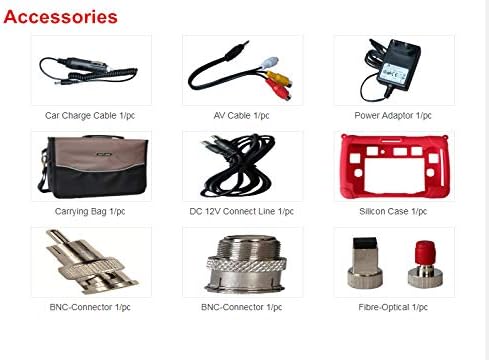
Joonis 9.1: Visual representation of the accessories included with the WS-6980, such as charging cables, AV cables, carrying case, and various connectors.
10. Garantii ja tugi
For warranty information and technical support, please refer to the documentation provided with your purchase or visit the official SatLink webveebisait. Hoidke ostutšekk ostutõendina garantiinõuete korral.


