1. Sissejuhatus
The Minuteman EN550 is a Standby Uninterrupted Power Supply (UPS) designed to provide reliable power protection for your electronic devices. It features a 550VA/300W capacity, 120Vac input and output, and a voltage range of 95-140Vac. This UPS includes four battery-backed receptacles and four surge-only receptacles, offering comprehensive protection against power outages and surges. Key features include phone/fax/modem line protection, independent battery bypass, and hot-swappable, tool-less battery replacement.
Pakendi sisu
- Minuteman EN550 UPS Unit
- Kasutusjuhend
- Kiirpaigaldusjuhend
- Garantiikaart
- Platinum Protection Card
- Sales Brochure
- USB kaabel
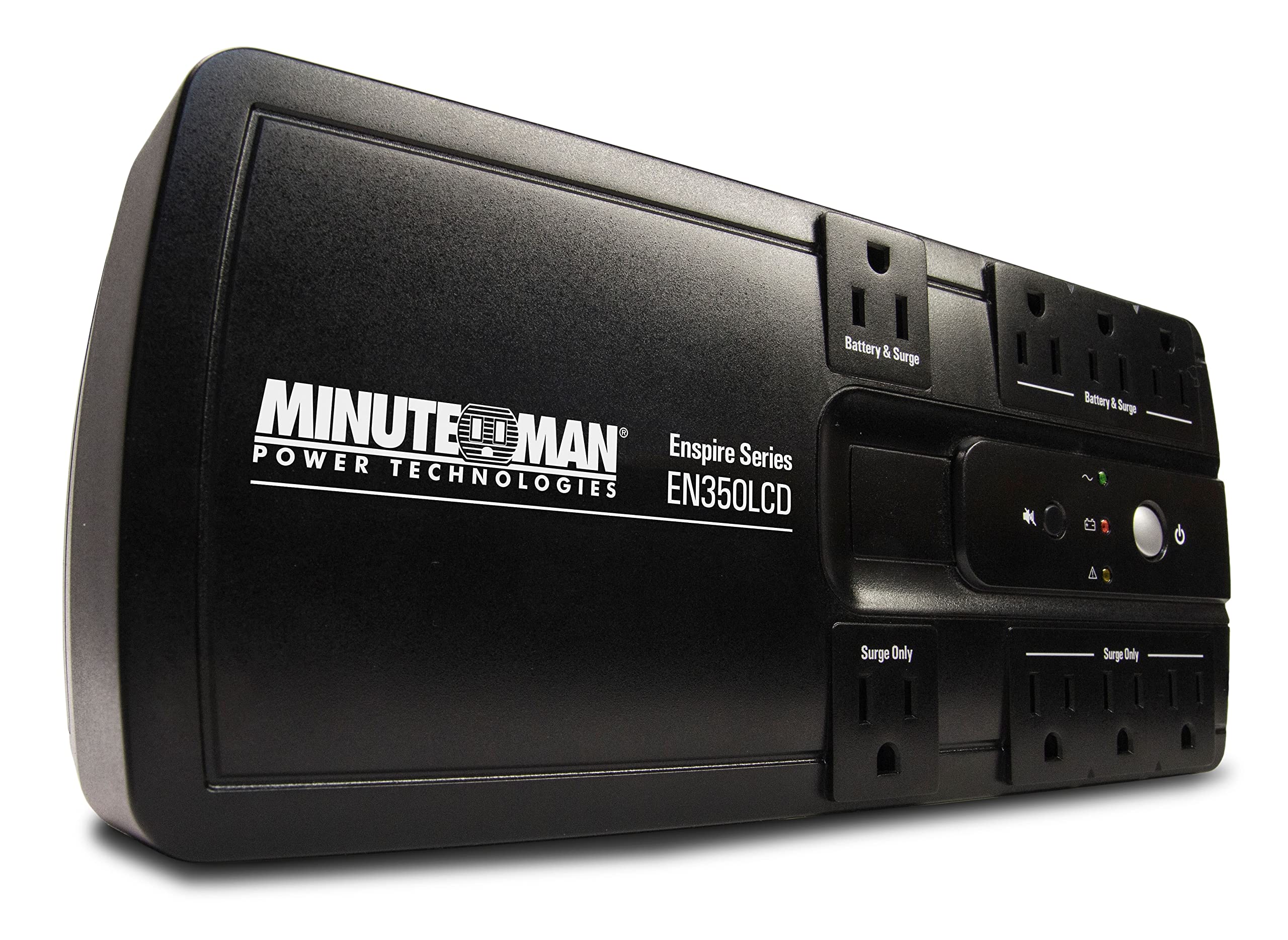
Image showing the Minuteman EN550 UPS unit with its front and side panels visible, highlighting the power outlets and status indicators.
2. Ohutusalane teave
Please read and follow all instructions carefully before installing or operating the Minuteman EN550 UPS. Retain this manual for future reference.
- Ärge avage UPS-i korpust.asing. There are no user-serviceable parts inside, except for the battery. Refer battery replacement to qualified service personnel.
- Ärge blokeerige ventilatsiooniavasid. Tagage seadme ümber piisav õhuvool.
- Ärge jätke UPS-i vihma, niiskuse ega liigse õhuniiskuse kätte.
- Connect the UPS to a properly grounded AC power outlet only.
- Avoid placing the UPS in direct sunlight or near heat sources.
- Disconnect the UPS from the AC power outlet before cleaning. Use a dry cloth for cleaning.
- The battery contains hazardous materials. Dispose of batteries properly according to local regulations.
3. Seadistamine ja installimine
Paigutus
Place the Minuteman EN550 UPS in a cool, dry, and well-ventilated indoor area. Ensure it is away from direct sunlight, heat sources, and excessive dust. The unit is wall-mountable for flexible placement options.
Esmane ühendus
- Ühendage aku: The UPS battery may be disconnected for shipping. Refer to the Quick Install Guide for instructions on connecting the internal battery.
- Ühendage vahelduvvoolutoitega: Plug the UPS power cord into a standard 120Vac grounded wall outlet.
- Esmane tasu: Allow the UPS to charge for at least 8 hours before connecting any devices to ensure optimal battery runtime. The unit will charge whether it is turned on or off.
- Ühendage seadmed: Plug your critical electronic devices (computer, monitor, modem, etc.) into the four battery-backed receptacles. Plug non-critical devices (printer, scanner) into the four surge-only receptacles.
- USB-side: Connect the provided USB cable from the UPS to your computer to enable communication and use the Sentried software (available via free download) for advanced monitoring and control.
- Phone/Fax/Modem Protection: Connect your phone, fax, or modem line through the RJ11/45 ports on the UPS to protect against surges on the data line.
4. Operatsioon
Sisse/välja lülitamine
- Sisselülitamiseks: Press and hold the power button for approximately 2 seconds until you hear a beep.
- Välja lülitamiseks: Press and hold the power button for approximately 2 seconds until you hear a beep and the unit powers down.
Receptacle Types
- Battery Backup & Surge Protection Outlets (4): These outlets provide power from the UPS battery during an outage and protect against surges. Connect your most critical equipment here.
- Surge-Only Protection Outlets (4): These outlets provide surge protection but do not offer battery backup. Connect less critical equipment that still requires surge protection.
Võimsus Outage Toimimine
Power ou ajaltage, the UPS will automatically switch to battery power. The unit will emit an audible alarm to indicate it is operating on battery. The EN550 provides approximately 3 minutes of runtime at full load (300W) and 11 minutes at half load (150W). It is recommended to save your work and shut down your computer gracefully during an extended outage.
Sentried Software
The Sentried software, available for free download, allows you to monitor the UPS status, configure settings, and perform automatic shutdowns of your computer during prolonged power events. Connect the UPS to your computer via the USB port to utilize this feature.
5. Hooldus
Patarei vahetus
The Minuteman EN550 features a hot-swappable battery design, allowing for tool-less battery replacement without powering down connected equipment. Batteries typically last 2-3 years under normal operating conditions. Refer to the Quick Install Guide or Minuteman's website for detailed battery replacement instructions.
- Always use genuine Minuteman replacement batteries to ensure compatibility and optimal performance.
- Kõrvaldage vanad patareid vastutustundlikult vastavalt kohalikele eeskirjadele.
Puhastamine
Ensure the UPS is turned off and disconnected from the AC power outlet before cleaning. Use a soft, dry cloth to wipe the exterior of the unit. Do not use liquid or aerosol cleaners.
6. Veaotsing
If you experience issues with your Minuteman EN550 UPS, consult the following table for common problems and solutions.
| Probleem | Võimalik põhjus | Lahendus |
|---|---|---|
| UPS ei lülitu sisse. | Aku pole ühendatud või on tühi. | Ensure battery is properly connected. Plug UPS into AC outlet and allow to charge for 8 hours. |
| Lühike aku tööaeg. | Overload, battery not fully charged, or battery end-of-life. | Reduce connected load. Allow UPS to charge for 8 hours. Replace battery if it is old. |
| UPS constantly beeps. | Operating on battery power during an outage or low battery. | Check AC power. If power is restored, UPS will return to normal. If low battery, allow to charge. |
| Ühendatud seadmetel puudub toide. | UPS is off, circuit breaker tripped, or outlets are surge-only. | Turn on UPS. Check and reset UPS circuit breaker. Ensure devices are plugged into battery-backed outlets. |
If the problem persists after attempting these solutions, please contact Minuteman technical support.
7. Tehnilised andmed
| Funktsioon | Spetsifikatsioon |
|---|---|
| Mudel | EN550 |
| Võimsus (VA/vatti) | 550VA / 300W |
| Sisend Voltage | 120 Volts AC |
| Voltage Vahemik | 95–140 vaakumit |
| Väljund Voltage | 120 Volts AC |
| Turustusvõimalused | 4 Battery Backup & Surge, 4 Surge-Only |
| Aku tüüp | Sealed Lead Acid (1 included) |
| Tüüpiline tööaeg (täiskoormusel) | 3 minuti |
| Typical Runtime (Half Load) | 11 minuti |
| Toote mõõtmed (P x L x K) | 12.4 x 5.1 x 3.7 tolli |
| Kauba kaal | 6.4 naela |
| Värv | Must |
| Tootja | Office Depot, Inc. |
| Esimene vaba kuupäev | 15. september 2016 |
8. Garantii ja tugi
Toote garantii
The Minuteman EN550 Uninterrupted Power Supply comes with a 3-year warranty on the unit and a 2-year warranty on the battery. Please refer to the included Warranty Card and Platinum Protection Card for full terms and conditions.
Tehniline tugi
For technical assistance, troubleshooting beyond this manual, or warranty claims, please contact Minuteman customer support. Contact information can typically be found on the Minuteman website or on the included documentation.


