1. Sissejuhatus
The Centralite Pearl Thermostat is designed to provide precise temperature control with an intuitive touch interface. It integrates seamlessly with various smart home platforms using ZigBee connectivity, offering efficient management of residential HVAC systems. This manual provides essential information for installation, operation, and maintenance of your Pearl Thermostat.
2. Põhiomadused
- Compatible with SmartThings, Spectrum, Cox, Time Warner Cable, Vera, and ZigBee platforms.
- Supports up to 2-stage soojust ja 2-stage cool HVAC systems.
- Designed for quick installation, typically within 15 minutes.
- Sisseehitatud toiteallikaga amplifier for extended wireless range.
- Equipped with responsive touch controls for user interaction.
3. Pakendi sisu
Veenduge, et pakis on kõik esemed olemas:
- Pearl Thermostat
- Kinnituskruvid (4)
- AA patareid (4)
- Kiirjuhend
- Juhtmete sildid
4. Paigaldamine
Enne paigaldamise alustamist veenduge, et teie HVAC-süsteemi toide on kaitselülitist välja lülitatud, et vältida elektrilööki.
4.1 Mounting the Backplate
- Carefully remove your old thermostat from the wall. Note the wiring connections before disconnecting.
- Mount the Pearl Thermostat backplate to the wall using the provided mounting screws. Ensure it is level.
4.2 Juhtmestik
The Pearl Thermostat features quick-connect terminals for tool-free wiring. Match the wires from your HVAC system to the corresponding terminals on the thermostat backplate. Use the included wiring labels for identification.

Joonis 1: Tagumine view of the Pearl Thermostat backplate, illustrating battery compartments and quick-connect wiring terminals for HVAC system connection.
Common wiring configurations include:
- R/Rc/Rh: 24V AC power (usually red wire)
- C: Common wire (for continuous 24V power, often blue or black)
- W/W1: Heat (usually white wire)
- A/A1: Cool (usually yellow wire)
- G: Fan (usually green wire)
- O / B: Reversing valve for heat pumps
Insert each stripped wire end into its corresponding terminal until it is securely held.
4.3 Aku paigaldamine
Insert the four AA batteries into the designated compartments on the back of the thermostat unit. Ensure correct polarity.
4.4 Attaching the Thermostat
Align the thermostat unit with the mounted backplate and gently push until it clicks into place. Restore power to your HVAC system at the circuit breaker.
5. Kasutusjuhised
The Pearl Thermostat features a clear LCD display and intuitive touch controls for easy operation.

Joonis 2: Esiosa view of the Pearl Thermostat, highlighting the digital display and touch-sensitive buttons for Mode, Hold, and Fan functions.
5.1 Temperatuuri reguleerimine
Kasutage + ja - touch areas on the right side of the thermostat to increase or decrease the desired temperature set point.
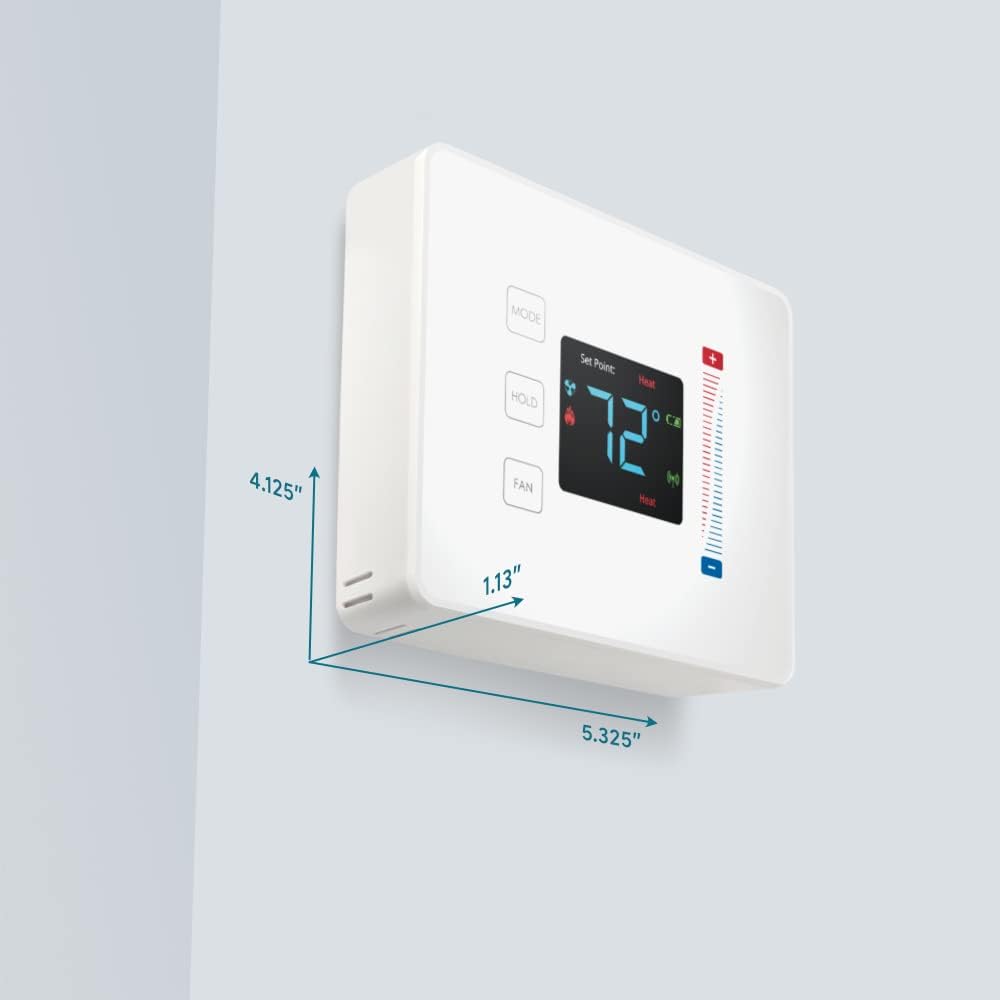
Figure 3: User interaction with the Pearl Thermostat's touch screen to modify temperature settings.
5.2 Režiimi valimine
Vajutage nuppu REŽIIM button to cycle through available operating modes: Heat, Cool, Auto, Off.
5.3 Hoia funktsioon
Vajutage nuppu HOIDA button to maintain the current temperature setting indefinitely, overriding any programmed schedules. Press again to release the hold and resume the schedule.
5.4 Ventilaatori juhtimine
Vajutage nuppu FAN button to cycle through fan settings: Auto (fan runs only when heating or cooling) or On (fan runs continuously).
6. Hooldus
6.1 Aku vahetamine
The Pearl Thermostat is powered by four AA batteries. When the battery level is low, a low battery indicator will appear on the display. To replace batteries:
- Gently pull the thermostat unit off its backplate.
- Remove the old AA batteries and dispose of them properly.
- Sisestage neli uut AA-tüüpi leelispatareid, jälgides õiget polaarsust.
- Reattach the thermostat unit to the backplate.
Regular battery replacement ensures uninterrupted operation and maintains ZigBee connectivity.
6.2 Puhastamine
Pühkige termostaadi pinda pehme lapigaamp lapiga. Vältige abrasiivsete puhastusvahendite või lahustite kasutamist, kuna need võivad ekraani ja viimistlust kahjustada.
7. Veaotsing
If you encounter issues with your Pearl Thermostat, refer to the following common troubleshooting steps:
- Ekraani/toite puudumine: Check if the AA batteries are correctly installed and fully charged. Ensure power to the HVAC system is on at the circuit breaker.
- HVAC-süsteem ei reageeri: Verify that the wiring connections to the backplate are secure. Confirm the thermostat is in the correct operating mode (Heat/Cool/Auto).
- Connectivity Issues (ZigBee): Ensure your smart home hub is powered on and within range. Refer to your smart home hub's instructions for device pairing. You may need to initiate a re-pairing process.
- Valed temperatuurinäidud: Veenduge, et termostaat ei oleks otsese päikesevalguse, tuuletõmbuse ega soojusallikate käes, mis võivad selle sisemist andurit mõjutada.
- Thermostat Not Responding to Touch: Gently clean the screen surface. If the issue persists, try removing the thermostat from its backplate, waiting 30 seconds, and reattaching it to perform a soft reset.
8. Tehnilised andmed

Figure 4: Dimensions of the Centralite Pearl Thermostat.
| Spetsifikatsioon | Detail |
|---|---|
| Kaubamärk | Centralite |
| Mudeli nimi | Centralite Pearl Thermostat |
| Mudeli number | 3000-wC |
| Kontrolleri tüüp | SmartThings, Vera |
| Värv | Valge |
| Temperatuuri reguleerimise tüüp | Programmeeritav, digitaalne |
| Ühenduvustehnoloogia | ZigBee |
| Toiteallikas | Patareitoitel (4 AA patareid, kaasas) |
| Kauba kaal | 0.97 naela (umbes 15.5 untsi) |
| Voltage | 230 Volts (HVAC system) |
| Materjal | Pärl |
| Kuva tüüp | LCD |
| Viimistluse tüüp | Satiin |
| Juhtimistüüp | Puuteplaadi juhtimine |
| Kontrollimeetod | Rakendus |
| Paigaldustüüp | Seinakinnitus |
| Taustvalgus | Jah |
| Toote mõõtmed (P x L x K) | 5.33 x 1.13 x 4.13 tolli |
| UPC | 812489022264 |
9. Garantii ja tugi
For warranty information and technical support, please refer to the documentation included with your product or visit the official Centralite websait. Hoidke ostutšekk ostutõendina alles.


