Olulised ohutusjuhised
ENNE KASUTAMIST LUGEGE KÕIK JUHISED HOOLIKAS.
- Enne puhastamist, hooldamist või teisaldamist eemaldage ventilaator alati vooluvõrgust.
- Ärge pistke sõrmi ega muid esemeid läbi võre, kui ventilaator töötab.
- Ärge kasutage ühtegi ventilaatorit, mille juhe või pistik on kahjustatud. Visake ventilaator ära või tagastage kontrollimiseks ja/või parandamiseks volitatud teeninduskeskusse.
- Ärge vedage juhet vaiba alla. Ärge katke juhet vaipade, jooksikute või sarnaste katetega. Paigutage juhe liiklusalast eemale ja kohta, kuhu see ei komista.
- Ärge kasutage ventilaatorit märjal või damp kohtades, näiteks vannitubades või pesuruumides.
- See ventilaator on mõeldud ainult siseruumides kasutamiseks. Ärge kasutage seda õues.
- Keep the fan away from curtains, drapes, or any objects that may get caught in the fan blades.
- Ventilaatori kasutamise ajal jälgige lapsi.
Toode läbiview
The Optimus 18-inch High Velocity Industrial Floor Fan is designed to provide powerful air circulation in various indoor environments. Its robust construction and high-velocity motor make it suitable for workshops, garages, and large rooms.
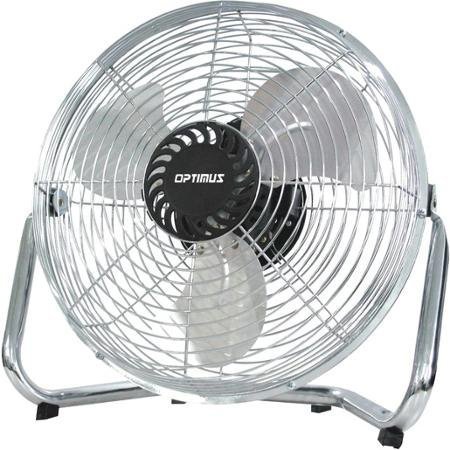
Image: Optimus 18-inch High Velocity Industrial Floor Fan. This image shows the fan with its silver metallic finish and sturdy floor stand.
Peamised omadused:
- 18-inch diameter for wide air distribution.
- Industrial-grade high velocity airflow.
- Durable metallic finish.
- Floor standing design for stable placement.
- Multiple power levels for adjustable airflow.
Seadistusjuhised
- Pakkige ventilaator lahti: Carefully remove the fan and all components from the packaging. Retain packaging for future storage or transport.
- Põrandaaluse kokkupanek:
- Attach the fan head to the floor stand using the provided screws and tools. Ensure all connections are secure.
- Verify the fan head can pivot smoothly on the stand.
- Paigutus: Place the fan on a firm, level surface. Ensure there is adequate space around the fan for proper air circulation and to prevent obstruction of the air intake/output. Keep the fan at least 3 feet away from walls or furniture.
- Toiteühendus: Ensure the fan is in the "OFF" position before plugging it into a standard 120V AC electrical outlet.
Kasutusjuhised
This fan features push-button controls for easy operation. A remote control may also be included for convenience.
- Toide sisse/välja: Locate the power button on the control panel. Press the button once to turn the fan ON. Press it again to turn the fan OFF.
- Ventilaatori kiiruse reguleerimine: The fan has 4 power levels. After turning the fan ON, repeatedly press the speed control button to cycle through the available speed settings (Low, Medium, High, Max). The fan will operate at the selected speed.
- Õhuvoolu suuna reguleerimine: The fan head can be tilted manually to direct airflow upwards or downwards. Gently tilt the fan head to the desired angle. Do not force the fan head beyond its intended range of motion.
Hooldus
Regular cleaning and maintenance will ensure optimal performance and extend the life of your fan.
- Ventilaatori puhastamine:
- Enne puhastamist eemaldage ventilaator alati vooluvõrgust.
- Kasutage pehmet, damp cloth to wipe the exterior surfaces of the fan. Do not use abrasive cleaners or harsh chemicals, as these may damage the finish.
- To clean the fan blades, carefully remove the front grille (if detachable, refer to assembly instructions for details). Wipe the blades with a soft cloth. Ensure the grille is securely reattached before operating the fan.
- Enne ventilaatori tagasi ühendamist veenduge, et kõik osad on täiesti kuivad.
- Hoiustamine: Kui ventilaatorit pikemat aega ei kasutata, hoidke seda jahedas ja kuivas kohas. Tolmu ja kahjustuste eest kaitsmiseks on soovitatav seda hoida originaalpakendis.
Veaotsing
| Probleem | Võimalik põhjus | Lahendus |
|---|---|---|
| Ventilaator ei lülitu sisse. | Pole vooluvõrku ühendatud; pistikupesa ei tööta; ventilaatori lüliti on välja lülitatud. | Ensure fan is securely plugged into a working outlet. Check household fuse/circuit breaker. Press the power button to turn the fan on. |
| Madal õhuvool. | Fan speed set too low; obstructed intake/output; dirty blades. | Increase fan speed. Clear any obstructions. Clean fan blades and grilles as per maintenance instructions. |
| Ebatavaline müra või ragin. | Loose parts; fan not on a level surface; foreign object in blades. | Unplug the fan and check for any loose screws or components. Place the fan on a stable, level surface. Carefully inspect for and remove any foreign objects. |
Tehnilised andmed
| Funktsioon | Detail |
|---|---|
| Kaubamärk | Optimus |
| Mudeli nimi | Suur kiirus |
| Kauba mudeli number | 306c1b92-f36b-4ccc-ac62-2ad33d5c9efb |
| Läbimõõt | 18 tolli |
| Värv | Hõbedane |
| Stiil | Tööstuslik |
| Toiteallikas | Juhtmega elekter |
| Võimsustasemete arv | 4 |
| Kontrollimeetod | Nupu juhtimine |
| Kasutamine siseruumides/välistingimustes | Siseruumides |
| Kaasatud komponendid | Floor Stand, Remote Control |
| Spetsifikatsioon Met | OSHA |
Garantii ja tugi
Optimus products are manufactured to high-quality standards. This product is covered by a limited warranty against defects in materials and workmanship from the date of purchase. Please refer to the warranty card included with your product for specific terms and conditions.
For technical support, troubleshooting assistance, or warranty claims, please contact Optimus customer service. Contact information can typically be found on the product packaging or the official Optimus websaidile.
Palun hoidke oma ostutõend garantiinõuete täitmiseks alles.


