1. Sissejuhatus
The GAMDIAS Hermes GKB3000 is a mechanical gaming keyboard designed for enhanced durability and performance. It features GAMDIAS Certified Blue Switches with a 50 million actuation lifecycle, a 7-color spectrum backlight with 14 lighting effects, and various functional keys for an optimized gaming and typing experience. This manual provides instructions for setting up, operating, and maintaining your keyboard.
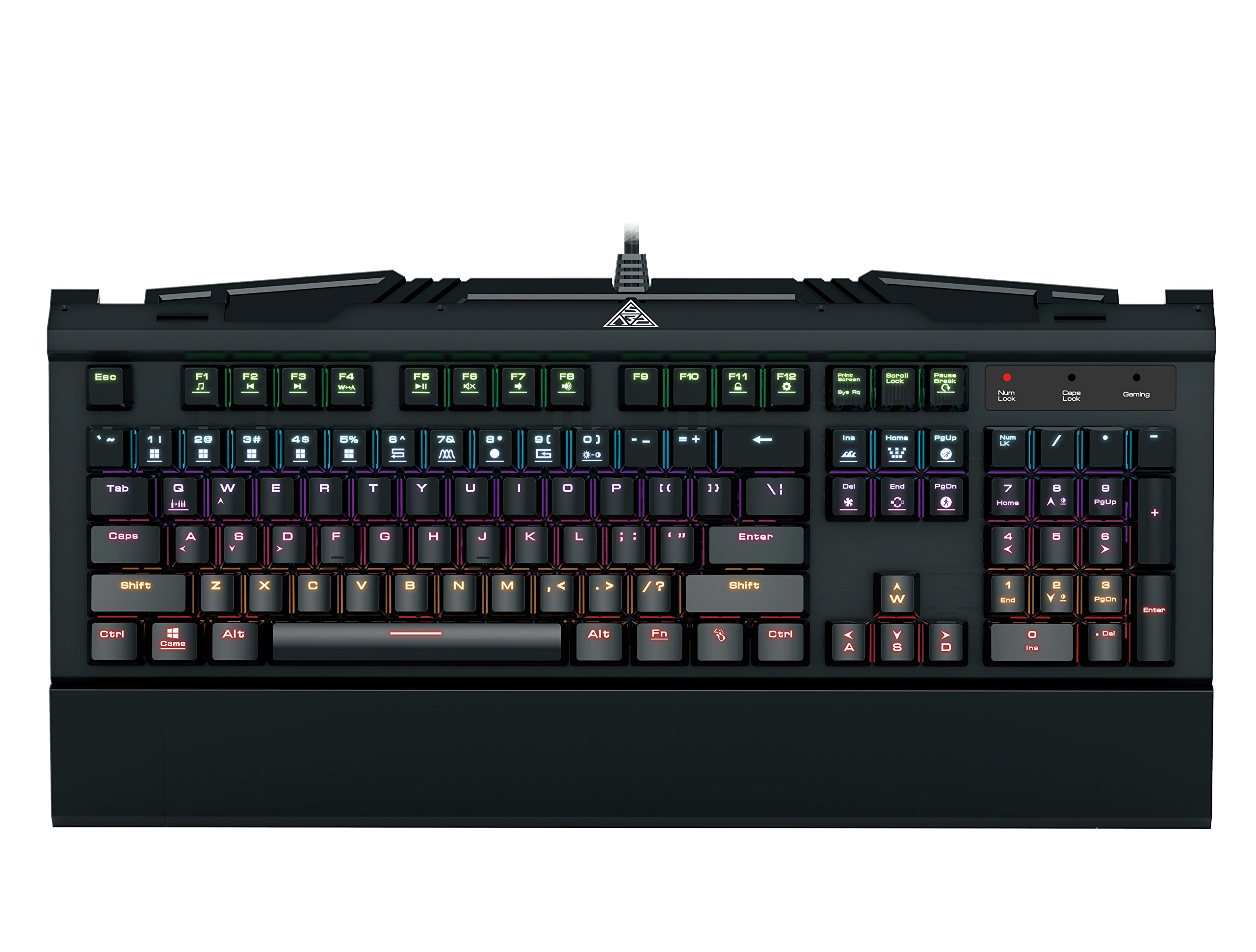
Image 1.1: The GAMDIAS Hermes GKB3000 Mechanical Gaming Keyboard. This image displays the full keyboard with its key layout and design, highlighting its compact yet robust build.
2. Pakendi sisu
Palun kontrollige pakendi sisu lahtipakkimisel, et kõik esemed oleksid olemas ja kahjustamata.
- GAMDIAS Hermes GKB3000 Mechanical Gaming Keyboard
- Kasutusjuhend (see dokument)
3. Seadistamine
Follow these steps to set up your GAMDIAS Hermes GKB3000 keyboard:
- Pakkige klaviatuur lahti: Eemaldage klaviatuur ettevaatlikult pakendist.
- Ühendage arvutiga: Ühendage klaviatuurikaabli USB-A-pistik arvuti vabasse USB-porti.
- Draiveri installimine: The keyboard is plug-and-play. Your operating system (e.g., Windows) will automatically detect and install the necessary drivers. No additional software installation is typically required for basic functionality.
- Paigutus: Place the keyboard on a stable, flat surface for comfortable use.
4. Kasutusjuhised
4.1. Valgustusefektid
The Hermes GKB3000 features a 7-color spectrum backlight with 14 sets of lighting effects. These include 9 preset effects and 5 customizable patterns.
- Switching Effects: Use the dedicated function keys (often combined with the Fn key) to cycle through the preset lighting effects. Refer to the keyboard's keycap legends for specific combinations.
- Customizing Effects: The keyboard supports 5 customizable lighting patterns. Instructions for programming these patterns are typically found in the full software suite available for download from the GAMDIAS website, if applicable.
- Heleduse reguleerimine: Adjust backlight brightness using designated function key combinations.
4.2. Multimeedia juhtnupud
Access multimedia functions quickly using the dedicated multimedia control keys, often activated by holding the Fn key in combination with the F-keys (F1-F12).
- Helitugevuse juhtimine: Heli suurendamine, vähendamine või vaigistamine.
- Meedia taasesitus: Esita/paus, stopp, eelmine lugu, järgmine lugu.
- Muud funktsioonid: May include opening default browser, email client, or calculator.
4.3. Special Gaming Functions
- WASD-Arrow Key Swap: This feature allows you to swap the functionality of the WASD keys with the arrow keys. This is useful for certain games or user preferences. Activate this function using a specific Fn key combination (e.g., Fn + W).
- Järjestikuse rünnaku režiim: This mode enhances rapid key input for gaming. Refer to the keyboard's specific documentation or GAMDIAS software for activation and configuration details.
- Klaviatuuri lukustus: Temporarily disable the keyboard input to prevent accidental presses. Activate using a Fn klahvikombinatsioon.
- Windows Key Disable: Prevent accidental presses of the Windows key during gaming, which can minimize your game. Activate using a Fn key combination (e.g., Fn + Win key).
- N-klahviga üleminek: The GKB3000 supports N-key rollover, meaning multiple keys can be pressed simultaneously without ghosting or missed inputs. This ensures accurate and responsive commands during intense gaming sessions.
5. Hooldus
Nõuetekohane hooldus tagab klaviatuuri pikaealisuse ja optimaalse jõudluse.
- Puhastamine:
- Enne puhastamist ühendage klaviatuur arvutist lahti.
- Kasutage kergelt pehmet ebemevaba lappi damppinna pühkimiseks veega või õrna puhastuslahusega niisutatud.
- Klahvide vaheliste tolmu ja prahi eemaldamiseks kasutage suruõhku.
- Vältige karmide kemikaalide, abrasiivsete puhastusvahendite või lahustite kasutamist.
- Hoiustamine: Hoidke klaviatuuri jahedas, kuivas ja otsese päikesevalguse ning äärmuslike temperatuuride eest kaitstult, kui seda pikemat aega ei kasutata.
- Käitlemine: Avoid dropping the keyboard or exposing it to excessive force, as this can damage the mechanical switches or internal components.
6. Veaotsing
If you encounter issues with your GAMDIAS Hermes GKB3000 keyboard, refer to the following common solutions:
| Probleem | Võimalik lahendus |
|---|---|
| Klaviatuur ei reageeri. |
|
| Backlight is not working or is dim. |
|
| Certain keys are not working. |
|
| WASD keys are acting as arrow keys. |
|
If the problem persists after trying these solutions, please contact GAMDIAS customer support for further assistance.
7. Tehnilised andmed
The following are the technical specifications for the GAMDIAS Hermes GKB3000 Mechanical Gaming Keyboard:
| Funktsioon | Detail |
|---|---|
| Kaubamärk | GAMDIAS |
| Mudeli number | GKB3000 |
| Lüliti tüüp | GAMDIAS Certified Mechanical Blue Switches |
| Actuation Lifecycle | 50 miljonit klahvivajutust |
| Taustvalgustus | 7-Color Spectrum, 14 Lighting Effects (9 preset, 5 customizable) |
| Anti-ghosting | N-klahviga üleminek |
| Ühenduvus | USB-A |
| Operatsioonisüsteem | Windows |
| Kauba kaal | 2.42 naela (umbes 1.1 kg) |
| Toote mõõtmed (PxLxK) | 18.8 x 10.5 x 2 tolli (umbes 47.75 x 26.67 x 5.08 cm) |
| Materjal | Plastic with Elegant Metal Plate Design |
8. Garantii ja tugi
GAMDIAS products are manufactured to the highest quality standards. For information regarding warranty coverage, terms, and conditions, please refer to the warranty card included with your product or visit the official GAMDIAS websaidile.
For technical support, troubleshooting assistance, or any product-related inquiries, please contact GAMDIAS customer support through their official websaidil või tootepakendil olevas kontaktteabes.
GAMDIASi ametnik Websait: www.gamdias.com


