Sissejuhatus
The Master & Dynamic MW60 Wireless Bluetooth Foldable Headphones are designed to deliver a high-quality audio experience with effective sound isolation. They feature 45mm neodymium drivers for clear audio reproduction across various music genres. Equipped with Bluetooth 4.1, these headphones offer wireless connectivity and up to 16 hours of battery life. Constructed with lightweight stainless steel and aluminum, and featuring leather ear pads, the MW60 headphones are designed for comfort and durability, with a foldable design for portability.
Mis on karbis
- Master & Dynamic MW60 Wireless Headphones
- Helikaabel (3.5 mm)
- Heliadapter
- Micro USB - USB laadimiskaabel
- Carry Case for Headphones
- Carry Pouch for Accessories
Toode läbiview
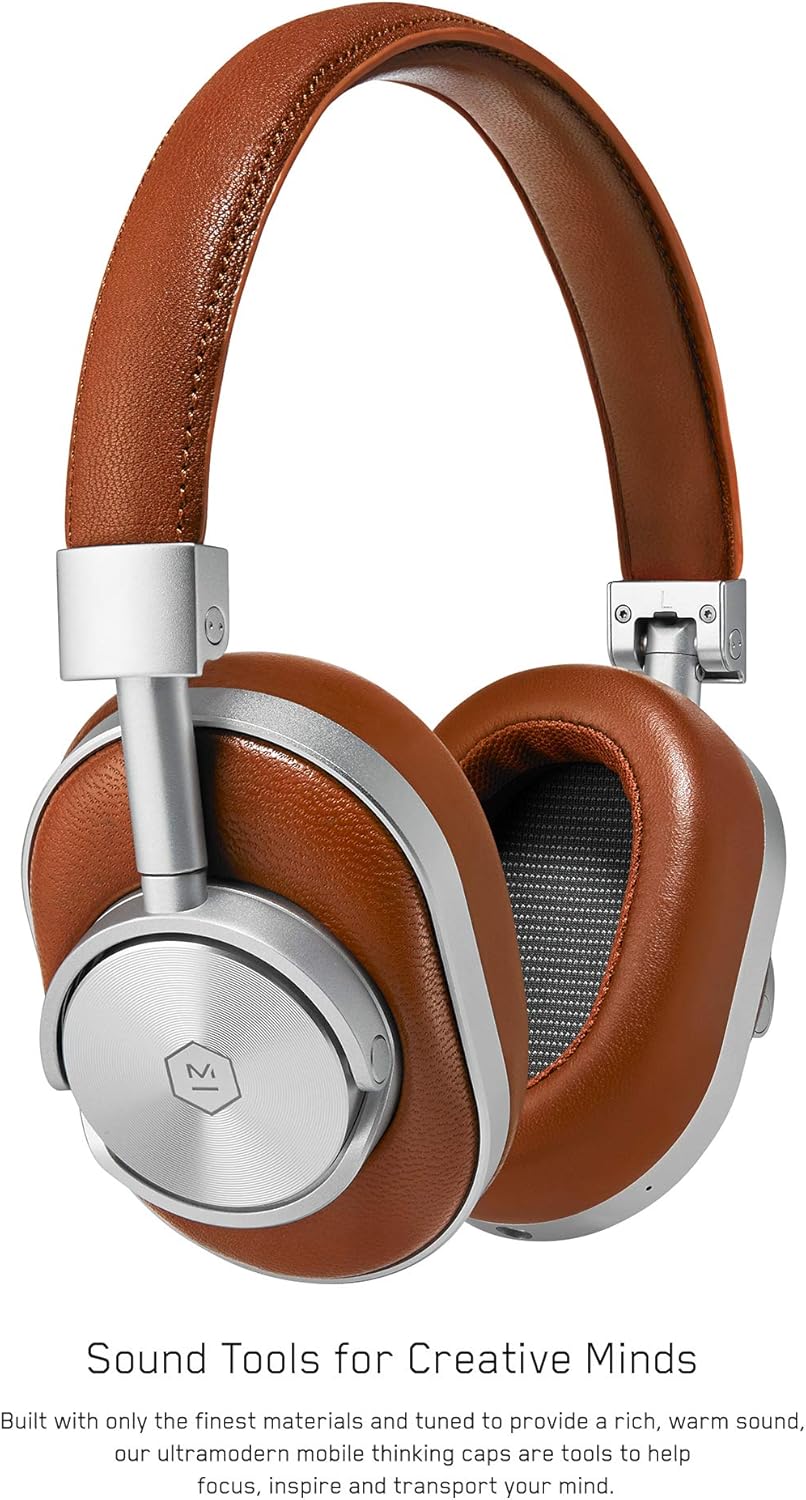
Joonis 1: Esiosa view of the Master & Dynamic MW60 Wireless Headphones. This image displays the over-ear design with silver metal accents and brown leather earcups and headband.

Joonis 2: Close-up of the right earcup showing the control buttons and ports. Visible controls include volume up/down, a multi-function button, and the power/pairing switch. A 3.5mm audio jack and micro USB charging port are also present.
Juhtnupud ja pordid
- Power/Pairing Switch: Located on the earcup, used to turn the headphones on/off and initiate Bluetooth pairing.
- Multifunktsionaalne nupp: Controls playback (play/pause), call management, and voice assistant activation.
- Helitugevuse üles / alla nupud: Adjusts audio volume. Can also be used for track skipping (hold for next/previous track).
- 3.5 mm helipistik: Juhtmega ühenduse loomiseks kaasasoleva audiokaabli abil.
- Micro USB port: Sisemise aku laadimiseks.
- Mikrofon: Integreeritud käed-vabad kõnede jaoks.
Seadistamine
Kõrvaklappide laadimine
- Connect the Micro USB end of the charging cable to the Micro USB port on the headphone earcup.
- Connect the USB-A end of the charging cable to a powered USB port (e.g., computer, wall adapter).
- Märgutuli näitab laadimise olekut. Täielik laadimine võtab tavaliselt umbes 2 tundi.
Bluetoothi sidumine
- Veenduge, et kõrvaklapid on täielikult laetud.
- Slide the Power/Pairing switch to the ON position.
- To enter pairing mode, slide and hold the Power/Pairing switch to the far right (pairing icon) until the indicator light begins to flash.
- Luba oma seadmes (nutitelefon, tahvelarvuti, arvuti) Bluetooth ja otsi saadaolevaid seadmeid.
- Select "MW60" from the list of detected devices.
- Once paired, the indicator light will turn solid blue or white, depending on the model.
Kasutusjuhised
Põhifunktsioonid
- Toide sisse/välja: Slide the Power/Pairing switch to the ON or OFF position.
- Esita/peata: Vajutage üks kord multifunktsionaalset nuppu.
- Helitugevuse juhtimine: Vajutage helitugevuse suurendamise (+) või vähendamise (-) nuppu.
- Järgmine lugu: Vajutage ja hoidke all helitugevuse suurendamise (+) nuppu.
- Eelmine lugu: Vajutage ja hoidke all helitugevuse vähendamise (-) nuppu.
Kõnehaldus
- Kõnele vastamine/lõpetamine: Vajutage üks kord multifunktsionaalset nuppu.
- Keeldu kõnest: Vajutage ja hoidke all multifunktsionaalset nuppu.
- Hääleabi aktiveerimine: Topeltvajutage multifunktsionaalset nuppu.
Juhtmega ühendus
To use the headphones with a wired connection, plug the included 3.5mm audio cable into the audio jack on the earcup and the other end into your audio source. The headphones will automatically switch to wired mode, conserving battery life.
Hooldus
Puhastamine
- Pühkige kõrvaklappe pehme ja kuiva lapiga.
- Ärge kasutage tugevaid kemikaale ega abrasiivseid materjale.
- For leather parts, use a specialized leather cleaner if necessary, following product instructions.
Säilitamine

Joonis 3: The MW60 headphones folded into a compact form, demonstrating their portability and ease of storage in the included carry case.
- When not in use, fold the headphones and store them in the provided carry case to protect them from dust and damage.
- Vältige hoidmist äärmuslikel temperatuuridel või kõrge õhuniiskusega.
Veaotsing
| Probleem | Võimalik lahendus |
|---|---|
| Kõrvaklapid ei lülitu sisse | Ensure the headphones are fully charged. Connect to a power source using the Micro USB cable. |
| Ei saa Bluetoothi kaudu siduda | Ensure headphones are in pairing mode (flashing indicator light). Turn off and on Bluetooth on your device. Try forgetting the device on your phone and re-pairing. Ensure no other devices are actively connected. |
| Vahelduv heli või ühenduse katkemine | Ensure your device is within the Bluetooth range. Avoid physical obstructions between the headphones and your device. Minimize interference from other wireless devices. |
| Juhtmega režiimis pole heli | Ensure the 3.5mm audio cable is securely connected to both the headphones and the audio source. Check the volume levels on both the headphones and the audio source. |
| Earcups detach easily | Ensure earcups are properly aligned and securely attached to the magnetic mounts. |
Tehnilised andmed
| Funktsioon | Detail |
|---|---|
| Mudeli nimi | MW60S2 |
| Ühenduvustehnoloogia | Traadita (Bluetooth 4.1) |
| Helidraiveri tüüp | 45mm Neodymium Dynamic Drivers |
| Aku tööiga | Kuni 16 tundi |
| Materjalid | Aluminum, Stainless Steel, Leather |
| Kauba kaal | 3 naela (umbes 1.36 kg) |
| Toote mõõtmed | 10 x 3.75 x 8 tolli (25.4 x 9.5 x 20.3 cm) |
| Takistus | 32 oomi |
| Mürakontroll | Heliisolatsioon (passiivne) |
| Kõrvaklappide Jack | 3.5 mm tungraud |
Garantii ja tugi
Warranty information for your Master & Dynamic MW60 Wireless Headphones is typically provided with your purchase. Please refer to the documentation included in your product packaging for specific warranty terms and conditions.
For technical support, service, or further inquiries, please contact Master & Dynamic customer service directly. Contact details can usually be found on the manufacturer's official websaidil või toote dokumentatsioonis.


