1. Sissejuhatus
The Alpine IVA-W520E is a full-featured 2DIN DVD player solution designed for in-car entertainment and media. It integrates advanced video and audio technologies, including a 7-inch LED touchscreen and a Burr-Brown 24-bit DAC, to deliver high-quality sound and clear images. This manual provides essential information for the proper installation, operation, and maintenance of your IVA-W520E unit.
2. Ohutusalane teave
Enne seadme paigaldamist või kasutamist lugege hoolikalt läbi kõik ohutusjuhised. Nende juhiste eiramine võib põhjustada vigastusi või kahjustada seadet või sõidukit.
- Professionaalne paigaldamine: Due to the complexity of car audio-visual systems, professional installation is highly recommended to ensure proper wiring and functionality.
- Toiteallikas: Ühendage seade ainult 12 V alalisvoolu negatiivse maandusega toiteallikaga.
- Vältige segavaid tegureid: Do not operate the unit's controls or view video content while driving, as this can lead to accidents. Always pull over to a safe location before making adjustments.
- Ventilatsioon: Tagage seadme ümber piisav ventilatsioon, et vältida ülekuumenemist. Ärge blokeerige ventilatsiooniavasid.
- Niiskus ja vedelikud: Keep the unit away from moisture and liquids. Do not expose it to rain or water.
- Puhastamine: Puhastamiseks kasutage pehmet ja kuiva lappi. Vältige abrasiivseid puhastusvahendeid või lahusteid.
3. Pakendi sisu
Enne paigaldamise jätkamist veenduge, et pakendis on kõik esemed olemas:
- Alpine IVA-W520E Head Unit
- Toite/kõlari rakmed
- Kinnitusdetailid (kruvid, kronsteinid)
- Kärpimisrõngas
- Kasutusjuhend (see dokument)
- Garantii teave
4. Seadistamine ja installimine
4.1. Paigaldusjuhised
Proper installation is crucial for optimal performance and safety. It is highly recommended to have the unit installed by a qualified professional.
- Aku lahtiühendamine: Enne elektritööde alustamist ühendage lühise vältimiseks lahti sõiduki aku negatiivne klemm.
- Paigaldamine: Securely mount the unit in the vehicle's double-DIN opening using the provided mounting brackets and screws. Ensure it is stable and does not obstruct any vehicle controls.
- Juhtmed: Connect the power harness, speaker wires, and other input/output cables according to the wiring diagram provided in the separate installation guide. Pay close attention to ground connections.
- Antenna and External Devices: Connect the radio antenna and any external devices such as a reverse camera or external ampelupäästjad.
4.2. Algseadistus
After installation, reconnect the battery and power on the unit for the first time.
- Keele valik: Eelistatud keele valimiseks järgige ekraanil kuvatavaid juhiseid.
- Kellaaeg ja kuupäev: Set the correct time and date for accurate display.
- Helisätted: Adjust basic audio settings such as volume, balance, and fader.
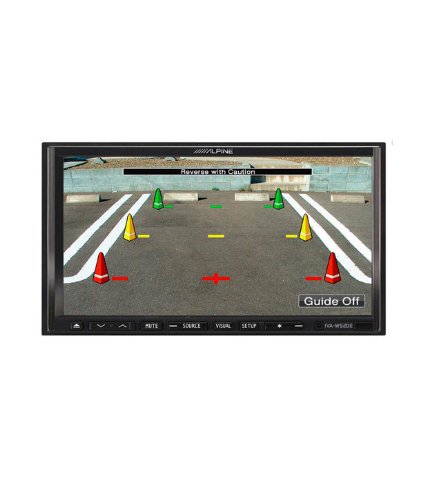
Joonis 4.1: näitample of the IVA-W520E displaying a reverse camera feed, showing parking guidelines. This feature aids in safe vehicle maneuvering.
5. Seadme kasutamine
5.1. Touchscreen and Button Controls
The IVA-W520E features a responsive 7-inch LED touchscreen for primary control, supplemented by physical buttons for quick access to common functions.
- Puuteekraan: Navigate menus, select sources, and control playback by touching the screen.
- Helitugevuse juhtimine: Use the dedicated volume buttons or on-screen controls to adjust audio levels.
- Allika nupp: Press to cycle through available audio/video sources (Radio, DVD, USB, iPod, AUX, Bluetooth).
- Vaigistamise nupp: Vaigistab ajutiselt heliväljundi.
- Seadistamise nupp: Juurdepääs süsteemiseadete menüüle.
5.2. Heli taasesitus
The unit supports various audio formats and sources, enhanced by its Burr-Brown 24-bit DAC for superior sound quality.
- USB -heli: Ühendage heli sisaldav USB-seade files. The unit will display track information and allow navigation through folders.
- iPod/iPhone Connectivity: Connect your iPod or iPhone for direct audio playback and control.
- DVD/CD taasesitus: Insert a DVD or CD into the disc slot for audio or video playback.
- Raadiotuuner: Access AM/FM radio stations.
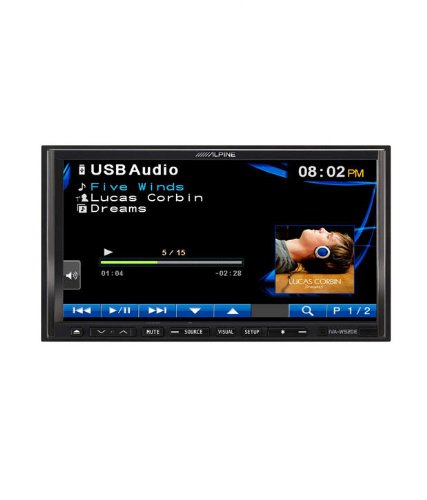
Figure 5.1: The IVA-W520E displaying the USB Audio interface, showing current track, artist, and playback controls. This allows for easy navigation of digital music files.
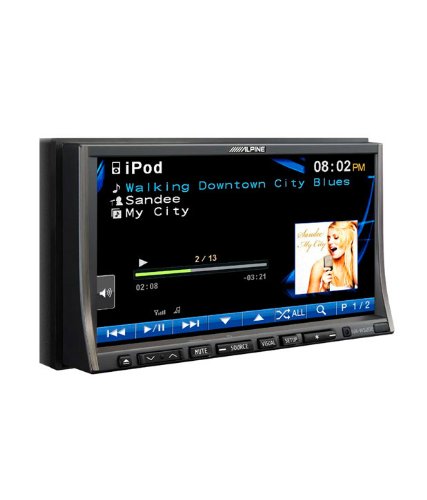
Figure 5.2: The IVA-W520E displaying the iPod interface, showing a list of songs and album art. This demonstrates seamless integration with Apple devices for music playback.
5.3. Video taasesitus
The 7-inch LED screen provides enhanced image quality with higher resolution, better contrast, and improved color reproduction compared to standard LCD screens.
- DVD Video: Insert a video DVD for playback. Ensure the parking brake safety wire is correctly connected for video to display while the vehicle is stationary.
- Väline video sisend: The unit supports external video sources, such as a reverse camera or other video devices.
5.4. Bluetooth-ühenduvus
The IVA-W520E is upgradable for Bluetooth hands-free system functionality, allowing for safe and convenient communication while driving.
- Sidumine: Refer to the separate Bluetooth module manual (if applicable) for pairing instructions with your mobile phone.
- Käed-vabad helistamine: Helistage ja võtke kõnesid vastu otse seadme kaudu.
- Heli voogesitus: Stream audio from your Bluetooth-enabled device.
5.5. Navigation System (Upgradable)
The unit is designed to be upgradable with a navigation system. Consult your Alpine dealer for compatible navigation modules and installation.
6. Hooldus
Regular maintenance helps ensure the longevity and optimal performance of your Alpine IVA-W520E.
- Ekraani puhastamine: Gently wipe the touchscreen with a soft, lint-free cloth. For stubborn smudges, slightly dampen the cloth with water or a screen-specific cleaner. Do not spray cleaner directly onto the screen.
- Plaadi pesa: Keep the disc slot free of dust and debris. Avoid inserting bent, scratched, or irregular discs.
- Üldpuhastus: Use a soft, dry cloth to wipe the unit's exterior. Avoid harsh chemicals or abrasive materials.
7. Veaotsing
If you encounter issues with your IVA-W520E, refer to the following common problems and solutions:
| Probleem | Võimalik põhjus | Lahendus |
|---|---|---|
| Jõudu pole | Läbipõlenud kaitse, vale juhtmestik, lahtine ühendus. | Check vehicle fuses and unit's fuse. Verify power and ground wiring connections. Ensure battery is connected. |
| Heli puudub | Volume too low, mute activated, speaker wiring issue, incorrect source selected. | Suurenda helitugevust. Deaktiveeri vaigistus. Kontrolli kõlarite ühendusi. Vali õige heliallikas. |
| Plaadi viga | Määrdunud, kriimustatud või ühildumatu plaat. | Clean the disc. Try a different, known-good disc. Ensure disc format is supported. |
| Video Not Displaying (while driving) | Parking brake safety wire not connected or incorrectly connected. | This is a safety feature. Video playback is disabled while the vehicle is in motion. Ensure the parking brake wire is correctly connected to the vehicle's parking brake circuit. |
| Bluetoothi sidumisprobleemid | Bluetooth module not connected, phone not in pairing mode, interference. | Ensure optional Bluetooth module is correctly installed. Put phone in pairing mode. Move closer to the unit. |
If the problem persists after trying these solutions, please contact your authorized Alpine dealer or customer support.
8. Tehnilised andmed
Key technical specifications for the Alpine IVA-W520E:
- Mudel: IVA-W520E
- Ekraani suurus: 7 tolli (18 cm)
- Kuva tüüp: LED LCD Touchscreen
- Resolutsioon: 480 x 272 pikslit
- Heli DAC: Burr-Brown 24-bit
- Ühilduvad seadmed: Smartphone (via USB/iPod, Bluetooth upgradable)
- Eriomadused: Touchscreen, Bluetooth (upgradable)
- Heliväljundi režiim: Kõlar
- Tootja: Alpine
- Esimene saadaval: 20. august 2015
9. Garantii ja tugi
For detailed warranty information, please refer to the warranty card included with your product package or visit the official Alpine websait. Hoidke ostutšekk ostutõendina alles.
For technical support, service, or inquiries about compatible accessories and upgrades (such as navigation modules or Bluetooth kits), please contact your authorized Alpine dealer or visit the Alpine customer support portal online.
Alpide ametnik Websait: www.alpine.com


