Sissejuhatus
The Logitech Illuminated Living-Room Keyboard K830 is designed to enhance your home entertainment experience. This keyboard combines a full keyboard layout with a built-in touchpad, offering seamless wireless control of your connected TV or computer, even in low-light conditions, thanks to its bright backlit keys.

Figure 1: Logitech K830 Illuminated Living-Room Keyboard, top view.
Pakendi sisu
Veenduge, et pakendis on kõik esemed olemas:
- Logitech K830 Illuminated Living-Room Keyboard
- Logitech Unifying vastuvõtja
- USB laadimiskaabel
- USB leviala laiendaja
- User information (this manual)
Seadistamine
1. Klaviatuuri laadimine
Before first use, fully charge the keyboard. Connect the supplied USB recharge cable to the micro-USB port on the keyboard and the other end to a USB power source (e.g., computer USB port, USB wall adapter).
- The battery indicator light will glow green when charging and turn off when fully charged.
- A full charge typically provides several weeks of use.
2. Klaviatuuri ühendamine
The K830 keyboard offers two connection methods: Logitech Unifying receiver or Bluetooth Smart technology.
2.1. Using the Logitech Unifying Receiver (Recommended for PCs)
- Locate the Logitech Unifying receiver in the package.
- Plug the Unifying receiver into an available USB port on your computer or smart TV. For optimal range, use the included USB range extender if the receiver is obstructed or far from the keyboard.
- Turn on the keyboard by sliding the power switch located on the top edge of the keyboard to the ON position.
- The keyboard should automatically connect to the receiver. If not, use the Logitech Unifying Software (downloadable from Logitech's website) to pair the devices.

Figure 2: User operating the K830 keyboard from a comfortable distance.
2.2. Using Bluetooth Smart Technology (For compatible devices)
- Ensure your device (e.g., Android TV, tablet) has Bluetooth Smart (Bluetooth Low Energy) enabled.
- Lülitage klaviatuur sisse.
- Press and hold the Bluetooth pairing button (usually indicated by a Bluetooth icon) on the keyboard until the indicator light starts blinking rapidly, indicating it's in pairing mode.
- Ava oma seadmes Bluetoothi seaded ja vali sidumiseks saadaolevate seadmete loendist „Logitech K830”.
- Sidumisprotsessi lõpuleviimiseks järgige ekraanil kuvatavaid juhiseid.
Kasutusjuhised
Klaviatuuri paigutus ja funktsioonid
The K830 features a compact layout optimized for living room use, including standard alphanumeric keys, function keys, and dedicated media controls.
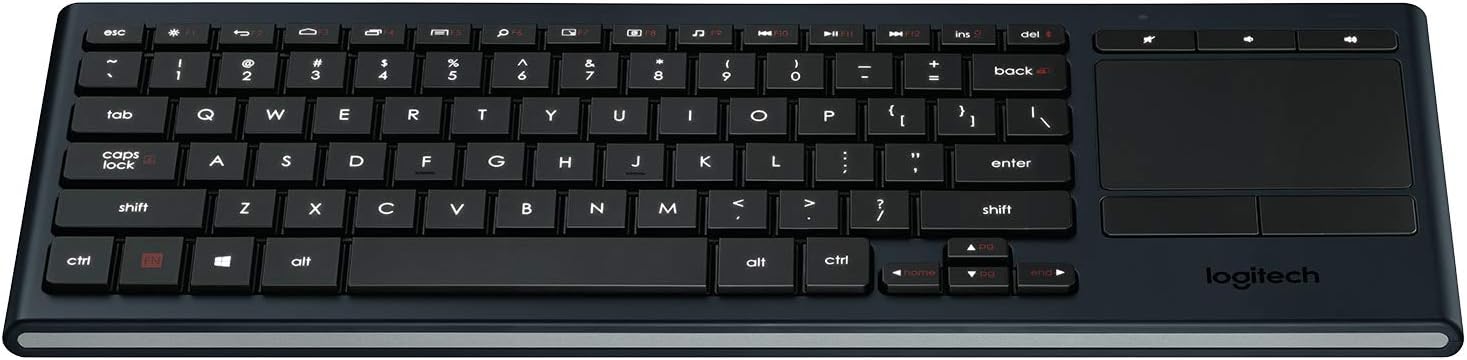
Joonis 3: Üleview of the K830 keyboard layout.
Taustvalgustus
The keyboard features automatic backlighting that adjusts to ambient light conditions. A sensor detects the room's light level and automatically brightens or dims the key backlights for optimal visibility. The backlighting also activates when your hands approach the keyboard and turns off when not in use to conserve battery.
Integreeritud puuteplaat
The large, responsive touchpad provides precise cursor control and supports multi-touch gestures. The two physical buttons below the touchpad function as left-click and right-click.
- Ühe sõrme puudutamine: Vasakklõps.
- Kahe sõrmega puudutus: Paremklõps.
- Kahe sõrmega kerimine: Drag two fingers up or down to scroll vertically.
- Pinch Zoom: Suumimiseks näpistage kahte sõrme kokku või välja.

Joonis 4: Külg view highlighting the integrated touchpad and power indicator.
Media Keys and Shortcut Keys
The top row of keys includes dedicated media controls and shortcut keys for quick access to common functions. These keys are optimized for Windows and Android operating systems.
- Helitugevuse regulaatorid: Vaigista, Helitugevuse vähendamine, Helitugevuse suurendamine.
- Meedia taasesitus: Esita/paus, eelmine lugu, järgmine lugu.
- Windows/Android Shortcuts: Home, Back, Search, etc. (specific functions may vary by OS).
To use the F1-F12 functions, press the Fn klahvi samaaegselt soovitud F-klahviga.
Hooldus
Klaviatuuri puhastamine
To clean your K830 keyboard:
- Enne puhastamist lülitage klaviatuur välja.
- Kasutage kergelt pehmet ebemevaba lappi damploputada vee või nõrga puhastuslahusega.
- Vältige liigset niiskust ja ärge pihustage puhastusvahendeid otse klaviatuurile.
- For the touchpad, use a dry, soft cloth to remove fingerprints and smudges.
Aku hooldus
The K830 uses a built-in rechargeable Lithium Polymer battery. To maximize battery life:
- Charge the keyboard regularly, but avoid leaving it plugged in constantly after it's fully charged.
- If storing the keyboard for an extended period, charge it to about 50% before storage.
- Vältige klaviatuuri kokkupuudet äärmuslike temperatuuridega.
Veaotsing
| Probleem | Võimalik põhjus | Lahendus |
|---|---|---|
| Klaviatuur ei reageeri | Low battery; Keyboard off; Receiver not plugged in; Out of range; Pairing issue. | Charge the keyboard. Ensure the keyboard is ON. Plug the Unifying receiver into a working USB port. Move closer to the receiver (within 10 meters/33 feet). Re-pair the keyboard using Logitech Unifying Software or Bluetooth pairing process. |
| Taustvalgustus ei tööta | Low battery; Ambient light too bright; Sensor obstruction. | Charge the keyboard. The backlighting automatically adjusts; it may not activate in bright environments. Ensure the light sensor (located near the top edge) is not covered. |
| Touchpad erratic or unresponsive | Dirty touchpad surface; Software issue; Interference. | Clean the touchpad surface with a dry, soft cloth. Restart your computer/device. Ensure no other wireless devices are causing interference. |
| Klahvid ei kirjuta õigesti | Software issue; Physical obstruction under key. | Restart your computer/device. Gently check for any debris under the affected key. |
Tehnilised andmed
| Funktsioon | Detail |
|---|---|
| Mudeli number | 920-007182 |
| Ühenduvus | Logitech Unifying (2.4 GHz RF), Bluetooth Smart (Bluetooth Low Energy) |
| Wireless Range | Kuni 10 meetrit (33 XNUMX jalga) |
| Aku tüüp | Laetav liitiumpolümeer |
| Taustvalgustus | Automatic, single color |
| Integreeritud puuteplaat | Yes, with multi-touch gesture support |
| Operatsioonisüsteemi ühilduvus | Windows 7, Windows 8, Windows 10 or later; Android 5.0 or later; Chrome OS |
| Mõõdud (PxLxK) | 15.1 x 5.59 x 1.65 tolli (38.35 x 14.2 x 4.19 cm) |
| Kaal | 1.09 naela (0.49 kg) |
Garantii ja tugi
Garantiiteabe, tehnilise toe ja lisaressursside saamiseks külastage Logitechi ametlikku tugilehte. website or refer to the user guide PDF:
- Logitechi tugi Websait: www.logitech.com/support
- Kasutusjuhend (PDF): Laadige alla PDF
Garantiinõuete esitamiseks säilitage ostutõend.


