1. Sissejuhatus
This manual provides essential instructions for the setup, operation, maintenance, and troubleshooting of your IBM Lenovo Preferred Pro USB Wired Keyboard and Mouse Set. Please read this manual thoroughly before using the product to ensure proper functionality and longevity.
2. Toote lõppview
The IBM Lenovo Preferred Pro USB Wired Keyboard and Mouse Set offers a reliable input solution for your computer. The keyboard features a standard layout with a numeric keypad, while the mouse is a 2-button optical mouse with a scroll wheel. Both devices connect via a standard USB interface, providing plug-and-play compatibility with most operating systems.

Joonis 2.1: Ülemine view of the IBM Lenovo Preferred Pro USB Wired Keyboard.
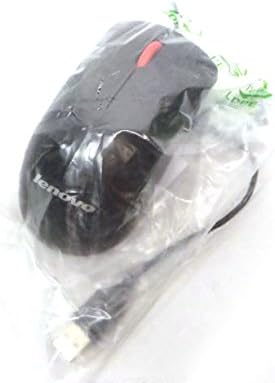
Joonis 2.2: Ülemine view of the Lenovo USB 2-Button Optical Mouse.
Peamised omadused:
- USB Wired Connectivity: Ensures a stable and reliable connection.
- Plug-and-Play: No additional drivers typically required for basic functionality.
- Standard Keyboard Layout: Full-size keyboard with numeric keypad.
- Optical Mouse: Precise tracking with a scroll wheel for easy navigation.
3. Seadistamine
Follow these steps to connect your keyboard and mouse to your computer.
- Seadmete lahtipakkimine: Võtke klaviatuur ja hiir ettevaatlikult pakendist välja.
- Identify USB Connectors: Locate the USB connectors at the end of the keyboard and mouse cables.
- Ühendage arvutiga: Insert the USB connector of the keyboard into an available USB port on your computer. Repeat this step for the mouse.
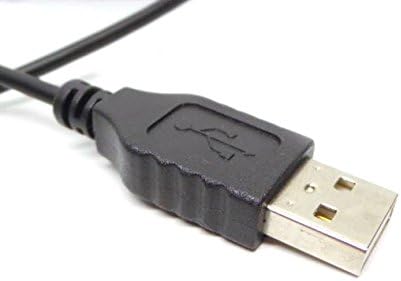
Figure 3.1: Close-up of a standard USB Type-A connector, used for connecting the keyboard and mouse.
Your computer should automatically detect and install the necessary drivers for the keyboard and mouse. No additional software installation is typically required for basic functionality.
4. Kasutusjuhised
4.1 Klaviatuuri kasutamine
- Tippimine: Tekstisisestuse jaoks kasutage tähtnumbrilisi klahve.
- Funktsiooniklahvid (F1–F12): These keys perform various functions depending on the application or operating system.
- Numbriklahvistik: Use the dedicated numeric keypad for efficient data entry. Ensure the "Num Lock" indicator light is on.
- Eriklahvid: Utilize keys like "Print Screen", "Scroll Lock", "Pause/Break", "Insert", "Home", "Page Up", "Delete", "End", and "Page Down" for their respective functions.
4.2 Hiire kasutamine
- Liikumine: Move the mouse across a flat surface to control the cursor on the screen.
- Vasak klõps: Vajutage vasakut nuppu üksuste valimiseks, linkide avamiseks või funktsioonide aktiveerimiseks.
- Paremklõps: Press the right button to open context menus.
- Kerimisratas: Dokumentide vahel liikumiseks kerige kerimisratast üles või alla või web lehekülgi. Kerimisratas võib toimida ka keskmise hiireklõpsu nupuna.
5. Hooldus
Proper care and maintenance will extend the life of your keyboard and mouse.
- Puhastamine:
- Disconnect devices from the computer before cleaning.
- Kasutage pehmet, damp cloth with a mild cleaning solution (e.g., water or isopropyl alcohol) to wipe surfaces.
- Avoid excessive moisture, especially near keycaps and optical sensors.
- Klaviatuuriklahvide vahelt tolmu ja prahi eemaldamiseks kasutage suruõhku.
- Hoiustamine: Store the devices in a clean, dry environment away from extreme temperatures and direct sunlight.
- Vältige lekkeid: Keep liquids away from the keyboard and mouse to prevent damage.
6. Veaotsing
If you encounter issues with your keyboard or mouse, refer to the following common problems and solutions:
| Probleem | Võimalik põhjus | Lahendus |
|---|---|---|
| Klaviatuur/hiir ei reageeri | Lahtine USB-ühendus, vigane USB-port, draiveri probleem. |
|
| Keys not working or typing incorrectly | Debris under keys, software conflict, keyboard settings. |
|
| Hiirekursor on ebakindel või ei liigu | Dirty optical sensor, unsuitable surface, software issue. |
|
If the problem persists after trying these solutions, contact customer support or your reseller for further assistance.
7. Tehnilised andmed
| Funktsioon | Detail |
|---|---|
| Keyboard Model Numbers | 54Y9400, 41A5289, SK-8825, KB1021 |
| Mouse Model Numbers | 45J4888, 25011476, 45J4889, M-U0025-O |
| Kaubamärk | IBM / Lenovo |
| Värv | Must |
| Ühenduvustehnoloogia | USB juhtmega |
| Klaviatuuri tüüp | Preferred Pro USB Wired Keyboard |
| Hiire tüüp | 2-Button Black Red Scroll Wheel Optical Mouse |
| Pakendi mõõtmed | 22 x 10.2 x 4.7 tolli (ligikaudne) |
| Kauba kaal | 1 nael (ligikaudne) |
| Tootja | Lenovo |
8. Garantii ja tugi
For warranty information, please refer to the documentation provided at the time of purchase or contact your reseller. IBM and Lenovo products typically come with a standard manufacturer's warranty.
For technical support or further inquiries, please contact the product's manufacturer or the authorized reseller from whom you purchased the item. Keep your purchase receipt and product model numbers handy for faster service.


