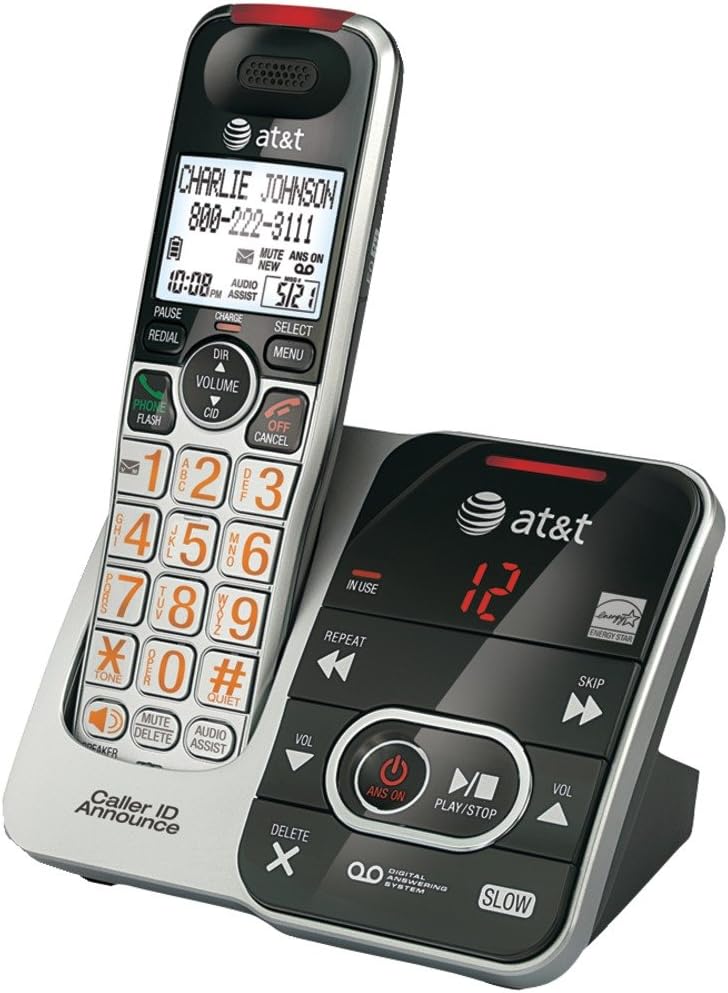
This manual provides instructions for the AT&T CRL32102 DECT 6.0 Expandable Cordless Phone with Answering System and Caller ID/Call Waiting. Please read this manual thoroughly before operating your new telephone to ensure proper use and to maximize its features.
Image Description: A silver and black AT&T CRL32102 cordless phone handset is shown resting in its matching base unit. The handset features a large display, a numeric keypad with large orange characters, and various function buttons. The base unit includes controls for the digital answering system, such as play/stop, skip, repeat, and volume, along with an "IN USE" indicator and a message counter displaying "12". The AT&T logo is visible on both the handset and the base.
Algseadistus
Aku paigaldamine
Install the supplied battery pack into the handset battery compartment. Ensure correct polarity by aligning the connectors. Close the battery compartment cover securely.
Telefonitoru laadimine
Place the handset in the telephone base or charger with the display facing up. The CHARGE light on the handset will illuminate, indicating proper placement. Allow 16 hours for the battery to fully charge before first use to ensure optimal battery performance.
Connecting the Telephone Base
Connect the small end of the power adapter to the power jack on the back of the telephone base. Plug the large end into an electrical outlet that is not controlled by a wall switch.
Connect one end of the telephone line cord to the TELLILINE jack on the back of the telephone base. Plug the other end into a telephone wall jack. If you have DSL internet service, a DSL filter (not included) may be required.
Telefoni kasutamine
Helistamine
Vajutage TELEFON / VÄLK or any dial pad key. Enter the phone number using the numeric keypad. The call will connect automatically.
Kõnele vastamine
Kui telefon heliseb, vajutage TELEFON / VÄLK or any dial pad key to answer the incoming call.
Kõne lõpetamine
Vajutage VÄLJAS/TÜHISTAMINE or place the handset in the telephone base to end an active call.
Helitugevuse reguleerimine
Kõne ajal vajutage VOLUME▲ (up arrow) or ▼ (down arrow) on the handset to adjust the earpiece volume to your preferred level.
Vaigistamise funktsioon
Kõne ajal vajutage Vaigistama to mute the microphone. This allows you to speak privately without the other party hearing you. Press Vaigistama again to unmute the microphone.
Kordusvalimine
Vajutage TAASVALIMINE juurde view the last 10 dialed numbers. Use the REŽ (directory) navigation keys to scroll through the list. Press TELEFON / VÄLK valitud numbri valimiseks.
Vastamissüsteem
The digital answering system can record up to 15 minutes of messages, memos, and announcements.
Automaatvastaja sisse-/väljalülitamiseks vajutage VASTUSED SEES telefonibaasis.
To skip a message, press JÄTA VÄLJA sõnumi taasesituse ajal.
To repeat a message, press KORDA during message playback. Press twice to play the previous message.
To delete a message, press KUSTUTA while the message is playing.
Hooldus
Puhastamine
Puhastage telefoni ja alust pehme, kergelt kuiva lapigaamp lapiga. Ärge kasutage puhastusspreisid ega vedelaid puhastusvahendeid, kuna need võivad kahjustada viimistlust või sisemisi komponente.
Aku hooldus
To maintain the life of the battery, periodically fully discharge the handset battery by leaving it off the charger until it runs out of power. Then, fully recharge it for 16 hours. This helps to recondition the battery and extend its lifespan.
Veaotsing
If you experience difficulty with your telephone, please try the following suggestions. For more detailed troubleshooting, refer to the full user manual or AT&T support.
Valimistooni pole
Ensure the telephone line cord is securely plugged into the telephone base and the wall jack.
Check if the power adapter is properly connected to the telephone base and a working electrical outlet.
If you have multiple phones, try unplugging others to see if the issue is with a specific phone or line.
Handset Does Not Charge
Ensure the handset is correctly placed in the base. The CHARGE light on the handset should be on.
Clean the charging contacts on the handset and base with a soft, dry cloth to remove any dust or debris.
Verify that the power adapter for the base is securely plugged in.
Halb helikvaliteet
Move the handset closer to the telephone base to improve signal strength.
Avoid placing the phone near other electrical appliances, metal objects, or large electronic devices that may cause interference.
Check for interference from other DECT 6.0 devices or Wi-Fi routers.
Toote spetsifikatsioonid
Funktsioon
Detail
ASIN
B00OZ55DTY
Kaubamärk
AT&T
Värv
Must, hõbedane
Telefoni tüüp
Juhtmeta
Toiteallikas
Juhtmega elekter
Helistaja tüüp
Üksikklaviatuur
Automaatvastaja tüüp
Digitaalne
Ühilduvad seadmed
AT&T cordless headset 2
Salvestusmaht
15 minuti
Konverentskõne võimalus
põhilised
Mitmerealine operatsioon
Üherealine töö
Esmakordselt saadaval olev kuupäev
3. mai 2016
Klienditugi
For further assistance, technical support, or warranty information, please visit the official AT&T support website or refer to the contact information provided with your product packaging. You can also find FAQs and additional resources online.
AT&T nutika kõneblokeerija DL72119 kasutusjuhend Juhend AT&T nutika kõneblokeerija funktsiooni kasutamiseks DL72119/DL72219/DL72319/DL72419/DL72519/DL72539/DL72549 DECT 6.0 juhtmeta telefonides. Siit saate teada, kuidas filtreerida robotkõnesid ja soovimatuid kõnesid, seadistada lubatud ja blokeeritud kõnede nimekirju ning hallata kõnede filtreerimise eelistusi.
AT&T nutika kõneblokeerija CL82219/CL82229/CL82319/CL82419/CL82519 kasutusjuhend DECT 6.0 juhtmeta telefonisüsteemide AT&T nutika kõneblokeerija funktsiooni kasutusjuhend. Siit saate teada, kuidas filtreerida robotkõnesid, hallata kõneloendeid (kataloog, lubamine, blokeerimine, tärniga märkimine) ja seadistada filtreerimisprogrammi.fileNagu „Ekraanirobot” ja „Ekraani tundmatu”.
AT&T DECT 6.0 juhtmeta telefoni kiirjuhend – CL82115 seeria AT&T DECT 6.0 juhtmeta telefoni ja automaatvastaja (CL82115/CL82215/CL82315/CL82415/CL82465/CL82515) kiirjuhend. Siit leiate teavet seadistamise, funktsioonide (nt helistaja ID, automaatvastaja, Bluetooth ja nutikas kõneblokeerija) kohta.
AT&T nutikas kõneblokeerija: seadistamis- ja kasutusjuhend (Kanada versioon) Siit saate teada, kuidas kasutada oma DECT 6.0 juhtmeta telefonisüsteemi AT&T nutika kõneblokeerija funktsiooni. See juhend selgitab seadistamist, kõnede filtreerimist ja ...filekontaktide haldamine ja soovimatute kõnede blokeerimine.