1. Sissejuhatus
The Intel NUC DE3815TYKHE is a compact, fanless mini PC designed for various applications, including thin clients, digital signage, and embedded solutions. This kit provides a flexible platform with support for a 2.5-inch storage drive, offering a customizable computing experience in a small form factor.
2. Pakendi sisu
Veenduge, et pakis on kõik esemed olemas:
- Intel NUC DE3815TYKHE Unit
- Vahelduvvoolu adapter
- VESA Mounting Bracket (with screws)
- Kiirjuhend (kui on kaasas)
3. Füüsiline üleview
3.1 Esipaneel
The front panel provides essential connectivity and controls.

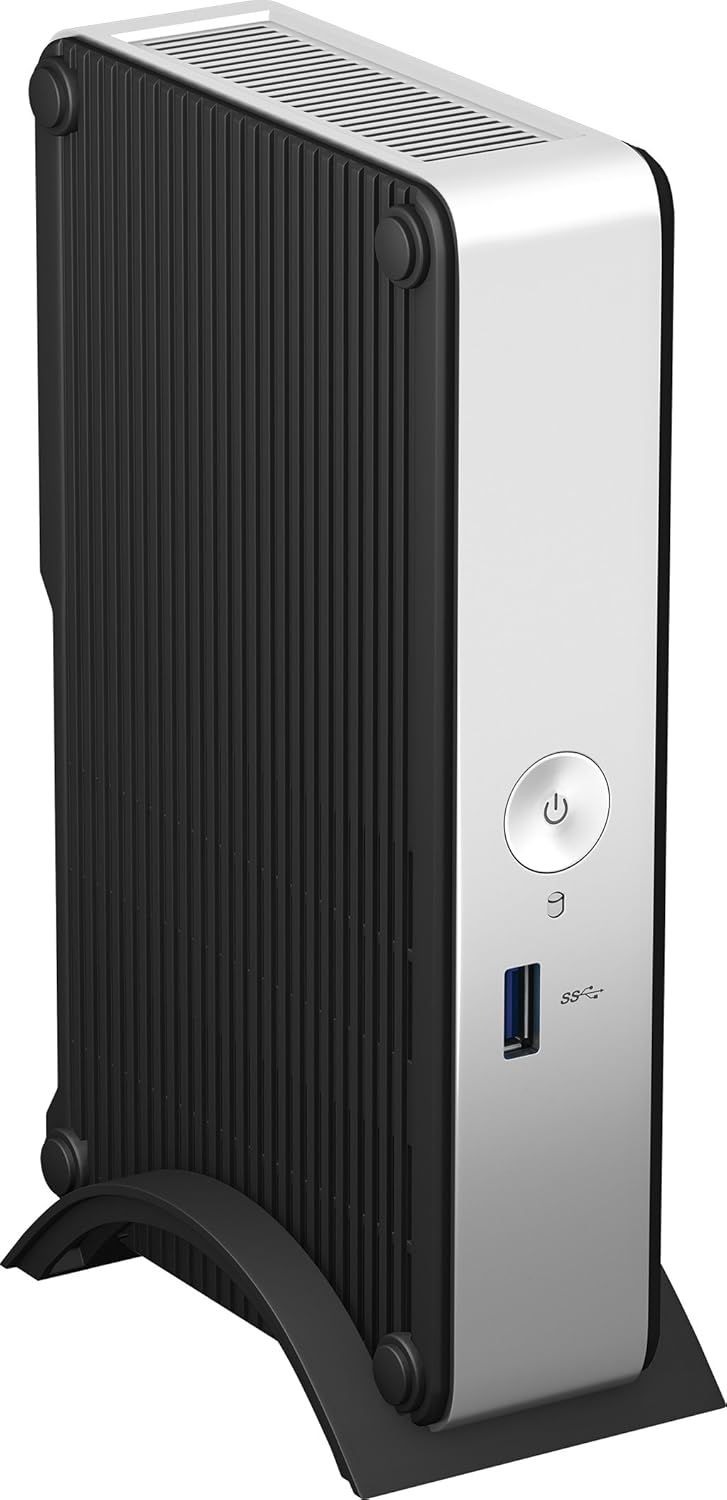
1. pilt: Esiosa view of the Intel NUC DE3815TYKHE. This image displays the compact, fanless design of the unit, highlighting the power button and a single blue USB 3.0 port on the front for easy access.
- Toitenupp: Kasutatakse seadme sisse- või väljalülitamiseks.
- USB 3.0 port: Kiirete USB-seadmete ühendamiseks.
3.2 Tagapaneel
The rear panel houses various ports for display, network, and peripherals.

2. pilt: Tagumine view of the Intel NUC DE3815TYKHE. This image details the available rear ports, including VGA, HDMI, two USB ports, an Ethernet port, and a headphone/microphone jack, along with the power input.
- VGA port: Vanemate monitoride või projektoritega ühendamiseks.
- HDMI-port: For connecting to modern displays with audio support.
- USB 2.0 pordid (x2): Standardsete USB-seadmete ühendamiseks.
- Etherneti port (RJ-45): Juhtmega võrguühenduse jaoks.
- Kõrvaklappide/mikrofoni pesa: Heli sisendi ja väljundi jaoks.
- DC toite sisend: Vahelduvvooluadapteri ühendamiseks.
3.3 Sisemised komponendid
Accessing the internal components is necessary for memory and storage installation.
3. pilt: Intel NUC DE3815TYKHE unit displayed alongside its internal motherboard. This view illustrates the compact size of the main unit and the layout of the internal components, including the processor, memory slot, and connectors for storage.
- DDR3L SODIMM Slot: For installing system memory.
- 2.5-inch Drive Bay: For installing a SATA HDD or SSD.
- Traadita antennid: Built-in for wireless connectivity.
- eMMC salvestusruum: 4GB embedded storage for operating system or data.
4. Seadistamine
Follow these steps to prepare your Intel NUC for operation.
4.1 Mälu (RAM) paigaldamine
- Unscrew and remove the bottom cover of the NUC unit.
- Locate the DDR3L SODIMM slot on the motherboard.
- Align the notch on the SODIMM module with the notch in the slot.
- Insert the module at a 45-degree angle and press down until the retaining clips snap into place.
4.2 Installing a 2.5-inch Storage Drive
- With the bottom cover removed, locate the 2.5-inch drive bay.
- Connect the SATA data and power cables from the NUC to your 2.5-inch HDD or SSD.
- Secure the drive within the bay using the provided screws (if applicable).
- Replace the bottom cover and secure it with screws.
4.3 Välisseadmete ühendamine
- Kuva: Connect your monitor to the HDMI or VGA port.
- Klaviatuur ja hiir: Connect USB keyboard and mouse to any available USB ports.
- Võrk: For wired internet, connect an Ethernet cable to the RJ-45 port. For wireless, ensure antennas are clear.
- Heli: Connect headphones or speakers to the audio jack if needed.
4.4 Sisselülitamine
- Connect the AC power adapter to the DC power input on the rear panel.
- Ühendage toiteadapter seinakontakti.
- Press the power button on the front panel to turn on the NUC.
5. Operatsioonisüsteemi installimine
The Intel NUC DE3815TYKHE supports multiple operating systems. You will need to install your preferred OS onto the internal eMMC storage or the 2.5-inch drive you installed.
- Prepare a bootable USB drive with your chosen operating system (e.g., Windows, Linux).
- Connect the USB drive to a USB port on the NUC.
- Power on the NUC and enter the BIOS/UEFI setup (usually by pressing F2 during boot) to configure the boot order.
- Operatsioonisüsteemi installimiseks järgige ekraanil kuvatavaid juhiseid.
6. Hooldus
The fanless design of the Intel NUC DE3815TYKHE minimizes maintenance requirements.
- Puhastamine: Periodically wipe the exterior with a soft, dry cloth. Avoid using liquid cleaners directly on the unit.
- Ventilatsioon: Ensure the ventilation slots are not obstructed to allow for proper passive cooling.
- Tarkvaravärskendused: Optimaalse jõudluse ja turvalisuse tagamiseks hoidke oma operatsioonisüsteem ja draiverid ajakohasena.
7. Veaotsing
Probleemide korral vaadake järgmisi levinud tõrkeotsingu samme.
- Toide puudub: Veenduge, et toiteadapter on kindlalt ühendatud nii NUC-i kui ka töötava pistikupesaga. Testige pistikupesa teise seadmega.
- Kuvarit pole: Verify that the monitor is powered on and correctly connected to the NUC's HDMI or VGA port. Try a different cable or monitor if possible.
- Operatsioonisüsteem ei käivitu: Check the boot order in the BIOS/UEFI settings. Ensure the installed storage drive is detected and contains a valid operating system.
- Välisseadet ei tuvastatud: Ensure USB devices are properly seated in the ports. Try a different USB port or device.
- Võrguühendus puudub: For wired connections, check the Ethernet cable and router. For wireless, ensure Wi-Fi is enabled in the OS and the NUC is within range of a network.
8. Tehnilised andmed
| Funktsioon | Detail |
|---|---|
| Mudeli nimi | DE3815TYKHE |
| Protsessor | Intel Atom Processor (e.g., E3815) |
| RAM | 4 GB DDR3L 1333 (SODIMM slot for expansion) |
| Sisemälu | 4GB eMMC (embedded MultiMediaCard) |
| Salvestusruumi laiendamine | Internal 2.5-inch SATA HDD/SSD bay |
| Graafika | Integreeritud Intel Graphics |
| Videoväljund | HDMI, VGA |
| USB-pordid | 1x USB 3.0 (ees), 2x USB 2.0 (taga) |
| Heli | Kõrvaklappide/mikrofoni kombineeritud pesa |
| Võrk | Ethernet (RJ-45), Built-in Wireless Antennas |
| Disain | Ventilaatorita |
| Operatsioonisüsteemi tugi | Multiple OS options (e.g., Windows, Linux) |
| Värv | Metallic gray plastic ring with black sides |
9. Garantii ja tugi
For warranty information and technical support, please refer to the official Intel webveebisaidilt või võtke ühendust ostukohaga. Hoidke ostutõend garantiinõuete esitamiseks alles.
- Veebitugi: Külastage Intel Support for DE3815TYKHE for drivers, downloads, and troubleshooting resources.
- Kontakt: Refer to the Intel support page for contact options.


