Sissejuhatus
This manual provides essential information for the proper use and care of your Beats Studio Wireless Over-Ear Headphones. Please read these instructions carefully before using your headphones to ensure optimal performance and longevity. The Beats Studio Wireless headphones offer a premium audio experience with wireless connectivity and Adaptive Noise Canceling technology.
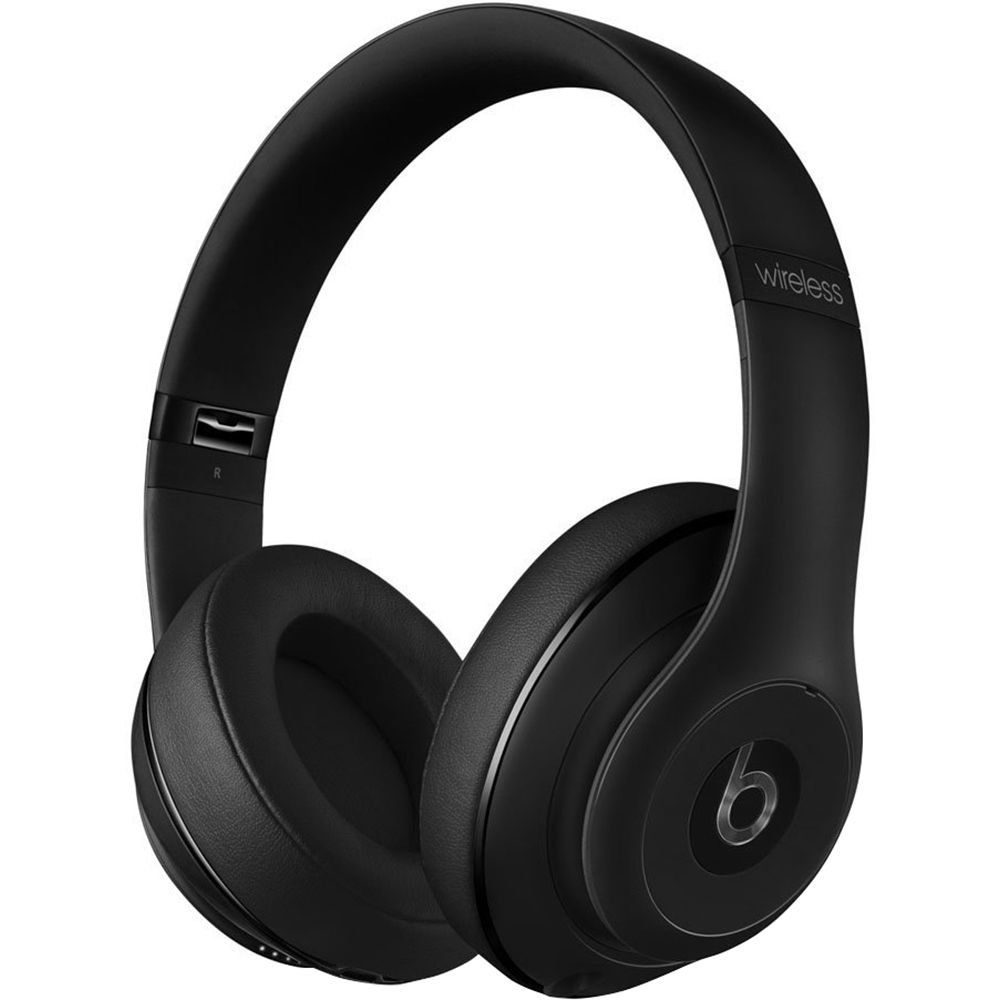
Image: Beats Studio Wireless Over-Ear Headphones in Matte Black, showcasing elegantne disain.
Mis on karbis
Veenduge, et pakis on kõik esemed olemas:
- Beats Studio Wireless over-ear headphones
- 3.5mm audio cable with RemoteTalk (for wired connection and controls)
- Standard 3.5 mm audio cable (for wired connection without RemoteTalk features)
- USB 2.0 cable (USB-A to USB Micro-B) for charging
- Hard-shell carrying case with carabiner clip

Image: The Beats Studio Wireless headphones, hard-shell carrying case, and various cables laid out from the packaging.
Seadistamine
1. Kõrvaklappide laadimine
Before first use, fully charge your Beats Studio Wireless headphones. A full charge provides approximately 12 hours of wireless playback or 20 hours of wired playback with Adaptive Noise Canceling enabled.
- Connect the small end of the USB 2.0 cable (USB-A to USB Micro-B) to the Micro-USB port on the right earcup of the headphones.
- Connect the larger end of the USB cable to a USB power adapter (not included) or a powered USB port on a computer.
- The Fuel Gauge LEDs on the right earcup will indicate charging status. When all five LEDs are solid white, the headphones are fully charged.
Märkus. The headphones cannot be used while charging.
2. Bluetoothi sidumine
Ühenda kõrvaklapid Bluetooth-toega seadmega juhtmevaba heli saamiseks.
- Veenduge, et teie kõrvaklapid on laetud ja välja lülitatud.
- Press and hold the power button on the right earcup for 3-5 seconds until the Fuel Gauge LEDs begin to pulse. This indicates pairing mode.
- Avage oma seadmes Bluetoothi sätted ja lubage Bluetooth.
- Select "Beats Studio Wireless" from the list of available devices.
- Once paired, the Fuel Gauge LEDs will turn solid white.
The headphones have a Bluetooth range of up to 30 feet (9 meters).
3. Juhtmega ühendus
For a wired connection, use the provided 3.5mm audio cables.
- Plug one end of the 3.5mm audio cable into the audio input port on the left earcup.
- Ühendage teine ots oma seadme 3.5 mm audioväljundisse.
The RemoteTalk cable allows for inline control of music and calls when connected to compatible devices.
Kasutusjuhised
1. Toide sisse/välja
- Sisselülitamiseks: Press and hold the power button on the right earcup until the Fuel Gauge LEDs illuminate.
- Väljalülitamiseks: Press and hold the power button until the Fuel Gauge LEDs turn off.
2. Controls (Wireless Mode)
The "b" button on the left earcup and the volume buttons control playback and calls.
- Esita/peata: Press the "b" button once.
- Järgmine lugu: Press the "b" button twice quickly.
- Eelmine lugu: Press the "b" button three times quickly.
- Helitugevuse suurendamine: Press the top volume button.
- Hääl maha: Press the bottom volume button.
- Kõnele vastamine/lõpetamine: Press the "b" button once during an incoming call or active call.
- Keeldu kõnest: Press and hold the "b" button for 2 seconds during an incoming call.
- Hääleabi aktiveerimine: Press and hold the "b" button for 2 seconds (functionality depends on device).
3. Adaptive Noise Canceling (ANC)
The Beats Studio Wireless headphones feature Dual-Mode Adaptive Noise Canceling. ANC is automatically active when the headphones are powered on. There are two modes:
- Full ANC: Engaged when listening to music or media, providing maximum noise reduction.
- ANC Only: When the audio cable is unplugged and the headphones are powered on, ANC will automatically switch to a more aggressive mode to reduce external noise without playing audio.
Hooldus
1. Puhastamine
To maintain the appearance and performance of your headphones:
- Pühkige kõrvaklappe ja peavõru pehme, kuiva ja ebemevaba lapiga.
- Ärge kasutage abrasiivseid puhastusvahendeid, alkoholi ega keemilisi lahusteid.
- Vältige niiskuse sattumist avadesse.
2. Ladustamine
When not in use, store your headphones in the provided hard-shell carrying case to protect them from damage.
- Fold the headphones carefully to fit into the case.
- Keep headphones away from extreme temperatures and humidity.
3. Aku hooldus
Aku tööea pikendamiseks:
- Vältige aku sagedast täielikku tühjenemist.
- Laadige kõrvaklappe regulaarselt, isegi kui neid pikka aega ei kasutata.
- Hoida jahedas ja kuivas kohas.
Veaotsing
If you encounter issues with your Beats Studio Wireless headphones, try the following solutions:
Puudub toide / ei lülitu sisse
- Veenduge, et kõrvaklapid on täielikult laetud. Ühendage need USB-kaabli abil toiteallikaga.
- Kontrollige USB-kaablit ja laadimisporti kahjustuste suhtes.
No Sound / Intermittent Audio
- Juhtmeta:
- Ensure headphones are paired and connected to your device.
- Check the volume levels on both the headphones and your device.
- Move closer to your device to avoid interference or exceeding Bluetooth range.
- Proovige kõrvaklapid oma seadmega lahti siduda ja uuesti siduda.
- Juhtmega:
- Ensure the 3.5mm audio cable is securely plugged into both the headphones and your audio source.
- Try a different 3.5mm audio cable if available.
Sidumisprobleemid
- Ensure the headphones are in pairing mode (pulsing Fuel Gauge LEDs).
- Lülitage oma seadme Bluetooth välja ja seejärel sisse.
- Forget "Beats Studio Wireless" from your device's Bluetooth list and attempt to pair again.
- Ensure no other Bluetooth devices are interfering with the pairing process.
Adaptive Noise Canceling (ANC) Not Working
- Ensure the headphones are powered on. ANC requires power.
- Check for any obstructions around the external microphones on the earcups.
Tehnilised andmed
Key technical specifications for the Beats Studio Wireless Over-Ear Headphones:
- Mudeli nimi: Stuudio
- Ühenduvustehnoloogia: Bluetooth (Wireless), 3.5 mm Jack (Wired)
- Traadita side tehnoloogia: Bluetooth
- Bluetoothi vahemik: Kuni 30 jalga (9 meetrit)
- Mürakontroll: Active Noise Cancellation (Dual-Mode Adaptive Noise Canceling)
- Aku eluiga: Approximately 12 hours (wireless), 20 hours (wired with ANC)
- Aku tüüp: 1 liitiumioonaku (laetav)
- Kontrolli tüüp: Media Control (on-earcup "b" button, volume buttons)
- Mikrofon: Sisseehitatud käed-vabad kõnede jaoks
- Vormitegur: Üle Kõrva
- Kõrva paigutus: Üle Kõrva
- Materjal: Plastikust
- Kauba kaal: Ligikaudu 9.2 untsi (0.26 kilogrammi)
- Toote mõõtmed: 9.6 x 7.3 x 4.5 tolli
- Tootja: Beats Electronics, LLC
- Esmakordse saadavaloleku kuupäev: 1. detsember 2013

Pilt: Lähivõte view of the headphone's inner band, displaying the model number B0501.
Garantii ja tugi
For warranty information and customer support, please refer to the official Beats webveebisaidilt või võtke otse ühendust nende klienditeenindusega. Hoidke ostutõendit garantiinõuete esitamiseks.
Märkus. This product is an older model. Specific warranty terms may vary based on purchase date and region. Please consult the manufacturer's official resources for the most accurate and up-to-date information.
Lisateabe saamiseks külastage: Beats tugi


