1. Sissejuhatus
Thank you for choosing the Antec HCG-850M 850W Power Supply. This manual provides essential information for the safe and efficient installation, operation, and maintenance of your power supply unit. Please read this manual thoroughly before installation and retain it for future reference.
2. Ohutusalane teave
Always observe the following safety precautions to prevent injury or damage to your system:
- Ärge tehke open the power supply casing. Suur mahttagon seadme sees isegi siis, kui see on vooluvõrgust lahti ühendatud.
- Ärge tehke insert any objects into the power supply's ventilation openings.
- Veenduge, et toiteallikas on paigaldatud hästiventileeritavasse kohta.
- Use only the modular cables provided with this power supply. Using incompatible cables can cause damage.
- Disconnect the AC power cord from the wall outlet before installing or removing the power supply.
- This product is designed for use in personal computers only.
3. Pakendi sisu
Veenduge, et pakis on kõik esemed olemas:
- Antec HCG-850M 850W Power Supply
- Modular Cable Set (PCI-E, SATA, Peripheral, CPU)
- Vahelduvvoolu toitejuhe
- Kinnituskruvid
- Kasutusjuhend (see dokument)
4. Toote lõppview
The Antec HCG-850M is an 850-watt, 80 PLUS Bronze certified, semi-modular power supply designed for high-performance personal computers. It features a quiet 135mm fan for efficient cooling and robust protection circuits to ensure stable power delivery.
4.1 Põhifunktsioonid
- 850 Watts Continuous Power
- 80 PLUS Bronze Certified Efficiency
- Semi-Modular Cable Management
- 135 mm vaikne ventilaator
- ATX vormitegur
- Multiple Protection Circuits (OCP, OVP, UVP, SCP, OPP, OTP)
4.2 toiteplokk
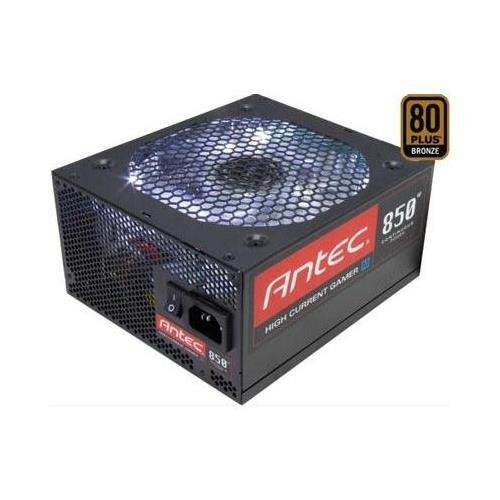
Pilt 1: esikülg view of the Antec HCG-850M 850W Power Supply, showing the fan grille and modular cable connectors. This unit provides stable power to your computer components.
5. Seadistamine ja installimine
Follow these steps to install your Antec HCG-850M power supply:
- Valmistage oma süsteem ette: Veenduge, et arvuti on täielikult välja lülitatud ja pistik seinakontaktist eemaldatud. Avage arvuti korpus.
- Eemaldage vana toiteplokk (kui see on olemas): Ühendage vana toiteploki küljest lahti kõik kaablid. Keerake vana toiteplokk lahti ja eemaldage see korpusest.
- Uue toiteploki paigaldamine: Carefully place the Antec HCG-850M into the power supply bay of your computer case. Secure it with the provided mounting screws. Ensure the fan is oriented correctly for optimal airflow (typically facing down if there's a bottom vent, or up if not).
- Ühendage olulised kaablid:
- Connect the 24-pin ATX motherboard power cable.
- Connect the 4+4-pin or 8-pin EPS/CPU power cable to your motherboard.
- Modulaarsete kaablite ühendamine: Attach the necessary modular cables for your components (e.g., PCI-E for graphics cards, SATA for hard drives/SSDs, Peripheral for fans/accessories). Connect them securely to both the power supply and the respective components.
- Kaabli haldamine: Õhuvoolu ja esteetika parandamiseks suunake kaablid korralikult.
- Sulgege korpus ja lülitage toide sisse: Close your computer case. Connect the AC power cord to the power supply and then to a wall outlet. Flip the power switch on the PSU to the 'ON' position. Power on your computer.
6. Kasutusjuhised
Once installed, the Antec HCG-850M operates automatically. Here are some general operating guidelines:
- Toide sisse/välja: Use your computer's power button to turn the system on or off. The switch on the power supply itself should generally remain in the 'ON' position during normal operation.
- Süsteemi stabiilsus: Ensure your system is stable. If you experience unexpected shutdowns or reboots, refer to the troubleshooting section.
- Ventilatsioon: Maintain good airflow around your computer case to prevent overheating of components, including the power supply.
7. Hooldus
Nõuetekohane hooldus võib pikendada teie toiteallika eluiga:
- Tolmu puhastamine: Periodically clean dust from the power supply's fan grille and the interior of your computer case using compressed air. Enne puhastamist eemaldage alati vahelduvvoolu toitejuhe.
- Kaabli kontroll: Occasionally check that all power cables are securely connected to the power supply and components.
- Keskkond: Operate the power supply in a clean, dry environment with stable temperatures.
8. Veaotsing
If you encounter issues with your power supply, try the following steps:
8.1 No Power to System
- Ensure the AC power cord is securely plugged into both the wall outlet and the power supply.
- Check that the power supply's ON/OFF switch is in the 'ON' position.
- Verify all internal power cables (24-pin ATX, CPU, PCI-E) are correctly and firmly connected.
- Testige seinakontakti teise seadmega, et veenduda, kas see on voolu all.
- If possible, test the power supply in another known working system or with a PSU tester.
8.2 System Instability or Random Shutdowns
- Veenduge, et teie süsteemi energiatarbed ei ületaks toiteploki 850 W võimsust.
- Check for overheating components. Ensure proper case ventilation and clean any dust buildup.
- Verify all power connections are secure. Loose connections can cause intermittent power delivery.
- If the issue persists, it may indicate a fault with the power supply or another component. Consider professional diagnosis.
9. Tehnilised andmed
| Funktsioon | Detail |
|---|---|
| Mudeli number | HCG-850M |
| Väljund vattage | 850 vatti |
| Tõhususe sertifitseerimine | 80 PLUS pronks |
| Vormitegur | ATX |
| Jahutusmeetod | Õhk (135 mm ventilaator) |
| Modulaarne tüüp | Poolmodulaarne |
| Ühilduvad seadmed | Personaalarvuti |
| Kauba kaal | 9 naela (umbes 4.08 kg) |
| ASIN | B00ESAI3M0 |
10. Garantii ja tugi
Anteci toodetele kehtib tootja garantii. Täpsemate garantiitingimuste kohta vaadake tootega kaasasolevat garantiikaarti või külastage Anteci ametlikku veebisaiti. website. For technical support or customer service, please contact Antec directly through their official support channels.
Ametlik Antec Websait: www.antec.com


