1. Sissejuhatus
Thank you for choosing the Fonestar AS-24U Hi-Fi USB/SD/MP3 AmpSee kasutusjuhend sisaldab olulist teavet seadme ohutuks ja tõhusaks kasutamiseks. Palun lugege see enne kasutamist hoolikalt läbi ja hoidke alles edaspidiseks kasutamiseks.
2. Ohutusjuhised
- Toiteallikas: Tagada amplifier is connected to a power source matching the specified voltage (230 V).
- Ventilatsioon: Ärge blokeerige ventilatsiooniavasid. Jätke seadme ümber piisavalt ruumi korralikuks õhuvooluks ja ülekuumenemise vältimiseks.
- Niiskus: Hoidke amplifier away from water, moisture, and high humidity environments. Do not expose it to dripping or splashing.
- Soojusallikad: Vältige seadme paigutamist soojusallikate, näiteks radiaatorite, küttekehade, pliitide või muude soojust tootvate seadmete lähedale.
- Puhastamine: Disconnect the power cord before cleaning. Use a dry, soft cloth. Do not use liquid cleaners or aerosol cleaners.
- Teenindus: Ärge proovige seda toodet ise hooldada. Andke kõik hooldustööd kvalifitseeritud hooldustöötajatele.
- Objekti/vedeliku sisenemine: Ärge kunagi suruge sellesse tootesse läbi avade mingeid esemeid, kuna need võivad puudutada ohtlikku volüümitage punktid või lühised osad, mis võivad põhjustada tulekahju või elektrilöögi.
3. Toote lõppview
3.1 Esipaneel
The front panel features controls for power, input selection, volume adjustment, and USB/SD media playback. It also includes a display for media information.
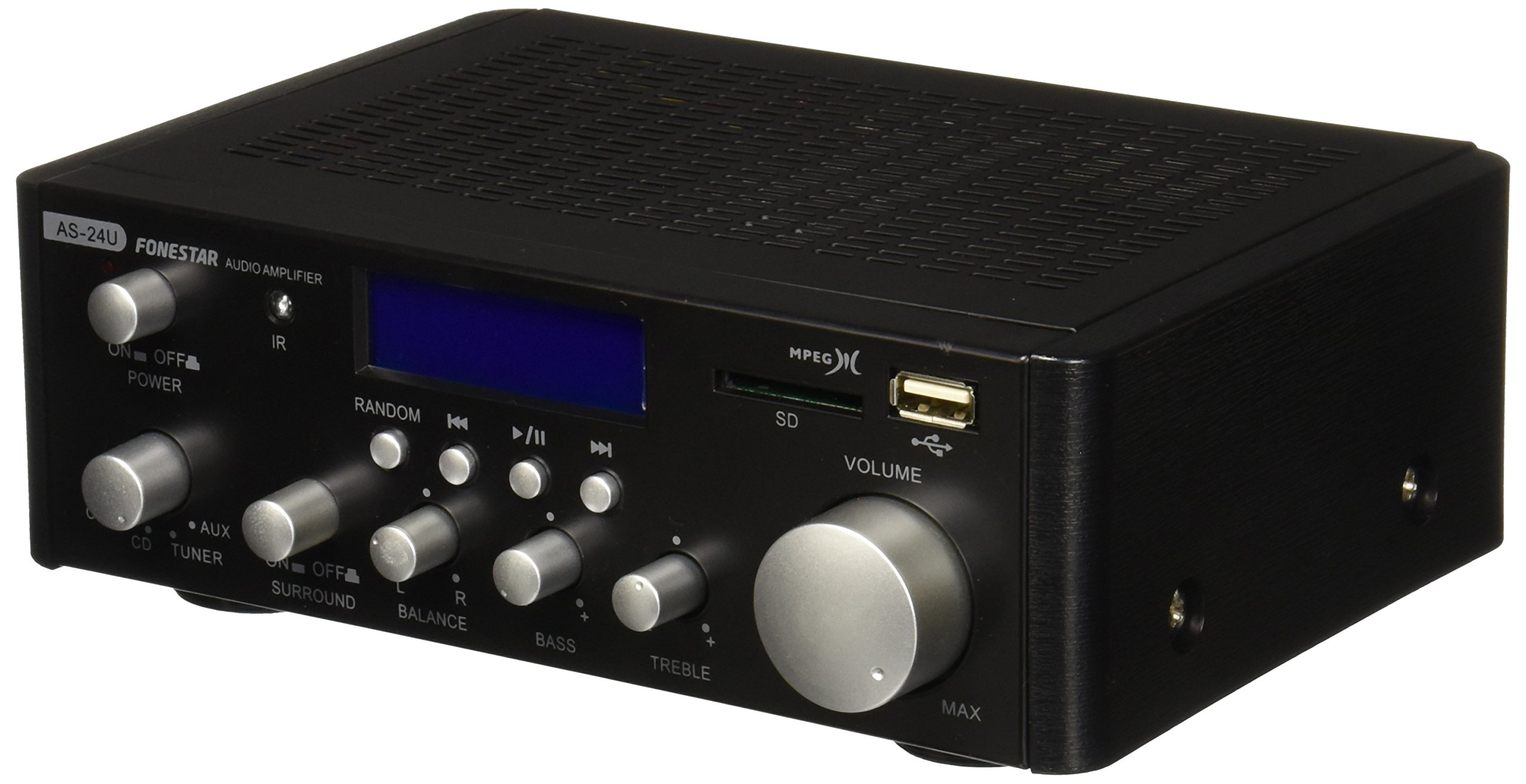
Pilt 1: esikülg view of the Fonestar AS-24U amplifier, showing the main controls and display.
3.2 Tagapaneel
The rear panel provides all necessary connections for audio input sources, speaker outputs, and power.

Pilt 2: tagumine view of the Fonestar AS-24U amplifier, detailing input/output ports and power connection.
- INPUT (AUX, TUNER, CD): RCA stereo inputs for connecting external audio sources.
- SPEAKER OUT (STEREO): Spring clip terminals for connecting passive speakers (4-8 Ω).
- SPEAKER OUT (SURROUND): Additional spring clip terminals for surround speakers (8 Ω).
- SISSE: AC power input for the main power cable.
- VOLTAGE VALIJA: Switch for selecting between 115V and 230V power input. Ensure this is set correctly for your region.
3.3 kaugjuhtimispult
Kaasasolev kaugjuhtimispult võimaldab seadet mugavalt juhtida amplifier's media playback functions.
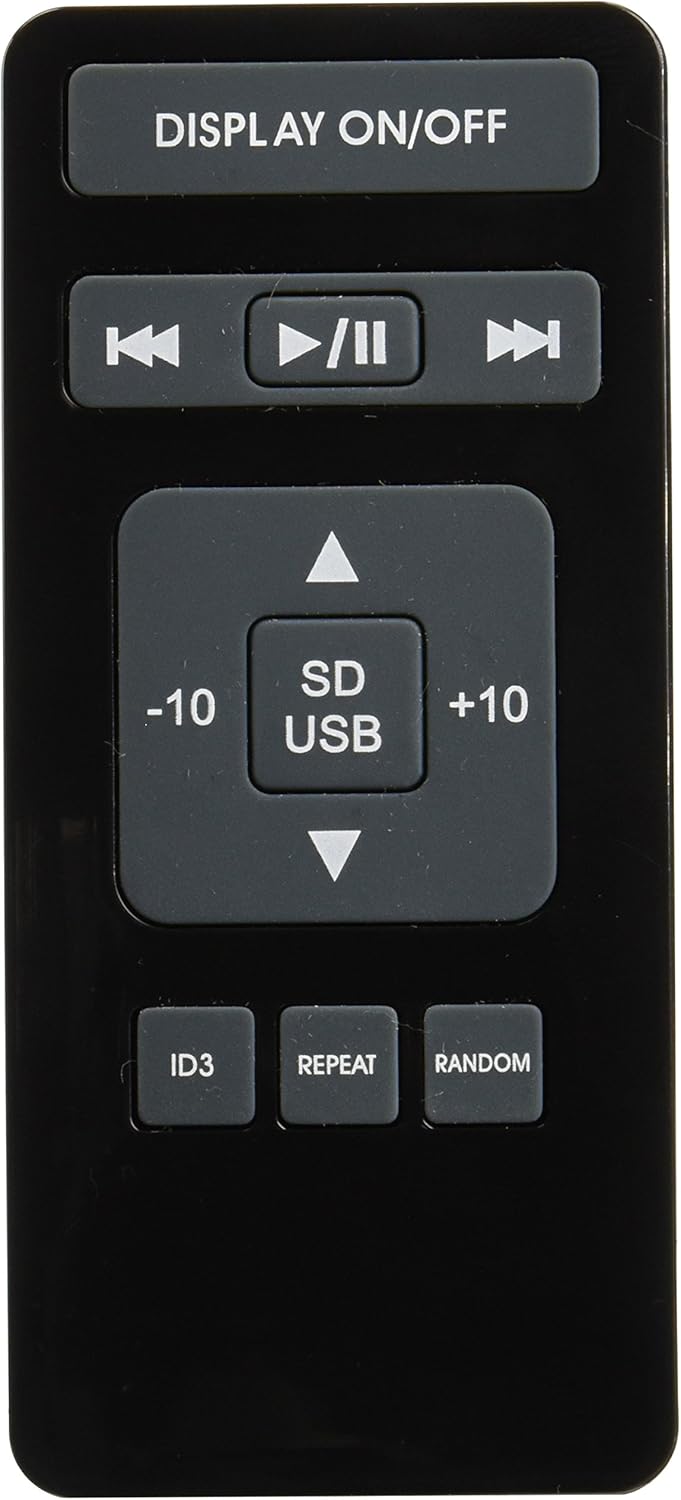
Image 3: Remote control for the Fonestar AS-24U amplifier, showing buttons for media playback and display control.
- EKRAAN ON / OFF: Toggles the front panel display.
- PLAY/PAUSE, PREVIOUS/NEXT: Controls for media playback.
- SD/USB: Selects between SD card and USB drive as the media source.
- -10/+10: Skips tracks by 10.
- ID3: Kuvab ID3 tag teave MP3 jaoks files.
- KORDA: Toggles repeat modes (e.g., repeat one, repeat all).
- Juhuslik: Toggles random playback.
4. Seadistamine
4.1 Kõlarite ühendamine
- Tagada amplifier on välja lülitatud ja vooluvõrgust lahti ühendatud.
- Connect your passive speakers to the SPEAKER OUT terminals on the rear panel.
- Match the positive (+) terminal on the ampkõlari positiivse (+) klemmi külge ja negatiivne (-) miinusklemmi (-) külge.
- For stereo speakers, use the 4-8 Ω terminals. For surround speakers, use the 8 Ω terminals. Ensure your speakers' impedance matches the amptõsteseadme spetsifikatsioonid.
4.2 Heliallikate ühendamine
- Connect your audio devices (e.g., CD player, tuner, auxiliary device) to the corresponding RCA INPUT jacks (CD, TUNER, AUX) on the rear panel.
- Ensure left and right channels are correctly matched (red for right, white for left).
4.3 Toiteühendus
- Kontrollige helitugevustTAGE SELECTOR switch on the rear panel is set to the correct voltage for your region (e.g., 230V).
- Connect the power cable to the POWER IN socket on the rear panel and then to a suitable wall outlet.
5. Kasutusjuhised
5.1 Sisse-/väljalülitamine
Vajutage esipaneelil olevat toitenuppu, et seadet sisse lülitada. amplifier on or off. A soft start protection circuit is integrated.
5.2 Sisendallika valimine
Use the input selector knob or buttons on the front panel to choose between CD, TUNER, AUX, USB, or SD inputs.
5.3 Helitugevuse reguleerimine
Rotate the main volume knob on the front panel to adjust the overall sound level. Start with a low volume and gradually increase it to a comfortable listening level.
5.4 USB/SD taasesitus
- Sisestage MP3-helifailidega USB-mälupulk või SD-kaart files esipaneelil olevasse vastavasse pessa.
- Select the USB or SD input using the input selector.
- Use the playback controls (Play/Pause, Previous/Next) on the front panel or remote control to manage your music.
- The remote control allows for additional functions like skipping 10 tracks (+10/-10), displaying ID3 tags, repeating tracks, and random playback.
6. Hooldus
6.1 Puhastamine
Et puhastada amplifier, first unplug it from the power outlet. Use a soft, dry cloth to wipe down the exterior surfaces. Do not use abrasive cleaners, waxes, or solvents as they may damage the finish.
6.2 Säilitamine
Kui säilitate amplifier for an extended period, ensure it is unplugged, clean, and stored in a cool, dry place away from direct sunlight and extreme temperatures.
7. Veaotsing
- Toide puudub:
- Check if the power cable is securely connected to both the ampja seinakontakti.
- Veenduge, et seinakontakt on töökorras.
- Kontrollige helitugevustTAGE SELECTOR switch is set correctly.
- Heli puudub:
- Veenduge, et valitud on õige sisendallikas.
- Kontrollige kõiki kõlariühendusi õige polaarsuse ja kindla kinnituse osas.
- Veenduge, et helitugevus oleks suuremaks keeratud ja mitte vaigistatud.
- Testi teise heliallikaga.
- Moonutatud heli:
- Vähendage helitugevust.
- Check speaker impedance compatibility.
- Veenduge, et helikaablid poleks kahjustatud ja oleksid kindlalt ühendatud.
- USB/SD Playback Issues:
- Ensure the USB drive or SD card is formatted to a compatible file süsteem (nt FAT32).
- Veenduge, et heli files on MP3 -vormingus.
- Try a different USB drive or SD card.
8. Tehnilised andmed
| Kaubamärk | FONESTAR |
| Mudel | AS-24U |
| Stereo Power Output | 25 + 25 W max, 15 + 15 W RMS (4 Ω), 12 + 12 W RMS (8 Ω) |
| Surround Power Output | 10 + 10 W max, 6 + 6 W RMS (8 Ω) |
| Sisendid | 3 stereo (CD, Tuner, AUX), 2 x RCA 400 mV |
| Kaitsed | Pehme käivitus, lühis, ülekoormus |
| Voltage | 230 volti |
| Mõõdud (P x L x K) | 5 x 5 x 10 cm (umbes 50 x 50 x 100 mm) |
| Kaal | 1.9 kg |
| Kõlari ühenduvus | Juhtmega |
9. Garantii ja tugi
This Fonestar AS-24U amplifier comes with a standard manufacturer's warranty. Please refer to the warranty card included with your purchase for specific terms and conditions. For technical support, service, or warranty claims, please contact your retailer or the official Fonestar customer service.


