1. Sissejuhatus
This manual provides detailed instructions for the setup, operation, and maintenance of your Vibe Axcess 5-in-1 Universal Remote. Please read this manual thoroughly before using the remote control to ensure proper functionality and to maximize your user experience. This remote is designed to control up to five different audio/video devices.
2. Toote lõppview
The Vibe Axcess 5-in-1 Universal Remote is designed to consolidate control of multiple home entertainment devices into a single unit. It features dedicated buttons for various functions and device types.
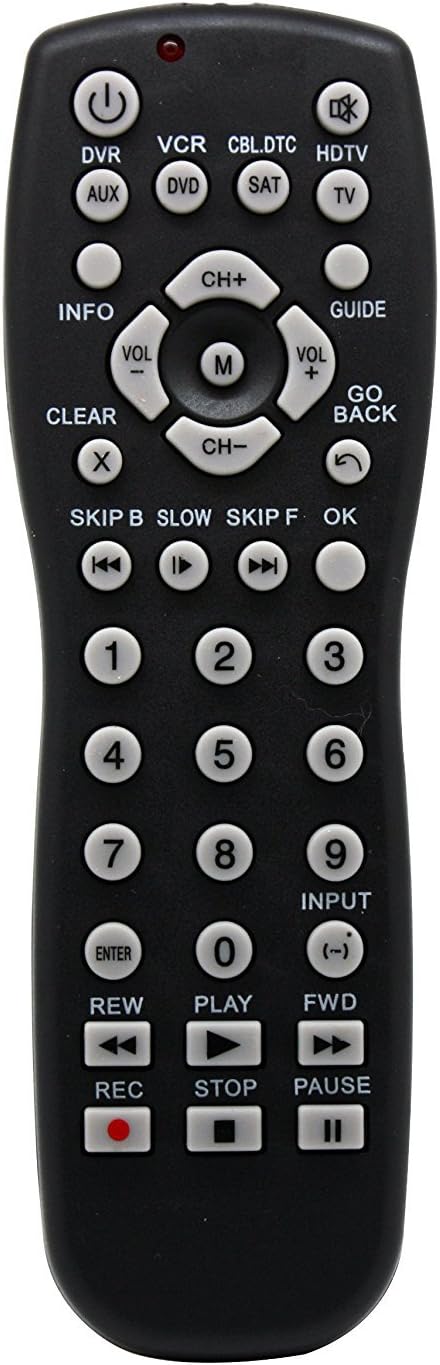
Joonis 1: Esiosa view of the Vibe Axcess 5-in-1 Universal Remote. This image displays the remote's layout, including device selection buttons (DVR, VCR, CBL.DTC, HDTV, AUX, DVD, SAT, TV), navigation pad, number keys, and media control buttons (REW, PLAY, FWD, REC, STOP, PAUSE).

Joonis 2: Packaging of the Vibe Axcess 5-in-1 Universal Remote. The packaging highlights the remote's 5-in-1 capability and compatibility with various device types such as DVD/VCR, HDTV, DVD, AUX, and CBL/SAT/CABLE.
3. Seadistamine
3.1 Aku paigaldamine
- Leidke kaugjuhtimispuldi tagaküljelt patareipesa kate.
- Avamiseks libistage kaant allapoole või vajutage riivi ja tõstke see üles.
- Sisestage kaks (2) AAA-patareid, veendudes, et positiivsed (+) ja negatiivsed (-) klemmid vastavad patareipesa sees olevatele joonistele.
- Pange patareipesa kate tagasi, libistades seda tagasi oma kohale, kuni see kindlalt klõpsatab.
Märkus. Kasutage alati uusi patareisid ja vahetage mõlemad patareid korraga. Ärge segage vanu ja uusi patareisid ega erinevat tüüpi patareisid.
3.2 Kaugjuhtimispuldi programmeerimine
To control your devices, the universal remote must be programmed with the correct codes for each device. There are typically two methods for programming:
3.2.1 Otsene koodi sisestamine
This method involves entering a specific code from a code list (usually provided with the remote or available online) for your device's brand.
- Lülitage sisse seade, mida soovite juhtida (nt teler, DVD-mängija).
- Vajutage ja hoidke all soovitud seadme nuppu puldil (nt TV, DVD) for approximately 3 seconds until the indicator light (usually red) illuminates and stays on.
- While the indicator light is on, enter the 3-digit or 4-digit code for your device's brand using the number keys.
- If the code is valid, the indicator light will turn off. If the light flashes and remains on, the code was invalid; re-enter the code.
- Testige kaugjuhtimispulti, vajutades VÕIMSUS button. If the device turns off, the code is correct. If not, try the next code listed for your brand.
3.2.2 Automaatne koodiotsing
If you cannot find a code or direct code entry fails, use the auto code search method.
- Lülitage seade, mida soovite juhtida, sisse.
- Vajutage ja hoidke all soovitud seadme nuppu (nt TV) umbes 3 sekundit, kuni märgutuli süttib ja jääb põlema.
- While holding the device button, press the VÕIMSUS nuppu üks kord. Märgutuli hakkab vilkuma, mis näitab, et seade otsib koodi.
- Point the remote at the device and wait for the device to turn off. This may take several minutes as the remote cycles through codes.
- Kui seade välja lülitub, vajutage kohe nuppu SISESTA button to save the code. The indicator light will turn off.
- Test the remote's functions. If some functions do not work, repeat the auto search process to find a more compatible code.
4. Kasutusjuhised
Once programmed, operating your Vibe Axcess 5-in-1 Universal Remote is straightforward.
- Valige seade: Vajutage vastavat seadme nuppu (nt TV, DVD, CBL.DTC) for the device you wish to control. The indicator light will briefly illuminate to confirm selection.
- Toide sisse/välja: Vajutage nuppu VÕIMSUS nuppu valitud seadme sisse- või väljalülitamiseks.
- Helitugevuse juhtimine: Kasutage VOL+ ja VOL- nuppe helitugevuse reguleerimiseks.
- Kanali juhtimine: Kasutage CH+ ja CH- nuppe kanalite vahetamiseks.
- Numbriklahvid: Use the number keys (0-9) to directly enter channel numbers or other numerical inputs.
- Navigeerimine: Use the directional pad (up, down, left, right) and OK button for menu navigation.
- Meedia juhtnupud: Kasutage MÄNGI, PAUS, STOP, REW, FWD, ja REC for controlling media playback on compatible devices.
5. Hooldus
5.1 Puhastamine
To clean your remote, gently wipe it with a soft, dry cloth. Do not use abrasive cleaners, solvents, or harsh chemicals, as these can damage the remote's finish or internal components.
5.2 Aku vahetamine
When the remote's performance degrades or the indicator light fails to illuminate, it is time to replace the batteries. Follow the battery installation steps in Section 3.1. Dispose of used batteries responsibly according to local regulations.
6. Veaotsing
- Pult ei tööta:
- Kontrollige, kas patareid on õigesti sisestatud ja pole tühjad. Vajadusel vahetage need välja.
- Ensure you have selected the correct device button (e.g., TV for your television).
- Verify that the remote is programmed with the correct code for your device. Re-program if unsure.
- Veenduge, et kaugjuhtimispuldi ja seadme infrapunasensori vahel ei oleks takistusi.
- Mõned funktsioonid ei tööta:
- Some universal remote codes may not support all original remote functions. Try another code for your device brand using the programming steps.
- Ensure the device you are trying to control supports the specific function (e.g., not all TVs have a dedicated 'INFO' button function).
- Märgutuli ei põle:
- Kontrollige ja vahetage patareisid.
- If the issue persists after battery replacement, the remote may be faulty.
7. Tehnilised andmed
- Mudel: OT795-KO
- Kaubamärk: Vibe
- Toote mõõtmed: 10.7 x 4 x 0.8 tolli
- Kauba kaal: 4 untsi
- Patareid: Vaja on 2 AAA patareid (ei kuulu komplekti)
- Toetatud seadmete maksimaalne arv: 5
- Ühenduvustehnoloogia: Infrapuna
- Erifunktsioon: Universaalne
8. Garantii ja tugi
For information regarding warranty coverage or technical support, please refer to the documentation included with your purchase or contact the retailer where the product was acquired. Specific warranty terms may vary.


