Sissejuhatus
This manual provides comprehensive instructions for the Verifone VX510 Dial-Up Credit Card Terminal. It covers the setup, operation, maintenance, and troubleshooting of your device to ensure efficient and reliable performance for processing credit card transactions.
Toode läbiview
The Verifone VX510 is a robust dial-up credit card terminal designed for secure and efficient transaction processing. It features a user-friendly keypad, a clear display, and essential ports for connectivity.

Figure 1: Verifone VX510 Dial-Up Credit Card Terminal, including the main unit, power adapter (SMPS094000-09), and power cord.
Komponendid
- Terminal Unit: The main device for processing transactions.
- Klaviatuur: Numeric and function keys for data entry and navigation.
- Ekraan: Shows transaction details, menus, and system messages.
- Toiteadapter: Model SMPS094000-09, provides power to the terminal.
- Toitejuhe: Connects the power adapter to a wall outlet.
- Sidepordid: Located at the rear/bottom for dial-up and other connections.
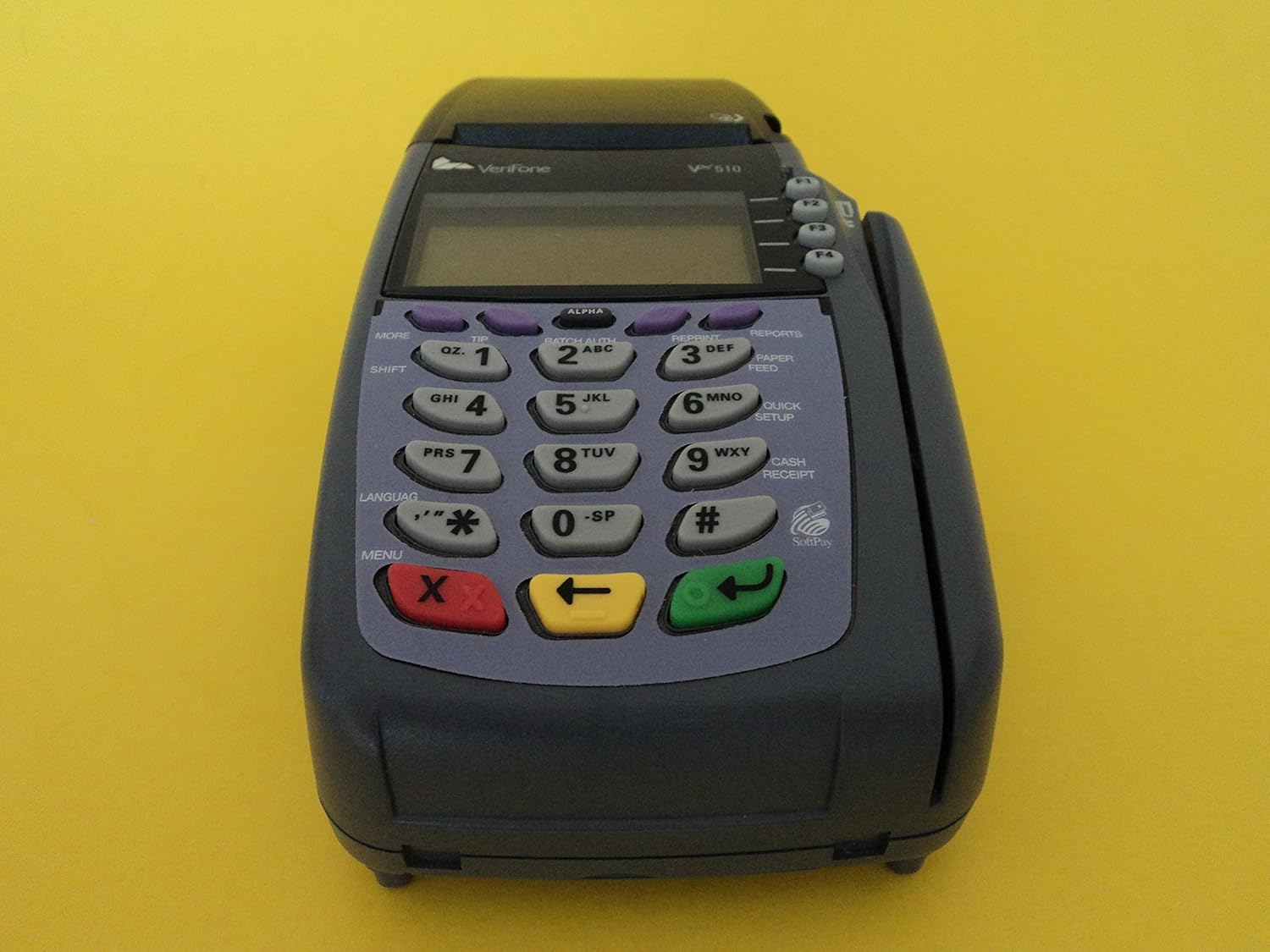
Joonis 2: Esiosa view of the Verifone VX510 terminal, highlighting the keypad and display screen.

Figure 3: The terminal's display screen showing initial boot-up information, including "VERIFONE VX510" and copyright details.

Joonis 4: Tagumine view of the Verifone VX510, showing the communication ports, including 10BaseT (Ethernet) and RS232 connections.
Seadistamine
Follow these steps to set up your Verifone VX510 terminal for the first time.
- Unpack the Terminal: Carefully remove all components from the packaging. Ensure you have the terminal unit, power adapter, and power cord.
- Ühendage toide:
- Ühendage toitejuhe toiteadapteriga.
- Plug the power adapter's barrel connector into the power input port on the back of the VX510 terminal.
- Ühendage toitejuhe standardsesse pistikupessa.

Figure 5: Verifone VX510 terminal with the power adapter connected and the unit powered on, displaying the current date and time.
- Connect Communication Line (Dial-Up): For dial-up connectivity, connect a standard telephone line from your wall jack to the "TELCO" port on the terminal.
- Esialgne käivitamine: The terminal will power on automatically once connected to power. The display will show boot-up sequences and then typically the date and time or a ready screen.
- Konfiguratsioon: Your terminal may require specific configuration settings (e.g., merchant ID, terminal ID, communication parameters) from your payment processor. Refer to your processor's documentation or contact their support for these details.
Kasutusjuhised
This section outlines the basic operations for processing transactions on your Verifone VX510 terminal.
Processing a Sale
- Vajutage ooteekraanil nuppu MÜÜK key (often F1 or a dedicated button).
- Enter the transaction amount using the numeric keypad. Press SISESTA (green key) to confirm.
- Swipe the customer's credit card through the magnetic stripe reader on the side of the terminal, or insert the EMV chip card into the slot at the bottom.
- Follow any on-screen prompts, such as entering a tip amount or PIN.
- The terminal will dial out to the payment processor. Once approved, a confirmation message will appear.
- Print the merchant copy and customer copy of the receipt.
Tehingu tühistamine
- Vajutage ooteekraanil nuppu VABA key (often F2 or a dedicated button).
- Enter the transaction number or select the transaction from a list if prompted.
- Confirm the void when prompted.
- Print the void receipt.
Batch Settlement
At the end of each business day, you must settle your batch to receive funds for processed transactions.
- Vajutage ooteekraanil nuppu SETTLE or PARTII key (often F3 or a dedicated button).
- Confirm the batch settlement when prompted.
- The terminal will dial out and transmit the batch.
- Print the batch settlement report.
Hooldus
Proper maintenance ensures the longevity and optimal performance of your Verifone VX510 terminal.
- Puhastamine: Kasutage kergelt pehmet ebemevaba lappi dampened with water or a mild, non-abrasive cleaner to wipe the exterior. Do not use harsh chemicals or abrasive materials. Avoid spraying liquids directly onto the terminal.
- Paberirulli vahetus: When the paper roll is low or empty, open the printer cover, remove the old roll, and insert a new thermal paper roll, ensuring the paper feeds correctly. Close the cover firmly.
- Kaabli haldamine: Ensure all cables (power, phone line) are securely connected and not crimped or strained.
- Tarkvaravärskendused: Periodically check with your payment processor for any required software updates for your terminal.
Veaotsing
This section addresses common issues you might encounter with your Verifone VX510 terminal.
| Probleem | Võimalik põhjus | Lahendus |
|---|---|---|
| Terminal does not power on. | Toiteadapter pole ühendatud; probleem pistikupesas. | Ensure power adapter is securely connected to the terminal and a working electrical outlet. Test the outlet with another device. |
| "COMM ERROR" or "DIAL FAILED" message. | Telephone line disconnected; incorrect dial-up settings. | Check that the telephone line is securely connected to the "TELCO" port and the wall jack. Verify dial-up settings with your payment processor. |
| Card not reading. | Card swiped incorrectly; dirty card reader; damaged card. | Ensure the card is swiped smoothly and consistently. Clean the magnetic stripe reader with a card reader cleaning card. Try another card if possible. |
| Printer not printing. | No paper; paper inserted incorrectly; printer jam. | Check and replace the paper roll. Ensure the paper is feeding correctly and the printer cover is closed. Clear any paper jams. |
Tehnilised andmed
Key technical specifications for the Verifone VX510 Dial-Up Credit Card Terminal.
- Mudel: VX510 (M251-060-36-NAA)
- Tootja: VeriFone
- Ühenduvus: Dial-Up (PSTN), RS232, 10BaseT (Ethernet - specific models/configurations)
- Toite sisend: 9VDC, 4A (via SMPS094000-09 power adapter)
- Mõõdud: Approximately 12 x 8 x 10 inches (Product Dimensions from data)
- Kaal: Approximately 0.01 ounces (Item Weight from data - likely a typo, actual weight is higher)
- Kuva: Taustvalgustusega LCD
- Klaviatuur: 19-key ergonomic keypad
- Kaardilugejad: Magnetic Stripe Reader, EMV Smart Card Reader
- Printer: Integreeritud termoprinter
- Seerianumber Näitample: 213-141-334 (Ntample from product image)

Figure 6: Bottom label of the Verifone VX510 terminal, showing model number M251-060-36-NAA, product rating, and serial number (S/N 213-141-334).
Garantii ja tugi
For warranty information and technical support, please refer to the documentation provided by your reseller or payment processor. Verifone provides support through authorized distributors and service providers.
- Contact your Payment Processor: For most operational and configuration issues, your payment processor is the primary point of contact.
- Volitatud edasimüüjad: If you purchased the device from a reseller, they may offer direct support or facilitate warranty claims.
- Verifone Websait: Visit the official Verifone website for general product information and to locate authorized service centers.


