Sissejuhatus
The Plantronics M25 Bluetooth headset is designed for convenient wireless communication and audio playback. It features an extended battery life with DeepSleep mode, ensuring readiness when needed. The headset provides whispered alerts for battery status and connection information, and allows for listening to music, internet radio, or navigation directions while managing calls.
Pakendi sisu
Veenduge, et pakis on kõik esemed olemas:
- Plantronics M25 Bluetooth-peakomplekt
- AC Charger (100-240v)
- Clip-on Earloop
Seadistamine
1. Peakomplekti laadimine
Before first use, fully charge the headset. Connect the AC charger to the headset's charging port. The indicator light will change to show charging status and turn off or change color when fully charged. A full charge can provide up to 5 months of readiness in DeepSleep mode.
2. Seadmega sidumine
To pair your Plantronics M25 headset with a Bluetooth-enabled device (e.g., smartphone, tablet):
- Veenduge, et peakomplekt on laetud ja välja lülitatud.
- Press and hold the Call button on the headset until the indicator light flashes red and blue, indicating pairing mode.
- Luba oma seadmes Bluetooth ja otsi uusi seadmeid.
- Select "Plantronics M25" from the list of available devices.
- Kui küsitakse pääsukoodi, sisestage "0000" (neli nulli).
- Once paired, the headset's indicator light will stop flashing and a voice prompt will confirm the connection.
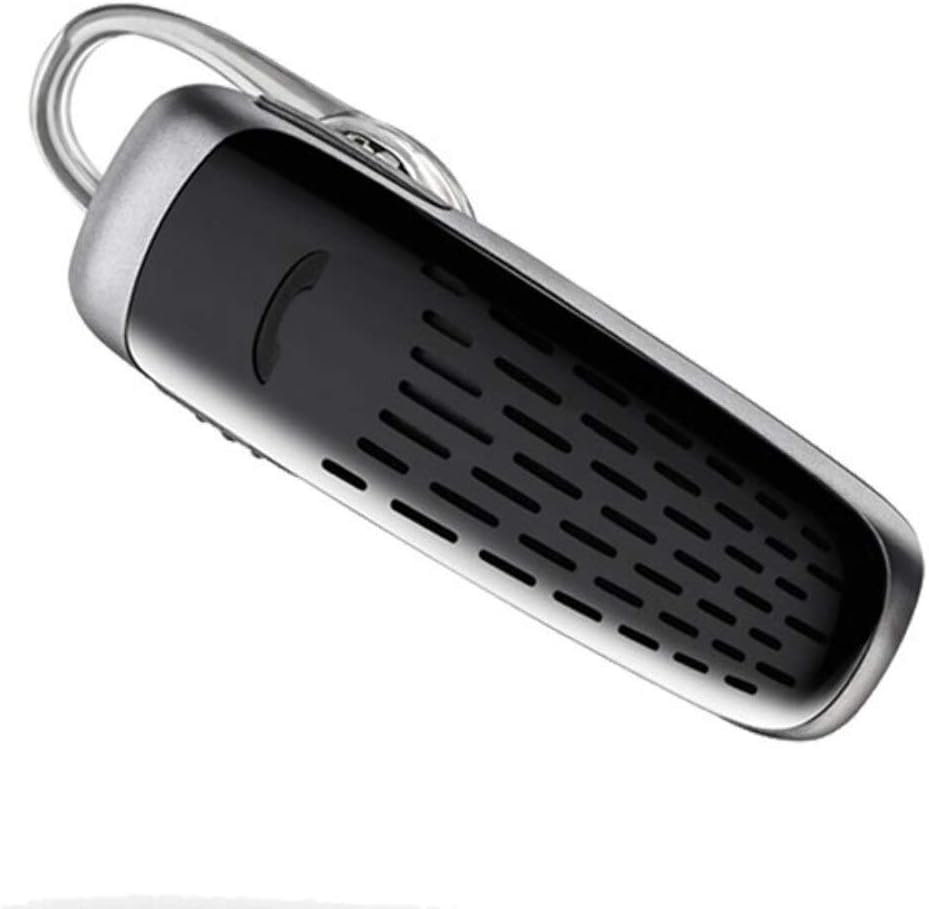
Image: The Plantronics M25 Bluetooth Headset, a compact black and silver device with an earloop, shown from an angled perspective. The call button is visible on the side.
Kasutusjuhised
Toide sisse/välja
- Toide sisse: Vajutage ja hoidke toitenuppu all, kuni märgutuli vilgub siniselt.
- Toide välja: Press and hold the Power button until the indicator light flashes red.
Kõnede tegemine ja vastuvõtmine
- Vasta kõnele: Vajutage nuppu Helista.
- Kõne lõpetamine: Vajutage nuppu Helista.
- Keeldu kõnest: Vajutage ja hoidke helistamisnuppu 2 sekundit all.
- Viimase numbri kordusvalimine: Kaks korda vajutage helistamisnuppu.
Heli taasesitus
The headset supports streaming audio from your device, including music, podcasts, and GPS directions.
- Esita/peata: Press the Call button during audio playback.
DeepSleep režiim
The headset enters DeepSleep power-saving mode if it is disconnected from your phone for over 90 minutes. To wake it up when it's back in range (within 33 feet), simply tap the Call button.
Hooldus
- Puhastamine: Peakomplekti puhastamiseks kasutage pehmet ja kuiva lappi. Ärge kasutage vedelaid puhastusvahendeid ega aerosoole.
- Hoiustamine: Hoidke peakomplekti jahedas ja kuivas kohas, eemal äärmuslikest temperatuuridest.
- Aku hooldus: To preserve battery life, avoid fully discharging the battery frequently. Charge the headset regularly, even if not in use.
- Veekindlus: See seade on Ei ole veekindelVältige kokkupuudet veega või liigse niiskusega.
Veaotsing
| Probleem | Lahendus |
|---|---|
| Peakomplekt ei lülitu sisse. | Ensure the headset is charged. Connect it to the AC charger and allow it to charge for at least 30 minutes before attempting to power on. |
| Peakomplekti ei saa minu seadmega siduda. |
|
| No audio or low audio volume. |
|
| Headset frequently disconnects. |
|
Tehnilised andmed
| Funktsioon | Detail |
|---|---|
| Mudeli nimi | Plantronics M25 |
| Ühenduvustehnoloogia | Bluetooth |
| Traadita side tehnoloogia | Bluetooth |
| Ühilduvad seadmed | Smartphones, Laptops, Desktops, Tablets, Smart Speakers, Televisions |
| Juhtimistüüp | Kõnede juhtimine |
| Kauba kaal | 0.3 untsi (umbes 8.5 grammi) |
| Veekindluse tase | Ei ole veekindel |
| Sagedusvahemik | 20 Hz kuni 20,000 XNUMX Hz |
| Battery Life (DeepSleep) | Kuni 150 päeva |
| Bluetoothi vahemik | Kuni 10 meetrit (33 jalga) |
| Kõrvade paigutus | Kõrvas |
| Vormitegur | One Ear |
| Mürakontroll | Aktiivne mürasummutus |
| Toote mõõtmed | 1.85 x 0.59 x 0.35 tolli |
| Värv | Must |
| Tootja | Plantroonika |
Garantii ja tugi
Garantii teave: Please note that this product is sold with No Warranty or Return as per the provided information. Users are advised to verify product condition upon receipt.
For further assistance or inquiries, please refer to the official POLY support channels or visit their website. Contact information may be available on the product packaging or the manufacturer's official websaidile.
Disclaimer: Product specifications and features are subject to change without notice. Always refer to the latest information provided by the manufacturer.