Sissejuhatus
Tänan ostu eestasing the GPX Weatherx WR282B Weather and Alert Radio. This portable radio is designed to provide you with AM/FM radio reception and access to all 7 NOAA weatherband channels, ensuring you stay informed during various conditions. It offers flexible power options, operating on either AC power or D-size batteries, making it suitable for both indoor and outdoor use.
Palun lugege enne seadme kasutamist see kasutusjuhend hoolikalt läbi, et tagada selle nõuetekohane kasutamine ning maksimeerida selle jõudlust ja pikaealisust.
Oluline ohutusteave
- Lugege juhiseid: Enne toote kasutamist tuleb läbi lugeda kõik ohutus- ja kasutusjuhised.
- Säilitage juhised: Ohutus- ja kasutusjuhised tuleks edaspidiseks kasutamiseks alles hoida.
- Pange tähele hoiatusi: Järgida tuleb kõiki tootel ja kasutusjuhendis olevaid hoiatusi.
- Järgige juhiseid: Järgida tuleb kõiki kasutus- ja kasutusjuhiseid.
- Vesi ja niiskus: Ärge kasutage seda toodet vee lähedal (nt vanni, kraanikausi, köögikraanikausi, pesuvanni lähedal, niiskes keldris või basseini lähedal).
- Puhastamine: Puhastage ainult kuiva lapiga.
- Ventilatsioon: Ärge blokeerige ühtegi ventilatsiooniava. Paigaldage vastavalt tootja juhistele.
- Kuumus: Ärge paigaldage soojusallikate, näiteks radiaatorite, küttekehade, ahjude või muude seadmete (sh amptõsteseadmed), mis toodavad soojust.
- Toitejuhtme kaitse: Kaitske toitejuhet selle peale kõndimise või muljumise eest, eriti pistikute, pistikupesade ja nende seadmest väljumise kohta.
- Välk: Ühendage seade vooluvõrgust lahti äikesetormide ajal või siis, kui seda pikka aega ei kasutata.
- Teenindus: Andke kõik hooldustööd kvalifitseeritud teeninduspersonalile. Hooldus on vajalik, kui seade on mingil viisil kahjustatud, nt toitejuhe või pistik on kahjustatud, vedelikku või seadmesse on kukkunud esemeid, seade on sattunud vihma või niiskuse kätte, ei tööta normaalselt või on maha kukkunud.
Omadused
- AM/FM-raadio tuuner
- Weatherband - All 7 NOAA Channels
- Swivel Telescopic Antenna
- Helitugevuse juhtimine
- Audio Line Input (Auxiliary Input)
- Integreeritud kandesang
- Dual Power Options: AC/DC Adapter or 3 x 'D' Batteries
Pakendi sisu
- GPX Weatherx WR282B Weather and Alert Radio
- AC/DC toiteadapter
- Kasutusjuhend (see dokument)
Juhtnupud ja indikaatorid
Familiarize yourself with the various controls and indicators on your WR282B radio.
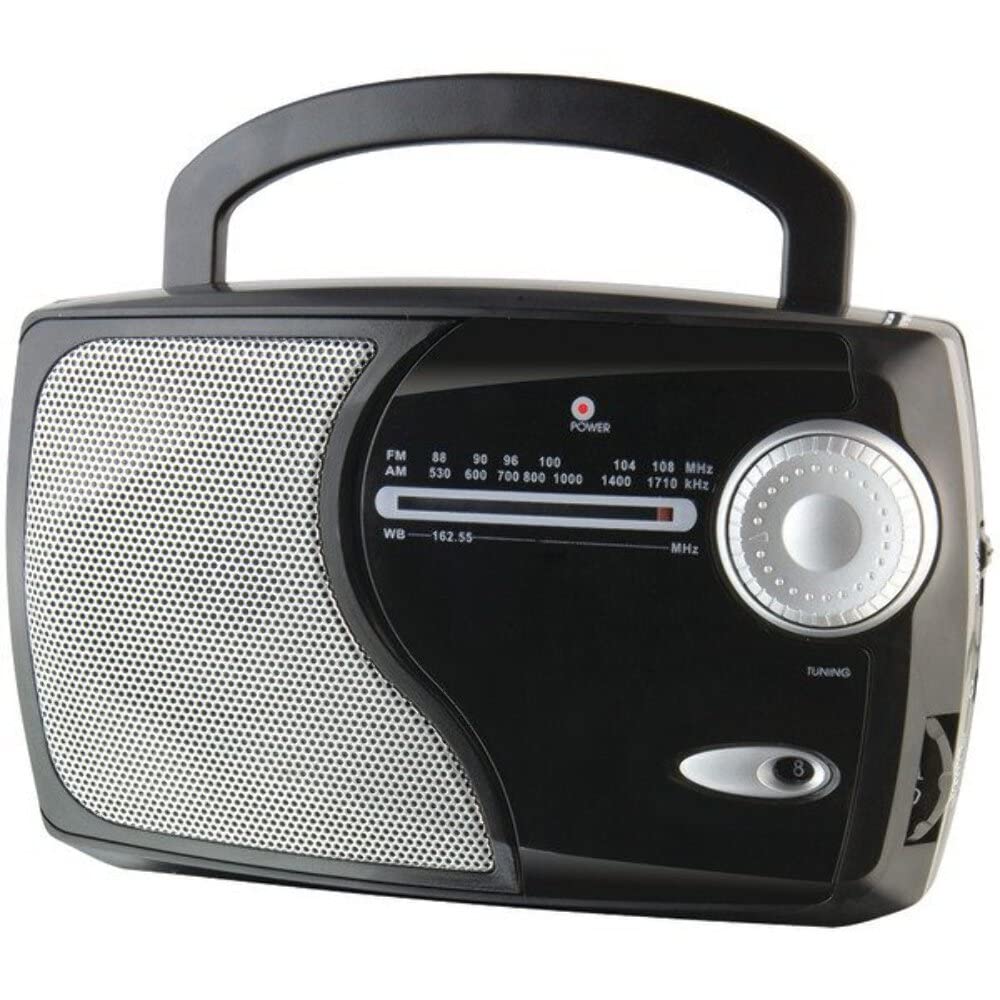
Pilt: Esikülg view of the GPX Weatherx WR282B radio, showing the speaker, tuning dial, and control knobs.
- Toite/helitugevuse nupp: Turns the radio on/off and adjusts the audio output level.
- Sagedusala valiku lüliti: Selects between AM, FM, and Weatherband (WB) modes.
- Häälestusnupp: Adjusts the frequency to tune into desired radio stations or weather channels.
- Tuning Indicator: Illuminates when a strong signal is received.
- Sagedusvalimine: Näitab praegust raadiosagedust.
- Teleskoopantenn: Extendable antenna for improved FM and Weatherband reception.
- Abisisend (AUX IN): 3.5 mm pesa väliste heliseadmete ühendamiseks.
- Vahelduvvoolu sisend: Jack for connecting the included AC/DC power adapter.
- Akupesa: Located on the back, holds 3 'D' size batteries.
- Kandekang: Lihtsaks kaasaskandmiseks.
Seadistamine
Raadio toide
The WR282B radio can be powered using either the included AC/DC power adapter or three 'D' size batteries.
1. AC Power Operation
- Ensure the radio is turned off by rotating the Power/Volume knob counter-clockwise until it clicks.
- Insert the small plug of the AC/DC power adapter into the AC Power Input jack on the radio.
- Plug the other end of the AC/DC power adapter into a standard wall outlet (AC 120V~60Hz).
- The radio is now ready for use with AC power.
Märkus. When the AC adapter is connected, battery power is automatically disconnected.
2. Battery Power Operation
- Veenduge, et raadio on välja lülitatud.
- Leidke raadio tagaküljelt patareipesa.
- Avage patareipesa kaas.
- Insert three (3) 'D' size batteries (not included) into the compartment, observing the correct polarity (+/-) as indicated inside the compartment.
- Sulgege akupesa kaas kindlalt.
- The radio is now ready for use with battery power.
Tähtis: Kui raadiosaatjat pikemat aega ei kasutata, eemaldage patareid, et vältida lekkeid ja kahjustusi.
Kasutusjuhised
1. Turning On and Adjusting Volume
- Pöörake Toite/helitugevuse nupp clockwise to turn on the radio. Continue rotating to increase the volume to a comfortable listening level.
- Raadio väljalülitamiseks keerake nuppu Toite/helitugevuse nupp counter-clockwise until it clicks.
2. Selecting a Radio Band (AM/FM/Weatherband)
- Kasutage Ribavalija lüliti to choose your desired listening mode:
- OLEN: Sest Amplitude Modulation radio stations.
- FM: For Frequency Modulation radio stations.
- WB: For NOAA Weatherband channels.
3. Tuning to a Station or Channel
- Laiendage Teleskoopantenn fully for optimal FM and Weatherband reception. For AM reception, the radio has a built-in antenna, and adjusting the radio's position may improve reception.
- Pöörake Häälestusnupp to scan through frequencies on the Sagedusnupp.
- When a strong signal is received, the Häälestuse indikaator tuli süttib.
- For Weatherband (WB) mode, tune to one of the 7 NOAA weather channels (162.400 MHz to 162.550 MHz).
4. Using the Auxiliary Input (AUX IN)
- Connect a 3.5mm audio cable (not included) from your external audio device (e.g., MP3 player, smartphone) to the Abisisend (AUX IN) jack on the radio.
- Ensure the radio is turned on and the volume is adjusted.
- The audio from your external device will now play through the radio's speaker. Control playback and track selection from your external device.
Hooldus
- Puhastamine: Pühkige raadio välispinda pehme ja kuiva lapiga. Ärge kasutage abrasiivseid puhastusvahendeid, vaha ega lahusteid.
- Patarei vahetus: Replace all three 'D' batteries when the radio's performance diminishes or if the unit will not be used for an extended period. Always replace with new batteries of the same type.
- Hoiustamine: When storing the radio for a long time, remove the batteries to prevent leakage. Store in a cool, dry place away from direct sunlight and extreme temperatures.
- Antenni hooldus: Käsitsege teleskoopantenni ettevaatlikult, et vältida painutamist või purunemist.
Veaotsing
| Probleem | Võimalik põhjus | Lahendus |
|---|---|---|
| Pole jõudu |
|
|
| Halb raadiovastuvõtt |
|
|
| No sound from AUX IN |
|
|
Tehnilised andmed
- Mudel: WR282B
- Raadio ansamblid: AM, FM, Weatherband (7 NOAA channels)
- Toiteallikas: AC 120V~60Hz (via included adapter) or 3 x 'D' Batteries (not included)
- Ühenduvus: 3.5 mm abisisend
- Antenn: Telescopic (FM/WB), Built-in Ferrite Bar (AM)
- Toote mõõtmed: 8.86" L x 2.76" W x 5.51" H (approximately)
- Kauba kaal: 1.06 naela (ilma patareideta)
Garantii ja tugi
For detailed warranty information and customer support, please refer to the warranty card included with your product or visit the official GPX webveebisait. Hoidke ostutšekk ostutõendina alles garantiinõuete korral.
If you experience issues not covered in the troubleshooting section, please contact GPX customer service for assistance.


