1. Sissejuhatus
This manual provides comprehensive instructions for the safe and effective use of the PeakTech True RMS P 3131 Clamp Meter with Multimeter. This device is designed for measuring AC/DC currents without circuit interruption, as well as AC/DC voltage and resistance, with continuity testing capabilities. It features a 3 3/4 digit LCD display with True RMS measurement for accurate readings.
Palun lugege see kasutusjuhend enne seadme kasutamist hoolikalt läbi ja hoidke see alles edaspidiseks kasutamiseks.
2. Ohutusalane teave
WARNING: Improper use of this meter can cause damage, shock, injury, or death. Always follow all safety precautions.
- Järgige alati kohalikke ja riiklikke ohutusnõudeid.
- Do not use the meter if it appears damaged or if the insulation on test leads is compromised.
- Enne mõõtmiste tegemist veenduge, et arvesti on seatud õigele funktsioonile ja mõõtepiirkonnale.
- Vältige kokkupuudet pingestatud vooluringidega. Kasutage sobivaid isikukaitsevahendeid.
- The device is rated for CAT II 600V. Do not exceed these limits.
- Patareide tühjenemise indikaatori ilmumisel vahetage patareid kohe välja.
- Do not operate the meter in explosive atmospheres.
3. Toote lõppview ja komponendid
The PeakTech P 3131 is a robust and reliable clamp meter. Familiarize yourself with its main components:

Joonis 1: Esiosa view of the PeakTech P 3131 Clamp Mõõtur, mis näitab klamp jaw, function selector, LCD display, and input terminals.
- Clamp Lõualuu: Kontaktivabaks vahelduv-/alalisvoolu mõõtmiseks.
- Funktsioonivaliku nupp: To select measurement modes (A~, A=, V~, V=, Ω/Continuity, OFF).
- LCD ekraan: Näitab mõõtmistulemusi, ühikuid ja indikaatoreid.
- Nupud: AC/DC, ZERO, H/MAX (Data Hold/Max Hold).
- Sisendklemmid: COM (common) and VΩ (voltage/resistance) for test leads.
- Käekaitse: Provides protection against accidental contact.
4. Seadistamine
4.1 Aku paigaldamine
The PeakTech P 3131 requires two 1.5V AAA batteries (included). To install or replace batteries:
- Veenduge, et seade oleks VÄLJA lülitatud.
- Leidke mõõturi tagaküljel asuv patareipesa kate.
- Kasutage sektsiooni avamiseks kruvikeerajat.
- Insert the two AAA batteries, observing correct polarity (+ and -).
- Asetage patareipesa kate tagasi ja kinnitage see kruviga.
When the low battery indicator appears on the display, replace the batteries immediately to ensure accurate measurements.
4.2 Testimisjuhtmete ühendamine
Vol. Jaokstage, resistance, and continuity measurements, connect the supplied test leads:
- Sisestage must testjuhe pessa KOM (common) input terminal.
- Sisestage punane testjuhe pessa VΩ sisendklemm.

Figure 2: PeakTech P 3131 Clamp Meter shown with its carrying case, test leads, batteries, and user manual.
5. Kasutusjuhised
5.1 Toide sisse/välja
Rotate the function selector dial from the "OFF" position to any desired measurement function to power on the meter. To power off, rotate the dial back to "OFF". The meter features an automatic power-off function (can be deactivated) to conserve battery life.
5.2 Vahelduv-/alalisvoolu mõõtmine (Clamp)
To measure current without breaking the circuit:
- Keerake funktsiooni valikuketas asendisse A~ (Vahelduvvool) või A= (Alalisvoolu) asend.
- Vajutage nuppu AC/DC button if you need to switch between AC and DC current modes (if the dial position combines them).
- Vajutage nuppu NULL button to zero the display before measuring DC current, especially for small currents, to compensate for residual magnetism.
- Ava klamp lõualuu päästikule vajutades.
- Enclose only üks conductor with the clamp lõualuu. Veenduge, et lõualuu on täielikult suletud.
- Lugege praegust väärtust LCD-ekraanilt.
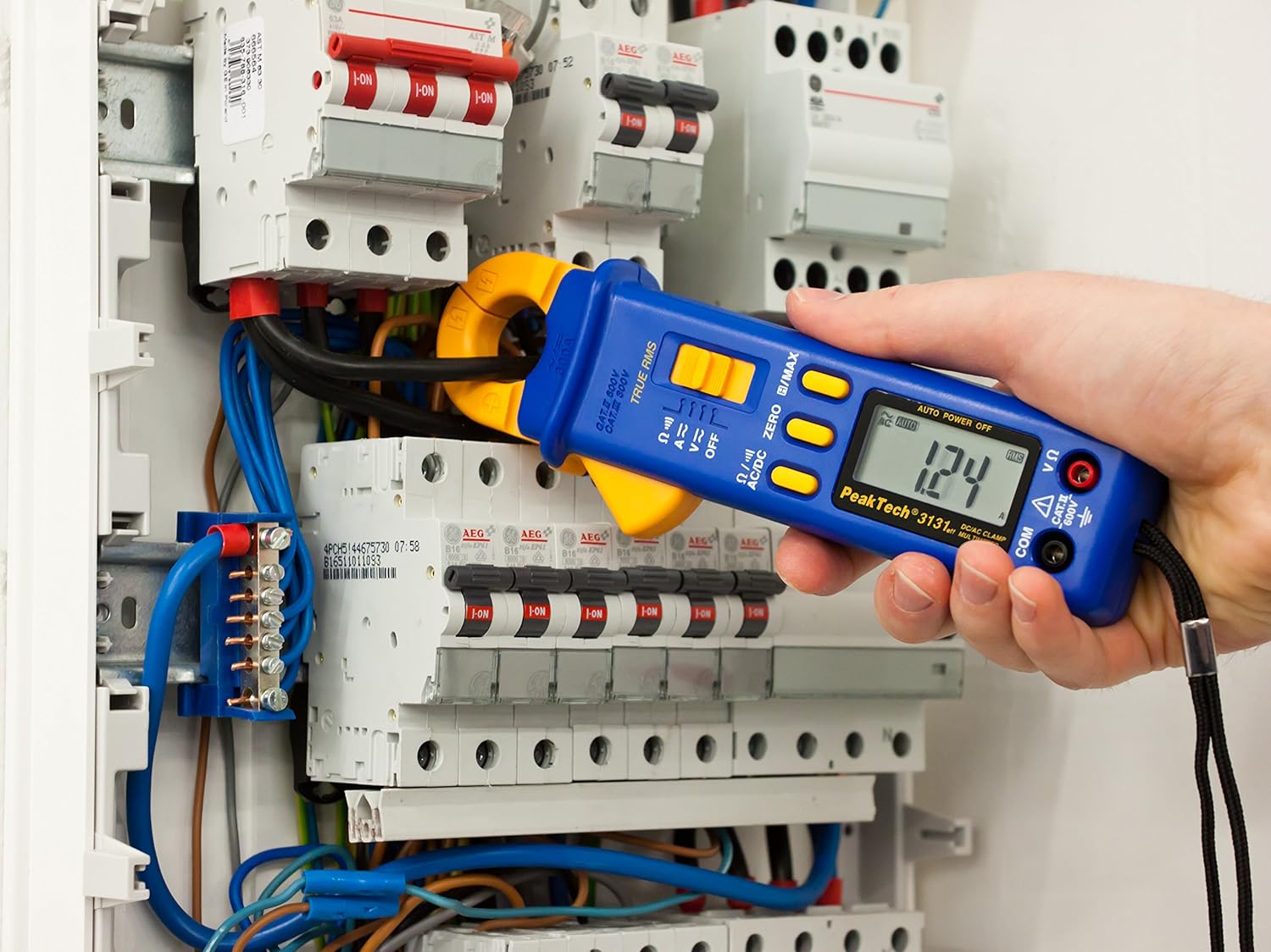
Figure 3: The PeakTech P 3131 Clamp Meter in use, measuring current on a single conductor within an electrical panel.
5.3 AC/DC Voltage Mõõtmine
Mõõtma voltage:
- Ühendage testjuhtmed vastavalt punktis 4.2 kirjeldatule.
- Keerake funktsiooni valikuketas asendisse V~ (Vahelduvvoolu mahttage) või V= (DC kdtage) positsioon.
- Ühendage testsondid paralleelselt mõõdetava vooluringi või komponendiga.
- Lugege kdtage väärtus LCD -ekraanil.
5.4 Takistuse ja järjepidevuse mõõtmine
To measure resistance or check for continuity:
- Ühendage testjuhtmed vastavalt punktis 4.2 kirjeldatule.
- Keerake funktsiooni valikuketas asendisse Ω/))) (Resistance/Continuity) position.
- For resistance: Connect the test probes across the component. Ensure the circuit is de-energized.
- For continuity: Touch the test probes to the two points you want to check. A continuous beep indicates a low-resistance path (continuity).
- Lugege takistuse väärtust LCD-ekraanilt.
5.5 Erifunktsioonid
- Tõeline RMS: The meter measures True Root Mean Square values for AC voltage and current, providing accurate readings for non-sinusoidal waveforms.
- Data Hold (H): Vajutage nuppu H/MAX Praeguse näidu ekraanile külmutamiseks vajutage nuppu lühidalt. Vabastamiseks vajutage uuesti.
- Maximum Value Hold (MAX): Vajutage ja hoidke all nuppu H/MAX button to capture and display the maximum measured value. Press again to exit.
- ZERO Function: Used to zero the display for DC current measurements to eliminate offset errors.
- Automaatne vahemiku valik: The meter automatically selects the appropriate measurement range.
- Automaatne väljalülitus: The meter automatically turns off after a period of inactivity to save battery. This feature can typically be disabled by holding a specific button during power-on (refer to the device's on-screen indicators or a more detailed manual if available).
6. Hooldus
6.1 Puhastamine
Pühkige arvesti korpust reklaamigaamp lapiga ja õrna pesuvahendiga. Ärge kasutage abrasiivseid aineid ega lahusteid. Enne kasutamist veenduge, et mõõteseade on täiesti kuiv.
6.2 Aku vahetamine
Refer to Section 4.1 for instructions on battery replacement. Always use two fresh 1.5V AAA batteries. Remove batteries if the meter is not used for an extended period to prevent leakage.
6.3 Säilitamine
Store the meter in a cool, dry place, away from direct sunlight and extreme temperatures. Use the provided carrying case for protection.
7. Veaotsing
| Probleem | Võimalik põhjus | Lahendus |
|---|---|---|
| Mõõtur ei lülitu sisse. | Tühjad või valesti paigaldatud patareid. | Kontrollige patareide polaarsust; vahetage patareid välja. |
| "OL" or "OVER" displayed. | Mõõtmine ületab valitud vahemiku või arvesti maksimaalse mõõteulatuse. | Select a higher range (if manual ranging) or ensure measurement is within meter's limits. |
| Inaccurate DC current reading. | Residual magnetism in clamp lõualuu. | Vajutage nuppu NULL button before measurement. |
| Jätkuvuse piiksu pole. | Avatud vooluring või kõrge takistus. | Check connections; ensure circuit is complete. |
If problems persist, contact PeakTech customer support or a qualified service technician.
8. Tehnilised andmed
| Parameeter | Spetsifikatsioon |
|---|---|
| Ekraan | 3 3/4 digit LCD, max. 3999 counts |
| DC kdtage (DCV) | 0.1 mV to 600 V (Accuracy: 0.5% + 2 digits) |
| AC kdtage (ACV) | 1 mV to 600 V (Accuracy: 1.5% + 5 digits) |
| DC vool (DCA) | 10 mA to 300 A (Accuracy: 1% + 2 digits) |
| Vahelduvvooluvool (ACA) | 10 mA to 300 A (Accuracy: 1% + 3 digits) |
| Takistus (Ω) | 0.1 Ω to 40 MΩ (Accuracy: 0.9% + 2 digits) |
| Järjepidevuse test | Sumisti funktsioon |
| Tõeline RMS | Yes, for AC measurements |
| Lõualuu avamine | 22 mm max. conductor diameter |
| Ohutushinnang | EN 61010-1, CAT II 600 V |
| Toiteallikas | 2 x 1.5 V AAA patareid |
| Mõõdud (P x L x K) | 192 x 66 x 27 mm (umbes 7.56 x 2.6 x 1.06 tolli) |
| Kaal | 205 g (umbes 0.45 naela) |
9. Garantii ja tugi
PeakTech products are manufactured under strict quality control. This product is covered by a standard manufacturer's warranty against defects in materials and workmanship. Please refer to the warranty card included with your product or visit the official PeakTech webTäpsemad garantiitingimused leiate veebisaidilt.
For technical support, service, or calibration inquiries, please contact your local PeakTech distributor or the PeakTech customer service department. Contact information can typically be found on the PeakTech websaidil või toote pakendil.