Sissejuhatus
Welcome to your new Tensor Compact Fluorescent Computer Lamp. This manual provides essential information for the safe operation, setup, maintenance, and troubleshooting of your lampPalun lugege need juhised enne kasutamist hoolikalt läbi ja hoidke need edaspidiseks alles.
Ohutusjuhised
- Read all instructions before operating the lamp.
- Ärge paljastage lamp vee või liigse niiskuse kätte.
- Veenduge, et lamp on enne pirni puhastamist või vahetamist vooluvõrgust lahti ühendatud.
- Kasutage ainult määratud tüüpi ja võimsusega pirnitage (13-watt compact fluorescent).
- Hoidke lamp eemal süttivatest materjalidest.
- Ärge proovige seadet muuta ega parandada.amp yourself. Contact qualified service personnel for assistance.
Pakendi sisu
- Tensor Compact Fluorescent Computer Lamp Üksus
- Toiteadapter
- Kasutusjuhend
Seadistamine
Lahtipakkimine
Carefully remove all components from the packaging. Inspect the lamp for any signs of damage during transit. If any damage is found, do not use the lamp ja võtke ühendust klienditoega.
Kokkupanek
The Tensor Compact Fluorescent Computer Lamp is designed for straightforward setup. No complex assembly is required. The lamp unit is largely pre-assembled.
Paigutus
Asetage lamp on a stable, flat surface such as a desk or table. Ensure there is adequate space around the lamp for safe operation and adjustment. Avoid placing the lamp soojusallikate lähedal või otsese päikesevalguse käes.
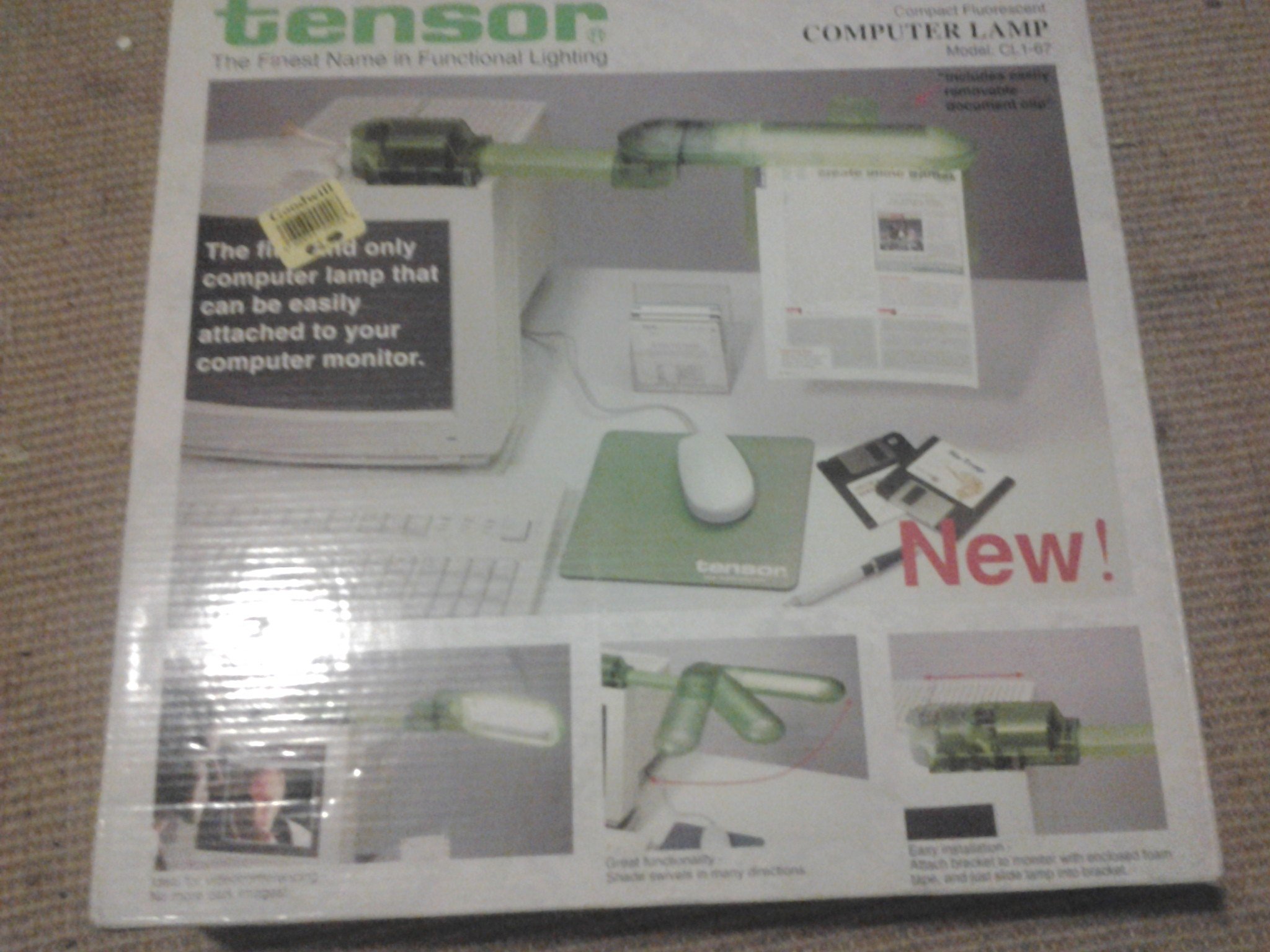
The image displays the packaging for the Tensor Compact Fluorescent Computer Lamp, model CL1C-64. The packaging highlights key features such as its adjustable functionality, allowing the shade to move in various directions, and the inclusion of an easily removable document clip.
Toiteühendus
Insert the power adapter's connector securely into the lamp's power input port. Then, plug the power adapter into a standard, easily accessible electrical outlet. Ensure the voltage sobib teie kohaliku toiteallikaga.
Kasutusjuhised
Sisse/välja lülitamine
Locate the power switch, typically positioned on the lamp's base or power cord. Press the switch to turn the lamp sisse või välja. lamp will illuminate when switched to the 'on' position.
L-i reguleerimineamp
Lamp features an adjustable design, allowing the lamp head and arm to be repositioned. Gently move the lamp components to direct the light precisely where needed. The shade is designed to move in multiple directions for optimal illumination.
Kontrollimeetodid
See lamp supports control via a dedicated app and a remote control. For detailed instructions on pairing the lamp with your device, configuring app settings, or using the remote control functions, please refer to the separate app/remote guide included with your purchase or available on the Tensor websaidile.
Hooldus
Puhastamine
Ühendage alati lamp from the power source before cleaning. Use a soft, dry cloth to gently wipe the lamp's surfaces. Do not use liquid cleaners, abrasive materials, or chemical solvents, as these can damage the finish or electrical components.
Pirni vahetus
See lamp uses a compact fluorescent bulb. To replace the bulb:
- Veenduge, et lamp is unplugged and completely cool before handling.
- Carefully twist the old bulb counter-clockwise to remove it from the socket.
- Insert the new 13-watt compact fluorescent bulb into the socket and twist clockwise until it is securely in place. Do not overtighten.
- Ühendage uuesti lamp to power and test its functionality.
Veaotsing
Lamp Ei lülitu sisse
- Check if the power cord is securely plugged into both the lamp ja pistikupesa.
- Verify that the electrical outlet is functional by testing it with another device.
- Ensure the bulb is correctly installed and not burnt out. Replace the bulb if necessary, following the bulb replacement instructions.
Vilkuv valgus
- Ensure the bulb is screwed in tightly into its socket.
- Replace the bulb if flickering persists, as it may be nearing the end of its operational lifespan.
Tehnilised andmed
| Funktsioon | Detail |
|---|---|
| Kaubamärk | Tensor |
| Mudeli number | CL1C-64 |
| Valgusallika tüüp | Fluorestseeruv |
| Wattage | 13 vatti |
| Paigaldustüüp | Lauaplaat |
| Erifunktsioon | Reguleeritav |
| Kontrollimeetod | Rakendus, kaugjuhtimispult |
| Kauba kaal | 3.2 naela |
| UPC | 077796252128 |
Document Clip
Lamp includes an easily removable document clip, designed to hold papers or notes for convenient viewing while working.
Garantii ja tugi
For warranty information, technical support, or to inquire about replacement parts, please refer to the contact details provided with your original purchase documentation. You may also visit the official Tensor website for additional resources and customer service contact information.


