1. Sissejuhatus
The Linksys SE1500 is a 5-Port Fast Ethernet Switch designed to expand your wired network. It allows you to connect up to five devices, such as computers, printers, storage devices, and gaming consoles, at speeds up to 100 Mbps. This device provides a simple and efficient way to add more wired connections to your existing network without complex configuration.

Joonis 1: Esiosa view of the Linksys SE1500 5-Port Fast Ethernet Switch.
2. Pakendi sisu
Veenduge, et teie pakett sisaldab järgmisi esemeid:
- Linksys SE1500 5-Port 10/100 Switch
- Toiteadapter
- Kiirjuhend (ei kuulu sellesse kasutusjuhendisse)
3. Toote omadused
The Linksys SE1500 switch offers the following key features:
- 5 kiiret Etherneti porti: Provides five 10/100 Mbps ports for connecting wired devices.
- Auto-Sensing Ports: Automatically detects and optimizes the speed for each connected device.
- Teenuse kvaliteet (QoS): Prioritizes traffic for smooth performance of bandwidth-intensive applications.
- Energiasäästufunktsioonid: Includes auto power-down for unused ports and a port status switch to disable LED indicators, reducing energy consumption.
- Plug-and-Play: Requires no software configuration for basic operation.
4. Seadistusjuhised
Follow these steps to set up your Linksys SE1500 switch:
- Position the Switch: Place the switch on a flat, stable surface or mount it in a suitable location. Ensure adequate ventilation around the device.
- Ühendage toiteadapter: Plug the included power adapter into the 12V DC port on the back of the switch. Then, plug the other end of the power adapter into a standard electrical outlet. The power LED on the front of the switch should illuminate.
- Ühendu oma võrguga: Connect an Ethernet cable from your router or modem to any of the five numbered Ethernet ports on the back of the SE1500 switch.
- Ühendage seadmed: Connect your wired devices (e.g., computer, printer, gaming console) to the remaining Ethernet ports on the switch using Ethernet cables. The switch's auto-sensing ports will automatically detect the connection speed.
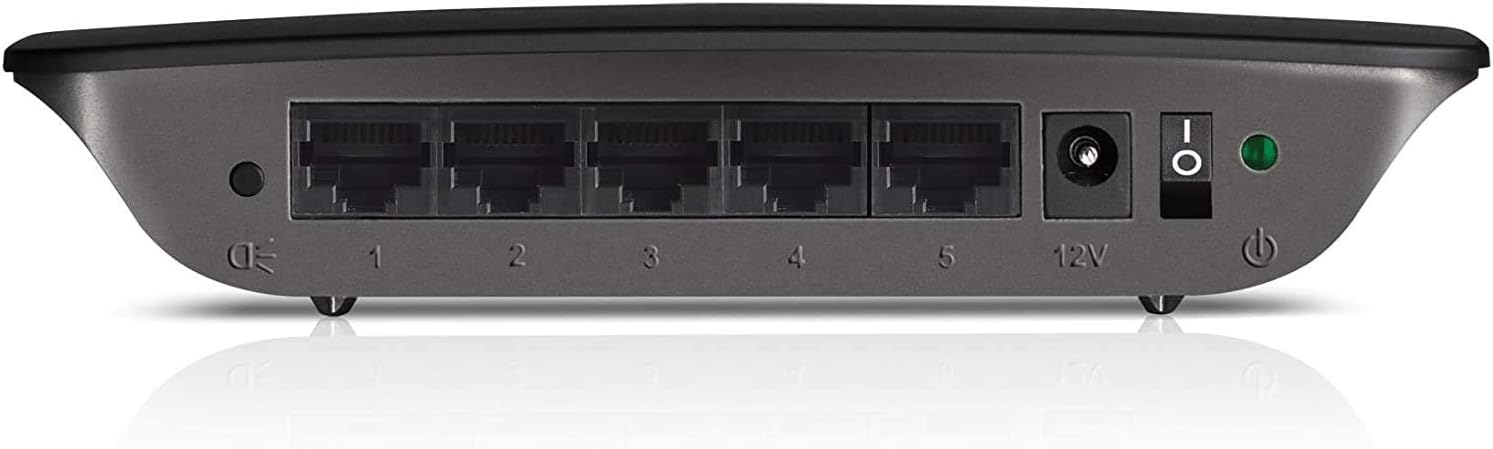
Figure 2: Rear panel of the Linksys SE1500, showing Ethernet ports, power input, and power switch.
5. Kasutusjuhised
The Linksys SE1500 is a plug-and-play device, meaning it typically requires no software configuration. Once connected, it operates automatically.
LED indikaatorid
The front panel of the switch features LED indicators to provide status information:
- Toite LED: Süttib, kui lüliti on sisse lülitatud.
- Pordi LED-id (1–5): Each numbered port has an associated LED.
- Tahke roheline: Indicates a successful link connection at 100 Mbps.
- Tahke merevaigukollane: Indicates a successful link connection at 10 Mbps.
- Vilgub: Näitab võrgutegevust (andmeedastust).
- Väljas: No link detected or port is inactive.
Energiasäästurežiim
The SE1500 automatically enters a power-saving mode when a connected device is turned off or when a port is unused. This feature helps reduce energy consumption. You can also use the port status switch on the rear panel to turn off the port LEDs if desired.
6. Hooldus
To ensure optimal performance and longevity of your Linksys SE1500 switch, consider the following maintenance tips:
- Hoidke puhas: Regularly wipe the exterior of the switch with a soft, dry cloth. Avoid using liquid cleaners or aerosols.
- Tagada ventilatsioon: Do not block the ventilation openings on the switch. Ensure it is placed in an area with good airflow to prevent overheating.
- Kaabli haldamine: Hoidke Etherneti kaablid korralikult korraldatuna, et vältida juhuslikke lahtiühendamisi või kahjustusi.
- Power Cycle (if needed): If the switch becomes unresponsive, disconnect the power adapter, wait 10 seconds, and then reconnect it.
7. Veaotsing
If you encounter issues with your Linksys SE1500 switch, try the following troubleshooting steps:
- Toide puudub:
- Veenduge, et toiteadapter on kindlalt lüliti ja töötava pistikupesaga ühendatud.
- Verify the power switch on the rear panel is in the "On" position.
- Puudub lingi tuli:
- Kontrollige, et Etherneti kaabel oleks kindlalt ühendatud nii kommutaatori pordi kui ka ühendatud seadmega.
- Proovige teist Etherneti kaablit.
- Veenduge, et ühendatud seade on sisse lülitatud ja töötab korralikult.
- If the port status switch is off, toggle it to enable the LEDs.
- Aeglane võrgu kiirus:
- Ensure all connected devices and cables support Fast Ethernet (100 Mbps) for optimal performance.
- Check for excessive network traffic or issues with your internet service provider (ISP) or router.
- Katkendlik ühendus:
- Inspect Ethernet cables for damage.
- Try connecting devices to different ports on the switch.
- Power cycle the switch, router, and connected devices.
8. Tehnilised andmed
| Mudel | SE1500 |
| Kaubamärk | Linksys |
| Portide arv | 5 |
| Liidese tüüp | RJ45 |
| Andmeedastuskiirus | 10/100 Mbps (kiire Ethernet) |
| Toote mõõtmed | 4.29 x 6.06 x 1.14 tolli |
| Kauba kaal | 5.4 untsi (0.34 naela) |
| Värv | Must |
| Ühilduvad seadmed | Desktop, Gaming Console, Laptop, Printer |
| Kaasatud komponendid | 5-port 10/100 Switch, Power Adapter |
9. Garantii ja tugi
For detailed warranty information and technical support, please refer to the documentation included with your purchase or visit the official Linksys support webveebisait. Garantiitingimused võivad piirkonniti erineda.
Linksysi tugi Websait: www.linksys.com/support


