Sissejuhatus
The My Weigh CTS-3000 Digital Counting Scale is a versatile and precise instrument designed for accurate weighing and counting of various items. With a robust 30,000 gram capacity and 0.5 gram resolution, it is suitable for a wide range of applications including kitchen use, business inventory, and educational purposes. This manual provides comprehensive instructions to help you set up, operate, and maintain your scale for optimal performance.
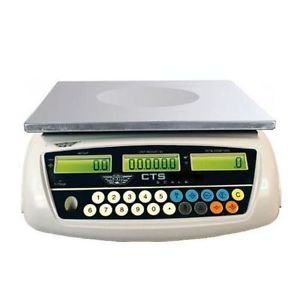
Image: The My Weigh CTS-3000 Digital Counting Scale, featuring a stainless steel platform and a blue backlit LCD display.
Seadistamine
- Lahtipakkimine: Carefully remove the scale from its packaging. Ensure all components are present: the scale unit, stainless steel platform, clear protective cover, and AC adapter.
- Paigutus: Place the scale on a stable, flat, and level surface. Avoid areas with excessive vibration, drafts, or direct sunlight, as these can affect accuracy. The scale features adjustable feet for leveling.
- Toiteühendus:
- Vahelduvvoolu toide: Connect the provided AC adapter to the scale's power input port and then plug it into a standard electrical outlet.
- Aku võimsus: The scale can also operate on 5 AA batteries (not included). Open the battery compartment on the underside of the scale and insert the batteries, ensuring correct polarity. The scale features overcharge and over-discharge protection when using the rechargeable battery pack (if included).
- Platvormi paigaldamine: Place the stainless steel weighing platform securely onto the scale base.
- Kaitsekate: Position the clear protective cover over the display and control panel to guard against spills and debris.
- Esialgne sisselülitamine: Vajutage nuppu SISSE/VÄLJA button to power on the scale. The display will show a self-test sequence before settling at 0.00.
Kasutusjuhised
1. Põhiline kaalumine
- Toide sisse: Vajutage nuppu SISSE/VÄLJA button. Wait for the display to stabilize at 0.00.
- Kohtobjekt: Asetage kaalutav(ad) ese(med) ettevaatlikult roostevabast terasest platvormi keskele.
- Loe mõõtmist: The weight will be displayed on the main LCD screen.
2. Changing Weighing Modes (Units)
The CTS-3000 supports multiple weighing modes: grams (g), ounces (oz), kilograms (kg), and pounds (lb).
- Vajutage MODE: Kui kaal on sisse lülitatud, vajutage nuppu REŽIIM button repeatedly to cycle through the available units.
- Valige üksus: Stop pressing when your desired unit (e.g., "g" for grams, "lb" for pounds) is displayed.
Video: Demonstration of the scale's accurate weighing and unit conversion functions. The video shows how to switch between grams, kilograms, and pounds.
3. Taara funktsioon
The Tare function allows you to subtract the weight of a container, so only the weight of its contents is measured.
- Koht konteiner: Asetage tühi anum kaalumisalusele. Ekraanile kuvatakse selle kaal.
- Press TARE: Vajutage nuppu TARE button. The display will reset to 0.00, effectively subtracting the container's weight.
- Lisa üksusi: Lisage anumasse kaalutavad esemed. Ekraanil kuvatakse ainult esemete netokaal.
4. Loendamisfunktsioon
The counting function allows you to count a large number of identical items quickly.
- Sample Kogus: Place a known number of sample items (e.g., 10, 20, 50, 100) on the platform. The more samples, the more accurate the count.
- Sisend Sample: Using the numeric keypad, enter the exact number of samples you placed on the platform.
- Vajutage SAMPLE: Vajutage nuppu SAMPLE button. The scale will calculate the average unit weight and display the quantity.
- Add More Items: Eemaldage samples and add the bulk quantity of items. The scale will automatically count them.
Video: Demonstration of the counting function, showing how to input a sample quantity and then count a larger batch of items.
5. Alarm Function (Weight & Quantity)
The scale features an alarm function that can be set for both weight and quantity thresholds.
- Sisenege äratusrežiimi: Vajutage ja hoidke all nuppu '.' klahvi, seejärel vajutage '5' to enter the alarm mode setting.
- Select Alarm Type: Kasutage M+ key to cycle through alarm modes: "no" (alarm off), "in" (alarm within range), "out" (alarm outside range), "up" (alarm when exceeding set value).
- Set Alarm Value: Vajutage nuppu ALARM SET key. Input the desired alarm value using the numeric keypad. For weight, input the value in grams (e.g., 10000 for 1kg on a 0.1g scale). For quantity, input the number of pieces.
- Kinnitage: Vajutage nuppu TARE klahvi sätte kinnitamiseks.
Video: Detailed instructions on setting up the weight and quantity alarm functions on the counting scale.
Hooldus
- Puhastamine: Wipe the scale platform and display with a soft, damp cloth. Do not use abrasive cleaners or immerse the scale in water. The removable "gunk shield" protects the display from spills.
- Hoiustamine: Store the scale in a clean, dry environment away from extreme temperatures and humidity.
- Aku hooldus: If using battery power, ensure batteries are replaced when low to maintain accuracy. If storing for extended periods, remove batteries to prevent leakage.
Veaotsing
| Probleem | Võimalik põhjus | Lahendus |
|---|---|---|
| Kaal ei lülitu sisse. | No power, dead batteries, or faulty adapter. | Kontrollige vahelduvvooluadapteri ühendust või vahetage patareid. |
| Ebatäpsed näidud. | Unstable surface, drafts, or scale not level. | Place on a stable, level surface. Avoid drafts. Ensure feet are adjusted. |
| Ekraanile kuvatakse teade "ÜLEKOORMUS". | Kaal ületab maksimaalse kandevõime. | Kahjustuste vältimiseks eemaldage liigne kaal kohe. |
| Loendusfunktsioon on ebatäpne. | Ebapiisav sample size or inconsistent unit weight. | Kasutage suuremat sample size (e.g., 50 or 100 pieces) for calibration. Ensure all items are identical. |
Tehnilised andmed
- Kaubamärk: Minu Kaal
- Mudel: CTS-3000
- Mahutavus: 30,000 grams (30 kg / 66.078 lb / 1057.24 oz)
- Resolutsioon: 0.5 grams (0.0005 kg / 0.001 lb / 0.02 oz)
- Weighing Modes: Grams (g), Ounces (oz), Kilograms (kg), Pounds (lb), Counting Mode
- Kuva: Three backlit LCD displays (Total Weight, Unit Weight, Number of Pieces)
- Platvormi materjal: Roostevaba teras
- Omadused: Tare function, Batching feature, Counting feature, Removable "gunk shield", RS-232 serial port, Liquid level indicator
- Võimsus: Rechargeable battery pack and AC adapter included
- Toote mõõtmed: 14.5 x 7 x 15 tolli
- Kauba kaal: 8.9 naela
Garantii ja tugi
For warranty information and technical support, please refer to the official My Weigh webveebisaidilt või võtke ühendust nende klienditeenindusega. Hoidke ostutšekk ostutõendina alles garantiinõuete korral.
Lisateabe saamiseks ja toote registreerimiseks külastage: www.myweigh.com


