1. Sissejuhatus
The Logitech Wireless Presenter R400 is designed to provide intuitive control over your presentations, allowing you to move freely and engage with your audience. This device combines essential presentation functions, including slide navigation and a red laser pointer, into a compact and ergonomic design. It operates wirelessly, offering a reliable connection for effective communication during your presentations.

Figure 1.1: The Logitech Wireless Presenter R400, a sleek black device with control buttons and a laser pointer.
2. Seadistamine
Setting up your Logitech Wireless Presenter R400 is a straightforward process that requires no software installation.
- Sisestage patareid: The presenter requires two AAA batteries. Locate the battery compartment on the underside of the device, open it, and insert the batteries according to the polarity indicators.
- USB-vastuvõtja hankimine: The wireless mini receiver is conveniently stored inside the presenter itself. Gently pull the receiver out from its storage slot.
- Ühenda vastuvõtja: Plug the USB receiver into an available USB port on your computer. The system will automatically detect the device.
- Toide sisse: Slide the ON/OFF switch on the side of the presenter to the "ON" position. The device is now ready for use.
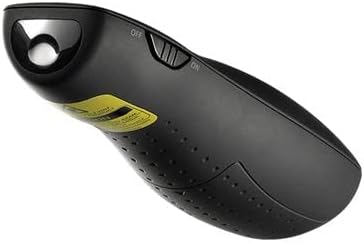
Figure 2.1: The Logitech Wireless Presenter R400 with its USB receiver stored in the base.
No additional drivers or software are required for basic functionality on compatible Windows-based systems.
3. Kasutusjuhised
The R400 presenter features intuitively placed controls for seamless presentation management.

Joonis 3.1: Ülemine view of the Logitech Wireless Presenter R400, highlighting the navigation and laser pointer buttons.
- Slide Navigation:
- Vajutage nuppu Forward (>) button to advance to the next slide.
- Vajutage nuppu Back (<) button to return to the previous slide.
- Laserpointer:
- Vajutage ja hoidke all nuppu Laserpointer button (typically a dot icon) to activate the red laser. Release the button to turn off the laser. This feature is useful for highlighting specific points on your presentation screen.
- Black Screen Function:
- Vajutage nuppu Must ekraan button (often a blank screen icon) to temporarily black out your presentation screen. Press it again to resume the presentation. This allows you to shift audience attention back to yourself.
- Start/Stop Presentation:
- The R400 may include a dedicated button to start or stop your presentation (e.g., a play/pause icon). Consult your software for specific compatibility.
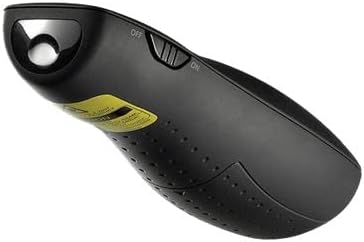
Joonis 3.2: Külg view of the Logitech Wireless Presenter R400, illustrating the laser output.
The wireless range of the R400 is approximately 50 feet (15 meters), providing ample freedom to move around the room and interact with your audience.
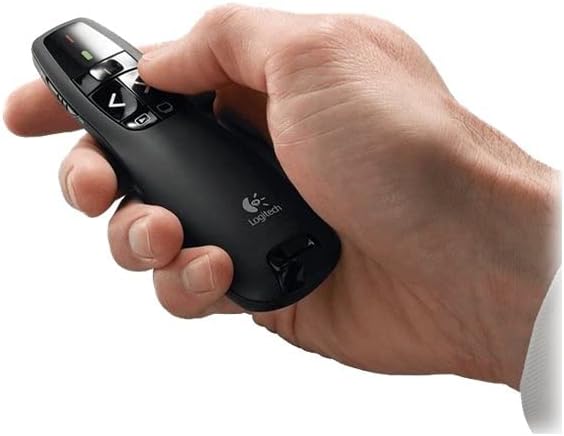
Figure 3.3: A hand comfortably holding the Logitech Wireless Presenter R400, demonstrating its ergonomic design.
4. Hooldus
Proper maintenance ensures the longevity and optimal performance of your presenter.
- Patarei vahetus: When the battery indicator light (if present) signals low power, or if the presenter's responsiveness decreases, replace the two AAA batteries. Always use fresh, high-quality batteries.
- Puhastamine: Use a soft, dry cloth to clean the exterior of the presenter. Avoid using abrasive cleaners or solvents, as these can damage the surface.
- Hoiustamine: When not in use, turn off the presenter using the ON/OFF switch. Store the USB receiver inside its dedicated slot within the presenter to prevent loss. The included carrying case provides additional protection during transport and storage.
5. Veaotsing
If you encounter issues with your Logitech Wireless Presenter R400, try the following solutions:
| Probleem | Võimalik põhjus | Lahendus |
|---|---|---|
| Presenter is unresponsive. | Patareid on tühjad või patareid on tühjad. Esineja on välja lülitatud. USB-vastuvõtja pole korralikult ühendatud. | Vahetage patareid välja. Lükake ON/OFF lüliti asendisse "ON". Veenduge, et USB-vastuvõtja on täielikult töötavasse USB-porti sisestatud. Proovige mõnda teist USB-porti. |
| Laser pointer is dim or not working. | Tühjad patareid. Obstruction in front of laser. | Vahetage patareid välja. Ensure nothing is blocking the laser output. |
| Limited wireless range or intermittent connection. | Teiste traadita seadmete tekitatud häired. Distance from receiver is too great. | Move closer to the computer. Vältige vastuvõtja asetamist teiste elektrooniliste seadmete lähedusse, mis võivad häireid põhjustada. |
| Slide navigation not working in presentation software. | Software not in presentation mode. Incompatibility with specific software. | Ensure your presentation software (e.g., PowerPoint, Keynote) is in slideshow or presentation mode. Kontrollige Logitechi tuge website for compatibility information or software updates. |
6. Tehnilised andmed
| Funktsioon | Detail |
|---|---|
| Mudeli number | 910-001356 |
| Ühenduvus | 2.4 GHz juhtmevaba tehnoloogia |
| Wireless Range | Kuni 50 jalga (15 meetrit) |
| Laseri tüüp | Punane laserkursor |
| Patareid | 2 x AAA patareid (kaasas) |
| Mõõdud (K x L x S) | 1.49 x 4.55 x 1.08 tolli (37.8 x 115.5 x 27.4 mm) |
| Kaal | 2.01 unts (57 g) |
| Süsteeminõuded | Windows-Based Computer: Windows Vista, Windows 7, Windows 8, Windows 10 or later; USB port |
| Värv | Must |
| Erifunktsioon | Ergonoomiline disain |
7. Garantii ja tugi
Garantii teave: Specific warranty terms and conditions for the Logitech Wireless Presenter R400 may vary by region and retailer. For detailed warranty information, please refer to the warranty card included with your product or visit the official Logitech websaidile.
Klienditugi: For further assistance, technical support, or to access frequently asked questions, please visit the official Logitech support website. You can typically find support resources, driver downloads (if applicable), and contact information for customer service there.
Official Logitech Websait: www.logitech.com


