Sissejuhatus
Welcome to the user manual for your new Karlsson KA4548 Gummy Alarm Clock. This battery-powered LCD alarm clock is designed for simplicity and functionality, featuring a unique rubberized casing that seamlessly integrates all control buttons. Its clear LCD display provides time at a glance, and the blue backlight activates only when the light button is pressed, ensuring no disruptive light emission during the night. This manual will guide you through the setup, operation, maintenance, and troubleshooting of your alarm clock.
Ohutusteave
- Aku ohutus: Always use the specified battery type (3 AAA batteries). Do not mix old and new batteries, or different types of batteries. Remove batteries if the clock will not be used for an extended period to prevent leakage. Dispose of used batteries responsibly.
- Paigutus: Place the alarm clock on a stable, flat surface. Avoid placing it in direct sunlight, near heat sources, or in areas with high humidity.
- Puhastamine: Clean the clock with a soft, dry cloth. Do not use abrasive cleaners or immerse the clock in water.
- Lapsed: Hoida väikelastele kättesaamatus kohas. See toode ei ole mänguasi.
Toode läbiview
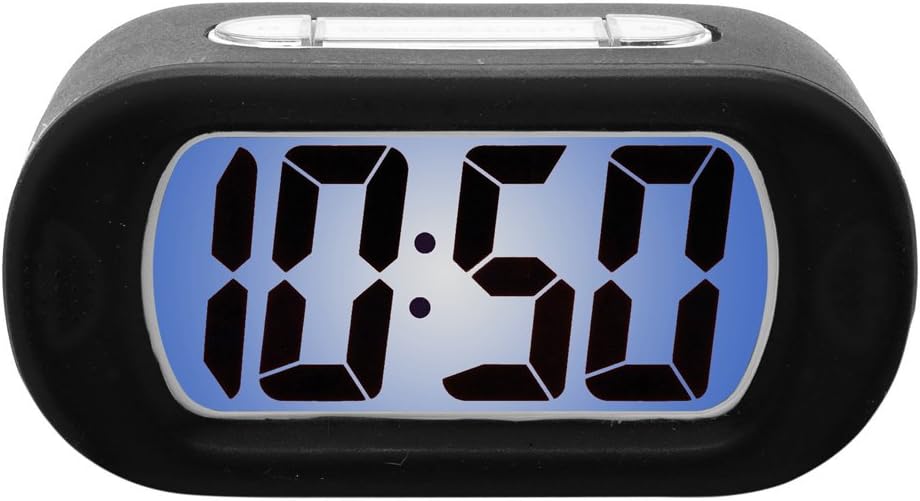
Figure 1: Karlsson KA4548 Gummy Alarm Clock. This image displays the Karlsson KA4548 Gummy Alarm Clock from a front-facing perspective. The clock features a black rubberized casing and a clear LCD screen with a blue backlight, currently displaying the time '10:50' in large, digital segments. The top of the clock shows subtle outlines of control buttons integrated into the rubber material.
Komponendid:
- LCD ekraan: Shows time, alarm status, and other indicators.
- Rubberized Casing: Durable and provides integrated button access.
- Juhtnupud: (Located on top/back, integrated into rubber) For setting time, alarm, snooze, and activating backlight.
- Akupesa: Located on the back, for 3 AAA batteries.
Seadistamine
Aku paigaldamine:
- Leidke äratuskella tagaküljel olev patareipesa.
- Avage patareipesa kaas.
- Sisestage 3 uut AAA-patareid, veendudes õiges polaarsuses (+ ja -), nagu on näidatud patareipesa sees.
- Close the battery compartment cover securely. The LCD display should now turn on.
Kasutusjuhised
Kellaaja määramine:
- Press the 'SET' button (or equivalent, typically integrated into the rubber casing). The hour digits will start flashing.
- Use the '+' or '-' buttons (or up/down arrows) to adjust the hour.
- Tunni kinnitamiseks ja minutite seadistamisele liikumiseks vajutage uuesti nuppu „SET”. Minutite numbrid vilguvad.
- Use the '+' or '-' buttons to adjust the minutes.
- Minutite kinnitamiseks ja aja seadistamise režiimist väljumiseks vajutage veel kord nuppu „SET”.
Alarmi seadistamine:
- Press the 'ALARM SET' button (or similar, often labeled with an alarm icon). The alarm hour digits will start flashing.
- Äratuse tunni reguleerimiseks kasutage nuppe '+' või '-'.
- Press 'ALARM SET' again to confirm the alarm hour and move to the alarm minute setting. The alarm minute digits will flash.
- Use the '+' or '-' buttons to adjust the alarm minutes.
- Press 'ALARM SET' one more time to confirm the alarm minutes and exit alarm setting mode.
- Ensure the alarm is activated. There is usually a dedicated 'ALARM ON/OFF' switch or button. A small alarm icon should appear on the display when the alarm is active.
Korduse funktsioon:
When the alarm sounds, press the 'SNOOZE' button (typically a large button on top). The alarm will temporarily stop and sound again after a few minutes (usually 5-9 minutes, depending on the model).
Taustvalgustuse funktsioon:
To illuminate the display in the dark, press the 'LIGHT' button (often integrated with the snooze button). The blue backlight will activate for a few seconds and then turn off automatically to conserve battery life. The display does not remain continuously lit.
Hooldus
Puhastamine:
Wipe the clock's surface with a soft, dry, lint-free cloth. For stubborn marks on the rubber casing, kergelt damp cloth can be used, but ensure no moisture enters the electronic components. Do not use chemical cleaners, solvents, or abrasive materials.
Patarei vahetus:
When the display dims or the alarm function becomes unreliable, it is time to replace the batteries. Follow the battery installation steps outlined in the 'Setup' section. Always replace all three AAA batteries at the same time with new ones.
Veaotsing
- Ekraan on tühi või tuhm:
Lahendus: Kontrollige patareide polaarsust. Vahetage need uute AAA patareide vastu. - Äratus ei helise:
Lahendus: Ensure the alarm is set and activated (check for alarm icon on display). Verify that the time and alarm time are correctly set. Replace batteries if they are low. - Backlight does not work or is very dim:
Lahendus: Press the 'LIGHT' button firmly. If it still doesn't work, replace the batteries. Note that the backlight is designed to be momentary, not continuously lit. - Nupud ei reageeri:
Lahendus: Ensure batteries are correctly installed and have sufficient power. Try removing and reinserting batteries to reset the device. - Vale aja kuvamine:
Lahendus: Reset the time following the 'Setting the Time' instructions.
Tehnilised andmed
| Funktsioon | Detail |
|---|---|
| Mudeli number | KA4548 |
| Kaubamärk | Karlsson |
| Toote mõõtmed | 14.73 x 5.08 x 7.62 cm |
| Kaal | 220 g |
| Värv | Must |
| Kuva tüüp | Digitaalne LCD |
| Toiteallikas | Battery (3 x AAA required) |
| Kaasas patareid | Ei |
| Eriomadused | Alarm, Momentary Backlight |
| Stiil | Kaasaegne disain |
| Nõutav kokkupanek | Ei |
Garantii ja tugi
Karlssoni tooted on valmistatud kõrgete kvaliteedistandardite kohaselt. Garantii kohta lisateabe saamiseks vaadake ostuga kaasasolevat garantiikaarti või külastage Karlssoni ametlikku veebilehte. website. For technical support or further assistance, please contact Karlsson customer service through their official channels.


