Sissejuhatus
This manual provides essential instructions for the safe and effective use of your Sony Cybershot DSCW170 digital camera. Please read this manual thoroughly before operating the camera and retain it for future reference. The Sony DSCW170 is a 10.1-megapixel digital camera featuring a Carl Zeiss 5x optical zoom lens and Super SteadyShot optical image stabilization, designed for capturing high-quality photos and videos.
Ohutusteave
- Aku ohutus: Use only specified batteries and chargers. Do not expose batteries to excessive heat or dispose of them in fire. Keep batteries out of reach of children.
- Vesi ja niiskus: This camera is not waterproof. Avoid exposing it to rain, moisture, or high humidity to prevent damage.
- Käitlemine: Do not drop the camera or subject it to strong impacts. Avoid pointing the lens directly at the sun or other intense light sources.
- Puhastamine: Use a soft, dry cloth for cleaning. Do not use organic solvents.
- Lahtivõtmine: Ärge proovige kaamerat lahti võtta ega muuta. Jätke kogu hooldus kvalifitseeritud personalile.
Pakendi sisu
Veenduge, et pakendis on kõik esemed olemas:
- Sony Cybershot DSCW170 Digital Camera
- Laetav aku
- Akulaadija
- USB kaabel
- Randmepael
- Tarkvara CD-ROM
- Kasutusjuhend (see dokument)
Seadistamine
1. Aku laadimine
- Insert the supplied rechargeable battery into the battery charger.
- Ühenda laadija seinakontakti. Laadimise märgutuli süttib.
- Charging is complete when the indicator light turns off. A full charge typically takes approximately 2-3 hours.
2. Aku ja mälukaardi sisestamine
Avage kaamera allosas asuv aku/mälukaardi kate.

Pilt: Tagumine view of the Sony Cybershot DSCW170 camera, displaying the LCD screen and various control buttons, including the mode dial and navigation pad.
- Insert the charged battery into the battery compartment with the correct orientation, ensuring it clicks into place.
- Insert a Memory Stick Duo or Memory Stick PRO Duo media card into the memory card slot until it clicks. The camera also has 15 MB of internal memory for limited storage.
- Sulgege aku/mälukaardi kate kindlalt.
3. Initial Power On and Date/Time Settings
- Vajutage nuppu VÕIMSUS nuppu kaamera sisselülitamiseks.
- If this is the first time using the camera or after the battery has been removed for an extended period, the date and time setting screen will appear.
- Use the control buttons to set the correct date, time, and time zone. Press the MENÜÜ or OK kinnitamiseks nuppu.
Kaamera kasutamine
1. Põhifotograafia (automaatrežiim)
For simple point-and-shoot operation, use the Auto mode.
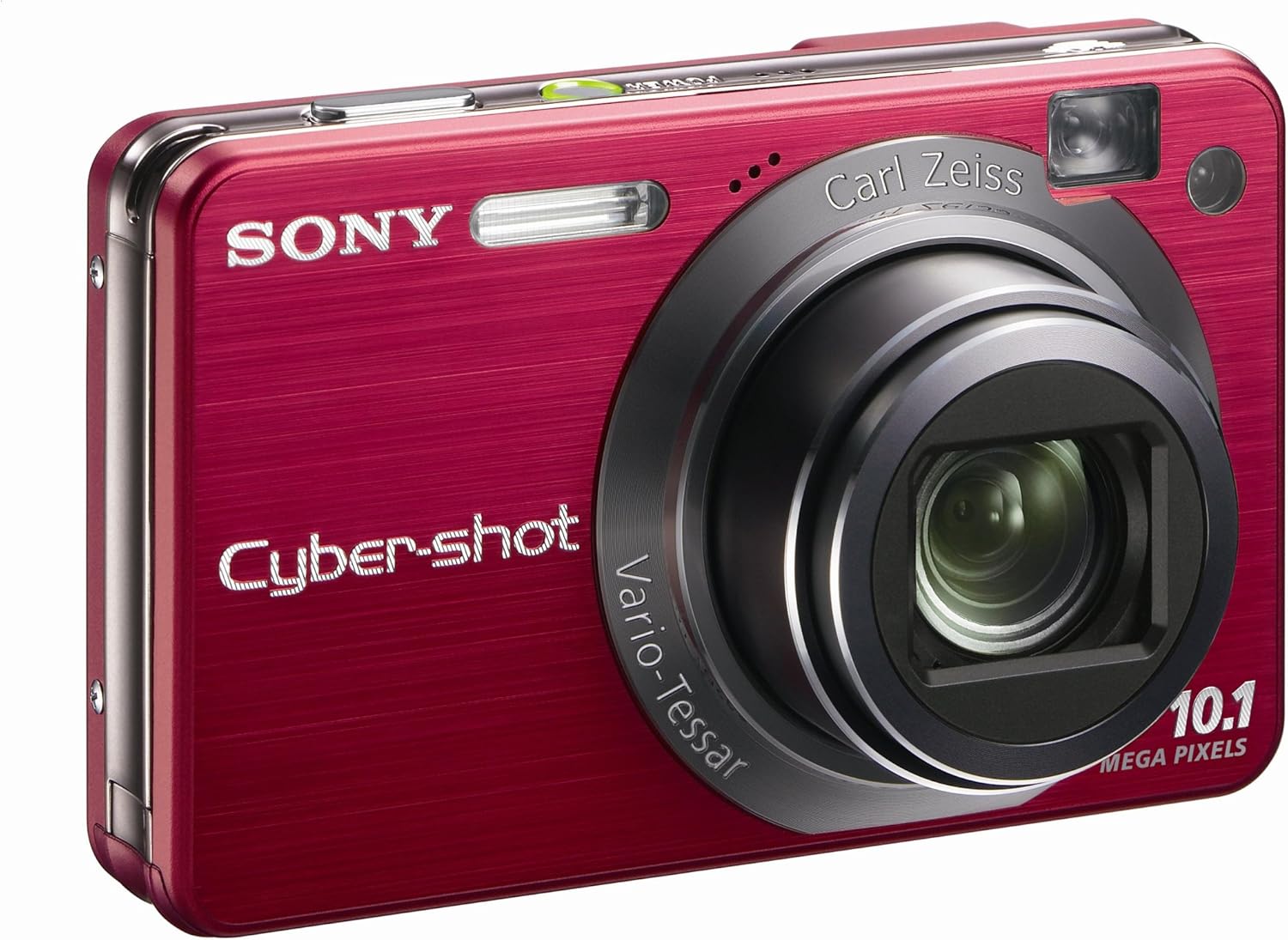
Pilt: Esikülg view of the Sony Cybershot DSCW170 camera, showing the Carl Zeiss lens, flash, and optical viewleidja.
- Keera režiimi valimise ketas asendisse AUTO.
- Frame your subject using the 2.7-inch Clear Photo LCD display or the optical viewleidja.
- Press the shutter button halfway down to focus. The camera will automatically adjust focus, exposure, and white balance.
- Pildistamiseks vajutage päästikunupp lõpuni alla.
2. Zoomi kasutamine
The camera features a 5x optical zoom and a Smart Zoom feature.
- To zoom in, push the zoom lever towards W (Wide).
- Välja suumimiseks lükake suumihooba suunas T (Teleobjektiiv).
- The Smart Zoom feature allows for additional digital zoom without significant image degradation by intelligently cropping the image.
3. Pildistamisrežiimid ja funktsioonid
Rotate the mode dial to select various shooting modes:
- Programmeeritud automaatrežiim (P): Võimaldab kaameral särituse määramisel sätete üle suuremat kontrolli.
- Stseeni valik (SCN): Choose from preset scenes like Twilight, Landscape, Soft Snap, Snow, High Sensitivity, and Beach for optimized settings in specific conditions.
- Lihtne pildistamisrežiim: Simplifies camera operation with easy-to-read on-screen instructions and limited settings, ideal for beginners.
- Filmi režiim: Records VGA (640 x 480) audio/video clips at 30 frames per second.
4. Täiustatud funktsioonid
- Näotuvastus: Automatically detects faces in the frame and adjusts focus, exposure, and flash for optimal results.
- Naeratuse katik: Automatically captures a photo when a smile is detected in the subject's face.
- Super SteadyShot optiline pildistabilisaator: Reduces blur caused by camera shake, especially in low light or with zoom.
- Dynamic Range Optimization (DRO): Preserves detail in both bright highlights and dark shadows.
- In-camera Retouching: Apply various effects and corrections to photos after shooting, such as Red-Eye adjustment, Soft Focus, and Happy Face.
5. Viewpiltide haldamine
- Vajutage nuppu Taasesitus nuppu view teie fotod ja videod.
- Use the control buttons to navigate through images.
- HD slaidiseanss muusikaga: Enjoy your photos with visual effects and background music on the camera's LCD or connected HDTV.
- Photo TV HD: Connect the camera to a PhotoTV HD-compatible Sony Bravia HDTV for high-definition image display.
- Transferring to PC: Connect the camera to your computer using the supplied USB cable. Use the Picture Motion Browser software to upload, organize, and search photos.
Hooldus
- Kaamera korpuse puhastamine: Pühkige kaamera korpust pehme ja kuiva lapiga. Kangekaelse mustuse korral kasutage kergelt niisutatud lappi.amploputage veega ja seejärel pühkige kuivaks.
- Objektiivi puhastamine: Use a lens brush or a blower to remove dust. For smudges, use a lens cleaning cloth and lens cleaning fluid. Do not touch the lens surface with your fingers.
- LCD-ekraani puhastamine: Gently wipe the LCD screen with a soft, lint-free cloth. Avoid pressing hard on the screen.
- Aku hooldus: Store batteries in a cool, dry place when not in use. Do not leave depleted batteries in the camera for extended periods.
- Hoiustamine: When storing the camera for a long time, remove the battery and memory card. Store the camera in a dry, well-ventilated area, away from direct sunlight and extreme temperatures.
Veaotsing
| Probleem | Lahendus |
|---|---|
| Kaamera ei lülitu sisse. | Veenduge, et aku on täielikult laetud ja õigesti sisestatud. Proovige akut uuesti laadida. |
| Pildid on udused. | Check if Super SteadyShot is enabled. Ensure sufficient lighting. Hold the camera steady or use a tripod. Clean the lens. |
| Red-eye in photos. | Use the Red-Eye Reduction flash mode. Utilize the in-camera retouching function to correct red-eye after shooting. |
| Videoid ei saa salvestada. | Ensure there is enough free space on the memory card. Check the selected shooting mode. |
| Mälukaardi viga. | Reinsert the memory card. Try a different, compatible Memory Stick Duo/PRO Duo card. Format the card (this will erase all data). |
| Aku tühjeneb kiiresti. | Reduce LCD brightness. Turn off the camera when not in use. Limit video recording. Ensure the battery is fully charged. |
Tehnilised andmed
| Funktsioon | Detail |
|---|---|
| Mudeli nimi | DSCW170 |
| Fotosensori eraldusvõime | 10.1 MP |
| Optiline suum | 5x |
| Pildi stabiliseerimine | Optiline (Super SteadyShot) |
| Objektiivi tüüp | Carl Zeiss Vario-Tessar |
| Ekraan | 2.7-tolline Clear Photo LCD-ekraan (230 000 punkti) |
| Sisemälu | 15 MB |
| Compatible Memory Media | Mälupulk Duo, mälupulk PRO Duo |
| Video eraldusvõime | VGA (640 x 480) kiirusega 30 kaadrit sekundis |
| ISO tundlikkus | Automaatne, 100, 200, 400, 800, 1600, 3200 |
| Ühenduvus | USB 2.0, Video Out (HDMI compatible with optional cable) |
| Toiteallikas | Laetav liitium-ioon aku |
| Mõõdud (umbes) | 93.7 x 58.0 x 24.0 mm (L x K x S) |
| Kaal (umbes) | 172 g (including battery and Memory Stick Duo) |
Garantii ja tugi
Your Sony Cybershot DSCW170 camera is covered by a limited warranty. Please refer to the warranty card included in your package for specific terms and conditions. For technical support, service, or additional information, please visit the official Sony support website or contact your local Sony customer service center. Keep your proof of purchase for warranty claims.


