
Toode läbiview
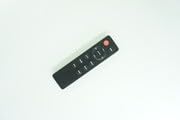
This replacement remote control is designed for use with JVC RM-STHD357 and RM-STHD588 2.1 Soundbar Speaker Systems. It offers basic functionality and is intended as a direct replacement. Please note that some advanced functions of the original remote may not be supported. The remote is constructed from durable ABS plastic, providing a comfortable grip and stable performance. It is compact and easy to operate.
Image: Generic Replacement Remote Control, showing its black casing ja nuppude paigutus.
Seadistamine
Aku paigaldamine
Kaugjuhtimispult vajab kahte AAA-patareid (ei kuulu komplekti). Nende paigaldamiseks järgige neid samme:
- Leidke kaugjuhtimispuldi tagaküljelt patareipesa kate.
- Avamiseks libistage kaant allapoole või vajutage riivi.
- Sisestage kaks AAA-patareid, veendudes, et positiivsed (+) ja negatiivsed (-) klemmid joonduvad õigesti sahtlis olevate märgistustega.
- Pange patareipesa kate tagasi, kuni see kindlalt paika klõpsatab.
Tähtis: No programming or setup is required for this replacement remote control. Once batteries are installed, it is ready for use.
Kasutusjuhised
To operate your JVC soundbar system with this remote control:
- Ensure the soundbar is powered on and within the remote's operating range (up to 15 meters).
- Point the remote control directly towards the soundbar's infrared receiver.
- Press the desired function button (e.g., Power, Volume Up/Down, Mute, Input Select) to control your soundbar.
Märkus ühilduvuse kohta: This is a replacement remote. While it provides essential functions, some specific or advanced features found on the original JVC remote control for RM-STHD357 or RM-STHD588 systems may not be fully supported or may operate differently. This is not indicative of a product defect.
Hooldus
Puhastamine
Kaugjuhtimispuldi välimuse ja funktsionaalsuse säilitamiseks:
- Pühkige pind pehme ja kuiva lapiga.
- Do not use liquid cleaners, solvents, or abrasive materials, as these can damage the remote's finish or internal components.
Säilitamine
Kui seadet pikemat aega ei kasutata:
- Store the remote control in a cool, dry place.
- Avoid direct sunlight, high humidity, and extreme temperatures.
- Remove the batteries if storing for more than one month to prevent potential battery leakage and damage to the remote.
Veaotsing
Kaugjuhtimispult ei reageeri
- Kontrollige patareisid: Veenduge, et patareid on sisestatud õige polaarsusega (+/-).
- Vahetage patareid: If the remote is unresponsive, replace old batteries with new ones.
- Eemaldage takistused: Make sure there are no objects blocking the line of sight between the remote and the soundbar's infrared receiver.
- Heliriba võimsus: Confirm that your JVC soundbar system is powered on.
Some Functions Not Working
- This remote is a replacement unit. It is designed to provide essential control but may not replicate all advanced or specific functions of the original JVC remote. This is considered normal operation for a replacement remote and not a defect.
- If a basic function (e.g., Power, Volume) is not working, refer to the "Remote Not Responding" section above.
Tehnilised andmed
| Kaubamärk | Üldine |
| Mudeli number | #fRM703f1682 |
| Materjal | ABS/plastik |
| Ühilduvad seadmed | JVC RM-STHD357, JVC RM-STHD588 2.1 Soundbar Speaker Systems |
| Ühenduvustehnoloogia | Infrapuna (IR) |
| Maksimaalne vahemik | 15 meetrit (umbes 49 jalga) |
| Toiteallikas | 2 x AAA patareid (ei kuulu komplekti) |
| Värv | Must või valge (värv võib erineda) |
Garantii ja tugi
This product is a generic replacement remote control. Specific warranty terms, if any, are provided by the seller at the time of purchase. Please retain your purchase receipt for any warranty claims.
For technical assistance, compatibility questions, or any issues not covered in this manual, please contact the seller directly through your purchase platform. They will be able to provide the most accurate and timely support.