
1. Sissejuhatus
This manual provides detailed instructions for the safe and effective operation of the Generic PWM150 Dual Channel Signal Generator. This device is designed to produce adjustable Pulse Width Modulation (PWM) signals across two independent channels, suitable for applications such as servo motor control and general signal generation. Please read this manual thoroughly before use to ensure proper functionality and to prevent damage.
2. Ohutusalane teave
- Toiteallikas: Use only a DC power supply within the specified range of 5V to 24V. Exceeding this voltage võib seadet kahjustada.
- Praegune piir: Ensure the output current does not exceed 0.2A to prevent damage to the device or connected components.
- Lühisekaitse: The device features output short-circuit protection. However, prolonged short circuits should be avoided.
- Keskkond: Operate the device in a dry environment, away from moisture, dust, and extreme temperatures.
- Käitlemine: Käsitsege seadet ettevaatlikult, et vältida füüsilisi kahjustusi.
3. Toote lõppview
The PWM150 is a compact dual-channel signal generator offering precise control over frequency, duty cycle, and phase. It features a clear digital display and intuitive controls for easy parameter adjustment.
3.1 Põhifunktsioonid
- Dual independent channels with equal performance.
- Output frequency range: 1Hz to 150KHz.
- Adjustable duty cycle: 0% to 100% (0.1% step adjustment).
- Adjustable phase: 0° to 360° (1° step, available in synchronous mode).
- Sisendi mahttage range: DC 5V-24V.
- Maximum output current: 0.2A.
- 4-digit green and 3-digit white digital tube display for frequency and duty cycle/phase.
- Rotary encoder and four-function buttons for parameter adjustment and mode switching.
- Synchronization function for linking both channels.
3.2 Seadme komponendid
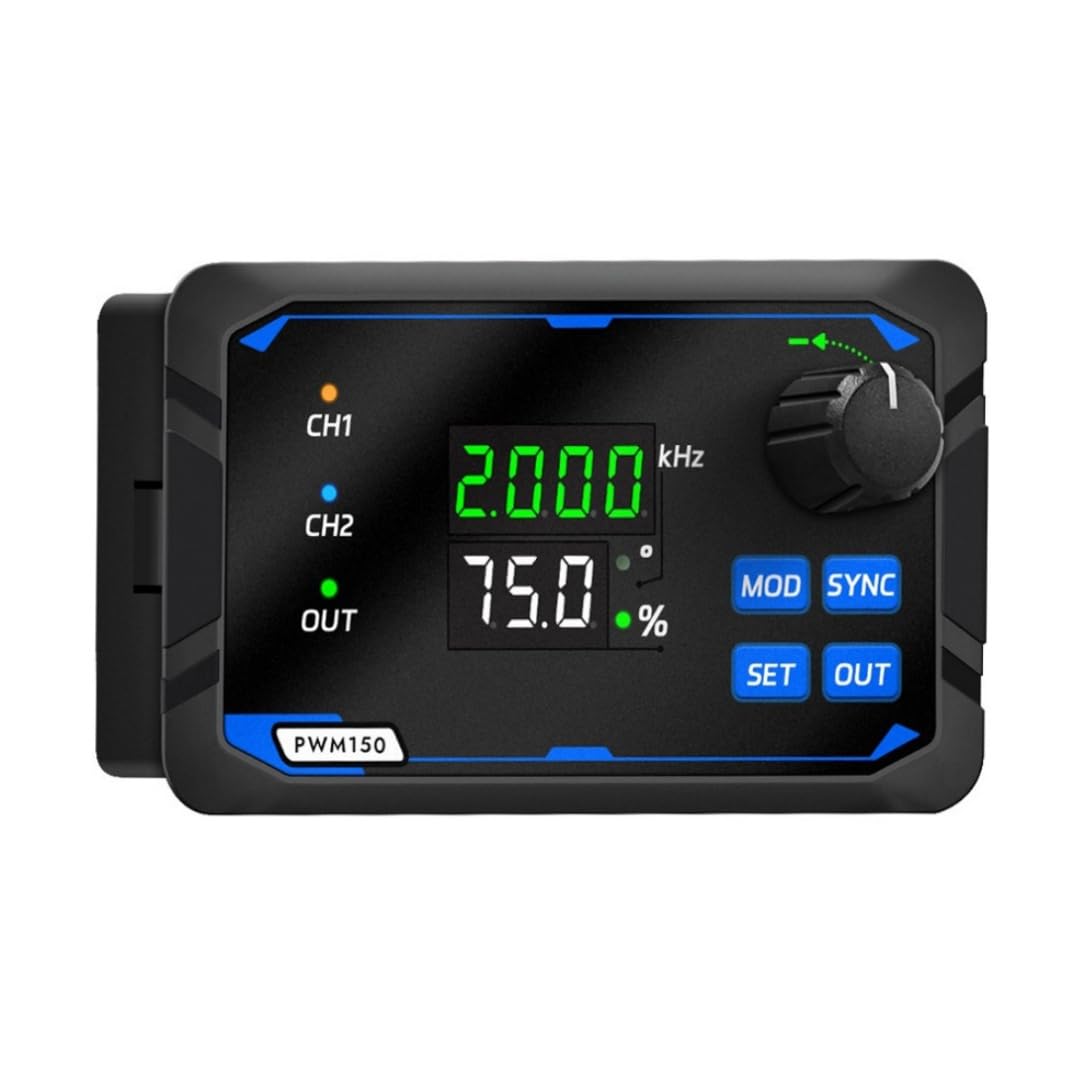
Joonis 1: Esiosa view of the PWM150 Signal Generator, showing the display, rotary encoder, and control buttons.
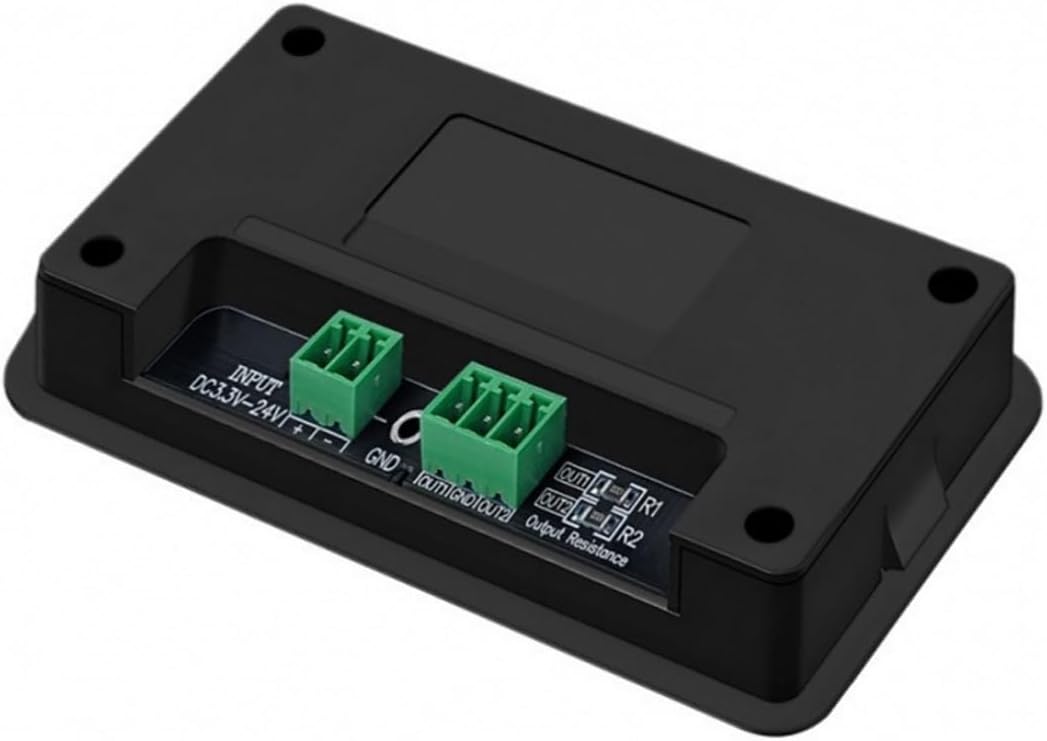
Joonis 2: Tagumine view of the PWM150 Signal Generator, illustrating the DC power input and dual channel output terminals.

Joonis 3: Detailed diagram of the PWM150 controls and indicators, including the rotary encoder, Mod key, Sync button, Set key, Out key, unit indicator lights, and three-color status lights.
- Rotary kodeerija: Used for adjusting parameter values. Short press to switch between digits (flashing indicator), rotate to change the value.
- MOD Key: Switches between channel selection (CH1/CH2) or duty cycle/phase display when in sync mode.
- SYNC nupp: Enables dual-channel parameter synchronization, allowing linked adjustment of frequency, duty cycle, and phase.
- SET klahv: Accesses system settings, including power-on output, parameter saving/retrieval, and frequency/duty cycle upper/lower limit settings.
- VÄLJAS-võti: Toggles the PWM signal output on or off. A green LED indicates output status.
- Unit Indicator Light: Indicates whether the displayed value is Phase or % duty cycle.
- Three-color Status Light: Provides clear status indication for CH1, CH2, and OUT.
- Kuvamissüsteem: Features a 4-digit green LED for frequency (e.g., 1.200 kHz) and a 3-digit white LED for duty cycle or phase (e.g., 75.0%).
4. Seadistamine
Follow these steps to set up your PWM150 Signal Generator:
- Toiteühendus: Connect a DC power supply (5V-24V) to the "INPUT" terminals on the rear of the device. Ensure correct polarity (+ to +, - to -).
- Väljundühendus: Connect your target device (e.g., servo motor, LED driver) to the "OUT1" and "OUT2" terminals for Channel 1 and Channel 2, respectively. Observe correct polarity and ensure the load does not exceed 0.2A.
- Esialgne sisselülitamine: Once connections are secure, apply power. The display should illuminate, showing default frequency and duty cycle values.

Joonis 4: Rear panel of the PWM150, highlighting the INPUT (DC3.3V-24V) and OUT1/OUT2 terminals. The model number P/N: 250700002 is also visible.
5. Kasutusjuhised
5.1 Põhitoimingud
- Toide sisse: Connect the power supply. The device will power on and display the last saved settings or default values.
- Valige kanal: Vajutage nuppu MOD key to switch between Channel 1 (CH1) and Channel 2 (CH2). The active channel will be indicated on the display.
- Reguleerige sagedust: The upper green display shows the frequency. Rotate the Pöördkooder to adjust the frequency. Short press the encoder to select which digit to adjust (the selected digit will flash).
- Adjust Duty Cycle: The lower white display shows the duty cycle (%). Press the MOD key until the duty cycle is displayed for the selected channel. Rotate the Pöördkooder to adjust the duty cycle from 0% to 100%.
- Start/Stop Output: Vajutage nuppu VÄLJAS key to start or stop the PWM signal output for the currently selected channel. A green LED next to "OUT" will illuminate when the output is active.
5.2 Synchronization Mode
The PWM150 allows for synchronization of parameters between CH1 and CH2.
- Enable Sync: Vajutage nuppu SYNC button. The display will indicate that synchronization mode is active.
- Adjust Synchronized Parameters: In sync mode, adjustments made to frequency or duty cycle on one channel will automatically apply to the other channel.
- Adjust Phase: When in sync mode, you can adjust the phase difference between CH1 and CH2. Press the MOD key until the lower white display shows the phase (e.g., 0°). Rotate the Pöördkooder to adjust the phase from 0° to 360°.
- Disable Sync: Vajutage nuppu SYNC button again to exit synchronization mode.
5.3 System Settings (SET Key)
Vajutage nuppu SET key to access advanced settings. Use the Pöördkooder to navigate and adjust values, and the SET key again to confirm or exit. Refer to the on-screen prompts for specific options, which may include:
- Power-on output state (on/off).
- Saving and recalling custom parameter settings.
- Setting upper and lower limits for frequency and duty cycle.
6. Tehnilised andmed
| Parameeter | Väärtus |
|---|---|
| Output Frequency Range | 1 Hz–150 kHz |
| Duty Cycle Adjustment | 0% - 100% (0.1% step) |
| Faasi reguleerimine | 0° - 360° (1° step, synchronous mode) |
| Tõusuaeg | 20ns |
| Väljund Voltage | Equal to Input Voltage (DC 5V-24V) |
| Väljundvool (maksimaalne) | 0.2A |
| Kuvamissüsteem | 4-digit green (frequency) + 3-digit white (duty cycle/phase) digital tubes |
| Toiteallika režiim | External DC 5V-24V |
| Mõõtmed | 120 mm x 75 mm x 50 mm (ligikaudne) |
| Mudeli number | PWM150 (P/N: 250700002) |
| Kaasatud komponendid | 1x signaaligeneraator |
7. Hooldus
- Puhastamine: Seadme puhastamiseks kasutage pehmet ja kuiva lappi. Ärge kasutage vedelaid puhastusvahendeid ega lahusteid.
- Hoiustamine: Hoidke seadet jahedas ja kuivas kohas, kui seda ei kasutata.
- Ülevaatus: Periodically check all connections for wear or damage.
8. Veaotsing
- Toide puudub: Ensure the DC power supply is correctly connected and within the 5V-24V range. Check the power adapter and cable.
- Väljundsignaali pole:
- Veenduge, et VÄLJAS key has been pressed and the green OUT LED is illuminated.
- Check output connections to the load.
- Ensure frequency and duty cycle parameters are set to valid values (not 0% duty cycle).
- Incorrect Readings/Unstable Output:
- Kontrollige lahtiste ühenduste olemasolu.
- Ensure the power supply is stable and providing sufficient current.
- Avoid operating in environments with strong electromagnetic interference.
- Buttons/Encoder Unresponsive: Power cycle the device. If the issue persists, contact support.
9. Garantii ja tugi
This Generic PWM150 Dual Channel Signal Generator comes with a 1-kuuline garantii from the date of purchase, covering manufacturing defects. For technical support, warranty claims, or any operational questions not covered in this manual, please contact the seller or manufacturer (YiBian) directly through your purchase platform.
Please provide your ASIN (B0FXMFGCZK) and model number (PWM150, P/N: 250700002) when contacting support for faster assistance.