
1. Sissejuhatus
The ZTE U60 Pro MU5250 is a portable 5G Wi-Fi 7 router designed to provide high-speed internet connectivity on the go. It features an ultra-high-speed 5G-A network, the flagship Snapdragon X75 chip platform, and advanced Wi-Fi 7 technology. This device is equipped with a 10,000 mAh high-capacity battery, offering extended usage and the ability to function as a power bank for other electronic devices. Its 3.5-inch HD touchscreen allows for easy network management and traffic monitoring. The U60 Pro supports up to 64 simultaneous device connections and offers convenient NFC one-touch connectivity, intelligent AI scenes, and AI voice management for a fast, stable, and efficient internet experience.

Pilt 1.1: esikülg view of the ZTE U60 Pro MU5250, showing its 3.5-inch display with network information.
2. Seadistamine
2.1 Pakendi sisu
Enne alustamist veenduge, et kõik komponendid on olemas:
- ZTE U60 Pro MU5250 5G Pocket Wi-Fi 7 Router
- Vahelduvvoolu adapter
- Kasutusjuhend (see dokument)
2.2 SIM -kaardi paigaldamine
To enable 5G connectivity, a compatible SIM card must be installed.
- Leidke seadme küljelt SIM-kaardi pesa.
- Using the provided SIM ejector tool (if applicable) or a small pin, gently press into the small hole next to the SIM tray to eject it.
- Place your 5G-enabled Nano-SIM card into the tray, ensuring proper orientation.
- Sisestage SIM-kaardi salv ettevaatlikult seadmesse tagasi, kuni see klõpsuga oma kohale lukustub.
2.3 Sisse-/väljalülitamine
To power on the device, press and hold the power button located on the side until the screen illuminates. To power off, press and hold the power button until the power-off options appear on the screen, then select 'Power Off'.
2.4 Esialgne WiFi-ühendus
After powering on, the device will automatically search for a 5G network. You can connect to the Wi-Fi network using one of the following methods:
- Manuaalne ühendus: On your device (phone, laptop, etc.), search for available Wi-Fi networks. Select the network name (SSID) displayed on the U60 Pro's screen and enter the password (also displayed on the screen).
- NFC ühe puutega ühendus: For Android phones with NFC enabled, tap your phone against the NFC area on the U60 Pro. Your phone will automatically connect to the Wi-Fi network without requiring a password.

Image 2.1: Illustrates the NFC one-touch connection process for quick Wi-Fi access.
3. Kasutusjuhised
3.1 Puutetundlik liides
The 3.5-inch HD touchscreen provides a minimalist user interface for managing the device. You can view network status, data usage, signal strength, battery level, and adjust basic settings directly from the screen. Swipe and tap gestures are used for navigation.
3.2 Mitme seadme ühendamine
The ZTE U60 Pro supports simultaneous connections for up to 64 devices, allowing multiple users to share the 5G network. Connect devices using the standard Wi-Fi connection method as described in Section 2.4.
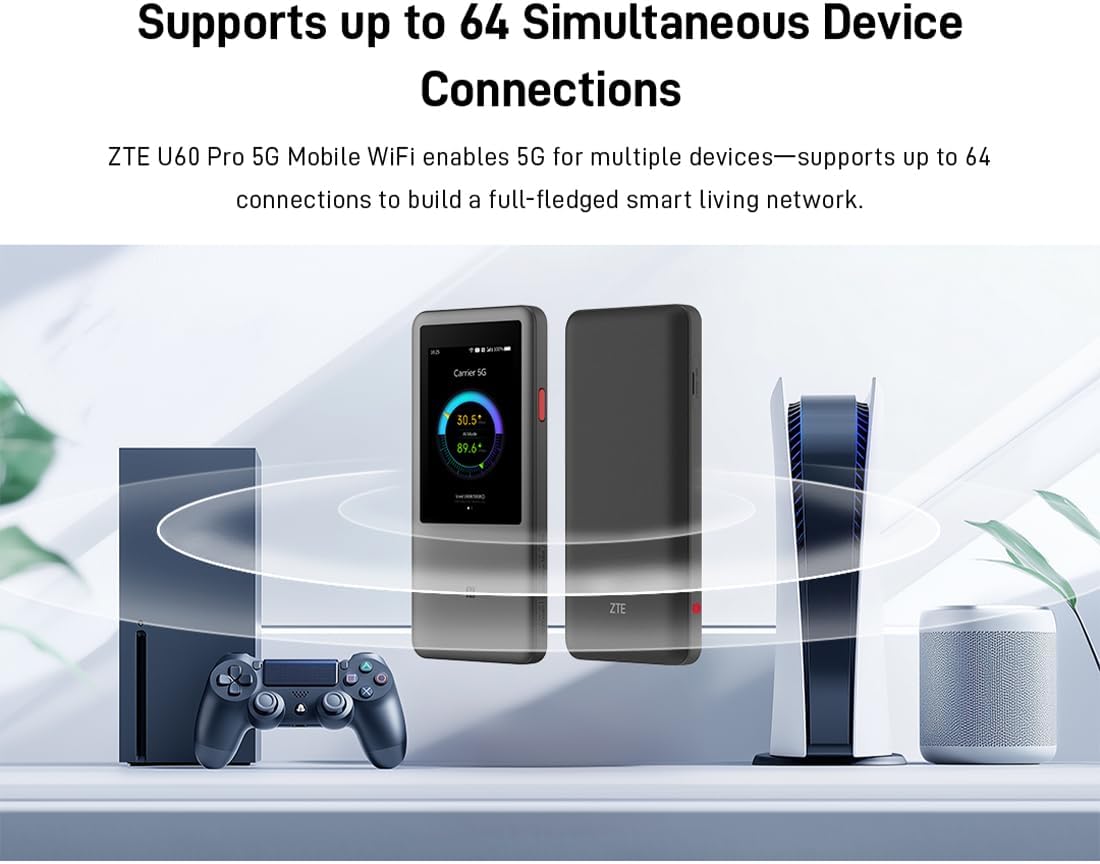
Image 3.1: The ZTE U60 Pro providing 5G Wi-Fi connectivity to various electronic devices.
3.3 AI Smart Scene Modes
The device features intelligent AI Scene technology with dynamic bandwidth allocation. It adjusts bandwidth and priority for applications based on user usage patterns to ensure smooth operation. Available modes include:
- Anchor Mode: Optimized for live streaming.
- Konverentsirežiim: Prioritizes video conferencing applications.
- Videorežiim: Enhances video playback and streaming.
- Kiirusrežiim: Maximizes overall network speed.
- Mängurežiim: Reduces latency for online gaming.
3.4 AI Voice Management (via ZTE Smart Life APP)
The ZTE Smart Life APP enables effortless device management, including AI voice control. This feature allows for intelligent management of the router through voice commands. Download the ZTE Smart Life APP from your device's app store.

Image 3.2: The ZTE Smart Life APP interface demonstrating AI voice management capabilities.
3.5 Akupanga funktsionaalsus
The U60 Pro can also serve as a power bank. With its 10,000 mAh battery and 18W reverse fast charging, you can charge other electronic devices by connecting them to the router's appropriate port (e.g., USB-C).
4. Hooldus
4.1 Aku hooldus
The device is equipped with a 10,000 mAh battery. To maximize battery life:
- Vältige äärmuslikke temperatuure.
- Optimaalseks laadimiseks kasutage kaasasolevat 27W kiirlaadijat.
- Pikaajaliseks hoiustamiseks laadige aku umbes 50% ulatuses ja hoidke jahedas ja kuivas kohas.
4.2 Seadme üldine hooldus
To ensure the longevity and optimal performance of your ZTE U60 Pro:
- Hoidke seadet puhtana ja tolmuvabalt. Puhastamiseks kasutage pehmet ja kuiva lappi.
- Vältige seadme kokkupuudet veega või liigse niiskusega.
- Ärge pillake seadet maha ega jätke seda tugevate löökide kätte.
- Kasutamise ajal tagage korralik ventilatsioon, et vältida ülekuumenemist.
5. Veaotsing
If you encounter issues with your ZTE U60 Pro, refer to the following common solutions:
5.1 Võrguühendus puudub
- Kontrollige SIM-kaarti: Ensure the SIM card is correctly inserted and activated with a 5G data plan.
- Signaali tugevus: Verify the signal strength indicator on the device's screen. Move to an area with better 5G coverage if the signal is weak.
- Taaskäivitage seade: Power off and then power on the U60 Pro.
- Võrguseaded: Check network settings via the touchscreen or ZTE Smart Life APP to ensure APN settings are correct (usually automatic).
5.2 WiFi-ühenduse probleemid
- Vale parool: Double-check the Wi-Fi password displayed on the U60 Pro's screen.
- Seadme piirang: Ensure you have not exceeded the maximum of 64 connected devices.
- Restart Connected Device: Restart the device attempting to connect to the Wi-Fi.
- Ruuteri taaskäivitamine: Restart the ZTE U60 Pro.
5.3 Aeglane interneti kiirus
- Signaali tugevus: Nõrk 5G signaal vähendab kiirust.
- Andmelimiit: Check if your data plan has a fair usage policy or if you have exceeded a data cap, which might throttle speeds.
- AI Scene Mode: Ensure the appropriate AI Scene mode (e.g., Speed Mode) is selected for your activity.
- Häired: Move the device away from other electronic devices that might cause interference.
6. Tehnilised andmed
The following table details the technical specifications of the ZTE U60 Pro MU5250:

Image 6.1: The Snapdragon X75 Flagship Chip-set Platform, central to the router's performance.
| Funktsioon | Detail |
|---|---|
| Kaubamärk | ZTE |
| Mudeli nimi | MU5250 |
| Kauba mudeli number | MU5250 |
| Tootja | ZTE |
| Erifunktsioon | 5G Connection, Wi-Fi 7, AI Scenes, Voice Control, Power Bank |
| Ühenduvustehnoloogia | 5G, Wi-Fi |
| Wi-Fi genereerimine | WiFi 7 |
| Traadita side standard | 802.11a, 802.11ac, 802.11b, 802.11g, 802.11n |
| Sagedusriba klass | Dual Band |
| Sagedus | 5 GHz |
| Andmeedastuskiirus | 4.29 Gigabits per second (Download) |
| Maksimaalne ülesvoolu andmeedastuskiirus | 3600 Megabits per second (Wi-Fi 7 Peak Throughput) |
| Antennide arv | 9 (Omnidirectional 5G Array) |
| Katvus | Wide and complete (360° full-band coverage) |
| Kontrollimeetod | Puudutage |
| Operatsioonisüsteem | ZyNOS |
| Turvaprotokoll | WPA3 |
| Router Firewall Security Level | Põhiline |
| Aku(d) | 1 AAA - included (Note: Product description mentions 10,000 mAh, likely internal) |
| Kauba kaal | 435 grammi |
| Kaasatud komponendid | Vahelduvvoolu adapter |
| Ühilduvad seadmed | Game Console, various Wi-Fi enabled devices |
| Toote soovitatavad kasutusalad | Streaming, Gaming, Outdoor/Travel, Small Office |
| Interneti-ühendus | Jah |
| Modem Compatible | No (Functions as a standalone 5G router) |
| Nutika kodu ühilduvus | Not Smart Home Compatible |
| Varuosade saadavus | Teave pole saadaval |
| Tarkvarauuendused on garanteeritud kuni | Teave pole saadaval |

Image 6.2: Highlighting the 5G ultra-high-speed network of the ZTE U60 Pro MU5250.

Image 6.3: Illustration of the 9 omnidirectional 5G antennas providing 360° full-band coverage.
7. Toetus ja garantii
7.1 Klienditugi
For further assistance, technical support, or inquiries not covered in this manual, please refer to the official ZTE support channels or contact your retailer.
7.2 Garantii teave
Warranty terms and conditions may vary by region and retailer. Please refer to the warranty card included with your product or consult your point of purchase for detailed warranty information.