
1. Sissejuhatus
This manual provides detailed instructions for the safe and effective use of the Generic M469A Smart Network Cable Tester. This device is designed to test RJ45 and RJ11 LAN cables, perform wire tracking, and assist in network repair tasks. Please read this manual thoroughly before operating the device and retain it for future reference.
2. Ohutusalane teave
- Always handle the device with care to prevent damage.
- Ärge jätke seadet niiskuse, äärmuslike temperatuuride ega otsese päikesevalguse kätte.
- Veenduge, et patareid on õigesti sisestatud vastavalt polaarsuse märgistustele.
- Eemaldage patareid, kui seadet pikemat aega ei kasutata.
- Ärge proovige seadet ise parandada ega muuta. Jätke kogu hooldus kvalifitseeritud spetsialistidele.
3. Pakendi sisu
Palun kontrollige paki sisu kättesaamisel. Kui mõni ese on puudu või kahjustatud, võtke ühendust oma müüjaga.
- M469A Smart Network Cable Tester (Main Unit)
- Kaugüksus
- RJ45 kaabel
- RJ11 kaabel
- Kasutusjuhend
4. Toote lõppview
The M469A Smart Network Cable Tester consists of a main unit and a remote unit. It features ports for RJ45 and RJ11 cables, an LCD display for test results, and control buttons for various functions.
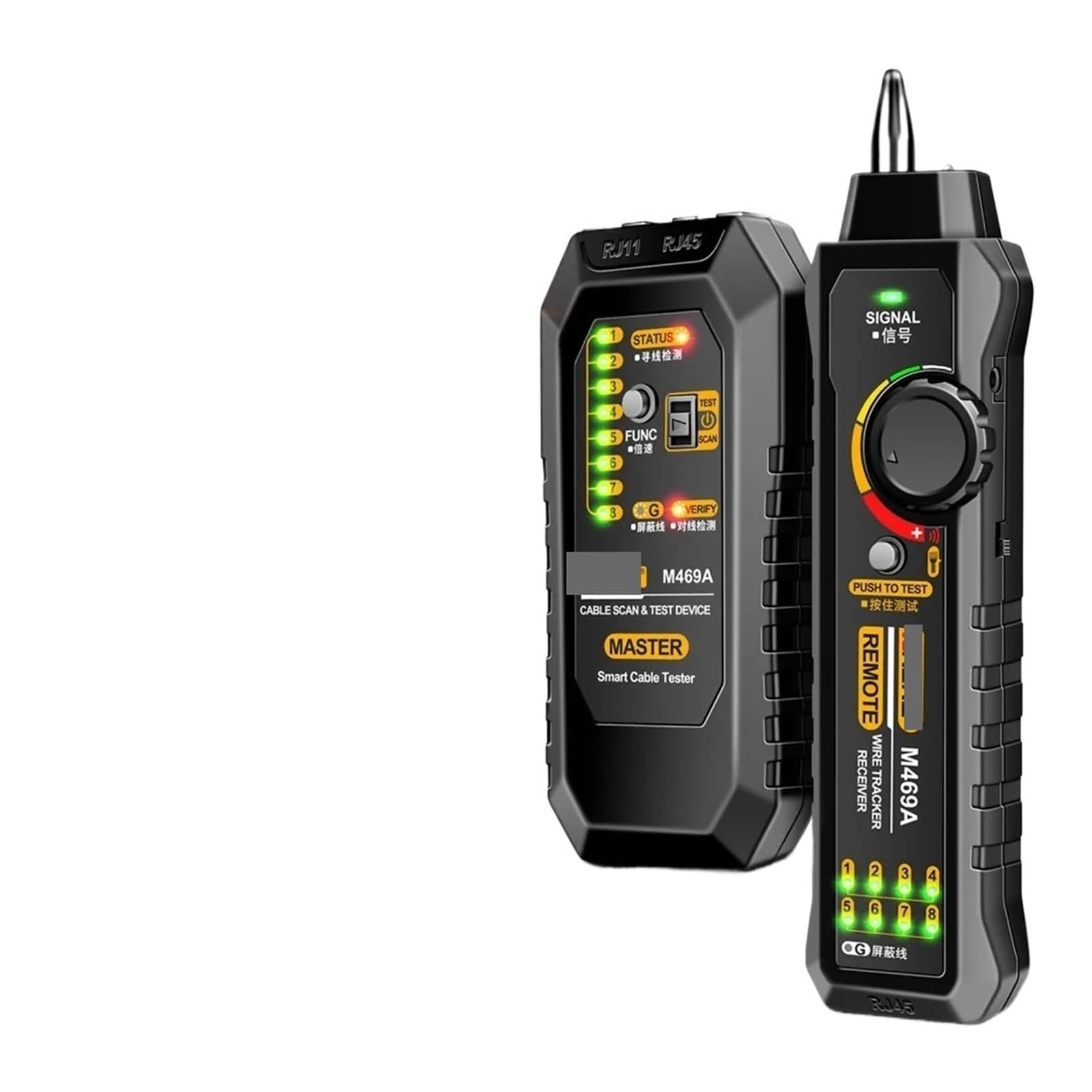
Image 1: M469A Smart Network Cable Tester. This image displays the main unit and the remote unit of the cable tester. The main unit typically features an LCD screen and control buttons, while the remote unit is a smaller, passive component used for end-to-end cable testing.
Seadme põhiomadused:
- LCD ekraan: Shows test results, cable status, and other information.
- RJ45 sadam: For testing Ethernet cables.
- RJ11 sadam: Telefonikaablite testimiseks.
- Juhtnupud: For power, mode selection, and test initiation.
- Toite sisend: Battery compartment for power supply.
Kaugseadme omadused:
- RJ45 sadam: Connects to the other end of an Ethernet cable for testing.
- RJ11 sadam: Connects to the other end of a telephone cable for testing.
5. Seadistamine
5.1 Aku paigaldamine
- Otsige üles akupesa põhiseadme tagaküljel.
- Avage patareipesa kaas.
- Insert the required batteries (e.g., 9V battery) according to the polarity markings (+/-).
- Sulgege akupesa kaas kindlalt.
5.2 Sisse-/väljalülitamine
- To power on the device, press and hold the Power button until the LCD screen illuminates.
- To power off the device, press and hold the Power button again until the LCD screen turns off.
6. Kasutusjuhised
6.1 Cable Testing (RJ45/RJ11)
- Veenduge, et seade oleks sisse lülitatud.
- Connect one end of the cable to be tested into the appropriate port (RJ45 or RJ11) on the main unit.
- Connect the other end of the cable into the corresponding port on the remote unit.
- Select the desired test mode (e.g., standard test, scan) using the mode button.
- Press the Test button to initiate the cable test.
- Observe the LCD display for results, which will indicate continuity, open circuits, short circuits, cross-overs, or split pairs.
6.2 Juhtmete jälgimise funktsioon
The wire tracking function helps locate specific cables within a bundle or trace their path.
- Connect the cable to be tracked to the main unit's RJ45 or RJ11 port.
- Select the wire tracking mode on the main unit.
- Use the receiver (often integrated or a separate probe) to trace the cable. The receiver will emit an audible tone when it detects the signal from the main unit, indicating the cable's location.
7. Hooldus
- Puhastamine: Seadme puhastamiseks kasutage pehmet ja kuiva lappi. Ärge kasutage abrasiivseid puhastusvahendeid ega lahusteid.
- Hoiustamine: Kui seadet ei kasutata, hoidke seda jahedas ja kuivas kohas otsese päikesevalguse ja niiskuse eest kaitstult.
- Patarei vahetus: Replace batteries promptly when the low battery indicator appears on the display to ensure accurate readings.
8. Veaotsing
| Probleem | Võimalik põhjus | Lahendus |
|---|---|---|
| Seade ei lülitu sisse. | Tühjad või valesti paigaldatud patareid. | Kontrollige patareide polaarsust; vahetage patareid välja. |
| Ebatäpsed testi tulemused. | Poor cable connection; damaged cable; low battery. | Ensure cables are securely connected; inspect cable for damage; replace batteries. |
| Wire tracking signal is weak or absent. | Cable not properly connected; receiver too far from cable; interference. | Verify cable connection; move receiver closer; minimize sources of electromagnetic interference. |
9. Tehnilised andmed
- Mudel: M469A (Part Number: PPZZZAIVV-BLACK)
- Kaubamärk: Üldine
- Toetatud kaablitüübid: RJ45 (Ethernet), RJ11 (Telephone)
- Funktsioonid: Cable Testing, Wire Tracking
- Toiteallikas: Battery Powered (e.g., 9V battery, not included)
- Värv: Must
- Täidetud spetsifikatsioon: UL
10. Garantii ja tugi
This product comes with a standard manufacturer's warranty. For specific warranty terms, please refer to the documentation provided at the time of purchase or contact your retailer. For technical support or service inquiries, please contact the vendor or manufacturer through the contact information provided with your purchase.