
1. Olulised ohutusjuhised
Please read all instructions carefully before using the fan and retain this manual for future reference. Failure to follow these instructions may result in electric shock, fire, or serious personal injury.
- Veenduge, et toiteallikas voltage vastab ventilaatori nimiväärtusele.
- Do not operate the fan with a damaged cord or plug. Contact authorized service personnel for repair.
- Keep fingers and other objects away from the fan blades and guards during operation.
- Ärge kastke ventilaatorit, juhet ega pistikut vette ega muudesse vedelikesse.
- Enne puhastamist või hooldustööde tegemist eemaldage ventilaator vooluvõrgust.
- See seade ei ole mõeldud kasutamiseks isikutele (kaasa arvatud lapsed), kellel on füüsilised, sensoorsed või vaimsed võimed või kogemuste ja teadmiste puudumine, välja arvatud juhul, kui nende ohutuse eest vastutav isik on neid jälginud või seadme kasutamist juhendanud.
- Lapsi tuleb jälgida, et nad seadmega ei mängiks.
- Do not use the fan near curtains, drapes, or other objects that could be drawn into the fan.
- Asetage ventilaator stabiilsele ja tasasele pinnale, et vältida selle ümberkukkumist.
2. Toote lõppview
The SONA SFS 9068DC is a remote-controlled DC dual-bladed high velocity fan designed for efficient air circulation. It features a brushless DC motor, dual fan blades for enhanced wind delivery, 3D oscillation, and smart memory functions.

Joonis 2.1: Üleview of the SONA SFS 9068DC fan highlighting its core features including 32W power, brushless DC motor, dual-bladed design, and up to 20m wind delivery.
3. Pakendi sisu
Before assembly, please check that all items listed below are present in the package:
- Ventilaatoripea komplekt
- Pedestal Stand (Upper and Lower sections)
- Base Plate
- Kaugjuhtimispult
- Kasutusjuhend (see dokument)
4. Seadistamine ja kokkupanek
Follow these steps to assemble your SONA SFS 9068DC fan:
- Attach the Pedestal Stand to the Base: Securely connect the lower section of the pedestal stand to the base plate. Ensure it is stable and tightened.
- Connect Upper Pedestal Section: Insert the upper section of the pedestal stand into the lower section. Adjust the height as desired and secure it.
- Ventilaatori pea paigaldamine: Carefully place the fan head assembly onto the top of the upper pedestal section. Ensure it clicks into place or is securely fastened according to the design.
- Ühendage toide: Ühendage toitejuhe sobivasse pistikupessa.
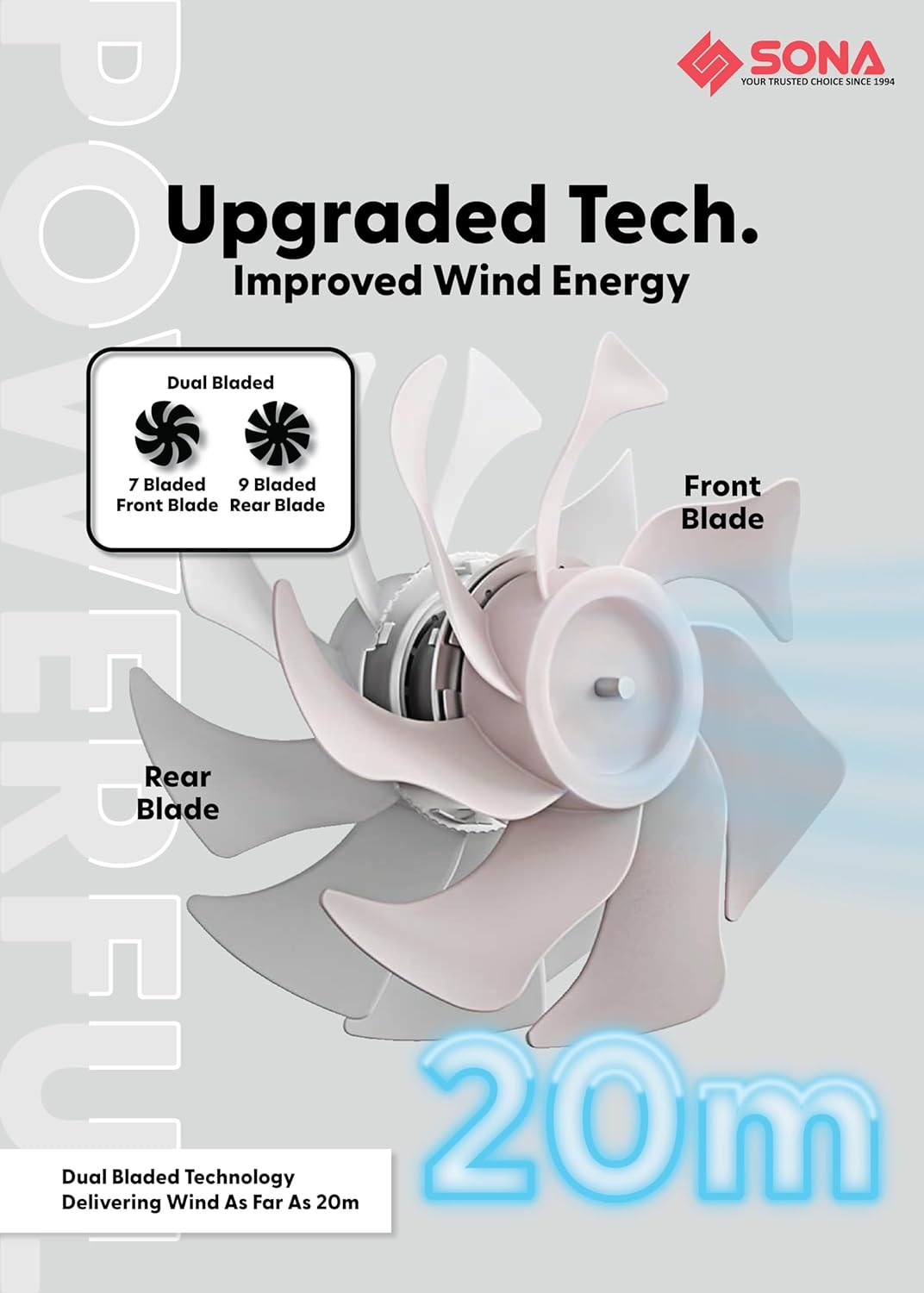
Figure 4.1: Illustration of the dual-bladed design, featuring a 7-bladed front fan and a 9-bladed rear fan, which contributes to improved wind energy and extended wind delivery.

Figure 4.2: Detail of the brushless DC motor, highlighting its role in providing powerful airflow with 32W power consumption and contributing to the fan's longevity.
5. Kasutusjuhised
The fan can be operated using the control panel on the unit or the included remote control.
5.1 Juhtpaneel ja kaugfunktsioonid
- Toitenupp: Lülitab ventilaatori sisse/välja.
- Kiiruse reguleerimine: Cycle through 9 wind speeds.
- Võnkumisnupp: Activates/deactivates 3D oscillation (up-down and left-right).
- Taimeri nupp: Seadistab töötaimeri kuni 9 tunniks.
- ECO-Saving Function: Activates the energy-saving mode, which can operate for up to 15 hours.
- Nutikas mälufunktsioon: The fan remembers your last used settings (speed, oscillation, mode) when turned off and resumes them upon restart.
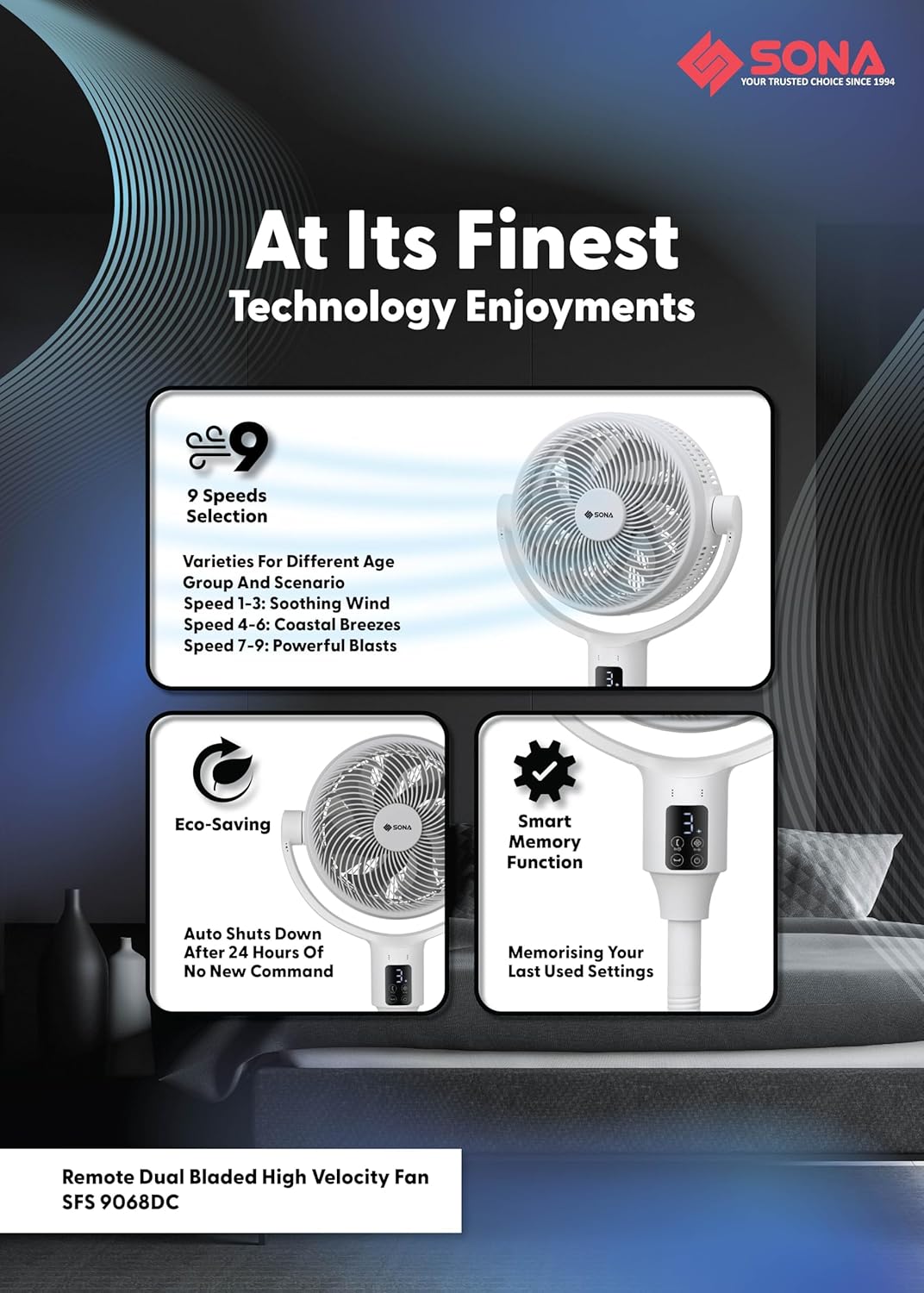
Joonis 5.1: Üleview of the fan's operational features, including 9 speed settings (1-3 soothing, 4-6 coastal breezes, 7-9 powerful blasts), Eco-Saving mode, and Smart Memory function.
6. Funktsioonide selgitus
6.1 Dual Bladed Technology
The fan incorporates a unique dual-bladed design with a 7-bladed front fan and a 9-bladed rear fan. This configuration works synergistically to generate a powerful and consistent airflow, delivering wind up to 20 meters.
6.2 Harjadeta alalisvoolumootor
Equipped with a premium brushless DC motor, the fan operates efficiently at 32W, providing strong wind output while ensuring a longer lifespan and quieter operation compared to traditional motors.
6.3 3D Oscillation and Height Adjustment
The fan offers 3D oscillation, allowing it to move both horizontally (left-right) and vertically (up-down) to distribute air across a wider area. It also features 2-in-1 height adjustments, enabling use as both a floor fan (lowest 63 cm) and a pedestal fan (highest 111 cm).
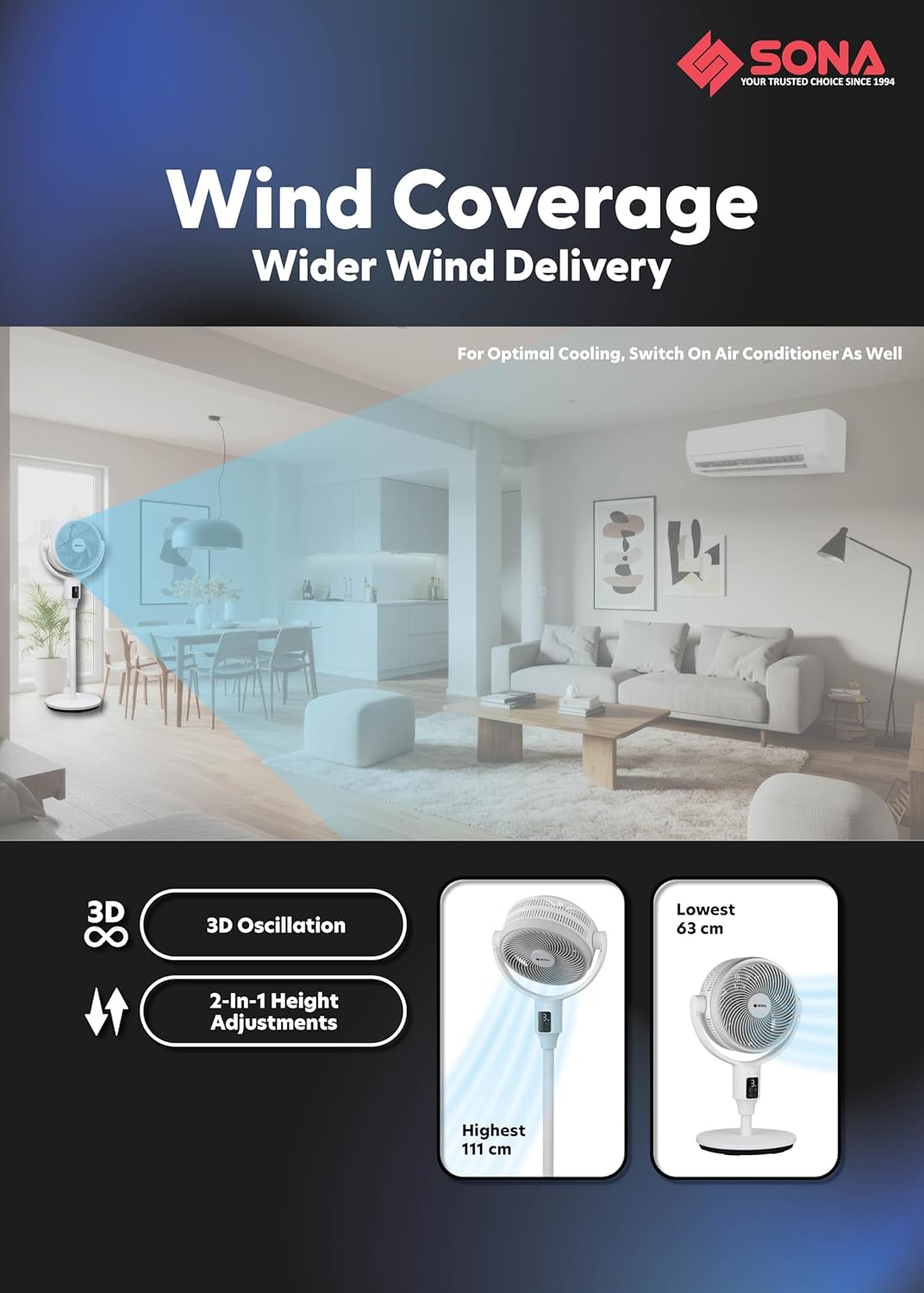
Figure 6.1: Visual representation of the fan's 3D oscillation capability and its adjustable height settings, ranging from 63 cm to 111 cm.
6.4 Anti-Drag Technology
This feature maximizes the drawing of air from the back of the fan and minimizes air loss as air travels from the back to the front. The unique shape and curving of the rear guard and rear fan blade are designed to maximize air intake. The unmovable middle fan blade pushes drawn air further without dispersing it, and the front fan blade's purpose is to deliver wind distance, with its curved edges on the front fan guard designed to push wind forward.
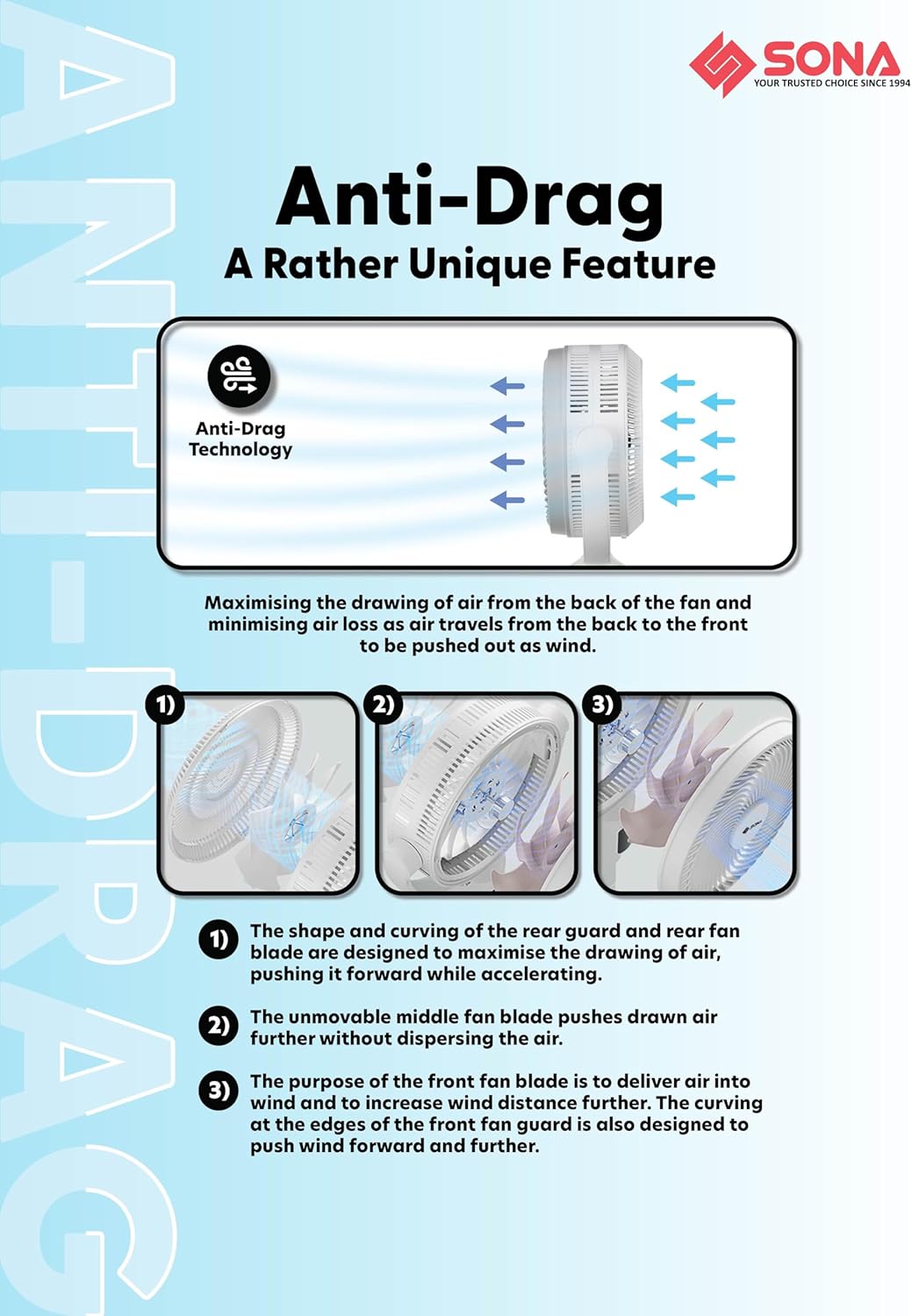
Figure 6.2: Detailed explanation of the Anti-Drag Technology, illustrating the airflow path and the roles of the fan components in maximizing wind delivery.
7. Hooldus ja puhastamine
Regular cleaning ensures optimal performance and extends the lifespan of your fan. Always unplug the fan before cleaning.
- Väline puhastus: Pühkige ventilaatori välispindu pehme lapigaamp riie. Ärge kasutage abrasiivseid puhastusvahendeid ega lahusteid.
- Tera puhastamine: The front and rear guards are dismantlable for easy access to the fan blades. Carefully remove the front guard, then the fan blades. Wipe the blades with a soft, damp cloth to remove dust and debris. Ensure blades are completely dry before reassembly.
- Kaitsekihi puhastamine: The fan features anti-rusting plastic front and rear guards. Clean them with a damp riie.
- Hoiustamine: Kui ventilaatorit pikemat aega ei kasutata, hoidke seda jahedas ja kuivas kohas, eelistatavalt originaalpakendis.
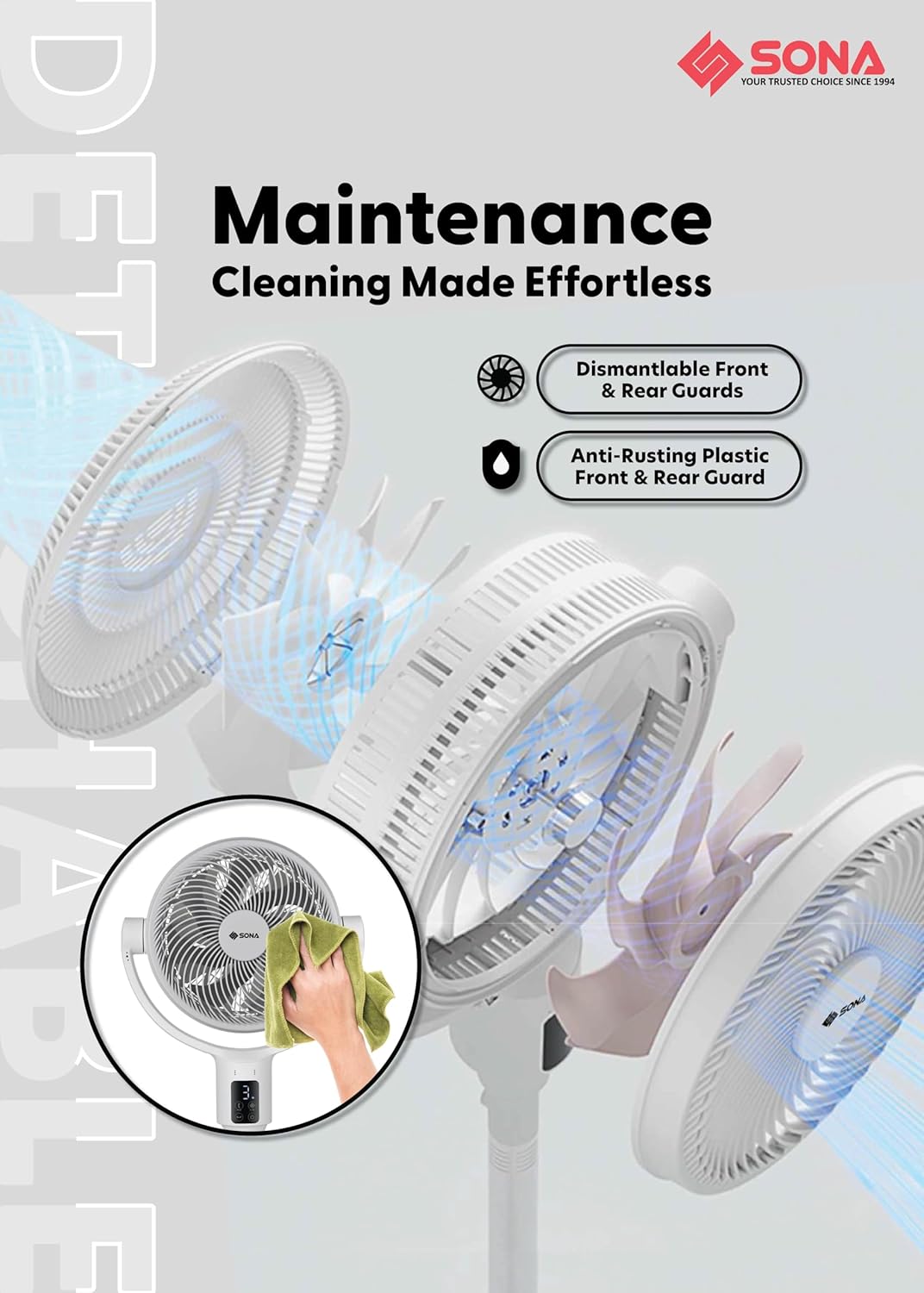
Figure 7.1: Visual guide for fan maintenance, demonstrating the ease of dismantling guards for cleaning and highlighting the anti-rusting material.
8. Veaotsing
If you encounter any issues with your fan, please refer to the table below for common problems and solutions.
| Probleem | Võimalik põhjus | Lahendus |
|---|---|---|
| Ventilaator ei lülitu sisse | Toiteallikas puudub Toitenuppu pole vajutatud | Check if the power cord is securely plugged in. Ensure the power outlet is functional. Press the power button on the unit or remote. |
| Nõrk õhuvool | Fan blades are dirty Fan speed is too low | Unplug the fan and clean the fan blades and guards (refer to Maintenance section). Increase the fan speed setting. |
| Ventilaator teeb ebatavalist häält | Lahtised osad Takistused ventilaatori labades | Unplug the fan and check for any loose components or foreign objects obstructing the blades. Ensure the fan is on a stable surface. |
| Kaugjuhtimispult ei tööta | Tühjad akud Obstruction between remote and fan | Replace the batteries in the remote control. Ensure there is a clear line of sight between the remote and the fan's receiver. |
| Võnkumine ei tööta | Võnkefunktsioon pole aktiveeritud | Press the oscillation button on the unit or remote to activate the feature. |
9. Tehnilised andmed
| Funktsioon | Spetsifikatsioon |
|---|---|
| Mudeli number | SFS 9068DC |
| Toite sisend | 100-240V~ 50/60Hz |
| Energiatarve | 32W |
| Mootori tüüp | Harjadeta alalisvoolumootor |
| Kiiruste arv | 9 |
| Taimer | Kuni 9 tundi |
| Võnkumine | Up-Down and Left-Right 3D Oscillation |
| Ventilaatori labad | 7 Bladed Front Fan Blade, 9 Bladed Rear Fan Blade |
| Wind Delivery | Kuni 20m |
| Eriomadused | Smart Memory Function, ECO-Saving Function (15Hrs), Remote Control, Anti-Drag Technology |
| Kõrguse reguleerimine | 2-in-1 (Lowest 63 cm, Highest 111 cm) |
| Materjal | Plastikust |
| Värv | Valge |
10. Garantii teave
The SONA SFS 9068DC fan comes with a 3-aastane garantii mootorile from the date of purchase. This warranty covers manufacturing defects under normal use. Please retain your proof of purchase for warranty claims. The warranty does not cover damage caused by misuse, accident, unauthorized repair, or normal wear and tear.
11. Klienditugi
For further assistance, troubleshooting, or warranty inquiries, please contact Sona customer support:
- Websait: Visit the official Sona webtugiressursside sait.
- E-post: Vaadake toote pakendilt või ametlikult webklienditeeninduse e-posti sait.
- Telefon: Vaadake toote pakendilt või ametlikult webklienditeeninduse telefoninumbrite sait.
Please have your model number (SFS 9068DC) and proof of purchase ready when contacting support.