
XINDADA HW S11
XINDADA HW S11 Smartwatch User Manual
Model: HW S11
1. Sissejuhatus
The XINDADA HW S11 Smartwatch is a versatile device designed for communication, navigation, and activity tracking. Featuring a 2.02-inch HD display, Android 8.1 operating system, and a powerful quad-core processor, it supports independent calls, video calls, GPS positioning, and a wide range of applications.

Pilt 1.1: läbiview of the HW S11 Smartwatch highlighting key features such as 4G video calls, GPS, music control, and access to popular apps.
2. Mis on karbis
Palun kontrollige pakendi sisu lahtipakkimisel:
- XINDADA HW S11 Smartwatch
- Charging Cable (Magnetic Wireless)
- Kasutusjuhend
3. Algseadistus
3.1 Nutikella laadimine
Before first use, fully charge your smartwatch. Connect the magnetic wireless charging cable to the charging points on the back of the watch and to a compatible USB power source. The watch has a 700 mAh battery.
3.2 SIM -kaardi paigaldamine
The HW S11 Smartwatch supports an independent SIM card for cellular connectivity. Locate the separate SIM card slot on the side of the watch. Carefully insert a Nano-SIM card into the slot, ensuring correct orientation.

Image 3.1: Detail of the smartwatch showing the 180° swivel camera and the dedicated SIM card slot for independent cellular connectivity.
3.3 Toide sisse/välja
- Sisselülitamiseks: Vajutage ja hoidke toitenuppu (tavaliselt küljel) all, kuni ekraan süttib.
- Väljalülitamiseks: Vajutage ja hoidke toitenuppu all, seejärel valige ekraanilt „Lülita välja”.
3.4 Esialgne konfiguratsioon
Upon first power-on, follow the on-screen prompts to select your language, set the time and date, and connect to a Wi-Fi network if desired.
4. Kasutusjuhised
4.1 Liidese navigeerimine
The smartwatch features a 2.02-inch HD touchscreen. Swipe left, right, up, or down to access different menus, notifications, and quick settings. Tap to select items and press the side button to return to the home screen or go back.
4.2 Helistamine ja kõnede vastuvõtmine
With a SIM card installed, you can make and receive calls directly from your smartwatch. Access the 'Phone' application, dial a number, or select a contact to initiate a call. Incoming calls will display on the screen, allowing you to answer or reject.
4.3 Video Calls
The HW S11 supports HD video calls. Utilize the built-in 180° swivel telescopic camera for video communication. Ensure you have a stable internet connection (Wi-Fi or cellular data) and a compatible video calling application installed.
4.4 GPS-positsioneerimine
The smartwatch integrates GPS, Beidou, and LBS Wi-Fi for precise real-time positioning. This feature allows for tracking your location, recording historical trajectories, and indoor positioning in large public spaces like malls or airports.
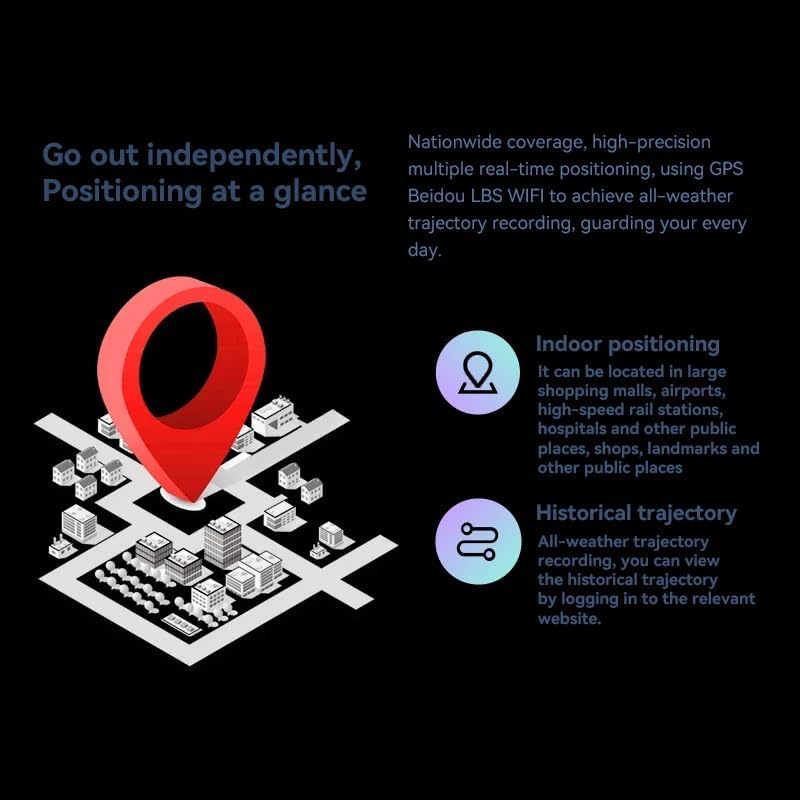
Image 4.1: Visual representation of the smartwatch's GPS and multi-location tracking features, including indoor and historical trajectory capabilities.
4.5 Rakenduse kasutamine
Running on Android 8.1 with 2GB RAM and 16GB internal storage, the smartwatch allows you to download and use various applications from its integrated app store. Popular apps like WeChat, TikTok, YouTube, and games are supported.

Image 4.2: The smartwatch interface showcasing a selection of popular applications available for download and use.
4.6 Muusika juhtimine
Control music playback on your connected smartphone or directly from the smartwatch if music files are stored on its internal memory. Access the music player app to play, pause, skip tracks, and adjust volume.
5. Hooldus
- Puhastamine: Wipe the watch screen and body with a soft, dry, lint-free cloth. Avoid using harsh chemicals or abrasive materials.
- Veekindlus: While the device may have some resistance, avoid submerging it in water or exposing it to high-pressure water streams.
- Hoiustamine: Hoidke nutikella jahedas ja kuivas kohas, kui te seda ei kasuta.
- Aku hooldus: To prolong battery life, avoid extreme temperatures and do not allow the battery to fully discharge for extended periods.
6. Veaotsing
6.1 Watch Does Not Power On
- Veendu, et kell on täielikult laetud. Ühenda see laadijaga vähemalt 30 minutiks.
- Try pressing and holding the power button for 10-15 seconds to force a restart.
6.2 Poor GPS Signal
- Veenduge, et viibite avatud alal, kus on selge view taevast.
- Avoid areas with tall buildings or dense foliage that can obstruct the signal.
6.3 Rakendused ei laadi alla/tööta
- Check your Wi-Fi or cellular data connection.
- Ensure there is sufficient storage space on the device (16GB internal memory).
- Taaskäivitage nutikell.
6.4 Puuteekraan ei reageeri
- Puhastage ekraan mustuse ja niiskuse eemaldamiseks.
- Taaskäivitage seade. Kui probleem püsib, võtke ühendust klienditoega.
7. Tehnilised andmed

Pilt 7.1: Sisemine view highlighting the Android 8.1 operating system and the quad-core ASR8601 processor, ensuring smooth operation.
| Funktsioon | Detail |
|---|---|
| Mudel | HW S11 |
| Kaubamärk | XINDADA |
| Operatsioonisüsteem | Android 8.1 |
| Protsessor | Quad-core (ASR8601) |
| RAM | 2 GB |
| Sisemälu | 16 GB |
| Ekraani suurus | 2.02 tolli |
| Kuva tüüp | LCD |
| Resolutsioon | 320 x 390 pikslit |
| Aku mahutavus | 700 mAh |
| Ühenduvus | Bluetooth, Wi-Fi, 4G (SIM card support) |
| GPS | Integrated GPS, Beidou, LBS |
| Kaamera | 180° Swivel Telescopic Camera |
| Mõõtmed | 5 x 5 x 5 cm |
| Kaal | 100 g |
8. Garantii ja tugi
Garantiiteabe ja tehnilise toe saamiseks lugege ostuga kaasas olnud dokumente või võtke ühendust edasimüüjaga. Hoidke ostutõendit alles garantiinõuete esitamiseks.
Ask a question about this manual
Ask about setup, troubleshooting, compatibility, parts, safety, or missing instructions. Manuals+ will review the question and use this page’s manual context to help answer it.