
1. Toote lõppview
This manual provides essential information for setting up, operating, maintaining, and troubleshooting your HP OMEN 16L Gaming Desktop. This high-performance desktop is equipped with an Intel Core i7-14700F processor, NVIDIA GeForce RTX 4060 graphics, 64GB DDR5 RAM, and a 2TB PCIe NVMe M.2 Solid State Drive, running on Windows 11 Pro.
The HP OMEN 16L is designed for demanding gaming and computing tasks, offering robust performance and efficient cooling. It comes bundled with a Thunderobot KG3089R Gaming Keyboard to enhance your experience.

Pilt 1.1: esikülg view of the HP OMEN 16L Gaming Desktop.
2. Seadistusjuhend
2.1 Karbist väljavõtmine ja esialgne paigutamine
- Carefully remove the desktop and all accessories from the packaging. Retain packaging for future transport or service.
- Asetage lauaarvuti stabiilsele ja tasasele pinnale, kus on piisav ventilatsioon igast küljest. Veenduge, et ükski ventilatsiooniavad poleks takistatud.
2.2 Välisseadmete ühendamine
Connect your monitor, keyboard, mouse, and other peripherals to the appropriate ports on the desktop. Refer to the 'Ports' section for a detailed diagram.
- Monitor: Connect your monitor using a DisplayPort or HDMI cable to the dedicated graphics card ports.
- Klaviatuur ja hiir: Connect the Thunderobot KG3089R Gaming Keyboard and your mouse to any available USB Type-A ports.
- Võimsus: Connect the power cable to the desktop's power supply port and then to a grounded electrical outlet.
- Võrk: For wired internet, connect an Ethernet cable to the RJ-45 port. For wireless, ensure Wi-Fi 6 is enabled after initial setup.

Pilt 2.1: Näideample of a complete desktop setup with peripherals connected.
2.3 Esimene käivitamine ja Windows 11 Pro seadistamine
- Vajutage lauaarvuti esiküljel asuvat toitenuppu.
- Windows 11 Pro esmase seadistamise (sh keele, piirkonna, võrguühenduse ja kasutajakonto loomise) lõpuleviimiseks järgige ekraanil kuvatavaid juhiseid.
- Ensure all drivers are up-to-date after Windows setup for optimal performance.
3. Kasutusjuhised
3.1 Toide sisse/välja
- Toide sisse: Vajutage lauaarvuti esiküljel asuvat toitenuppu.
- Toide välja: Click the Start button in Windows, then select Power > Shut down. Avoid direct power-offs unless necessary to prevent data loss.
3.2 Võrguühendus
- Juhtmega (Ethernet): Connect an Ethernet cable to the RJ-45 port on the rear of the desktop. The connection should be automatically detected.
- Traadita (Wi-Fi 6): Windowsis klõpsake tegumiribal võrguikoonil, valige oma WiFi-võrk, sisestage parool ja looge ühendus.
3.3 Using Ports and Connections
The desktop offers a variety of ports for connecting external devices:
- Eesmised pordid: 3 x Superspeed USB Type-A (5Gbps signaling rate), 1 x Superspeed USB Type-C (10Gbps signaling rate), 1 x Headphone/Microphone combo.
- Tagumised pordid: 4 x USB Type-A 2.0, 1 x RJ-45 (Ethernet), 1 x HDMI, 3 x DisplayPort, 2 x Audio Port.

Image 3.1: Front panel ports for easy access.
3.4 Mängimine ja jõudlus
The HP OMEN 16L is optimized for gaming. Utilize the pre-installed OMEN Gaming Hub software to monitor system performance, customize RGB lighting, and optimize game settings. Ensure your graphics drivers are regularly updated for the best gaming experience.

Image 3.2: The HP OMEN 16L desktop in a gaming environment.
4. Hooldus
4.1 Puhastamine
- Välimus: Kasutage pehmet, damp Välispindade puhastamiseks lapiga. Vältige tugevaid kemikaale.
- Vents: Periodically use compressed air to clear dust from the intake and exhaust vents to maintain optimal airflow and cooling. Ensure the system is powered off before cleaning vents.
4.2 Tarkvaravärskendused
- Kontrollige ja installige Windowsi värskendusi regulaarselt Windowsi sätete kaudu.
- Update graphics drivers (NVIDIA GeForce RTX 4060) directly from the NVIDIA website or through the GeForce Experience application.
- Update HP-specific drivers and firmware using the HP Support Assistant or OMEN Gaming Hub.
4.3 Andmete varundamine
Varundage oma olulisi andmeid regulaarselt välisele kõvakettale või pilvesalvestusse, et vältida andmete kadumist süsteemi rikke korral.
5. Veaotsing
See jaotis käsitleb levinud probleeme, millega võite kokku puutuda.
5.1 Toide puudub
- Veenduge, et toitekaabel oleks kindlalt ühendatud nii lauaarvuti kui ka pistikupessa.
- Veenduge, et pistikupesa töötab, ühendades sinna teise seadme.
5.2 Kuva puudub
- Check that the monitor is powered on and the video cable (DisplayPort/HDMI) is securely connected to both the desktop's graphics card and the monitor.
- Veenduge, et teie monitoril on valitud õige sisendallikas.
- Mitme monitori kasutamisel testige ühe monitoriga.
5.3 Süsteemi aeglustumine või hangumine
- Sulgege taustal töötavad mittevajalikud rakendused.
- Check Task Manager (Ctrl+Shift+Esc) for processes consuming high CPU, RAM, or disk resources.
- Ensure the system has adequate ventilation and is not overheating. Clean vents if necessary.
- Käivitage täielik süsteemikontroll pahavara või viiruste suhtes.
5.4 Võrguühenduse probleemid
- Juhtmega: Check the Ethernet cable connection and router status.
- Juhtmeta: Restart your router/modem. Ensure Wi-Fi is enabled in Windows and try reconnecting to the network.
6. Tehnilised andmed
Detailed technical specifications for the HP OMEN 16L Gaming Desktop (Model TG03).
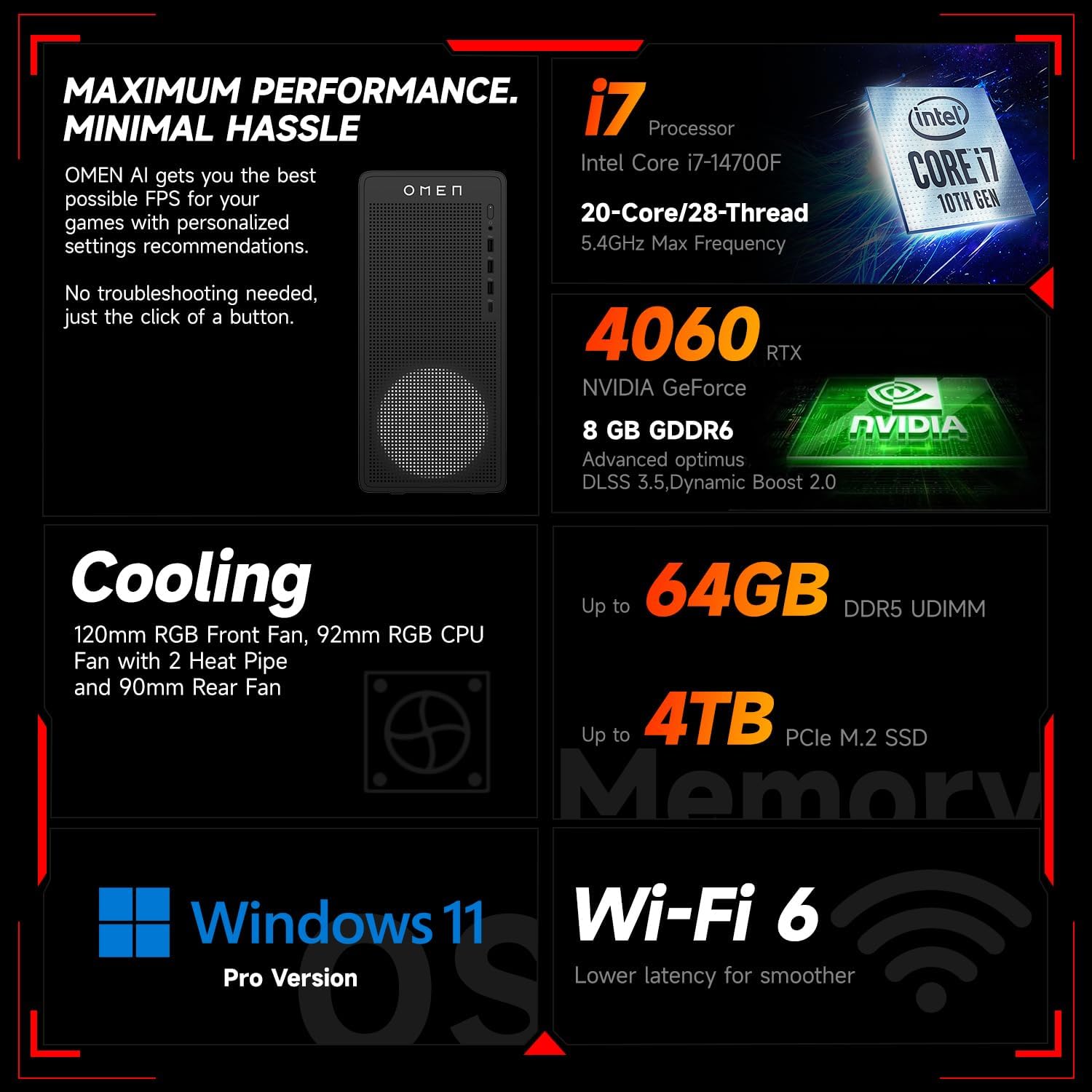
Pilt 6.1: läbiview of key performance and cooling specifications.
| Komponent | Spetsifikatsioon |
|---|---|
| Kaubamärk | HP |
| Mudeli number | TG03 |
| Operatsioonisüsteem | Windows 11 Pro |
| CPU mudel | Intel Core i7-14700F (20 südamikku, 28 niiti, kuni 5.4 GHz) |
| Graafika kaasprotsessor | NVIDIA GeForce RTX 4060 (8 GB GDDR6) |
| Paigaldatud RAM-mälu suurus | 64 GB DDR5 RAM |
| Mälu salvestusmaht | 2 TB PCIe NVMe M.2 SSD |
| Traadita ühenduvus | Wi-Fi 6, Bluetooth |
| Eesmised pordid | 3x USB Type-A (5Gbps), 1x USB Type-C (10Gbps), Headphone/Mic Combo |
| Tagumised sadamad | 4x USB Type-A 2.0, 1x RJ-45, 1x HDMI, 3x DisplayPort, 2x Audio Port |
| Mõõdud (P x L x K) | 13.26 x 6.1 x 12.12 tolli |
| Kauba kaal | 13.14 naela |
| Värv | Must |
| Komplektis olev lisatarvik | Thunderobot KG3089R Gaming Keyboard |

Image 6.2: Details of the Intel Core i7-14700F processor.

Image 6.3: Information on the NVIDIA GeForce RTX 4060 graphics card.
7. Garantii teave
Your HP OMEN 16L Gaming Desktop comes with a standard manufacturer's warranty. The specific terms and duration of the warranty are provided with your purchase documentation and are subject to HP's official warranty policy.
Oluline märkus: Modifications to the system, such as upgrading components (e.g., RAM) with non-HP certified parts or by unauthorized personnel, may void the manufacturer's warranty. Always consult HP's official support or authorized service providers before making any internal hardware changes.
The Thunderobot KG3089R Gaming Keyboard bundled with this desktop may have a separate warranty provided by its manufacturer. Please refer to the documentation included with the keyboard for its specific warranty terms.
8. Toetus
For further assistance, technical support, or warranty claims, please contact HP Customer Support through the following channels:
- HP tugi Websait: Külastage www.hp.com/support draiverite, kasutusjuhendite ja tõrkeotsingu juhendite jaoks.
- HP tugiassistent: Use the pre-installed HP Support Assistant software on your desktop for diagnostics, updates, and direct access to support.
- Telefonitugi: Refer to your product documentation or the HP support webpiirkondlike kontaktnumbrite sait.