
Sissejuhatus
This manual provides instructions for the MangoKit CD-X Portable CD Player. This device allows you to enjoy your favorite audio CDs, MP3, and WMA files on the go, with versatile connectivity options including Bluetooth 5.3, wired headphones, and AUX output. It features a rechargeable battery and anti-skip protection for uninterrupted listening.
Ohutusteave
- Ärge jätke seadet äärmuslike temperatuuride, otsese päikesevalguse ega kõrge õhuniiskuse kätte.
- Vältige seadme maha pillamist või tugevate löökide allutamist.
- Ärge proovige seadet ise lahti võtta ega parandada. Abi saamiseks võtke ühendust klienditoega.
- Use only the provided charging cable and a compatible power adapter (5V/1A recommended, not included) to charge the device.
- Hoidke seadet veest ja muudest vedelikest eemal.
- When using headphones, adjust the volume to a moderate level to prevent hearing damage.
Pakendi sisu
Veenduge, et pakendis on kõik esemed olemas:
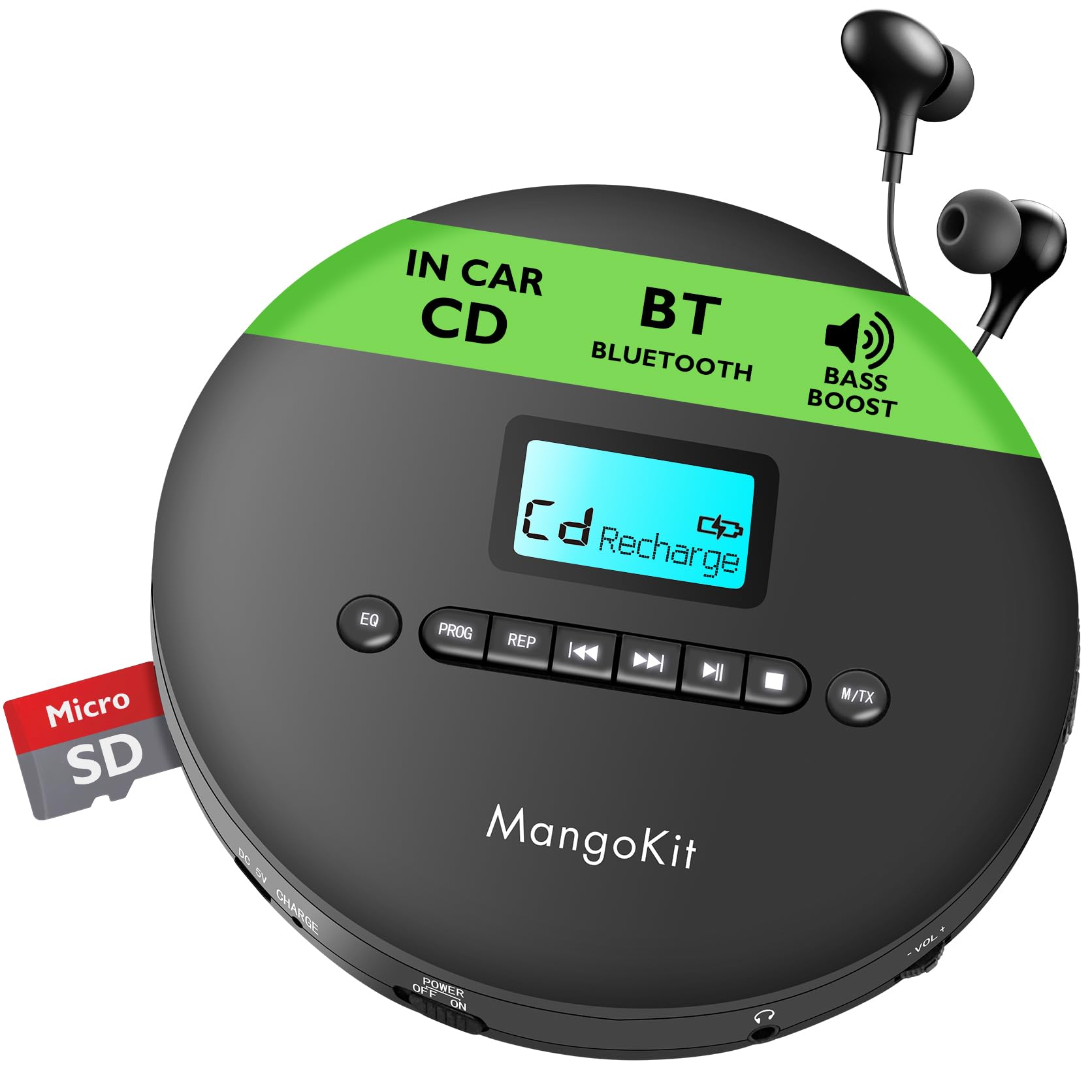
- 1 x MangoKit CD-X Portable CD Player
- 1 x juhtmega kõrvaklapid
- 1 x USB Type-C laadimiskaabel
- 1 x 3.5 mm kuni 3.5 mm AUX kaabel
- 1 x kasutusjuhend

The MangoKit CD-X Portable CD Player and its included accessories, ready for use.
Toode läbiview
The MangoKit CD-X features an intuitive layout for easy operation.
Esipaneeli juhtnupud:
- EQ nupp: Press to cycle through equalizer sound modes.
- PROG nupp: Used for programming track playback order.
- REP Button: Cycles through repeat modes (repeat one, repeat all, random).
- Eelmise/tagasikerimise nupp: Short press for previous track, long press to rewind.
- Esitamise/pausi nupp: Taasesituse alustamine või peatamine.
- Järgmise/edasikerimise nupp: Short press for next track, long press to fast forward.
- Stop-nupp: Peatab taasesituse.
- M/TX Button: Mode/Bluetooth Transmit button.
- LCD ekraan: Shows track number, time, battery status, and mode.
Side Panel Ports and Switches:
- DC 5V CHARGE Port: USB Type-C input for charging.
- POWER OFF/ON Switch: Lülitab seadme sisse või välja.
- Kõrvaklappide pesa (3.5 mm): Connect wired headphones or AUX cable.
- HELI- / HELI+: Helitugevuse nupud.
- TF CARD Slot: MP3/WMA esitamiseks files TF-kaardilt.

Üksikasjalik view of the MangoKit CD-X Portable CD Player's controls and ports.
Seadistamine
1. Charging the Player
Enne esmakordset kasutamist laadige seade täielikult.
- Connect the USB Type-C charging cable to the DC 5V CHARGE port on the player.
- Connect the other end of the USB cable to a compatible USB power adapter (5V/1A recommended, not included) or a computer's USB port.
- The battery indicator on the LCD display will show charging status. It will indicate full when charging is complete.
Täislaadimine annab kuni 12 tundi taasesitust.
The CD player's compact design and long battery life for portable use.
2. CD sisestamine
- Gently slide the "OPEN" switch to open the CD compartment lid.
- Place the CD with the label side facing up onto the center spindle.
- Press the CD gently until it clicks into place.
- Sulgege CD-pesa kaas kindlalt, kuni see lukustub.
3. Connecting Headphones or AUX Cable
- For wired listening, plug the included earphones or your own 3.5mm headphones into the headphone jack.
- To connect to an external speaker or car audio system, use the included 3.5mm AUX cable. Plug one end into the player's headphone jack and the other end into the AUX input of your external device.

Connecting the CD player to a car audio system using the AUX cable.
4. Bluetooth Pairing (for Headphones/Earphones)
The CD-X player supports Bluetooth 5.3 for wireless audio transmission to Bluetooth headphones or earphones.
- Veenduge, et CD-mängija on sisse lülitatud ja CD on sisestatud.
- Turn on your Bluetooth headphones/earphones and put them into pairing mode (refer to your headphone's manual for specific instructions).
- On the CD player, long press the M/TX button. The Bluetooth icon on the LCD display will flash, indicating it's searching for devices.
- Kui sidumine on toimunud, lakkab Bluetoothi ikoon vilkumast ja jääb põlema. Nüüd saate heli juhtmevabalt esitada.
Note: Bluetooth is for connecting to headphones/earphones only and does not support car audio systems directly via Bluetooth. Use the AUX cable for car audio.

The CD player's Bluetooth feature for wireless headphone connection.
Kasutusjuhised
Toide sisse/välja
Libistage TOITE VÄLJAS / SEES switch to "ON" to turn on the player. Slide to "OFF" to turn it off.
Tavaline taasesitus
- After inserting a CD and powering on, the player will automatically start reading the disc.
- Vajutage nuppu Esita/Paus nuppu taasesituse alustamiseks või peatamiseks.
- Vajutage nuppu Edasi nuppu järgmise loo juurde liikumiseks.
- Vajutage nuppu Eelmine button to go back to the beginning of the current track or to the previous track.
- Vajutage pikalt nuppu Edasi button for fast forward.
- Vajutage pikalt nuppu Eelmine button for rewind.
- Vajutage nuppu Peatus taasesituse peatamiseks.
Helitugevuse juhtimine
Kasutage VOL+ ja VOL- buttons on the side of the player to adjust the volume level.
EQ (Equalizer) Settings
Vajutage nuppu EQ button repeatedly to cycle through different sound modes (e.g., Bass, Pop, Jazz, Rock, Classic).
Repeat and Program Modes
Vajutage nuppu REP button repeatedly to select playback modes:
- REP 1: Kordab praegust lugu.
- KÕIK: Kordab kõiki plaadil olevaid lugusid.
- RAND: Esitab lugusid juhuslikus järjekorras.
- SISSEJUHATUS: Plays the first 10 seconds of each track (if available).
Programmi taasesitus
- Peatamisrežiimis vajutage nuppu PROG button. The display will show "PROG" and "01".
- Kasutage Eelmine or Edasi nuppe, et valida soovitud loo number.
- Vajutage PROG again to confirm the track and move to the next program slot.
- Korrake samme 2-3, et programmeerida kuni 20 lugu.
- Vajutage nuppu Esita/Paus nuppu programmeeritud taasesituse alustamiseks.
Hüppamise vastane kaitse
The player features electronic skip protection: 100 seconds for standard CDs and 180 seconds for MP3 CDs. This function helps maintain continuous playback during movement or minor shocks.
Playing MP3/WMA CDs or TF Card
When an MP3/WMA CD is inserted or a TF card with MP3/WMA files is inserted into the TF CARD slot, the player will automatically detect the file type. Use the navigation buttons to browse folders and tracks.

The CD player is ideal for language learning and listening to audiobooks.
Hooldus
Seadme puhastamine
Wipe the player with a soft, dry cloth. Do not use abrasive cleaners or solvents.
Objektiivi puhastamine
If the player experiences reading errors, use a specialized CD lens cleaning disc (not included) to clean the laser lens.
Aku hooldus
- Aku eluea pikendamiseks vältige aku sagedast täielikku tühjendamist.
- If the device will not be used for an extended period, charge it at least once every three months.
Veaotsing
| Probleem | Lahendus |
|---|---|
| Mängija ei lülitu sisse. | Ensure the POWER switch is in the "ON" position. Check if the battery is charged; connect to power if necessary. |
| Ei mingit heli. | Check headphone connection. Adjust volume. Ensure headphones are properly paired if using Bluetooth. |
| Disc skipping or not playing. | Ensure the CD is clean and free of scratches. Make sure the CD is inserted correctly. Try a different CD. Clean the laser lens. |
| Bluetoothi sidumine nurjus. | Ensure your Bluetooth headphones are in pairing mode and close to the player. Turn off and on both devices and try again. |
Tehnilised andmed
| Funktsioon | Detail |
|---|---|
| Mudeli number | CD-X |
| Kaubamärk | MangoKit |
| Mõõtmed | 14 x 14 x 2.8 cm |
| Kaal | 400 g |
| Aku | 2000 mAh Rechargeable (up to 12 hours playback) |
| Ühenduvus | Bluetooth 5.3, AUX (3.5mm Jack) |
| Toetatud helivormingud | CD, CD-R, CD-RW, MP3, WMA |
| Hüppamise vastane kaitse | 100 sekundit (CD), 180 sekundit (MP3) |
| Kaasas olevad komponendid | CD Player, Earphones, USB Type-C Cable, AUX Cable, User Manual |
Garantii ja tugi
MangoKit products come with a standard manufacturer's warranty. For detailed warranty information, technical support, or any questions regarding your CD player, please refer to the contact information provided on the product packaging or visit the official MangoKit websaidile.
Tootevideod
See video annab visuaalse ülevaateview of the MangoKit CD-X Portable CD Player, showcasing its design, features, and various usage scenarios.