
Sissejuhatus
This manual provides detailed instructions for the installation, operation, and maintenance of your Generic HI-M505 Radio Receiver. Designed for 12V and 24V systems, this unit features DAB, AM, FM radio, USB connectivity, and Bluetooth, making it suitable for various applications, including compatibility with Komatsu, Kobelco, and Sumitomo excavator parts.
Pakendi sisu
Palun veenduge, et kõik allpool loetletud esemed on teie pakendis olemas:
- 1 x Car Radio Stereo With Frame
- 1 x GPS Cable
- 2 x USB kaabel
- 1 x Power Cable With Canbus
- 1 x RCA-kaabel
- 1 x kaamera sisendkaabel
- 1 x Radio Adapter Cable
- 1 x Kasutusjuhend (käesolev dokument)
Seadistamine ja installimine
Proper installation is crucial for optimal performance. If you are unsure about any steps, consult a qualified technician.
1. Ohutusmeetmed
- Enne paigaldamise alustamist ühendage sõiduki aku lahti, et vältida lühiseid.
- Ensure the unit is compatible with your vehicle's electrical system (12V or 24V).
- Do not install the unit where it may obstruct the driver's view või segada sõiduki tööd.
2. Seadme paigaldamine
- Carefully remove the existing radio or blank panel from the dashboard.
- Insert the HI-M505 radio stereo with its frame into the dashboard opening.
- Secure the unit using appropriate mounting hardware (not included unless specified).
3. Juhtmete ühendused
Connect the provided cables as follows:
- Power Cable with Canbus: Connect to the vehicle's power supply and ground. Ensure correct polarity. The Canbus connection facilitates communication with the vehicle's system.
- Radio Adapter Cable: Connect to the vehicle's antenna input.
- GPS-kaabel: Connect the GPS antenna to the unit and mount the antenna in a location with a clear view taevast.
- USB Cables (x2): Connect to the unit's USB ports. These can be routed to a convenient location for connecting USB devices.
- RCA-kaabel: Välise ühendamiseks amplifiers or other audio/video devices.
- Camera Input Cable: Tagaosa ühendamiseksview camera (camera not included).
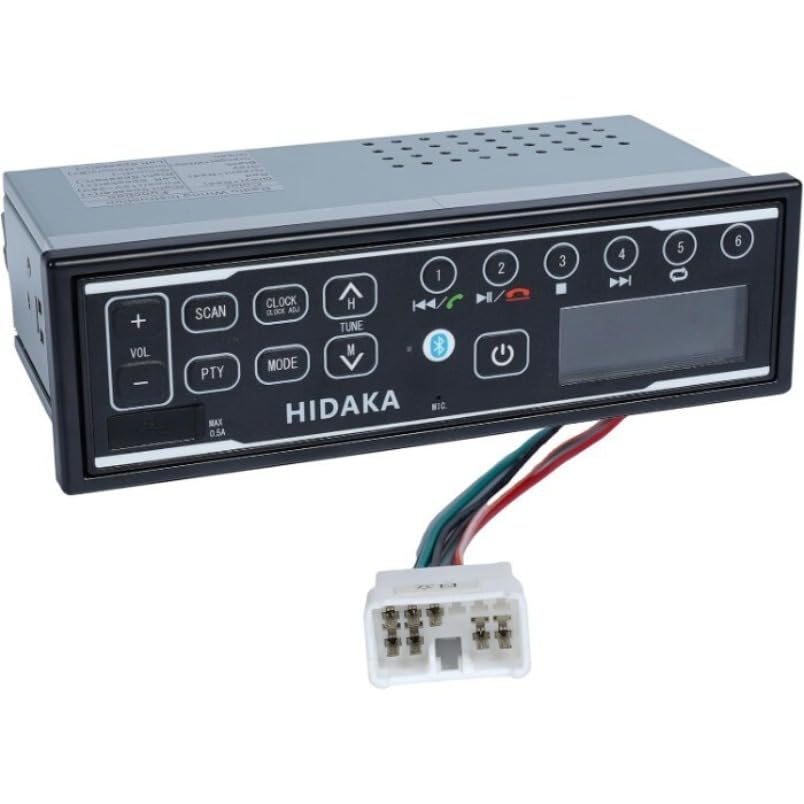
Pilt: Esikülg view of the HI-M505 Radio Receiver, showing the display and control buttons. This image illustrates the general appearance of the unit.
Kasutusjuhised
The HI-M505 operates on an Android platform, offering a user-friendly interface.
1. Toide sisse/välja
Press and hold the power button (usually marked with a power symbol) to turn the unit on or off. A short press typically mutes the audio or changes the source.
2. Radio Functions (DAB, AM, FM)
- Allika valik: Tap the "Radio" icon on the main screen or use the source button to select AM, FM, or DAB (if available in your region).
- Skaneerimine: Use the seek buttons to automatically scan for available stations.
- Eelseaded: Kiireks juurdepääsuks salvestage oma lemmikjaamad eelhäälestatud nuppude alla.
3. USB taasesitus
Insert a USB drive into one of the provided USB ports. The unit will automatically detect the drive and display its contents. Use the media player application to browse and play audio or video files.
4. Bluetooth-ühenduvus
- Go to the unit's settings menu and select "Bluetooth".
- Enable Bluetooth and make the unit discoverable.
- On your mobile device, search for available Bluetooth devices and select "HI-M505" (or similar name).
- Kinnitage sidumiskood, kui seda küsitakse.
- Once paired, you can stream audio or make hands-free calls.
5. Wi-Fi and Apple CarPlay
- WiFi: Access the Wi-Fi settings to connect to a local Wi-Fi network or a mobile hotspot. This enables internet access for apps and updates.
- Apple CarPlay: Connect your iPhone via USB to activate Apple CarPlay. This allows you to use compatible iPhone apps directly on the unit's display.
Hooldus
Regular maintenance ensures the longevity and optimal performance of your HI-M505 radio receiver.
- Puhastamine: Use a soft, dry cloth to clean the display and exterior. Avoid abrasive cleaners or solvents.
- Tarkvaravärskendused: Periodically check for software updates via Wi-Fi to ensure you have the latest features and bug fixes.
- Kaabli ühendused: Veenduge, et kõik kaablid on kindlalt ühendatud ja kahjustusteta.
Veaotsing
Probleemide korral vaadake järgmisi levinud probleeme ja lahendusi.
- Toide puudub:
- Check the power cable connections and ensure they are secure.
- Veenduge, et sõiduki raadio kaitsme ei oleks läbi põlenud.
- Ensure the vehicle's battery is charged and connected.
- Heli puudub:
- Check the volume level and ensure the unit is not muted.
- Kontrollige kõlarite ühendusi.
- Kui kasutate välist amplifier, kontrollige selle toidet ja ühendusi.
- Halb raadiovastuvõtt:
- Ensure the radio antenna is properly connected and not damaged.
- Check for obstructions or interference in the area.
- Bluetoothi sidumisprobleemid:
- Veenduge, et Bluetooth oleks lubatud nii seadmes kui ka teie mobiilseadmes.
- Kustutage eelmised sidumised mõlemas seadmes ja proovige uuesti siduda.
- Move closer to the unit to ensure a strong signal.
- USB-seadet ei tuvastatud:
- Ensure the USB device is formatted correctly (e.g., FAT32).
- Proovige teist USB-seadet või kaablit.
- Check if the USB port is damaged.
Kui probleem püsib, võtke ühendust klienditoega.
Tehnilised andmed
| Funktsioon | Detail |
|---|---|
| Mudel | HI-M505 |
| Kaubamärk | Üldine |
| Ühenduvustehnoloogia | Bluetooth, WiFi |
| Kontrolleri tüüp | Android |
| Eriomadused | Apple CarPlay, Built-In Wi-Fi |
| Ühilduvad seadmed | Ampelujõulisem |
| Ühenduse tüüp | USB tüüp A |
| Heliväljundi režiim | Stereo |
| Kauba kaal | 4.4 naela |
| Toite sisend | 12V / 24V DC (as per product description) |
Garantii teave
Specific warranty terms and conditions for the Generic HI-M505 Radio Receiver are provided by the seller at the time of purchase. Please refer to your purchase documentation or contact the seller directly for detailed warranty coverage, duration, and claim procedures.
Klienditugi
For technical assistance, troubleshooting beyond this manual, or inquiries regarding your HI-M505 Radio Receiver, please contact the seller or retailer from whom you purchased the product. They will be able to provide the most accurate and timely support.