
1. Sissejuhatus
Tänan ostu eestasing the THINKYA TH-A10 Portable CD Player. This device combines classic CD playback with modern connectivity options, including Bluetooth 5.1, USB, AUX, and optical output. Designed for high-fidelity audio, it features built-in stereo speakers, a rechargeable battery, and anti-skip protection for stable playback. Please read this manual thoroughly before use to ensure proper operation and to maximize your listening experience.

Image: The THINKYA TH-A10 Portable CD Player, highlighting its elegant wooden finish and compact form factor.
2. Toote lõppview
2.1 Komponendid ja juhtseadised
The TH-A10 CD player is designed with user-friendly controls and a robust build. It features a wooden cabinet for enhanced sound quality and reduced resonance.
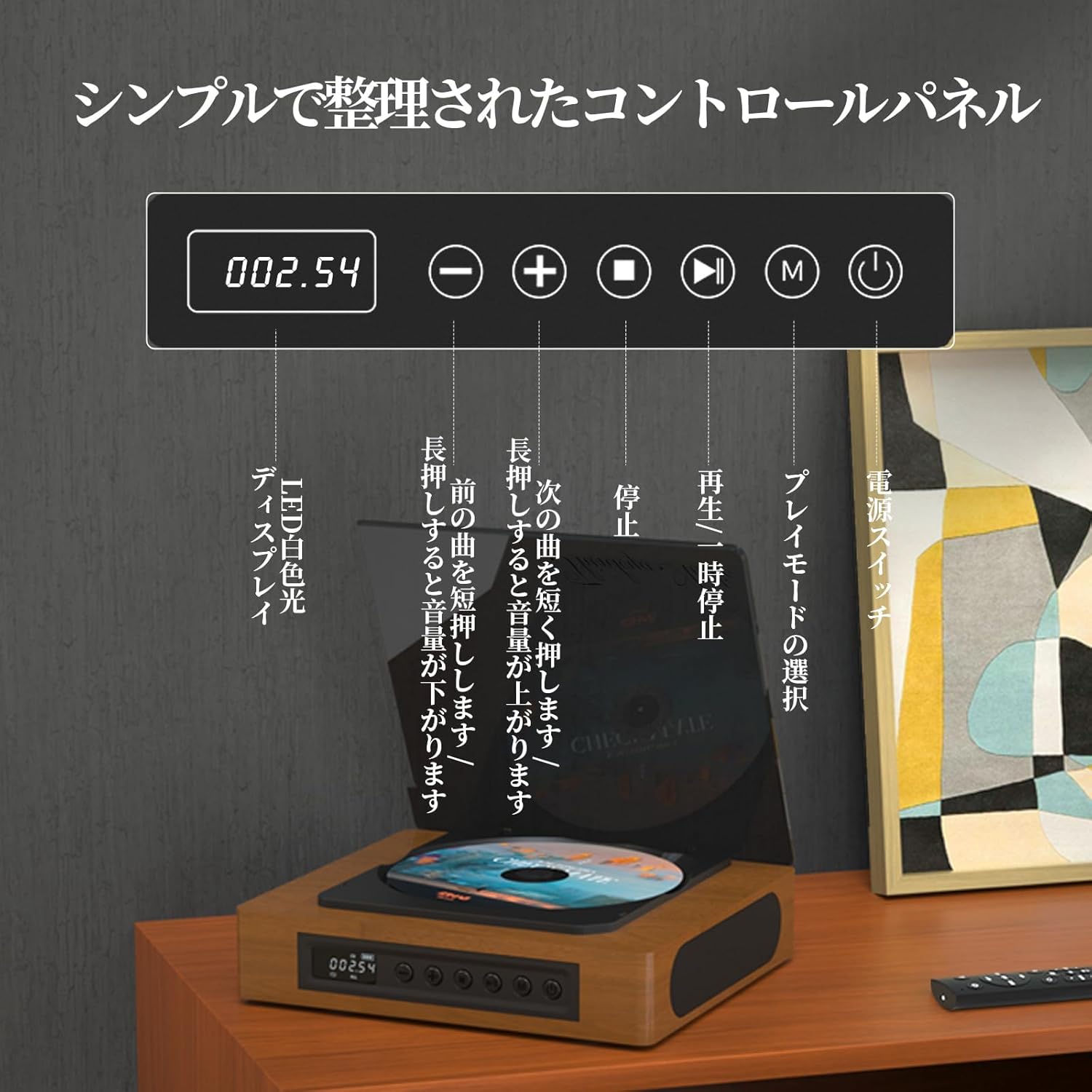
Image: The control panel and LED display of the TH-A10 CD Player. The LED display shows track number and time, while buttons control playback, volume, and mode selection.
Juhtpaneeli funktsioonid:
- LED-ekraan: Shows current track, time, and mode.
- Toitelüliti: Lülitab seadme sisse/välja.
- Esitamise/pausi nupp: Taasesituse alustamine või peatamine.
- Eelmine/helitugevuse vähendamise nupp: Eelmise loo kerimiseks lühike vajutus, helitugevuse vähendamiseks pikk vajutus.
- Järgmine/Helitugevuse suurendamise nupp: Lühike vajutus järgmise loo jaoks, pikk vajutus helitugevuse suurendamiseks.
- Stop-nupp: Peatab taasesituse.
- Režiimi nupp (M): Selects playback mode (CD, Bluetooth, USB, AUX, Optical).

Pilt: Detailne view of the LED display, indicating operational status and battery level.
2.2 Tagapaneeli ühendused
The rear panel provides various ports for external connections.

Image: The rear panel of the TH-A10, displaying the various input/output ports including USB, AUX, Type-C for charging, and Optical output.
Pordid:
- Alalisvoolu sisend (C-tüüp): For charging the internal battery or powering the device.
- USB-port: Heli esitamiseks files from a USB memory stick.
- AUX IN/OUT (3.5mm Jack): For connecting external audio devices or outputting audio to headphones/speakers.
- Optical Output (SPDIF): Välise seadmega ühendamiseks amplifier or DAC for high-fidelity audio.
3. Seadistamine
3.1 Sisselülitamine ja laadimine
- Connect the provided Type-C charging cable to the DC IN port on the rear of the player.
- Connect the other end of the cable to a USB power adapter (not included) or a powered USB port.
- The LED display will indicate charging status. A full charge provides approximately 6 hours of playback.
- Seadme sisselülitamiseks vajutage toitelülitit.

Image: Charging options for the TH-A10, including wall adapter, car charger, and power bank, connected via the Type-C port.
3.2 Esialgne paigutus
Place the CD player on a stable, flat surface. Ensure adequate ventilation around the unit.
4. Kasutusjuhised
4.1 CD taasesitus
- Avage õrnalt tolmukate.
- Place a CD (CD, CD-R, CD-RW) onto the spindle, label side up.
- Sulgege tolmukate.
- Vajutage nuppu „M” (režiim), kuni valitud on „CD” režiim.
- Taasesituse alustamiseks vajutage nuppu Esita/Paus.
- Use the Previous/Next buttons to skip tracks. Long press for volume adjustment.
Märkus. This player does not support Blu-ray discs.

Image: Playback modes (sequential, repeat one, repeat all, random) and the ASP anti-shock function are shown, indicating versatile and stable audio experience.
4.2 Bluetooth Operation (Receive/Transmit)
The TH-A10 supports Bluetooth 5.1 for both receiving and transmitting audio.

Image: The TH-A10's Bluetooth functionality, demonstrating connections to various devices like smartphones, tablets (receiving), and Bluetooth speakers or headphones (transmitting).
4.2.1 Bluetooth Receive Mode:
- Press the 'M' (Mode) button until 'BT' mode is selected. The LED display will show 'BT' and flash, indicating pairing mode.
- Lubage oma nutitelefonis või tahvelarvutis Bluetooth ja otsige saadaolevaid seadmeid.
- Select 'TH-A10' from the list to pair. Once connected, the 'BT' indicator will stop flashing.
- You can now play audio from your device through the TH-A10's speakers.
4.2.2 Bluetooth Transmit Mode:
- Veenduge, et teie Bluetooth-kõrvaklapid või kõlar on sidumisrežiimis.
- Press the 'M' (Mode) button until 'BT' mode is selected.
- The TH-A10 will automatically search for nearby Bluetooth receiving devices.
- Once connected, audio from the CD player (or other selected source) will be transmitted to your Bluetooth headphones/speaker.
4.3 USB-taasesitus
- Insert a USB memory stick containing MP3, WMA, or WAV audio files tagapaneelil asuvasse USB-porti.
- Vajutage nuppu „M” (režiim), kuni valitud on režiim „USB”.
- The player will automatically begin playing audio files USB-mälupulgalt.
4.4 AUX-sisend/väljund
4.4.1 AUX Input:
- Connect an external audio device (e.g., smartphone, MP3 player) to the AUX port using a 3.5mm audio cable.
- Vajutage nuppu „M” (režiim), kuni valitud on „AUX” režiim.
- Play audio from your external device. The sound will be output through the TH-A10's speakers.
4.4.2 AUX Output (Headphones/External Speakers):
- Connect headphones or external speakers to the AUX port using a 3.5mm audio cable.
- Select your desired playback mode (CD, Bluetooth, USB).
- Audio will be routed to the connected headphones or external speakers.
4.5 Optiline väljund
For the highest audio fidelity, use the optical output.
- Connect an optical cable (not included) from the SPDIF Optical Output port on the TH-A10 to an optical input on your amptõsteseade või DAC.
- Select the optical input on your amplifier/DAC.
- Play audio from the TH-A10 (CD, USB, or Bluetooth source).
4.6 kaugjuhtimispult
The included remote control allows for convenient operation from a distance of up to 10 meters.
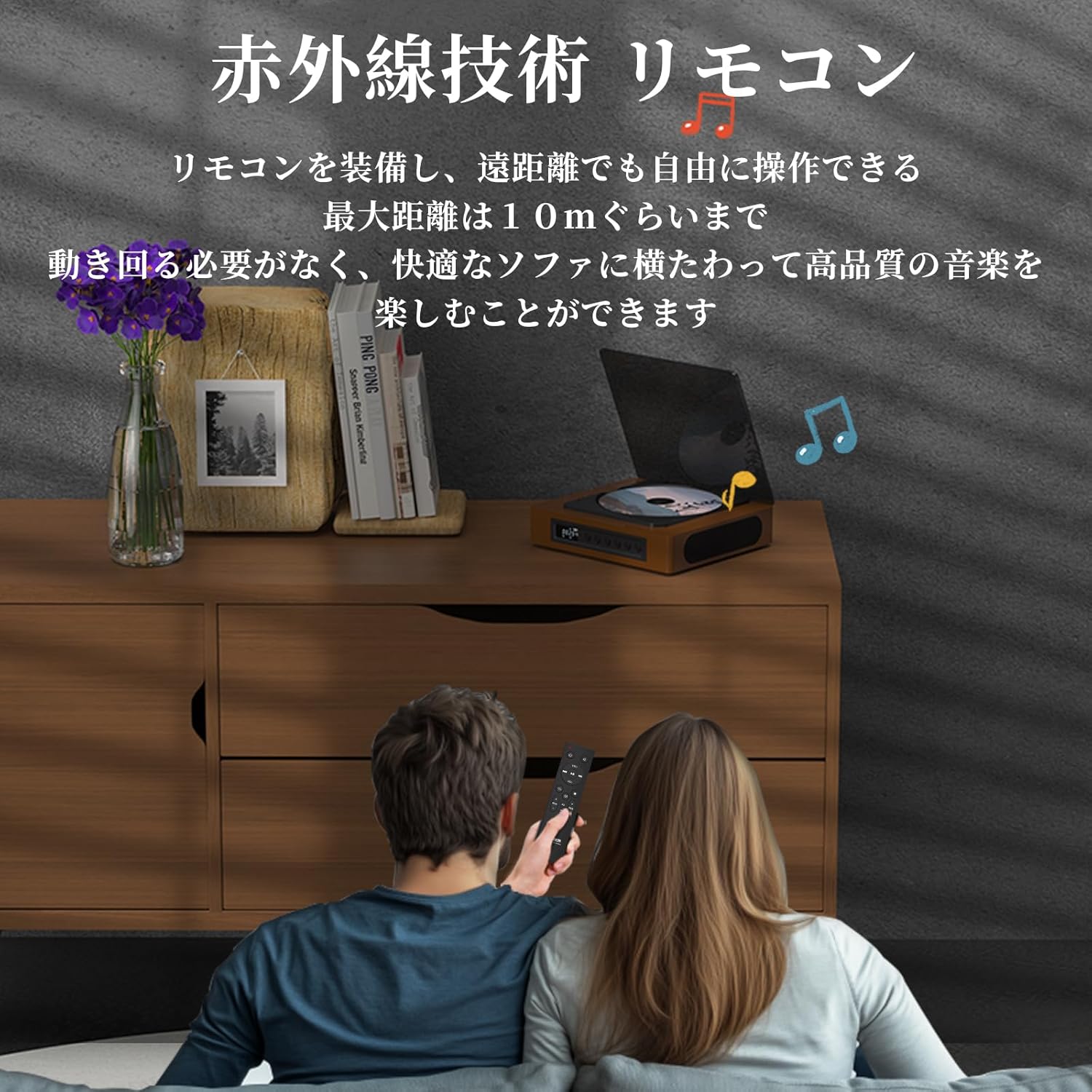
Image: A couple using the remote control for the TH-A10 CD Player, demonstrating its convenience for remote operation.
5. Hooldus
5.1 Puhastamine
- Pühkige seadme välispind pehme ja kuiva lapiga.
- For the CD lens, use a specialized CD lens cleaner. Do not touch the lens directly.
- Keep the transparent dust cover clean to prevent dust accumulation on the CD.

Image: The transparent dust cover of the TH-A10, designed to protect the CD mechanism from dust and moisture.
5.2 Säilitamine
Kui mängijat pikemat aega ei kasutata, hoidke seda jahedas ja kuivas kohas, eemal otsesest päikesevalgusest ja äärmuslikest temperatuuridest.
6. Veaotsing
| Probleem | Võimalik põhjus | Lahendus |
|---|---|---|
| Pole jõudu | Battery drained; Power cable not connected. | Laadige akut; veenduge, et toitekaabel on kindlalt ühendatud. |
| CD ei mängi | CD inserted incorrectly; Disc is dirty or scratched; Incorrect mode selected; Blu-ray disc inserted. | Reinsert CD correctly; Clean or replace disc; Select 'CD' mode; Blu-ray discs are not supported. |
| Kõlaritest ei kosta heli | Volume too low; Mute activated; External headphones/speakers connected to AUX out. | Increase volume; Check mute status; Disconnect external audio devices from AUX out if using internal speakers. |
| Bluetoothiga sidumine ebaõnnestus | Seade ei ole sidumisrežiimis; Leviulatusest väljas; Häired. | Ensure both devices are in pairing mode; Move devices closer; Restart Bluetooth on both devices. |
| Skipping during CD playback | Player is unstable; Disc is damaged; Excessive vibration. | Place player on a stable surface; Clean or replace disc; ASP anti-shock function is active for minor vibrations. |
7. Tehnilised andmed
| Funktsioon | Detail |
|---|---|
| Mudeli number | TH-A10 |
| Kaubamärk | MÕTLE |
| Ühenduvus | Bluetooth 5.1 (Receive/Transmit), USB, AUX (3.5mm), Optical (SPDIF), Type-C (Power) |
| Toetatud plaadivormingud | CD, CD-R, CD-RW (Not compatible with Blu-ray discs) |
| Toetatud helivormingud | MP3, WMA, WAV, APE, FLAC (from USB) |
| Aku mahutavus | 2600 mAh |
| Playback Time (Battery) | Approx. 6-8 hours (depending on usage) |
| Kõlarid | Built-in Stereo Speakers (2x50mm Neodymium Iron Boron Magnetic Units) |
| Anti-Shock Protection (ASP) | 60 sekundit CD puhul, 120 sekundit MP3 puhul |
| Mõõdud (P x L x K) | 17.8 x 15.8 x 4.85 cm |
| Kaal | 1.12 kg |
| Kaasas tarvikud | CD Player, Audio Line, Type-C Charging Cable, Remote Control, Instruction Manual |
8. Garantii ja tugi
8.1 Garantii teave
This THINKYA TH-A10 CD Player comes with a 1-aastane garantii from the date of purchase. This warranty covers defects in materials and workmanship under normal use. If the product fails due to a manufacturing defect within this period, we will provide a free replacement. Please retain your proof of purchase for warranty claims.
Märkus. Garantii ei kata kahjustusi, mis on tekkinud väärkasutuse, õnnetuse, volitamata muudatuste või normaalse kulumise tagajärjel.
8.2 Klienditugi
For any questions, technical assistance, or warranty claims, please contact THINKYA customer support through the retailer where you purchased the product. Our team is dedicated to providing prompt and helpful service.