
1. Sissejuhatus
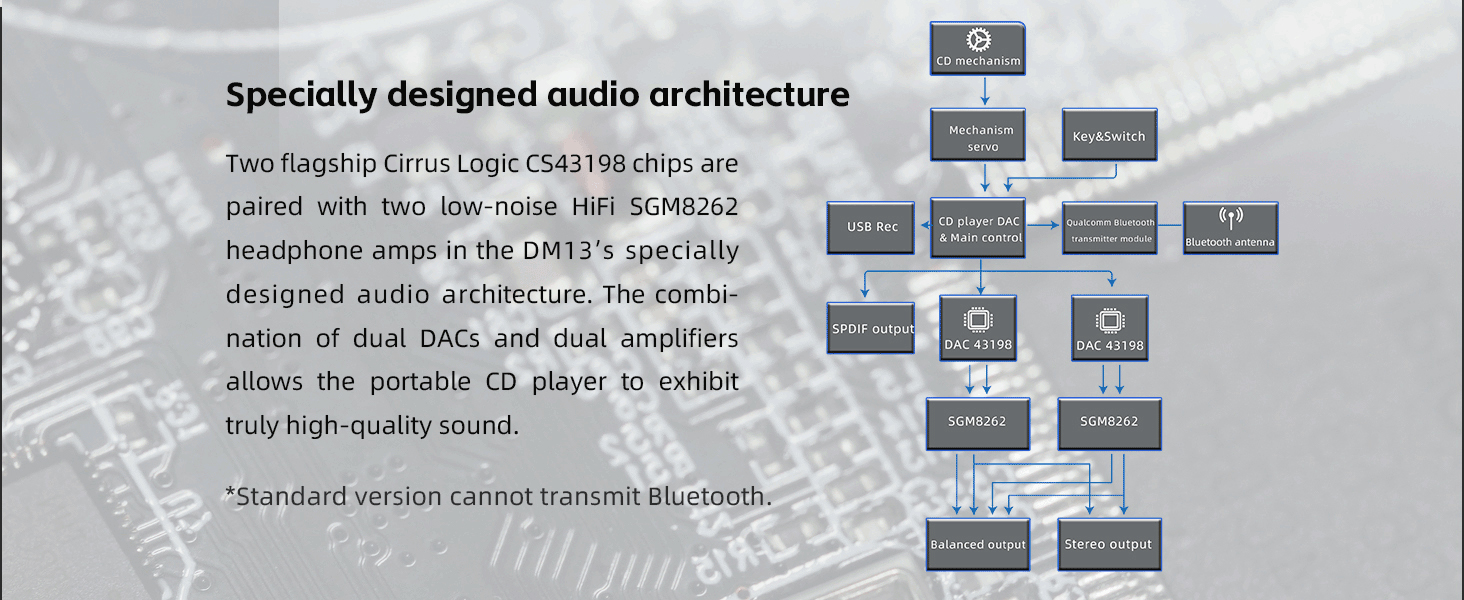
The FiiO DM13 is a multifunctional portable stereo CD player designed to deliver high-fidelity audio. It features a professional audio architecture with dual CS43198 DACs and dual SGM8262 headphone amplifiers, ensuring clear and precise sound reproduction. This compact device supports various output options, including 3.5mm, 4.4mm balanced, optical, and coaxial, allowing versatile connectivity to headphones, active speakers, or external amplifiers. Additionally, the DM13 offers convenient features such as USB ripping for digital archiving of your CDs and Bluetooth connectivity for wireless audio streaming.
2. Toote lõppview
Põhifunktsioonid
- Kõrge täpsusega heli: Dual CS43198 DACs and dual SGM8262 headphone amps for professional-grade sound.
- Compact Design, Powerful Output: Delivers up to 660mW balanced output power, capable of driving most earbuds and connecting to advanced audio systems.
- USB Ripping: Supports ripping CDs to WAV format on FAT32 formatted USB storage devices (32GB or lower recommended).
- Mitu heliväljundit: Includes 3.5mm and 4.4mm headphone outputs, 3.5mm and 4.4mm line outputs, and optical/coaxial digital audio outputs.
- Töölaua režiim: Allows direct power from a USB adapter without consuming battery, extending battery life.
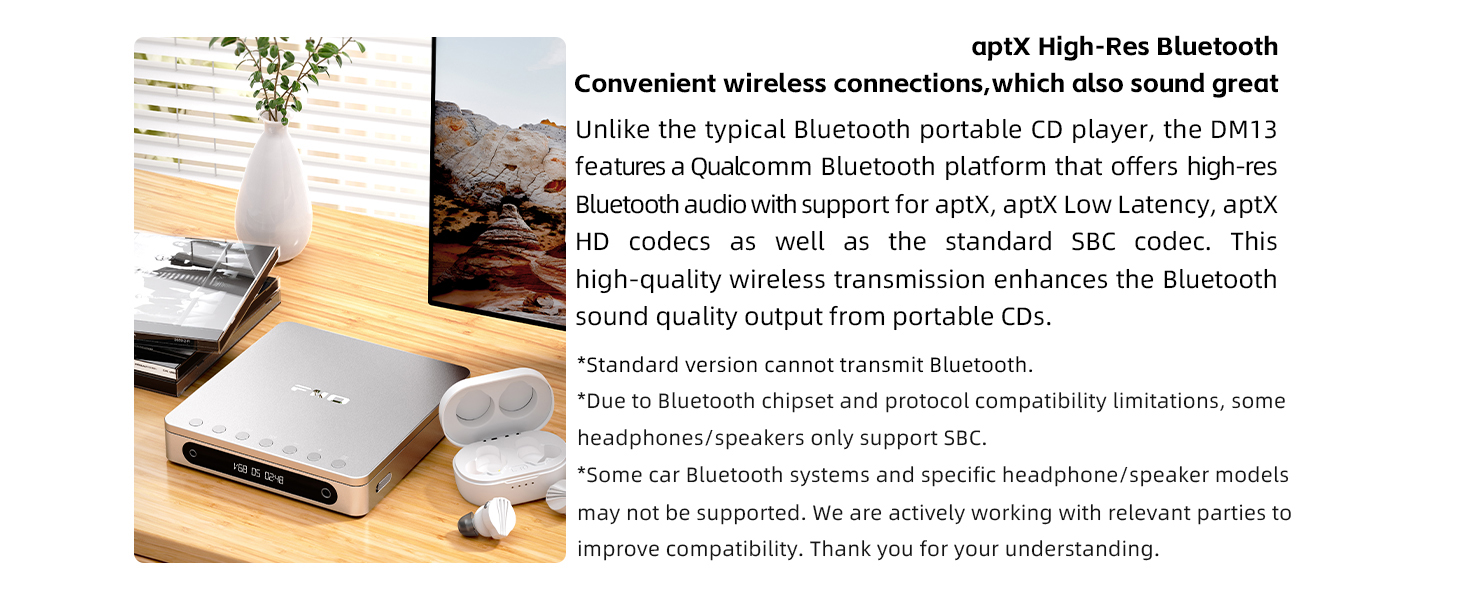
- Bluetoothi ühenduvus: Features a Qualcomm Bluetooth platform with support for aptX, aptX Low Latency, aptX HD, and SBC codecs.
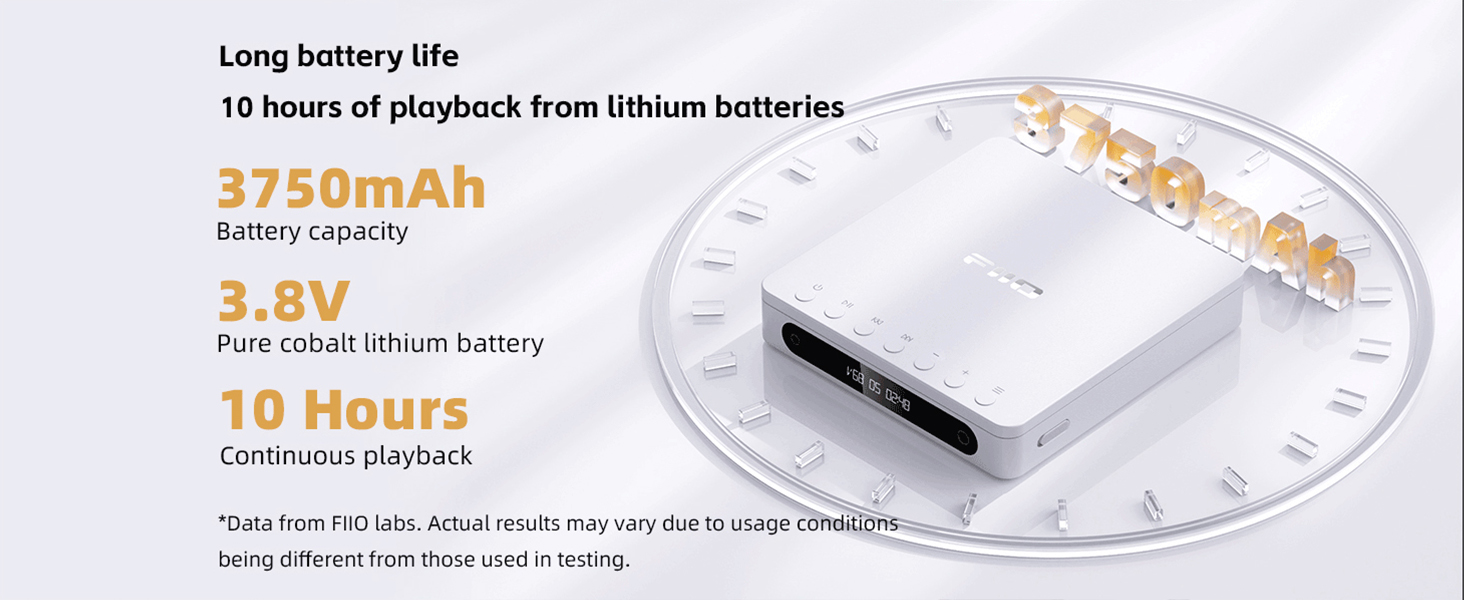
- Pikk aku tööiga: Equipped with a 3750mAh pure cobalt lithium battery providing approximately 10 hours of continuous playback.
- Selge LCD-ekraan: Custom high-contrast LCD shows volume, track number, and playback duration.
Toote komponendid

The FiiO DM13 Portable Stereo CD Player in its closed state, showcasing oma kompaktset disaini.

The FiiO DM13 CD Player with its lid open, ready for CD insertion or playback. Note: CD not included.

A close-up of the FiiO DM13's top panel, highlighting the playback control buttons and display.
This image displays the rear panel of the DM13, detailing the available connectivity options such as headphone outputs, line outputs, digital audio outputs, USB recording port, power input, and the D.MODE and ESP switches.
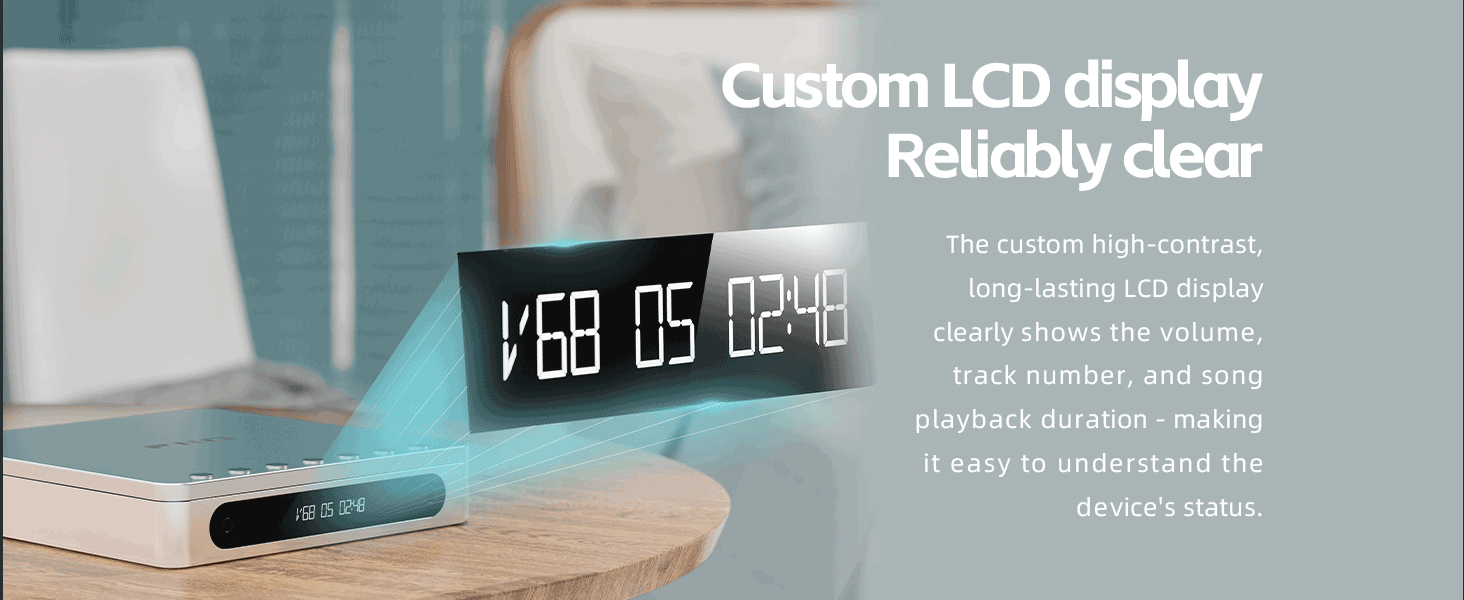
Selge view of the DM13's custom LCD display, providing essential information such as volume level, track number, and playback duration.
3. Seadistamine
3.1 Lahtipakkimine
Carefully remove all components from the packaging. Ensure all accessories, including the USB cable, are present.
3.2 Seadme laadimine
- Ühendage kaasasolev USB-C-kaabel SÜSTEEM port on the DM13.
- Ühendage USB-C-kaabli teine ots ühilduva USB-toiteadapteriga (ei kuulu komplekti) või arvuti USB-porti.
- The device will begin charging. The display may indicate charging status.
3.3 CD sisestamine
- Gently open the lid of the CD player.
- Place a standard audio CD onto the spindle, ensuring it is centered and flat.
- Sulgege kaas kindlalt, kuni see klõpsatusega oma kohale lukustub.
3.4 Connecting Audio Outputs
- Kõrvaklapid: Connect your headphones to either the 3.5mm or 4.4mm headphone output jack.
- Väline Amplifier/Aktiivkõlarid: Use the 3.5mm or 4.4mm line output jacks to connect to an external amptõstukõlarid või aktiivsed kõlarid.
- External DAC: For connection to an external high-end decoder, use the optical or coaxial digital audio outputs.
4. Kasutusjuhised
4.1 Toide sisse/välja
Press and hold the power button (usually located on the side or top panel) for a few seconds to turn the device on or off.
4.2 Põhilised taasesituse juhtnupud
- Esita/peata: Press the Play/Pause button to start or temporarily stop playback.
- Järgmine / eelmine lugu: Use the skip buttons to navigate to the next or previous track.
- Kiire edasi/tagasi kerimine: Press and hold the skip buttons to fast forward or rewind within a track.
- Helitugevuse juhtimine: Use the dedicated volume buttons to adjust the audio output level. The DM13 offers 99 levels of precise volume control.
A video tutorial explaining the basic functions of the control buttons on the FiiO DM13 Portable CD Player.
4.3 USB CD Ripping
The DM13 allows you to rip audio tracks from your CDs to a USB storage device.
- Ensure a FAT32 formatted USB drive (32GB or lower recommended) is inserted into the USB REC sadamasse.
- Insert the desired audio CD into the player.
- Vajutage nuppu USB REC button. The display will show "REC XXXX" indicating the ripping process is active.
- The ripped tracks will be saved as WAV files teie USB-draivil.
The FiiO DM13 connected to a laptop, illustrating its USB CD ripping capability to transfer audio files salvestusseadmesse.
Official video guide on how to rip audio tracks from a CD to a USB drive using the FiiO DM13's USB ripping function.
4.4 Bluetoothi sidumine
To connect your DM13 wirelessly to Bluetooth headphones or speakers:
- Turn on your Bluetooth receiving device (headphones, speaker) and set it to pairing mode.
- On the DM13, activate Bluetooth pairing mode (refer to the device's display or specific button for Bluetooth function).
- Place both devices close together. They should automatically pair.
- Once paired, the DM13 display will show the corresponding Bluetooth codec (e.g., aptX HD).
Official video guide demonstrating the steps to successfully pair Bluetooth devices with the FiiO DM13 Portable CD Player.
4.5 Desktop Mode (D.MODE)
To use the DM13 without consuming battery power:
- Connect the DM13 to a USB power source using the USB-C cable.
- Pöörake D.MODE switch on the rear panel to the "ON" position.
- The device will now be powered directly by the USB source, preserving the internal battery.
The FiiO DM13 operating in Desktop Mode, powered directly via USB with the D.MODE switch engaged, preserving battery life.
Video demonstrating how to activate and utilize the Desktop Mode and ESP switch on the FiiO DM13 for optimized power usage and audio settings.
4.6 ESP Switch
The ESP switch is designed for audiophiles, offering specific audio processing options. Refer to advanced user guides or FiiO's official resources for detailed information on its functionality.
5. Hooldus
- Puhastamine: Use a soft, dry, lint-free cloth to clean the device's exterior. Avoid using liquid cleaners or abrasive materials.
- CD-de käsitsemine: Always handle CDs by their edges. Keep them free from dust, fingerprints, and scratches to ensure optimal playback and prevent damage to the player's laser lens.
- Aku hooldus: To prolong battery life, avoid exposing the device to extreme temperatures. Utilize the Desktop Mode (D.MODE) whenever possible when near a power source.
- Hoiustamine: When not in use for extended periods, store the DM13 in a cool, dry place.
6. Veaotsing
- Seade ei lülitu sisse:
- Veenduge, et aku oleks piisavalt laetud.
- If connected to a power source, verify the USB cable and adapter are functioning correctly.
- If using Desktop Mode, ensure the D.MODE switch is in the "ON" position and external power is supplied.
- CD Not Reading or Skipping:
- Check the CD for dirt, scratches, or damage. Clean the CD with a soft cloth if necessary.
- Ensure the CD is properly seated on the spindle.
- Try a different audio CD to rule out a disc-specific issue.
- Note that some CD-R discs may have compatibility issues depending on their quality or burning method.
- Heliväljund puudub:
- Veenduge, et helitugevus poleks vaigistatud ega miinimumile seatud.
- Ensure headphones or speakers are securely connected to the correct output port.
- If using digital outputs, confirm the external DAC or receiver is correctly configured.
- Bluetoothi sidumisprobleemid:
- Ensure both the DM13 and the receiving Bluetooth device are in pairing mode.
- Sidumise ajal asetage seadmed üksteisele lähedale.
- Some Bluetooth headphones/speakers may only support the basic SBC codec, which can affect compatibility or sound quality with advanced codecs.
- Certain car Bluetooth systems or specific headphone/speaker models may not be fully supported.
7. Tehnilised andmed
| Kaubamärk | FiiO |
| Mudeli nimi | DM13 |
| Ühenduvustehnoloogia | USB, Bluetooth |
| Eriomadused | USB Ripping, 4.4 Balanced Line Output, Desktop Mode |
| Ketaste arv | 1 |
| Toetatud helivorming | CD-Audio, WAV (for ripped files), MP3 (playback compatibility not explicitly stated for MP3 CDs, but common for modern players) |
| Pistikute tüübid | 3.5mm, 4.4mm, Optical, Coaxial |
| Kanalite arv | 2 |
| Meediumivormingu tüüp | Audio CD |
| Ühilduvad seadmed | Headphones, Speakers, Ampelupäästjad |
| Kõrvaklappide Jack | 3.5 mm pesa, 4.4 mm pesa |
| Aku tüüp | 1 liitium-ioon aku (kaasas) |
| Tootja | FiiO |
8. Garantii teave
The FiiO DM13 Portable Stereo CD Player comes with a 1-aastane tootjagarantii. This warranty covers defects in materials and workmanship under normal use. Please retain your proof of purchase for warranty claims. For specific terms and conditions, refer to the warranty card included with your product or visit the official FiiO websaidile.
9. Toetus
For further assistance, technical support, or to access updated resources, please visit the official FiiO websait:
You may also contact FiiO customer service directly through their website for product inquiries or support requests.