
1. Toote lõppview
The Generic A19 is a compact and portable 1080P recording camera designed for various applications, including conference recording, outdoor sports, and general surveillance. Featuring a magnetic back clip and a 90-degree rotatable lens, it offers versatile mounting and recording angles. This device is equipped with a built-in microphone for audio capture and supports external memory cards for storage.

Image 1.1: The A19 camera's compact size, shown held in a hand, highlighting its portability.
2. Pakendi sisu
Palun kontrollige pakendi sisu pärast karbist võtmist. Kui mõni ese on puudu või kahjustatud, võtke ühendust klienditoega.
- Generic A19 Portable Recording Camera
- USB laadimiskaabel
- Kasutusjuhend
Märkus. A memory card is not included and must be purchased separately.

Image 2.1: Contents of the product package, showing the camera, user manual, and USB cable.
3. Toote omadused
- Kõrglahutusega salvestus: Captures video in 1080P resolution (1920x1080) for clear visuals.
- Wide-Angle Rotatable Lens: Features a GC1054 100° wide-angle lens that can rotate 90° for flexible recording perspectives.
- Sisseehitatud mikrofon: Omnidirectional capacitor MIC for clear audio recording (WAV format, 512KBPS).
- Magnetic Back Clip: Allows for easy attachment to clothing or metallic surfaces.
- Kaasaskantav disain: Compact and lightweight for discreet and convenient use.
- Extended Storage Support: Supports TF (MicroSD) cards up to 128GB (not included).
- Pikk aku tööiga: Equipped with a 400mAh battery, providing approximately 150 minutes of continuous video recording.
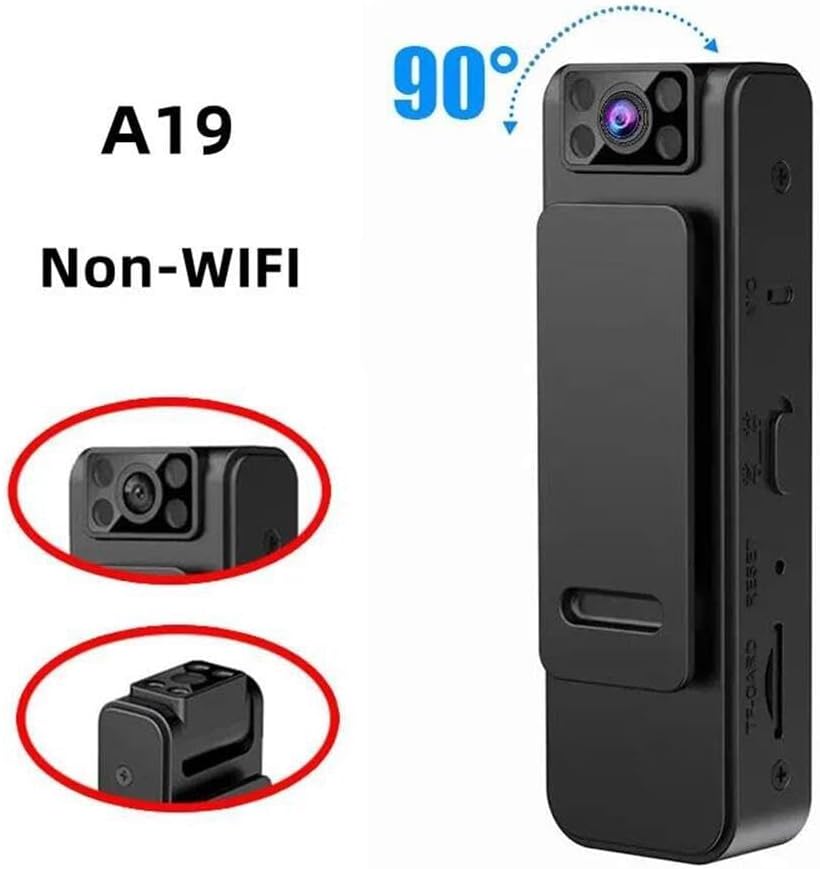
Image 3.1: The A19 camera demonstrating its 90-degree rotatable lens feature.
4. Osade identifitseerimine
Familiarize yourself with the various parts and controls of your A19 recording camera:

Pilt 4.1: Mitmekordne views of the A19 camera, highlighting its various buttons, ports, and features.
- Objektiiv: The camera's recording lens, capable of 90-degree rotation.
- Märgutuli: Displays device status (e.g., charging, recording, standby).
- Toite / režiimi nupp: Used to power the device on/off and switch between recording modes.
- Salvestusnupp: Initiates and stops video or audio recording.
- TF-CARD Slot: Insert your MicroSD memory card here.
- USB Port (Micro USB): Seadme laadimiseks ja arvutiga ühendamiseks.
- MIC: Sisseehitatud mikrofon heli salvestamiseks.
- Lähtestamisnupp: Used to reset the device in case of malfunction.
- Tagumine klipp: Magnetic clip for attaching the camera to various surfaces.
5. Seadistamine
5.1 Mälukaardi sisestamine
- Veenduge, et kaamera on välja lülitatud.
- Locate the TF-CARD slot on the side of the device.
- Gently insert a MicroSD (TF) card (up to 128GB, Class 10 or higher recommended) into the slot with the gold contacts facing down until it clicks into place.
- Eemaldamiseks lükake kaarti kergelt sissepoole, kuni see välja hüppab.
5.2 Seadme laadimine
- Connect the provided USB cable to the camera's Micro USB port.
- Connect the other end of the USB cable to a USB power adapter (DC5V-1A recommended) or a computer's USB port.
- The indicator light will illuminate during charging and typically change color or turn off when fully charged.
- Täislaadimine võtab aega umbes 2-3 tundi.
6. Kasutusjuhised
6.1 Sisse-/väljalülitamine
- Toide sisse: Press and hold the Power/Mode button for approximately 3 seconds until the indicator light turns on.
- Toide välja: Press and hold the Power/Mode button for approximately 3 seconds until the indicator light turns off.
6.2 Video salvestamine
- Ensure the camera is powered on and in video recording mode (check indicator light status, refer to specific light patterns in a full manual if available).
- Press the Recording button once to start video recording. The indicator light will typically flash slowly to indicate recording is in progress.
- To stop recording, press the Recording button again. The indicator light will return to standby mode.
- Videos are saved as AVI files (1920x1080) on the inserted memory card.
6.3 Audio Recording (Voice Recorder Mode)
If your device supports a dedicated audio recording mode:
- With the camera powered on, press the Power/Mode button briefly to switch to audio recording mode (indicator light pattern will change).
- Press the Recording button once to start audio recording.
- Press the Recording button again to stop audio recording.
- Heli files are saved as WAV files (512KBPS).
6.4 Arvutiga ühendamine
- Veenduge, et kaamera on välja lülitatud.
- Ühendage kaamera USB -kaabli abil arvutiga.
- The camera will be recognized as a removable disk. You can then access the recorded video and audio files.
6.5 Rotating the Lens
The camera lens can be manually rotated up to 90 degrees to adjust your recording angle. Gently pivot the lens assembly to the desired position.
7. Hooldus
- Puhastamine: Use a soft, dry cloth to clean the camera body. For the lens, use a specialized lens cleaning cloth and solution if necessary. Avoid harsh chemicals.
- Hoiustamine: Store the camera in a cool, dry place away from direct sunlight, extreme temperatures, and high humidity.
- Aku hooldus: Aku tööea pikendamiseks vältige aku sagedast täielikku tühjendamist. Laadige seadet regulaarselt, isegi kui seda pikka aega ei kasutata.
- Mälukaart: Periodically format the memory card to maintain optimal performance and prevent data corruption. Back up important files enne vormindamist.
8. Veaotsing
- Seade ei lülitu sisse: Ensure the battery is charged. If fully charged, try pressing the Reset button with a small pin.
- Ei saa salvestada: Check if a memory card is inserted correctly and if it has sufficient free space. Ensure the card is not corrupted; try formatting it (after backing up data).
- Computer does not recognize the device: Ensure the USB cable is properly connected. Try a different USB port or cable. Ensure the camera is powered off before connecting.
- Halb video-/helikvaliteet: Ensure the lens is clean. Check recording settings if adjustable. Ensure the microphone is not obstructed.
- Lühike aku tööiga: Ensure the device is fully charged. Battery performance can degrade over time. Avoid operating in extreme temperatures.
9. Tehnilised andmed

Image 9.1: Dimensions of the A19 portable recording camera.
| Funktsioon | Spetsifikatsioon |
|---|---|
| Mudeli nimi | KLIW002 |
| Objektiiv | GC1054, 100° Wide-angle, 90° Rotation |
| Video jäädvustamise eraldusvõime | 1080p (1920 x 1080) |
| Video formaat | AVI |
| Helivorming | WAV (512KBPS) |
| Sisseehitatud MIC | Omnidirectional Capacitor MIC |
| Aku | 402050 / 400 mAh |
| Video salvestamise aeg | u. 150 minutit |
| USB-liides | Micro USB / DC5V-1A |
| Mälukaardi tugi | Up to 128GB TF (MicroSD) card |
| Töötemperatuur | -20°C kuni 50°C |
| Kauba mõõtmed | Approx. 8.2cm x 2.6cm x 1.9cm (3.2in x 1.0in x 0.5in) |
10. Garantii ja tugi
Sellel tootel on standardne tootjagarantii. Täpsemate garantiitingimuste kohta vaadake ostu sooritamisel kaasasolevat dokumentatsiooni või võtke ühendust edasimüüjaga.
For technical support, troubleshooting assistance, or inquiries about replacement parts, please contact the seller or manufacturer directly through the platform where the product was purchased.