
Sissejuhatus
This instruction manual provides essential information for the safe and effective use of your Sony PXW-Z200 4K XDCAM Camcorder. The PXW-Z200 is designed for professional video production, offering UHD 4K60 HDR footage with advanced features like AI-powered autofocus, 20x optical zoom, and versatile recording formats. Please read this manual thoroughly before operating the camcorder and retain it for future reference.
Seadistamine
1. Lahtipakkimine ja sisu kontrollimine
Pakkige kõik esemed ettevaatlikult karbist välja. Veenduge, et järgmised komponendid oleksid olemas:
- Sony PXW-Z200 4K 1-tollise CMOS-sensoriga XDCAM-videokaamera
- Vahelduvvoolu adapter
- Toitejuhe
- Akulaadija
- BP-U35 Battery Pack (2 included in bundle)
- LCD-kapuuts
- Objektiivi varjuk
- Silmakupp
- Mikrofoni hoidik
- Külma kinga komplekt
- 64GB mälukaart
- Suur ümbris
- Teleobjektiiv
- Mälukaardilugeja
- Filtrikomplekt
- Wide Angle Lens Attachment
- Mälukaardi rahakott
- Objektiivi katte hoidja
- Puhastuskomplekt
- HDMI kaabel
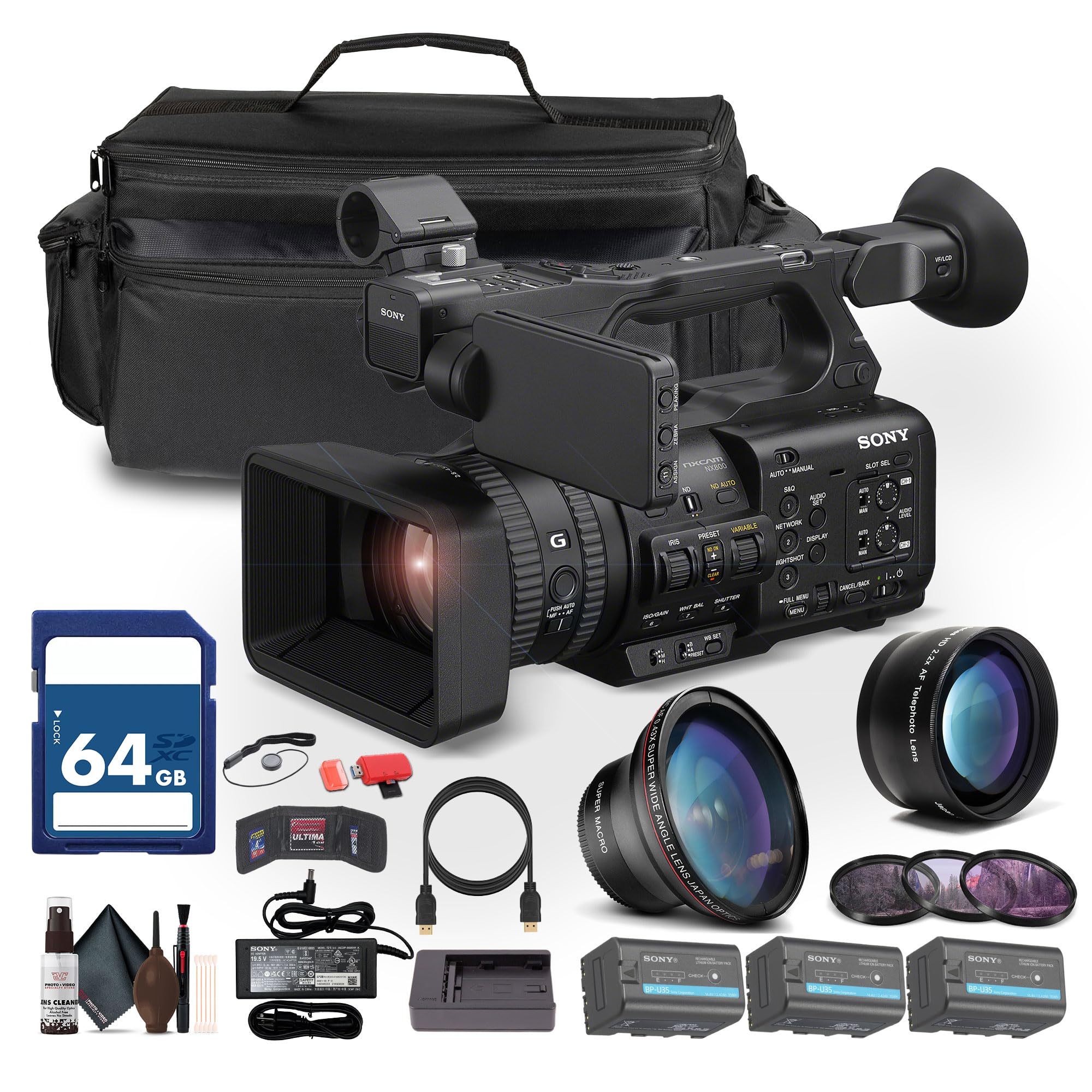
Figure 1: Sony PXW-Z200 4K XDCAM Camcorder (main unit).
2. Objektiivivarjuki ja okulaari kinnitamine
- Attach the provided lens hood to the front of the camcorder's lens to reduce glare and protect the lens.
- Attach the eyecup to the viewmugavuse leidja viewing.
3. Aku paigaldamine ja laadimine
- Insert the BP-U35 battery pack into the battery slot on the rear of the camcorder until it clicks into place.
- Connect the AC adapter to the camcorder's DC IN jack and plug it into a power outlet. The battery will begin charging.
- Alternatively, use the external battery charger to charge the BP-U35 battery packs.
- Enne esmakordset kasutamist veenduge, et aku oleks täielikult laetud.
4. Mälukaardi sisestamine
The PXW-Z200 supports dual CFexpress Type-A/SD card slots.
- Avage mälukaardi pesa kate.
- Insert a compatible CFexpress Type-A or SD card into the designated slot with the label facing the correct direction until it clicks.
- Sulgege mälukaardi pesa kate.
- Format the memory card in the camcorder's menu before first use to ensure optimal performance.
Videokaamera kasutamine
1. Toite sisse / välja lülitamine
- To power on, slide the POWER switch to the ON position.
- Väljalülitamiseks lükake POWER-lüliti OFF-asendisse.
2. Põhiline salvestamine
- Recording Start/Stop: Salvestamise alustamiseks või lõpetamiseks vajutage nuppu REC START/STOP.
- Salvestusvormingud: The camcorder supports XAVC S-I, HS-L, S-L, and HD/QFHD recording formats. Select your desired format via the menu.
- Kaadrisagedus: Capture high frame rate footage at 4K120 and 1080p240 for slow-motion effects.
- HDR: The camcorder supports UHD 4K60 HDR with HLG (Hybrid Log-Gamma) for high dynamic range content.
3. Fookuse ja suumi juhtimine

Figure 2: AUTO/MANUAL switch for focus and exposure control.
- Autofookus: The camcorder features AI-driven autofocus and auto-framing for precise tracking of subjects. Engage AUTO mode using the switch (refer to Figure 2).
- Käsitsi teravustamine: For precise control, switch to MANUAL mode and adjust the focus ring on the lens.
- Optiline suum: Utilize the 20x optical zoom for clear magnification.
- Selge pildi suum: In 4K, the camcorder offers a 30x Clear Image Zoom, extending your reach without significant loss of quality.
4. Heli seaded
The PXW-Z200 includes 4-channel audio input.
- Connect external microphones to the XLR inputs for professional audio capture.
- Adjust audio levels using the dedicated audio controls on the camcorder body or via the menu.
- Jälgige heli kõrvaklappide kaudu, mis on ühendatud kõrvaklappide pesaga.
5. Networking and Streaming
The camcorder supports integrated dual-band 2.4/5 GHz Wi-Fi and Ethernet for live streaming and file üleandmine.
- Connect to a Wi-Fi network or an Ethernet cable.
- Utilize RTMP/RTMPS, SRT, and FTP protocols for direct live streaming and file ülekanded.
- Configure network settings and streaming parameters through the camcorder's menu.
6. Color Profiles
The PXW-Z200 supports various color profiles for creative flexibility and matching with other Sony Cinema Line cameras.
- Select from S-Cinetone, ITU709, 709tone, and HLG profiles in the menu to achieve your desired look.
7. Using the Sony Monitor & Control App
Download and install the Sony Monitor & Control app on a compatible smartphone or tablet to remotely control and monitor the camcorder.
- Connect your device to the camcorder via Wi-Fi.
- Use the app for remote control of recording, zoom, focus, and other settings, as well as for monitoring live footage.

Figure 3: Sony PXW-Z200 camcorder in a typical usage scenario.
Hooldus
1. Videokaamera puhastamine
- Use the provided cleaning kit to gently clean the lens and camcorder body.
- For the lens, use a soft, lint-free cloth and lens cleaning solution. Avoid harsh chemicals.
- For the body, wipe with a dry, soft cloth.
- Ärge kasutage lahusteid ega abrasiivseid puhastusvahendeid.
2. Aku hooldus
- Kui akusid ei kasutata, hoidke neid jahedas ja kuivas kohas.
- Akude eluea pikendamiseks vältige nende sagedast täielikku tühjendamist.
- Charge batteries using only the specified Sony charger or the camcorder's AC adapter.
3. Ladustamine
- When storing the camcorder for extended periods, remove the battery.
- Store the camcorder in a dry, dust-free environment, preferably in the large case provided.
- Vältige äärmuslikke temperatuure ja kõrget õhuniiskust.
Veaotsing
If you encounter issues with your Sony PXW-Z200, refer to the following common problems and solutions.
| Probleem | Võimalik põhjus | Lahendus |
|---|---|---|
| Videokaamera ei lülitu sisse. | Battery is not charged or not inserted correctly. AC adapter is not connected. | Ensure battery is fully charged and properly inserted. Verify AC adapter connection. |
| Cannot record footage. | Memory card is full, not inserted, or not formatted. Recording mode is incorrect. | Check memory card status, insert/format if necessary. Verify recording settings. |
| Autofocus is not working correctly. | Camcorder is in Manual Focus mode. Subject is too close or lacks contrast. | Switch to AUTO focus mode. Ensure adequate lighting and distance to subject. |
| Heli pole salvestatud. | Microphone is disconnected or audio levels are too low. | Check microphone connections. Adjust audio input levels. |
| Cannot connect to Wi-Fi/Stream. | Incorrect network settings. Out of range. | Verify Wi-Fi password and network settings. Move closer to the access point. |
Täpsema tõrkeotsingu saamiseks vaadake Sony ametlikku tugilehte. websaidil või võtke ühendust klienditeenindusega.
Tehnilised andmed
Key technical specifications for the Sony PXW-Z200 4K XDCAM Camcorder:
| Funktsioon | Detail |
|---|---|
| Kaubamärk | Sony |
| Mudeli nimi | PXW-Z200 |
| Anduri tüüp | 1" Exmor RS CMOS |
| Video jäädvustamise eraldusvõime | UHD 4K (3840 Pixels), 720p, 480p |
| Optiline suum | 20x |
| Clear Image Zoom (4K) | 30x |
| Maksimaalne ava | f/1.8 |
| Maksimaalne fookuskaugus | 154.21 mm |
| Video jäädvustamise vorming | XAVC S-I, HS-L, S-L, HD/QFHD |
| Toetatud helivorming | Dolby Digital/AC-3 |
| Ekraani suurus | 1 inch (LCD Hood included) |
| Ühenduvustehnoloogia | HDMI, 12G-SDI, Wi-Fi (2.4/5 GHz), Ethernet |
| Eriomadused | AI-Driven Autofocus, Auto-Framing, 4K HDR Capture (HLG), High Frame Rates (4K120, 1080p240), Direct Live Streaming (RTMP/RTMPS, SRT, FTP), S-Cinetone |
| Salvestuskandjad | Dual CFexpress Type-A/SD card slots |
| Kauba kaal | 4.3 naela |
| Veekindluse tase | Ei ole veekindel |
| Pildi stabiliseerimine | Ei |
Garantii ja tugi
The Sony PXW-Z200 Camcorder is manufactured by Sony. For detailed warranty information, including terms, conditions, and registration, please refer to the warranty card included with your product or visit the official Sony support websaidile.
For technical support, service, or to download the latest firmware and software, please visit: Sony tugi Websaidile.


