
1. Toote lõppview
This document provides instructions for the KRPTQJoo replacement remote control, designed for various Midea air conditioner models. This remote control offers essential functions for operating your Midea AC unit.
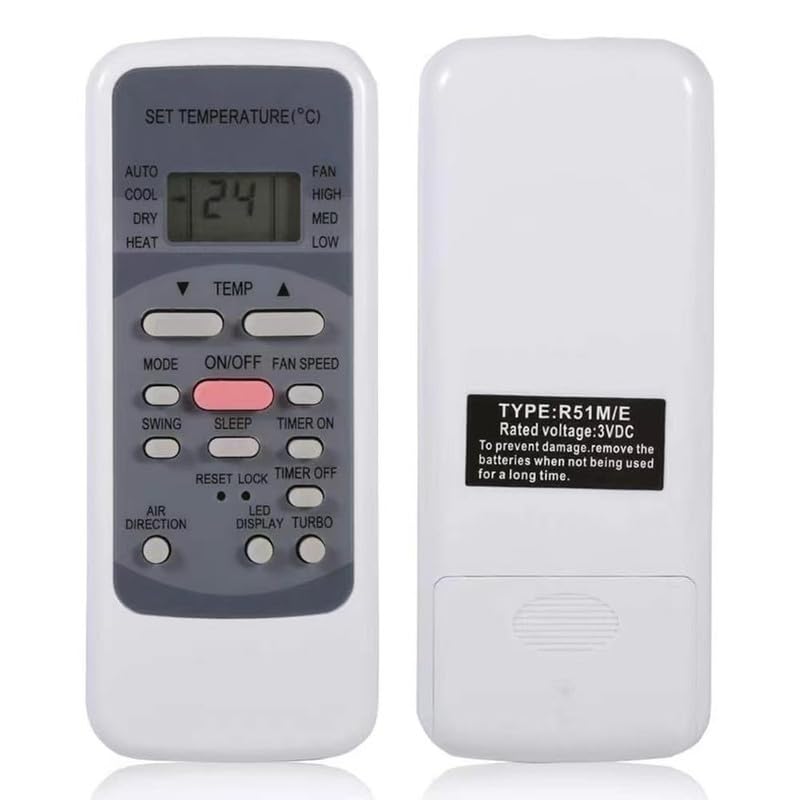
Pilt 1.1: Esikülg ja tagakülg view of the KRPTQJoo remote control. The front displays the LCD screen and various control buttons, while the back shows the battery compartment and product label.
Peamised omadused:
- Infrared (IR) connectivity for reliable operation.
- No pairing or complex setup required; ready to use with compatible models.
- Controls essential air conditioner functions such as power, mode, temperature, and fan speed.
- Kompaktne ja kerge disain.
2. Important Notice Regarding Compatibility and Variations
This remote control is a replacement unit and is compatible with the Midea AC models listed in the product description. Please note the following:
- Multiple Appearances: There may be slight variations in the physical appearance or button layout of the remote control you receive, as different styles are shipped randomly. Functionality for the listed compatible models remains consistent.
- Nupu funktsionaalsus: Some buttons on this replacement remote may not have a corresponding function on your specific Midea AC unit if your original unit did not support that feature. Refer to your original air conditioner's manual to confirm supported features.
- No Manual or Batteries Included: This product includes the remote control unit only. Batteries (2 x AAA) and a user manual for the AC unit are not included.
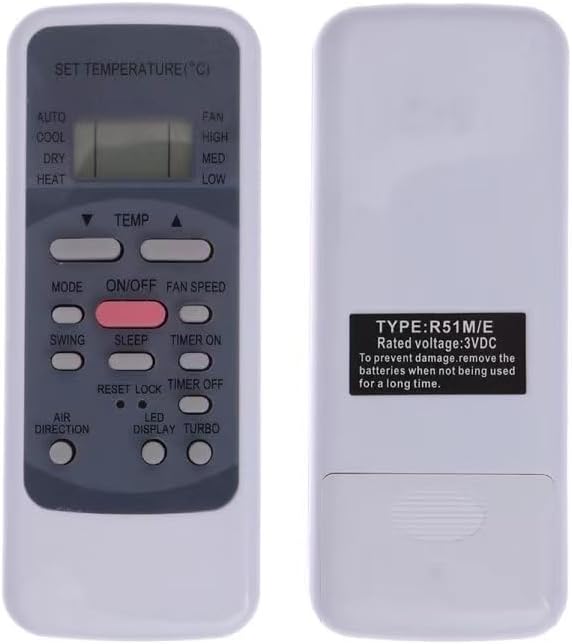
Image 2.1: An alternative style of the remote control, showing a slightly different button layout.

Image 2.2: Another alternative style of the remote control, highlighting potential variations in design.
3. Seadistamine
3.1 Aku paigaldamine
Kaugjuhtimispuldi tööks on vaja kahte (2) AAA-patareid (ei kuulu komplekti). Patareide paigaldamiseks järgige neid samme:
- Leidke kaugjuhtimispuldi tagaküljelt patareipesa kate.
- Avage sahtel, lükates kaant allapoole või vajutades riivi ja tõstes seda üles.
- Sisestage kaks AAA-patareid, veendudes, et positiivsed (+) ja negatiivsed (-) klemmid joonduvad õigesti sahtlis olevate märgistustega.
- Pange patareipesa kate tagasi, libistades seda tagasi oma kohale, kuni see kindlalt klõpsatab.

Image 3.1: The back of the remote control, illustrating the battery compartment where two AAA batteries are to be inserted.
3.2 Esmane kasutamine
This remote control is designed for immediate use with compatible Midea AC models. No pairing or complex setup procedures are required. Once batteries are installed, point the remote control towards your air conditioner and begin operation.
4. Kasutusjuhised
Familiarize yourself with the buttons on your remote control to operate your Midea AC unit effectively. The exact button layout may vary slightly, but the core functions are generally consistent.

Pilt 4.1: esikülg view kaugjuhtimispuldi LCD-ekraani ja erinevate funktsiooninuppude kuvamine.
Tavaliste nuppude funktsioonid:
- SISSE/VÄLJA: Lülitab konditsioneeri sisse või välja.
- MODE: Cycles through operating modes (e.g., Auto, Cool, Dry, Heat, Fan).
- TEMP ▲ / ▼: Reguleerib temperatuuri seadistust üles või alla.
- VENTILAATORI KIIRUS: Changes the fan speed (e.g., Low, Med, High, Auto).
- KIIG: Aktiveerib või deaktiveerib ribide kiikumisfunktsiooni.
- TAIMER: Määrab automaatse sisse-/väljalülitamise taimeri.
- RESET/LOCK: May reset settings or lock the remote to prevent accidental changes.
For specific advanced functions or features not listed, please consult the original user manual for your Midea air conditioner model.
5. Hooldus
Nõuetekohane hooldus ja korrashoid pikendavad teie kaugjuhtimispuldi eluiga.
- Puhastamine: Pühkige kaugjuhtimispulti pehme ja kuiva lapiga. Ärge kasutage vedelaid puhastusvahendeid ega abrasiivseid materjale.
- Patarei vahetus: Replace batteries when the remote's range decreases or the display becomes dim. Always replace both batteries at the same time with new AAA batteries.
- Hoiustamine: Kui kaugjuhtimispulti pikemat aega ei kasutata, eemaldage patareid, et vältida leket ja seadme võimalikku kahjustamist.
- Väldi kokkupuudet: Keep the remote control away from direct sunlight, high temperatures, and moisture.
6. Veaotsing
Kui teil tekib probleeme kaugjuhtimispuldiga, proovige järgmisi tõrkeotsingu samme.
- Kaugjuhtimispult ei reageeri:
- Kontrollige, kas patareid on õigesti ja õige polaarsusega paigaldatud.
- Vahetage vanad patareid uute AAA patareide vastu.
- Veenduge, et kaugjuhtimispuldi ja kliimaseadme vastuvõtja vahel ei oleks takistusi.
- Veenduge, et olete efektiivse tööraadiuse piires (kuni 8 meetrit).
- Some Buttons Do Not Work:
- This is often due to your specific Midea AC model not supporting that particular function. Refer to your original AC manual.
- Confirm that your AC model is listed as compatible with this remote control.
- Katkendlik töö:
- Nõrgad patareid võivad põhjustada katkendlikku tööd. Vahetage need välja.
- Veenduge, et puldi infrapunakiirgur oleks puhas ja takistusteta.
7. Tehnilised andmed
| Kaubamärk | KRPTQJoo |
| Mudeli number | Joo4725 |
| Ühilduvad seadmed | Midea Air Conditioners (RG51A(2)/E, RG51B(2)/E, RG51A(2)/EU1, RG51F2(2)/EFU1, RG51B1/CEU, RG51A/E, RG51B/E, RG51A/CE, RG51B/CE, RG51A10/E, RG51B10/E, MSAE-13CRN1) |
| Ühenduvustehnoloogia | Infrapuna (IR) |
| Maksimaalne vahemik | 8 meetrit |
| Nõutavad patareid | 2 x AAA (ei kuulu komplekti) |
| Värv | Hall |
8. Toetus
For any questions or concerns regarding your KRPTQJoo remote control, please contact the seller directly. We aim to provide a quick response within 12 hours to assist you with your needs.