
Sissejuhatus
This manual provides essential instructions for the Generic Replacement Remote Control. This remote is designed to function as a direct replacement for original remote controls of various Polaroid and AKI television models. Please ensure your original remote matches the appearance of this replacement remote for optimal compatibility and functionality.
Seadistamine
Aku paigaldamine
Kaugjuhtimispuldi tööks on vaja kahte (2) AAA-patareid (ei kuulu komplekti). Patareide paigaldamiseks järgige neid samme:
- Leidke kaugjuhtimispuldi tagaküljelt patareipesa kate.
- Vajutage sakile alla ja libistage kaant allapoole, et avada sahtel.
- Sisestage kaks AAA-patareid, veendudes, et positiivsed (+) ja negatiivsed (-) klemmid joonduvad õigesti sahtlis olevate märgistustega.
- Lükake akupesa kate tagasi oma kohale, kuni see kindlalt klõpsatab.
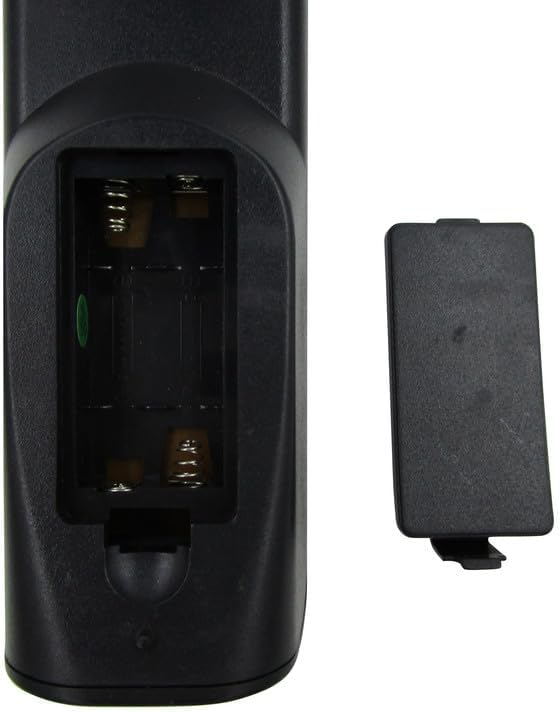
Joonis 1: Open battery compartment of the remote control. Insert two AAA batteries according to polarity markings.
Märkus. Vahetage alati mõlemad patareid korraga. Ärge segage vanu ja uusi patareisid ega erinevat tüüpi patareisid. Eemaldage patareid, kui pulti pikemat aega ei kasutata.
Kasutusjuhised
Once batteries are installed, the remote control is ready for use with compatible television models. Point the remote directly at the TV's infrared sensor.
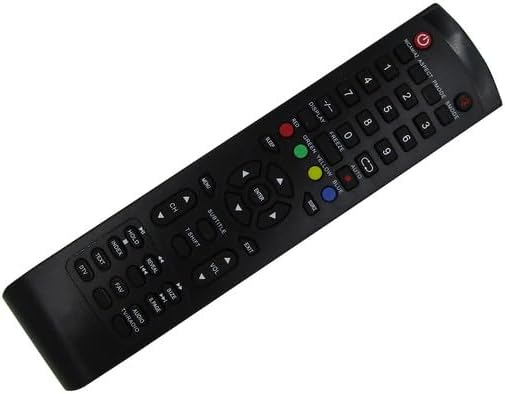
Joonis 2: Esiosa view kaugjuhtimispuldi nuppude paigutus.
Põhifunktsioonid:
- Võimsus (●): Lülitab teleri sisse või välja.
- Numbrinupud (0-9): Valige otse kanaleid.
- CH +/-: Vahetab kanaleid järjestikku.
- VOL +/-: Reguleerib helitugevust.
- MUTE: Vaigistab või tühistab teleri heli.
- SOURCE/INPUT: Valib sisendallika (HDMI, AV jne).
- MENÜÜ: Avab teleri peamenüü.
- Navigeerimisnupud (üles, alla, vasakule, paremale, ENTER): Menüüdes navigeerimine ja valikute kinnitamine.
- VÄLJU: Väljub praegusest menüüst või funktsioonist.
- Color Buttons (RED, GREEN, YELLOW, BLUE): Used for specific functions within certain TV menus or smart features, if supported by your TV model.
For advanced functions or specific TV features, refer to your television's original user manual, as this replacement remote provides standard infrared control.
Hooldus
Puhastamine:
Kaugjuhtimispuldi puhastamiseks kasutage pehmet ja kuiva lappi. Kangekaelse mustuse korral nühkige seda kergeltampen the cloth with water or a mild cleaning solution. Do not use abrasive cleaners, alcohol, or solvents, as these can damage the remote's surface or internal components.
Hoiustamine:
Store the remote control in a cool, dry place away from direct sunlight and extreme temperatures. If the remote will not be used for an extended period, remove the batteries to prevent leakage and potential damage.
Veaotsing
- Kaugjuhtimispult ei reageeri:
- Veenduge, et kaugjuhtimispult oleks suunatud otse teleri infrapunasensorile.
- Check the batteries. Replace them if they are old or depleted. Refer to the Aku paigaldamine osa.
- Verify there are no obstructions between the remote and the TV.
- Mõned nupud ei tööta:
- This replacement remote is designed for basic TV functions. Some advanced or smart TV features may not be supported if they require specific codes or functions not present on this generic remote.
- Clean the remote's surface, especially around the unresponsive buttons, to ensure no debris is interfering.
- Televiisor ei lülitu sisse/välja:
- Confirm the TV is plugged into a power source and is not in standby mode due to a power outage.
- Ensure the remote's batteries are fresh and correctly installed.
Kui probleemid püsivad ka pärast nende sammude järgimist, võtke ühendust klienditoega.
Tehnilised andmed
| Kaubamärk | Üldine |
| Mudeli number | Easytry22233 |
| Ühilduvad seadmed | Television (Various Polaroid and AKI models) |
| Ühenduvustehnoloogia | Infrapuna (IR) |
| Maksimaalne vahemik | 8 meetrit |
| Vajalike patareide arv | 2 AAA |
| Värv | Must |
| Erifunktsioon | Ergonoomiline, asendus |
Garantii teave
Selle tootega on kaasas a 90-päevane garantii from the date of purchase. This warranty covers manufacturing defects and ensures hassle-free returns for eligible issues. Please retain your proof of purchase for warranty claims.
Klienditugi
For any questions, concerns, or troubleshooting assistance not covered in this manual, please contact the seller or manufacturer directly. Provide your product model number (Easytry22233) and details of your issue for prompt support.