
Sissejuhatus
Tänan ostu eestasing the Funistree Cell Phone Stand with Wireless Bluetooth Speaker. This device combines a versatile phone stand with a high-quality Bluetooth speaker and a white noise machine, designed to enhance your audio and viewing experience. Please read this manual carefully before use to ensure proper operation and to maximize the product's lifespan.
Toode läbiview
The Funistree H77 is a multi-functional device featuring a detachable phone stand and a wireless Bluetooth speaker. Its innovative design allows for independent use of the speaker and the stand, or combined for an integrated entertainment solution.
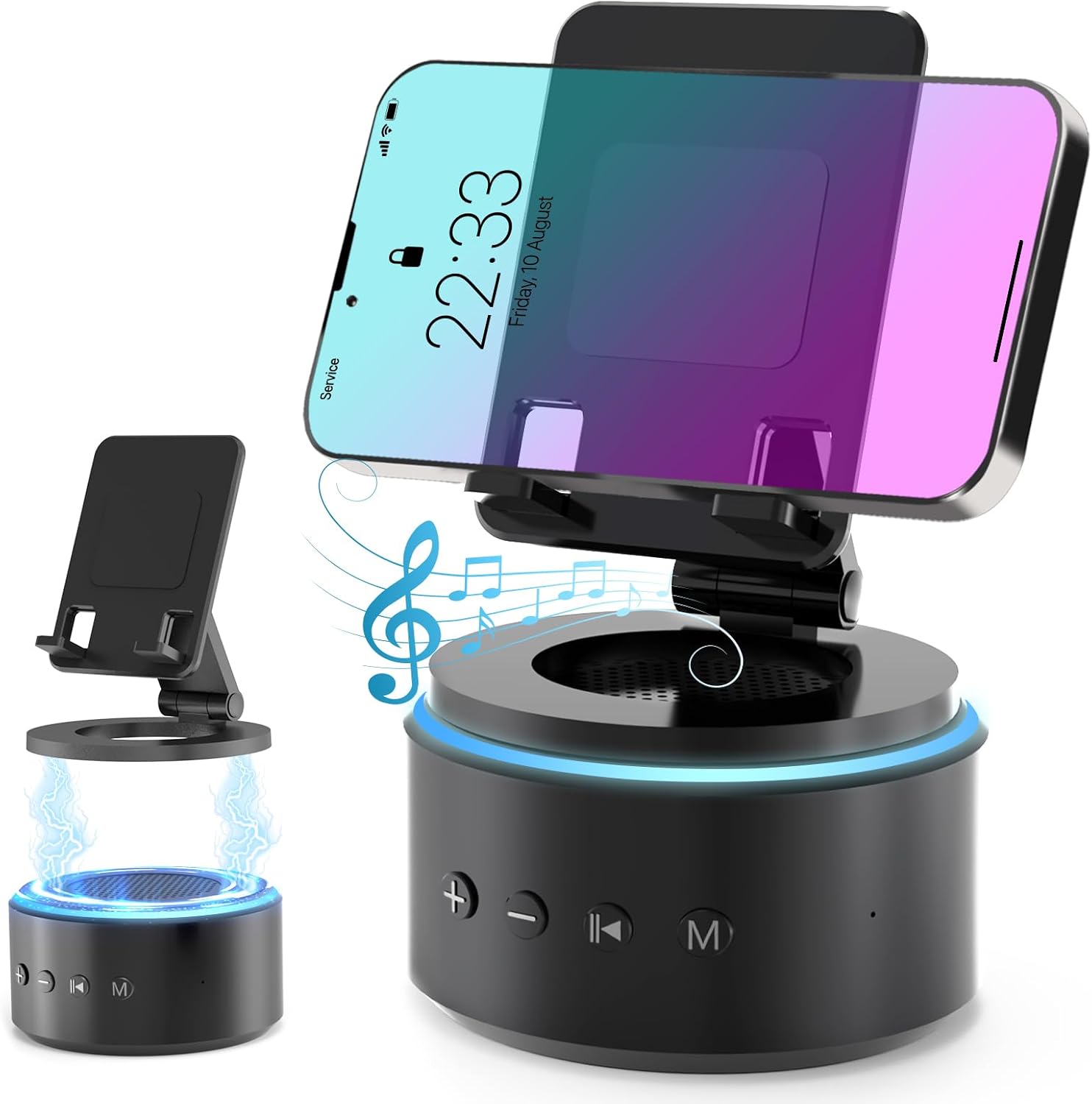
Image: The Funistree H77 device, illustrating its 2-in-1 design with the phone stand attached to the speaker base and also shown detached.
Peamised omadused:
- 2-ühes eemaldatav disain: The phone stand magnetically connects to the Bluetooth speaker, allowing for combined or separate use.
- Adjustable & Portable Stand: Pakub mitut viewing angles and includes a hanging design for easy portability.
- HD-stereo heli: Equipped with a dual stereo system for enhanced bass, clear highs, and balanced midrange.
- Valge müra masin: Features 10 soothing white noise sounds with an auto-off timer (15, 30, or 60 minutes).
- Stabiilne alus: Anti-slip silicone pads ensure device stability.
- Pikk aku tööiga: Optimized 1800 mAh battery for extended use.
Pakendi sisu
Palun kontrollige pakendilt järgmisi esemeid:
- Funistree Cell Phone Stand with Wireless Bluetooth Speaker (Model H77)
- USB laadimiskaabel
- Kasutusjuhend
Note: Contents may vary slightly. If any items are missing or damaged, please contact customer support.
Seadistamine
Seadme laadimine:
- Locate the charging port on the speaker base.
- Ühendage kaasasolev USB-laadimiskaabel kõlariga.
- Ühendage USB-kaabli teine ots ühilduva USB-toiteadapteriga (ei kuulu komplekti) või arvuti USB-porti.
- Laadimise märgutuli süttib. Kui aku on täielikult laetud, võib tuli värvi muuta või kustuda.
Initial charge time is approximately 2-3 hours.
Assembling the Phone Stand and Speaker:
The phone stand and speaker connect magnetically.
- Align the magnetic base of the phone stand with the top surface of the speaker.
- The magnets will snap the two components together securely.
- To detach, simply pull the phone stand upwards from the speaker base.

Pilt: Lähivõte view demonstrating the magnetic connection between the phone stand and the speaker base.
Kasutusjuhised
Toide sisse/välja:
- To power on, press and hold the Power button (usually marked with a power symbol) on the speaker base for a few seconds until you hear an audible prompt or see an indicator light.
- Väljalülitamiseks vajutage ja hoidke toitenuppu uuesti paar sekundit all.
Bluetoothi sidumine:
- Ensure the speaker is powered on and in pairing mode (indicated by a flashing LED light, usually blue). If not, briefly press the Bluetooth button (if available) or power cycle the device.
- Mine oma mobiilseadmes (nutitelefonis, tahvelarvutis jne) Bluetoothi seadetesse.
- Otsi available devices. The speaker will appear as "H77" or "Funistree H77".
- Select the speaker from the list to pair. Once paired, you will hear a confirmation sound, and the LED light will become solid.
- Nüüd saate oma seadmest pärit heli kõlari kaudu esitada.

Image: The Funistree H77 in use, with a smartphone mounted on the stand, playing music, and a laptop nearby, illustrating its versatile functionality.
White Noise Function:
The speaker includes 10 built-in white noise sounds to aid relaxation or concentration.
- Press the 'M' (Mode) button to cycle through the white noise sounds.
- To set a timer for the white noise, press the Timer button (if available) or refer to the specific button layout on your device. The available timer settings are 15, 30, or 60 minutes. The device will automatically turn off after the selected duration.

Image: Visual representation of the 10 white noise options (Ocean, Wind, Rain, Bird, Heartbeat, Campfire, Thunderstorm, Brook, Fan, Piano) and timer settings, with a person sleeping, indicating the relaxation benefits.
Helitugevuse ja taasesituse reguleerimine:
- Helitugevuse suurendamine: Vajutage nuppu „+”.
- Hääl maha: Vajutage nuppu '-'.
- Esita/peata: Press the Play/Pause button (usually marked with a triangle/two vertical bars).
- Järgmine lugu: Press the '>>|' button.
- Eelmine lugu: Press the '|<<' button.
Telefonialuse kasutamine:
The phone stand is adjustable to provide optimal viewnurgad.
- Place your smartphone or tablet securely on the stand's cradle.
- Adjust the angle of the stand by gently pushing or pulling the articulated arm to your desired viewasend.
- The stand features anti-slip silicone pads to prevent your device from sliding.

Pilt: Detailne view highlighting the adjustable angle mechanism and the anti-slip silicone pads on the phone stand and base for secure device placement.
Kaasaskantavus:
The speaker can be carried easily using its integrated hanging design.

Image: A woman outdoors, holding the Funistree speaker by its hanging rope, demonstrating its portability for outdoor activities.
Hooldus
- Puhastamine: Use a soft, dry cloth to wipe the surface of the device. Do not use abrasive cleaners, alcohol, or chemical solvents, as these may damage the finish.
- Hoiustamine: Kui seadet pikemat aega ei kasutata, hoidke seda jahedas ja kuivas kohas, eemal otsesest päikesevalgusest ja äärmuslikest temperatuuridest.
- Aku hooldus: Aku tööea pikendamiseks vältige aku sagedast täielikku tühjendamist. Laadige seadet regulaarselt, isegi kui seda aktiivselt ei kasutata.
- Vältige vett: This device is not waterproof. Keep it away from water, moisture, and excessive humidity.
- Käsitsege ettevaatlikult: Vältige seadme maha pillamist või tugevate löökide allutamist.
Veaotsing
| Probleem | Võimalik põhjus | Lahendus |
|---|---|---|
| Seade ei lülitu sisse. | Aku tühi. | Laadige seade täielikult täis. |
| Ei saa Bluetoothi kaudu siduda. | Speaker not in pairing mode; Bluetooth disabled on source device; device too far. | Ensure speaker is in pairing mode. Enable Bluetooth on your device. Move devices closer (within 10 meters). Forget previous pairings and try again. |
| Heli puudub või on vaikne. | Volume too low on speaker or source device; device not properly paired. | Increase volume on both speaker and source device. Re-pair the device. |
| White noise function not working. | Valitud on vale režiim. | Press the 'M' (Mode) button to cycle to the white noise function. |
| Telefonialus on ebastabiilne. | Device not placed correctly; surface is uneven. | Ensure phone is centered on the cradle. Place the stand on a flat, stable surface. |
If the problem persists, please contact Funistree customer support.
Tehnilised andmed
| Mudeli number | H77 |
| Toote mõõtmed | 4.53 x 4.13 x 4.37 tolli |
| Kauba kaal | 15.8 untsi |
| Aku tüüp | 1 liitium-ioon aku (kaasas) |
| Aku mahutavus | 1800 mAh |
| Ühenduvus | Bluetooth |
| Valge müra helid | 10 types (Ocean, Wind, Rain, Bird, Heartbeat, Campfire, Thunderstorm, Brook, Fan, Piano) |
| Taimeri sätted | 15, 30, 60 minutit |
| Ühilduvad seadmed | Smartphones, Tablets (iPhone, Galaxy, LG, iPad, Samsung Tab, Sony, etc.) |
Ohutusteave
- Do not disassemble, repair, or modify the device. This may cause damage, electric shock, or fire.
- Keep the device away from heat sources, direct sunlight, and high temperatures.
- Ärge jätke seadet vee või muude vedelike kätte.
- Do not use the device in environments with strong electromagnetic interference.
- Hoida lastele ja lemmikloomadele kättesaamatus kohas.
- Dispose of the device and its battery responsibly according to local regulations. Do not dispose of with household waste.
Garantii ja tugi
Funistree products are designed and manufactured to the highest quality standards. For warranty information and customer support, please refer to the warranty card included with your purchase or visit the official Funistree website. If you encounter any issues or have questions regarding your product, please contact our customer service team.
Täiendava abi saamiseks külastage: Funistree Official Store on Amazon