
Sissejuhatus
This document provides instructions for the Generic Replacement Remote Control, designed for use with various Philips Signage LCD HD Displays. It is compatible with models that originally used remote controls such as Philips YKF326-019 and 398GRABDDNEPHT. This remote offers essential functions for controlling your display.
Oluline märkus: This is a replacement unit and may not support all advanced or specific functions of your original remote control. No batteries are included with this product.
Seadistamine: Aku paigaldamine
Kaugjuhtimispuldi kasutamise alustamiseks peate kõigepealt patareid paigaldama.
- Avage patareipesa: Locate the battery compartment cover on the back of the remote control. Slide the cover downwards or press the latch and lift to open it.
- Sisestage patareid: Insert two (2) AAA batteries into the compartment. Ensure that the positive (+) and negative (-) terminals of the batteries align correctly with the indicators inside the compartment. Incorrect insertion can prevent the remote from functioning.
- Sulgege sektsioon: Pange patareipesa kate tagasi, libistades seda tagasi oma kohale, kuni see kindlalt klõpsatab.
- Testige kaugjuhtimispulti: Point the remote control towards your Philips display and press the Power button to verify functionality.

Pilt: Tagasi view of the remote control, highlighting the battery compartment. This is where you will insert the two AAA batteries.
Kasutusjuhised
This remote control operates using infrared (IR) technology. For optimal performance, ensure there is a clear line of sight between the remote's IR emitter (located at the front tip) and your display's IR receiver.
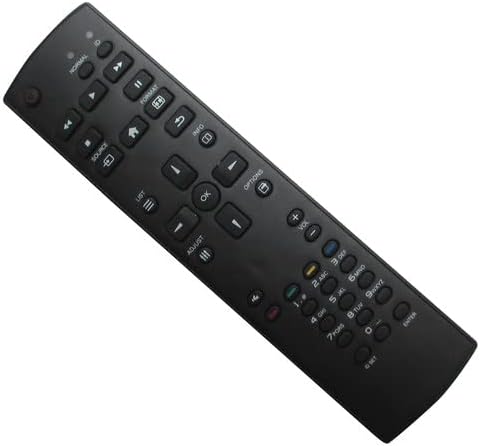
Pilt: Esikülg view of the remote control, displaying all buttons.
Ühised funktsioonid:
- Toitenupp: Lülitab ekraani sisse või välja.
- Helitugevuse suurendamine/mahandamine: Reguleerib helitugevust.
- Kanal üles/alla: Changes the television channel (if applicable).
- Allikas/sisend: Selects the input source (e.g., HDMI 1, HDMI 2, AV).
- Menu/Options: Accesses the display's on-screen menu or options.
- Navigeerimisnupud (üles, alla, vasakule, paremale, OK): Kasutatakse menüüdes navigeerimiseks ja valikute kinnitamiseks.
- Numbriklahv: Kanali otseseks sisestamiseks või numbriliseks sisestamiseks.
- Vaigista: Silences the display's audio.
Refer to your display's original user manual for specific functions and menu navigation details, as this replacement remote aims to replicate primary controls.
Hooldus
Nõuetekohane hooldus pikendab teie kaugjuhtimispuldi eluiga:
- Puhastamine: Pühkige pulti pehme ja kuiva lapiga. Ärge kasutage vedelaid puhastusvahendeid ega abrasiivseid materjale.
- Hoiustamine: Store the remote in a dry place, away from direct sunlight, high temperatures, and humidity.
- Patarei vahetus: If the remote becomes unresponsive or its range decreases, replace both AAA batteries with new ones. Remove batteries if the remote will not be used for an extended period to prevent leakage.
- Vältige kukkumisi: Kaitske kaugjuhtimispulti füüsiliste löökide eest, kuna see võib kahjustada sisemisi komponente.
Veaotsing
Kui teil tekib probleeme kaugjuhtimispuldiga, proovige järgmisi lahendusi.
- Kaugjuhtimispult ei reageeri:
- Ensure there is a clear line of sight between the remote and the display's IR receiver.
- Kontrollige, kas patareid on õigesti sisestatud, jälgides positiivset (+) ja negatiivset (-) polaarsust.
- Asendage patareid värskete AAA patareidega.
- Confirm that the display is powered on and not in standby mode.
- Piiratud funktsionaalsus:
- As a replacement remote, some advanced or specific functions of your original display remote may not be supported. This is normal for universal or replacement remotes.
- Ensure your display model is listed as compatible. If your model is not listed, full functionality cannot be guaranteed.
Tehnilised andmed
| Kaubamärk | Üldine |
| Compatible Model (Primary) | Philips YKF326-019 |
| Ühenduvustehnoloogia | Infrapuna (IR) |
| Toetatud seadmete maksimaalne arv | 1 |
| Aku tüüp | AAA |
| Vajalike patareide arv | 2 |
| Maksimaalne vahemik | 10 meetrit |
| Kontrolleri tüüp | Nupu juhtimine |
Garantii ja tugi
Selle tootega on kaasas a 90-päevane garantii alates ostukuupäevast, mis katab tootmisdefektid.
For technical support, compatibility inquiries, or warranty claims, please contact the seller directly through your purchase platform. It is recommended to verify your display's model number against the compatible models listed in the product description before purchase.