
1. Sissejuhatus
Thank you for choosing the Goshyda Portable Multimedia 1080P Projector. This compact and versatile device is designed to provide a personal cinema experience, supporting various multimedia inputs for entertainment, presentations, and more. Please read this manual carefully before using the projector to ensure proper operation and to maximize its lifespan.

Image 1.1: The Goshyda YG300 Mini Portable Projector in a home entertainment setting.
2. Ohutusalane teave
- Toiteallikas: Use only the specified 5V 2A power adapter or a compatible power bank. Incorrect voltage võib seadet kahjustada.
- Ventilatsioon: Ärge blokeerige ventilatsiooniavasid. Tagage projektori ümber piisav õhuvool, et vältida ülekuumenemist.
- Keskkond: Avoid exposing the projector to water, moisture, dust, or extreme temperatures. Operate in a clean, dry environment.
- Puhastamine: Enne puhastamist ühendage seade vooluvõrgust lahti. Kasutage pehmet ja kuiva lappi. Ärge kasutage vedelaid ega aerosoolpuhastusvahendeid.
- Lahtivõtmine: Ärge proovige projektorit ise lahti võtta ega parandada. Jätke kogu hooldus kvalifitseeritud töötajatele.
- Silmade kaitse: Ärge vaadake otse projektori objektiivi, kui lamp on sisse lülitatud.
3. Pakendi sisu
Palun kontrollige pakendi sisu pärast karbist võtmist. Kui mõni ese on puudu või kahjustatud, võtke ühendust edasimüüjaga.
- Goshyda Portable Projector
- Kaugjuhtimispult
- AV Cable
- Toiteadapter
- Kasutusjuhend (see dokument)

Image 3.1: Included accessories with the Goshyda Portable Projector.
4. Toote lõppview
4.1. Projektori omadused
- 1080P Resolution Support: Annab selged ja detailsed pildid.
- Kompaktne ja kaasaskantav disain: Weighing approximately 290g, it is easy to carry.
- Multi-Port Connectivity: Includes USB, HDMI, AV, memory card slot, and audio output.
- Sisseehitatud kõlarid: Provides integrated audio for convenience.
- Paindlik võimsus: Can be powered by a 5V 2A wall charger or power bank.

Image 4.1: Visual representation of the projector's main features.
4.2. Projector Ports and Controls
Tutvuge oma projektori erinevate portide ja juhtnuppudega.
- Objektiiv: Front-facing projection lens.
- Teravustamisrõngas: Reguleerib pildi selgust.
- Power Input (DC IN): Connects to the 5V 2A power adapter.
- HDMI-port: Seadmete ühendamiseks HDMI-kaabli abil.
- USB-port: USB-mäluseadmete ühendamiseks.
- AV-port: For connecting devices via AV cable.
- MicroSD kaardi pesa: Mälukaardi sisestamiseks.
- Heliväljund: Väliste kõlarite või kõrvaklappide ühendamiseks.
- Juhtnupud: On the top panel for basic navigation and selection.

Pilt 4.2: Külg view of the projector highlighting its connectivity ports.

Image 4.3: Close-up of the projector lens.
5. Seadistamine
5.1. Toiteühendus
- Ühendage kaasasolev toiteadapter projektori DC IN-porti.
- Ühendage toiteadapter tavalisse pistikupessa.
- Alternatively, for portable use, connect a 5V 2A power bank to the DC IN port.

Image 5.1: Powering the projector via wall adapter or power bank.
5.2. Paigutus ja projektsioon
Place the projector on a stable, flat surface. The optimal projection distance is between 1 to 2.5 meters, allowing for a screen size of up to 60 inches.
- For a 24-inch screen, place the projector approximately 0.8 meters away.
- For a 47-inch screen, place the projector approximately 1.2 meters away.
- For a 60-inch screen, place the projector approximately 1.6 meters away.
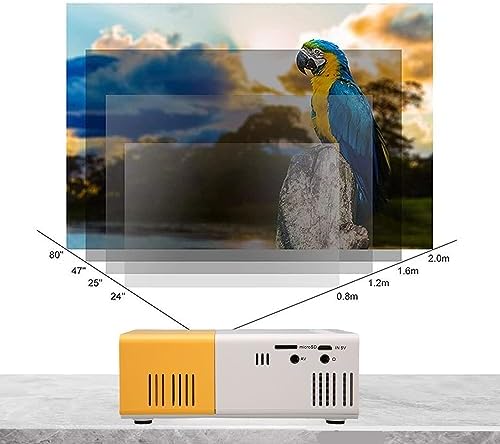
Image 5.2: Projection distance guidelines for various screen sizes. Note: Maximum recommended projection size is 60 inches.
5.3. Fookuse reguleerimine
After placing the projector and powering it on, rotate the focus ring located around the lens until the projected image appears clear and sharp.
6. Kasutusjuhised
6.1. Toide sisse/välja
- Toide sisse: Vajutage projektori või kaugjuhtimispuldi toitenuppu.
- Toide välja: Vajutage uuesti toitenuppu. Projektor lülitub välja.
6.2. Sisendallika valik
Use the 'Source' button on the remote control or the projector's control panel to cycle through available input sources (HDMI, USB, AV, MicroSD).
6.3. Menüüs navigeerimine
Use the arrow buttons on the remote control or projector to navigate through menus. Press 'OK' or 'Enter' to confirm selections. Use the 'Return' or 'Back' button to go back to the previous menu.
7. Ühenduvus
The projector offers multiple connectivity options for various devices.

Image 7.1: Connectivity options for the Goshyda projector.
7.1. HDMI-ühendus
Connect devices such as laptops, TV Sticks, game consoles (e.g., for Xbox One), or Blu-ray players using an HDMI cable. Select 'HDMI' as the input source.
7.2. USB-ühendus
Meediumi esitamiseks sisestage USB-mälupulk USB-porti files directly. Select 'USB' as the input source and navigate through your files.
7.3. AV Connection
Use the provided AV cable to connect older devices like DVD players. Select 'AV' as the input source.
7.4. Smartphone/Tablet Connection
To connect directly to your smartphone or tablet, you will need an appropriate adapter (e.g., Micro USB to HDMI, Type-C to HDMI, or a dedicated HD multimedia interface device), depending on your device's operating system (OS X or Android) and available ports. These adapters are sold separately.
7.5. Heliväljund
Connect external speakers or headphones to the audio output port for enhanced sound.
8. Hooldus
- Objektiivi puhastamine: Use a soft, lint-free cloth specifically designed for optical lenses to gently wipe the projector lens. Do not use abrasive materials or harsh chemicals.
- Väline puhastus: Pühkige projektori välispind pehme ja kuiva lapiga.
- Hoiustamine: When not in use for extended periods, store the projector in a cool, dry place, away from direct sunlight and dust.
9. Veaotsing
| Probleem | Võimalik põhjus | Lahendus |
|---|---|---|
| Pole jõudu | Power adapter not connected or faulty; insufficient power supply. | Ensure the 5V 2A power adapter is securely connected and plugged into a working outlet. Try a different power source or power bank. |
| Pilt puudub | Incorrect input source selected; cable not connected properly; device not outputting signal. | Select the correct input source (HDMI, USB, AV). Check all cable connections. Ensure the connected device is powered on and outputting a signal. |
| Pilt on udune | Fookus pole reguleeritud; projektor on ekraanile liiga lähedal/kaugel. | Rotate the focus ring to sharpen the image. Adjust the projection distance within the recommended range (1-2.5m). |
| Ei mingit heli | Volume too low or muted; external speakers not connected; audio format not supported. | Increase the volume on the projector and the source device. Check if external speakers are properly connected. Ensure the audio format is supported. |
10. Tehnilised andmed
| Funktsioon | Detail |
|---|---|
| Kaubamärk | Goshyda |
| Mudeli number | Goshyda89pkbg17g0 |
| Ekraani eraldusvõime | 1920 x 1080 (1080P tugi) |
| Heledus | 200 XNUMX luumenit |
| Kuvasuhe | 4:3 |
| Projektsiooni kaugus | 1–2.5 meetrit |
| Projektsiooni suurus | Kuni 60 tolli |
| Ühenduvustehnoloogia | HDMI, USB, AV, MicroSD, Audio Out |
| Toite sisend | 5V 2A |
| Kuva tüüp | LCD |
| Toote mõõtmed | 12L x 8.5W x 4.6H cm (Approx. 4.7 x 3.3 x 1.8 inches) |
| Vormitegur | Kaasaskantav |
| Paigaldustüüp | Lauakinnitus |
11. Garantii ja tugi
For warranty information and customer support, please refer to the documentation provided with your purchase or contact your retailer directly. Keep your proof of purchase for warranty claims.