
GEONFINO G5+G2
GEONFINO WiFi & Bluetooth Smart Lock G5+G2 User Manual
Model: G5+G2
1. Toote lõppview
The GEONFINO G5+G2 Smart Lock is a keyless entry system designed for enhanced home security and convenience. It integrates WiFi and Bluetooth connectivity, offering multiple access methods and smart home compatibility.
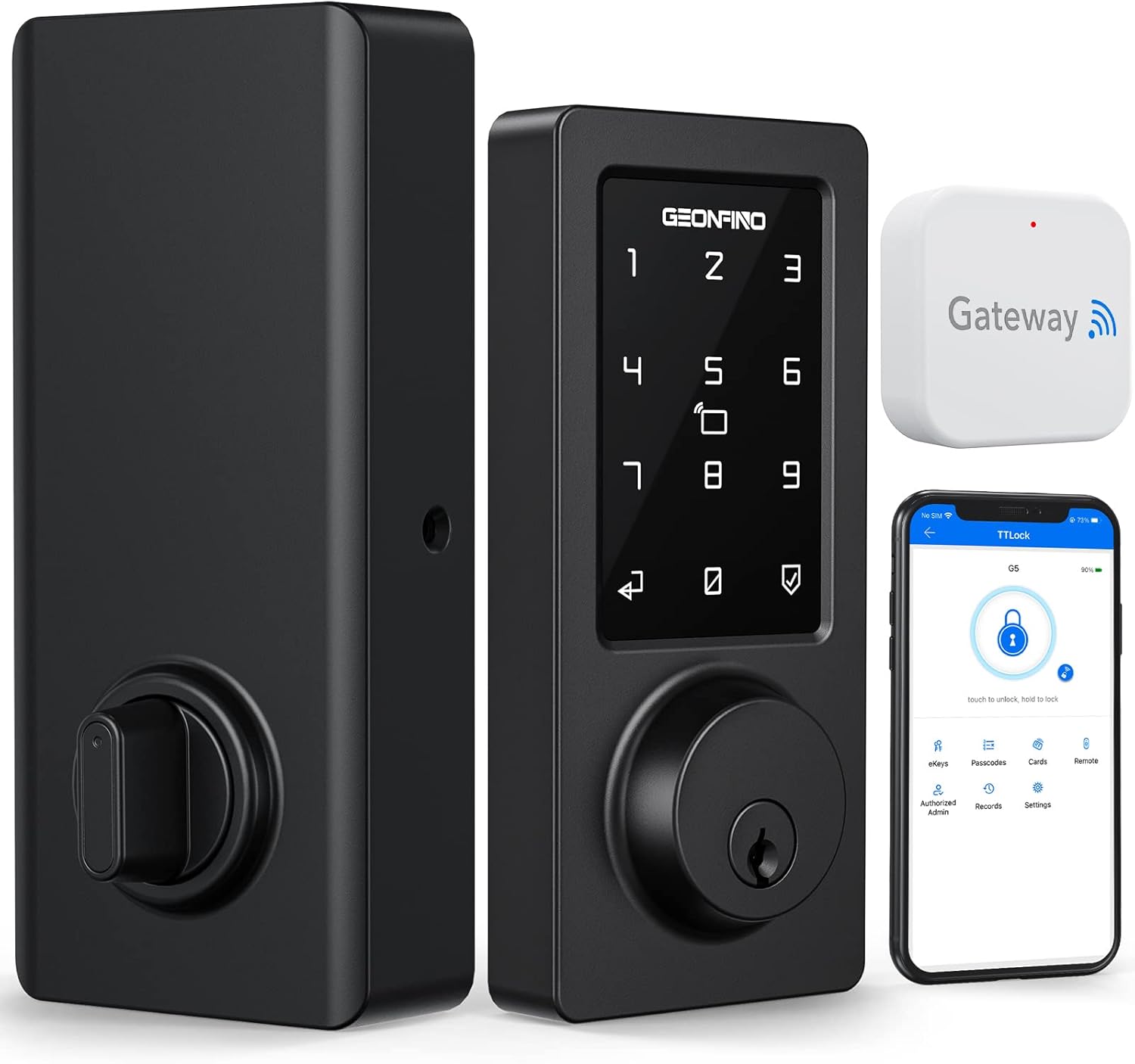
Image 1.1: GEONFINO Smart Lock G5+G2 components including the exterior keypad, interior assembly, gateway, and a smartphone displaying the control app.
Kaasatud komponendid:
- Värav X 1
- C-tüüpi USB-kaabel x 1
- Interior Assembly X 1
- Latch X 1
- Keypad X 1
- Battery Cover X 1
- Mounting Plate X 1
- Strike X 1
- Strike Box X 1
2. Seadistamine ja installimine
The GEONFINO Smart Lock is designed for straightforward installation. A single screwdriver is typically sufficient for the process. Ensure your door meets the compatibility requirements before beginning installation.
Ukse ühilduvus:
- Door thickness: 1.6 to 2 inches (40mm to 50mm)
- Deadbolt depth: 60 mm or 70 mm (2.36 inches or 2.75 inches)
Paigaldamise etapid:
- Valmistage uks ette: Verify door dimensions and ensure the existing deadbolt hole is clear.
- Paigaldage riiv: Sisestage riiv ukse serva sisse ja kinnitage see kruvidega.
- Paigaldage klaviatuur: Paigaldage väline klaviatuurikomplekt, viies kaabli läbi ukse.
- Paigaldage paigaldusplaat: Secure the interior mounting plate to the door.
- Connect and Install Interior Assembly: Connect the keypad cable to the interior assembly and mount it to the plate.
- Sisestage patareid: The lock requires 4 AA batteries (not included). Insert them into the battery compartment.
- Paigaldage kaitseplaat ja kast: Attach the strike plate and box to the door frame.
- Testoperatsioon: Manually test the lock and latch for smooth operation.

Image 2.1: A person installing the GEONFINO Smart Lock on a wooden door using a screwdriver.
Lüüsi seadistamine:
The included gateway acts as a bridge between your smart lock and your home WiFi network, enabling remote control and smart home integration. Plug the gateway into a power source within range of both your WiFi router and the smart lock. Follow the instructions in the TTLock app to pair the gateway with your lock and connect it to your WiFi network.
3. Kasutusjuhised
The GEONFINO Smart Lock offers multiple methods for locking and unlocking, providing flexibility and convenience.
Juurdepääsumeetodid:
- Pääsukood: Enter a numerical code on the touchscreen keypad. Up to 200 passcodes can be generated with varying validity periods.
- eKeys: Grant temporary or permanent access via digital eKeys sent through the TTLock app.
- Rakenduse juhtimine: Lock or unlock the door directly using the TTLock app on your smartphone.
- Hääljuhtimine: Integrate with Alexa for convenient voice commands (requires gateway).
- RFID-kaardid: Use provided RFID cards for quick tap-to-unlock access.
- Füüsilised võtmed: Traditional key access is available as a backup.

Image 3.1: Visual representation of the six keyless entry methods: App Control, Passcode, IC Card, Physical Key, Gateway Remote Control, and Alexa Voice Control.
Remote Control via TTLock App:
With the gateway connected, you can control your smart lock from anywhere using the TTLock app. This allows you to:
- Lukusta või ava oma uks eemalt.
- View unlock records and access logs.
- Modify or delete existing passcodes.
- Generate new passcodes or eKeys for guests.

Image 3.2: Users demonstrating remote control of the smart lock via a smartphone app, showing the convenience of managing access from any location.
Hääljuhtimine Alexa abil:
When integrated with Alexa via the gateway, you can use voice commands to control your smart lock. For example, say "Alexa, lock the front door."

Image 3.3: A person interacting with an Alexa device to lock the smart door lock, illustrating the voice control feature.
Turvafunktsioonid:
- Automaatne lukustus: The smart deadbolt can be set to automatically lock after a specified time (0-60 seconds) to ensure your door is always secured.
- Virtual Code Function: To prevent unauthorized viewing of your passcode, you can enter random digits before or after your correct passcode. The lock will still recognize the correct sequence.
- Wrong Code Lockout: If an incorrect code is entered more than 5 times, the deadbolt will temporarily lock for 5 minutes.
- Access Record Naming: Assigning names to each passcode allows you to clearly identify who unlocked the door and when.

Image 3.4: A visual explanation of the virtual code function, where random digits can be added before or after the actual passcode, and the auto-lock mechanism.
4. Hooldus
Proper maintenance ensures the longevity and optimal performance of your GEONFINO Smart Lock.
Akuhaldus:
- The lock requires 4 AA batteries.
- When the battery level is low, the screen will illuminate and emit an audible beep as a warning.
- For emergency situations where batteries are completely depleted, the smart lock is equipped with a micro-USB interface for temporary power supply. Connect a standard micro-USB cable to a power bank or charger to provide power and operate the lock.
Üldine hooldus:
- Clean the keypad and lock body with a soft, dry cloth. Avoid abrasive cleaners or solvents.
- Ensure the lock cylinder and latch operate smoothly. Do not force the lock if resistance is encountered.
- The lock is IP65 waterproof, suitable for harsh environments, but avoid direct exposure to heavy water jets or prolonged submersion.
5. Veaotsing
Selles jaotises käsitletakse levinud probleeme, millega nutilukuga kokku puutuda võib.
Levinud probleemid ja lahendused:
- Lukk ei reageeri:
- Kontrollige patareide taset. Kui patareid on tühjad, vahetage need välja.
- Use the micro-USB port for emergency power if batteries are completely drained.
- Klaviatuur ei reageeri:
- Ensure the keypad is clean and dry.
- If the lock is in lockout mode (after 5 incorrect entries), wait 5 minutes.
- Kaugjuhtimispult ei tööta:
- Verify the gateway is powered on and connected to your home WiFi.
- Ensure the gateway is within range of both the smart lock and your WiFi router.
- Kontrollige oma nutitelefoni internetiühendust.
- Automaatne lukustus ei rakendu:
- Confirm the auto-lock feature is enabled and configured correctly in the TTLock app.
- Paigaldamise raskused:
- Refer to the detailed instruction manual included with the product.
- Ensure door dimensions match the compatibility requirements.
For issues not covered here, please contact GEONFINO customer support.
6. Tehnilised andmed
| Funktsioon | Detail |
|---|---|
| Kaubamärk | GEONFINO |
| Mudeli nimi | G5+G2 |
| Luku tüüp | Klahvistiku survelukk |
| Eriomadused | Bluetooth + APP Keyless Control + Alexa Voice Control |
| Ühenduvusprotokoll | Bluetooth, WiFi |
| Kontrollimeetod | App, Keypad, Voice, RFID Card, Physical Key |
| Materjal | Tsingi sulam |
| Värv | Must |
| Viimistluse tüüp | Poleeritud |
| Toote mõõtmed | 8.86 x 3.86 x 5.51 tolli |
| Kauba kaal | 3.72 naela |
| Nõutavad patareid | 4 AA patareid (ei kuulu komplekti) |
| Tootja | Zhongshan City Geonfino Co., Ltd |
| Globaalne kaubanduse identifitseerimisnumber | 06974346350119 |
7. Garantii ja tugi
Garantii teave:
GEONFINO provides a 12-month warranty for all products from the date of purchase. This warranty covers manufacturing defects and malfunctions under normal use.
Tehniline tugi:
Lifetime technical support is available for your GEONFINO Smart Lock. If you encounter any issues or have questions regarding installation, operation, or troubleshooting, please do not hesitate to contact our customer service team. We offer support through emails, online chatting, and call services, with a commitment to reply within 24 hours.
Please refer to the contact information provided with your product packaging or visit the official GEONFINO webkõige ajakohasema tugiteabe saamiseks külastage veebisaiti.