
Sissejuhatus
This manual provides comprehensive instructions for the Docooler T-Wolf V11 Wired Gaming Mouse. It covers setup, operation, maintenance, and troubleshooting to ensure optimal performance and longevity of your device. The T-Wolf V11 is designed for both gaming and office use, featuring adjustable DPI, ergonomic design, and customizable RGB lighting.
Toote omadused
- 8-nupuline disain: Equipped with 8 programmable buttons suitable for various tasks in gaming and office applications.
- Reguleeritav DPI: Offers 6 levels of DPI adjustment (1000/1600/2400/3200/4800/6400) for precise cursor control and sensitive operation.
- Ergonomic Arc Design: Engineered for a comfortable grip, fitting closely to your palm to reduce fatigue during extended use.
- Integrated Weights: Features independent weights within the mouse, allowing customization for improved stability and precision to suit individual preferences.
- RGB Colorful Backlight: Provides 6 types of colorful RGB streaming light effects, enhancing the visual experience.
- Vastupidav konstruktsioon: Includes a lightweight aluminum alloy anti-skid roller for comfortable and reliable use.
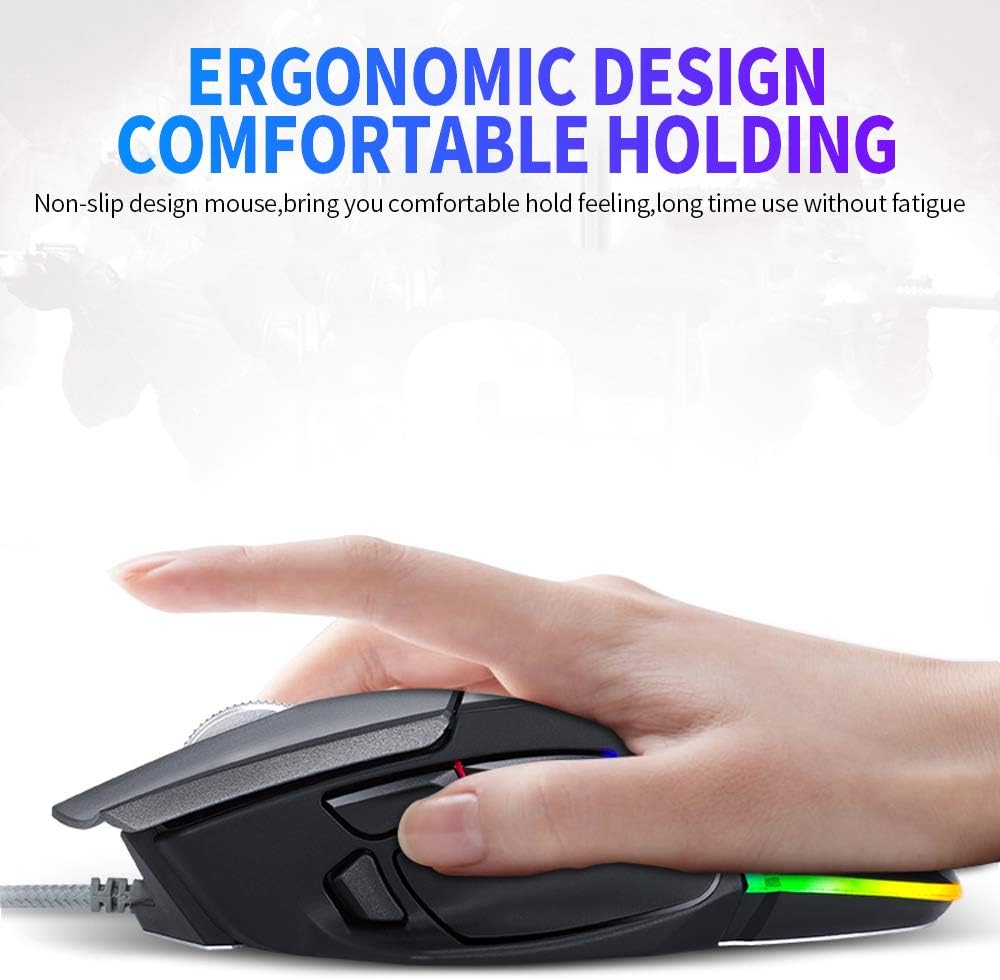
Image: The ergonomic design of the T-Wolf V11 mouse, demonstrating how it comfortably fits the hand to reduce strain during prolonged use.

Image: The T-Wolf V11 mouse illuminated with its dynamic RGB streaming light effects, showcasing the customizable lighting options.
Seadistusjuhised
- Pakkige hiir lahti: Carefully remove the T-Wolf V11 mouse from its packaging.
- Ühendage arvutiga: Plug the USB connector of the mouse's cable into an available USB port on your computer (desktop or laptop).
- Draiveri installimine: The mouse is typically plug-and-play. Your operating system (Windows, macOS, Linux) should automatically detect and install the necessary drivers. No additional software installation is usually required for basic functionality.
- Funktsionaalsuse kontrollimine: Once connected, move the mouse to check cursor movement and click the left and right buttons to ensure they are responsive.

Image: The Docooler T-Wolf V11 gaming mouse connected to a laptop, illustrating a typical setup scenario.
Kasutusjuhised
Nuppude funktsioonid
- Vasakklõps (nupp 1): Standardne esmane klõpsufunktsioon.
- Paremklõps (nupp 2): Standardne teisejärgulise klõpsu funktsioon.
- Kerimisratas (nupp 3): Scrolls content up/down. Can also be pressed for middle-click functionality.
- DPI Cycle Button (Button 4): Located near the scroll wheel, press to cycle through DPI settings (1000/1600/2400/3200/4800/6400).
- Forward/Backward Buttons (Buttons 5 & 6): Typically located on the side, used for navigation in web brauserid või file uurijad.
- Additional Programmable Buttons (Buttons 7 & 8): These buttons can often be customized using third-party software or operating system settings for specific functions or macros.
DPI reguleerimine
Press the DPI cycle button (usually located behind the scroll wheel) to switch between the available DPI settings. Each press will change the sensitivity, allowing you to adapt to different tasks, from precise aiming in games to fast navigation in desktop environments. The RGB lighting may change color to indicate the current DPI level.
RGB valgusefektid
The T-Wolf V11 features 6 types of colorful RGB streaming light effects. These effects are pre-programmed and cycle automatically, providing a dynamic visual experience. There is no specific button to change RGB modes on the mouse itself; the lighting patterns are typically fixed or cycle through automatically.

Pilt: detailne view of the T-Wolf V11 mouse, illustrating its DPI adjustment capabilities and RGB streamer marquee lighting.
Hooldus
- Puhastamine: Hiire pinna pühkimiseks kasutage pehmet ja kuiva lappi. Kangekaelse mustuse korral kuivatage seda kergelt.ampLoputage lappi veega või õrnatoimelise mitteabrasiivse puhastusvahendiga. Vältige tugevate kemikaalide ja liigse niiskuse kasutamist.
- Anduri puhastamine: Täpse jälgimise tagamiseks puhastage hiire all asuvat optilist andurit regulaarselt vatitupsuga.
- Kaabli hooldus: Avoid sharply bending or twisting the mouse cable to prevent internal damage. Store the cable neatly when not in use.
- Hoiustamine: Kui hiirt pikemat aega ei kasutata, hoidke seda puhtas ja kuivas kohas, eemal otsesest päikesevalgusest ja äärmuslikest temperatuuridest.
Veaotsing
- Hiir ei reageeri:
- Veenduge, et USB-kaabel oleks kindlalt arvuti töötavasse USB-porti ühendatud.
- Proovige hiir ühendada teise USB-porti.
- Taaskäivitage arvuti.
- Kursori liikumine on ebakindel või hüplik:
- Puhastage hiire allosas asuv optiline andur.
- Veenduge, et kasutate hiirt puhtal, mittepeegeldaval ja ühtlasel pinnal (nt hiirematil).
- DPI ei muutu:
- Press the DPI cycle button firmly.
- Veenduge, et hiir on korralikult ühendatud ja teie süsteem selle ära tunneb.
- RGB tuled ei tööta:
- Kontrollige USB-ühendust.
- The RGB lighting is typically automatic; if it's not illuminating, ensure the mouse is receiving power.
Tehnilised andmed
| Kaubamärk | Docooler |
| Mudel | V11 |
| Värv | Must |
| Ühenduvustehnoloogia | Juhtmega |
| Nuppude arv | 8 |
| DPI seaded | 1000/1600/2400/3200/4800/6400 (Adjustable) |
| Taustvalgustuse tüüp | RGB värviline |
| Kaabli pikkus | 1.9 meetrit |
| Kauba suurus | 13 x 8.5 x 4.5 cm (5.1 x 3.3 x 1.8 tolli) |
| Kauba kaal | 177 g (6.24 untsi) |
| Ühilduvad seadmed | Sülearvuti, arvuti |
| Riistvara platvorm | PC |
| Toiteallikas | Elektriline kaabel (USB) |
Garantii ja tugi
For warranty information and technical support, please refer to the documentation provided with your purchase or contact Docooler customer service directly. Keep your proof of purchase for any warranty claims. Support contact details can typically be found on the manufacturer's official websaidile.