
Sissejuhatus
Thank you for choosing the AW 7-inch RGB Dual LED Ring Light. This device is designed to provide versatile and adjustable lighting for various applications such as live streaming, makeup application, photography, and video recording. Please read this manual thoroughly before use to ensure proper setup and operation.
Pakendi sisu
Veenduge, et pakendis on kõik komponendid olemas:
- Dual LED Ring Light with Gooseneck Arms
- Reguleeritav statiivi alus
- Töölaua alus
- Phone Holder with Gooseneck
- Bluetoothi kaugjuhtimispult
- USB Power Cable with In-line Controller
- Peegel

Pilt: Kõik pakendis olevad komponendid on kontrollimiseks välja pandud.
Toote omadused
- Dual Ring Design: Two 7-inch LED ring lights with flexible 360-degree rotating gooseneck arms for optimal light positioning.
- Reguleeritav värv ja heledus: 3 color modes (6500K white, 4500K neutral, 3200K warm light) and 9 RGB colors (white, red, green, blue, purple, yellow, light blue, color gradient, color flashing mode). 6-level brightness adjustment.
- Versatile Stands: Includes an adjustable aluminum alloy tripod stand (32" to 55" height) and a foldable desktop stand.
- Telefoni hoidja: Gooseneck phone holder compatible with phones 1 15/16" to 3 9/16" wide, allowing portrait, landscape, or upside-down orientations.
- Bluetoothi kaugjuhtimispult: For wireless selfie shooting with iOS and Android phones.
- Adjustable Mirror: Integrated mirror for convenient makeup application and touch-ups.
- USB toitega: Compatible with various USB power sources.
Seadistusjuhised
- Statiivialuse kokkupanek:
Extend the legs of the tripod stand and adjust its height to your desired level (from 32" to 55"). Secure the height adjustment clamps firmly. Alternatively, use the smaller desktop stand for tabletop use.

Image: The adjustable tripod stand shown at different heights, from 15 12/16 inches (40 cm) to 55 2/16 inches (140 cm).
- Attach the Ring Light Assembly:
Mount the main ring light assembly onto the top of the tripod stand. Ensure it is securely fastened.

Image: A diagram showing the fully assembled ring light with its dimensions, including the dual ring lights, mirror, and phone holder on the tripod.
- Installige telefonihoidik:
Attach the gooseneck phone holder to the designated slot on the main assembly. Insert your smartphone into the holder, ensuring it is held firmly. The holder accommodates phones from 1 15/16" to 3 9/16" wide.

Image: The Bluetooth remote control with iOS/Android buttons and the 360-degree adjustable gooseneck phone holder, demonstrating phone placement and rotation.
- Asetage peegel:
The mirror is integrated into the central hub. Adjust its angle as needed for makeup or self-viewing.
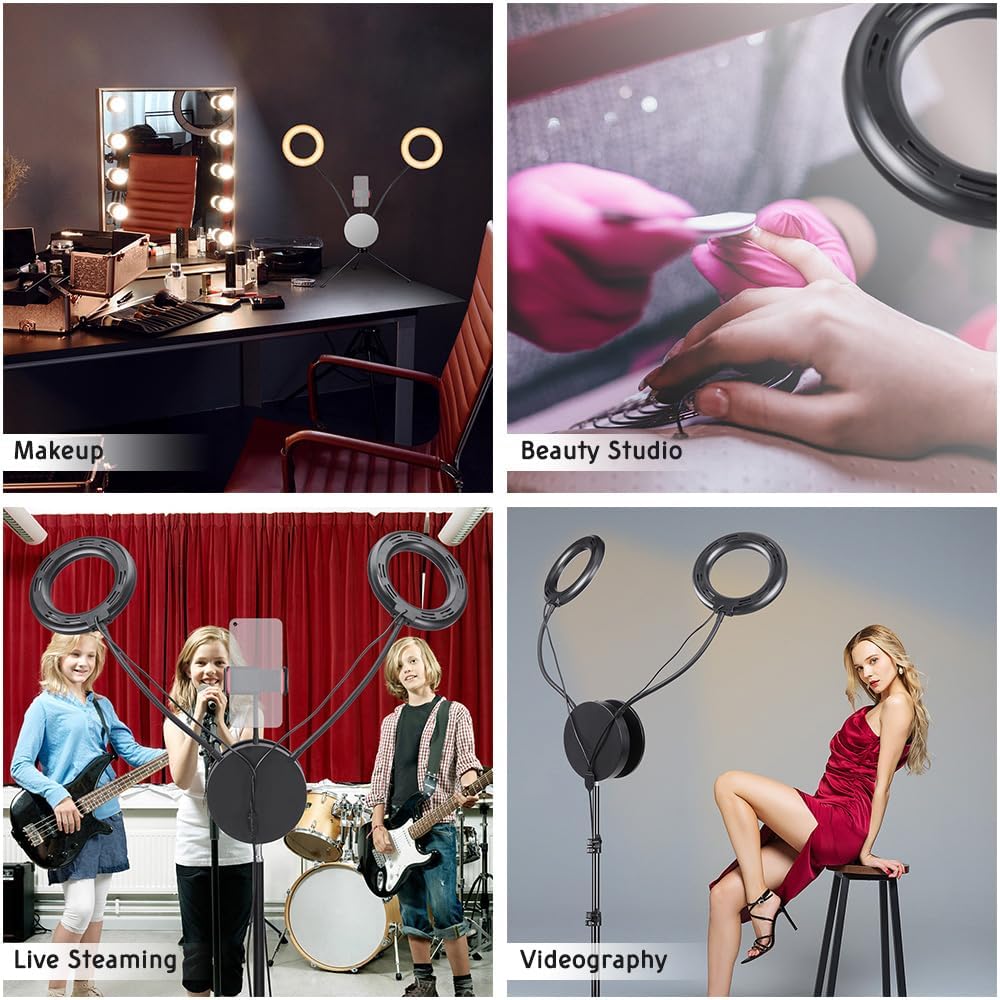
Image: Diagrams illustrating the 360-degree flexibility of the gooseneck arms for the ring lights and the adjustable, rotating mirror for convenient makeup application.
- Ühendage toide:
Plug the USB power cable into a compatible USB power source (e.g., USB wall adapter, power bank, computer USB port). The in-line controller will illuminate.

Image: The in-line control panel with buttons for brightness, power, and RGB adjustments, along with various USB power source examples like a laptop, desktop, power strip, and wall adapter.
Kasutusjuhised
- Toide sisse/välja:
Vajutage nuppu SISSE/VÄLJA button on the in-line controller to turn the light on or off.
- Heleduse reguleerimine:
Kasutage Heleduse suurenemine ja Heleduse vähendamine buttons on the in-line controller to cycle through 6 levels of brightness.
- Change Color Modes (White Light):
Vajutage nuppu RGB Color Change button (or similar designated button) to switch between the 3 white light color temperatures: 6500K (cool white), 4500K (neutral white), and 3200K (warm light).

Image: Visual representation of the three normal white color temperatures (6500K, 5500K, 3200K) and seven RGB color options, including color gradient and flashing modes.
- Activate RGB Colors:
Jätkake klahvi RGB Color Change button to cycle through the 9 RGB color modes, including solid colors, color gradient, and color flashing mode.
- Adjust RGB Brightness:
When an RGB color mode is active, use the RGB Brightness Adjust button to modify the intensity of the RGB lighting.
- Bluetooth-kaugjuhtimispuldi kasutamine:
Turn on the Bluetooth remote control. On your smartphone, enable Bluetooth and pair with the device (usually named "AB Shutter3" or similar). Once paired, press the appropriate button on the remote (iOS or Android) to trigger your phone's camera shutter for wireless photos or video recording.
- Adjusting Gooseneck Arms:
Flex the gooseneck arms of the ring lights to direct illumination precisely where needed. The 360-degree rotation allows for versatile lighting angles.
Hooldus
- Puhastamine: Use a soft, dry cloth to wipe down the ring lights and stand. Do not use abrasive cleaners or solvents.
- Hoiustamine: When not in use, fold the tripod stand and store all components in a dry, cool place to prevent damage.
- Kaabli hooldus: Avoid bending or crimping the USB power cable excessively to prevent internal damage.
Veaotsing
- Tuli ei lülitu sisse:
- Ensure the USB cable is securely connected to both the light and a working power source.
- Proovige teist USB-porti või toiteadapterit.
- Verify the ON/OFF button on the in-line controller has been pressed.
- Bluetooth-pult ei ühendu:
- Make sure the remote control is powered on.
- Veenduge, et Bluetooth oleks teie nutitelefonis lubatud.
- Unusta seade oma telefoni Bluetoothi sätetes ja proovi uuesti siduda.
- Kontrollige, kas kaugjuhtimispuldi patarei vajab vahetamist.
- Tuled on hämarad või vilguvad:
- Ensure the power source provides sufficient power (e.g., a 5V/2A USB adapter is recommended).
- Adjust the brightness settings using the in-line controller.
Tehnilised andmed
| Kaubamärk | AW |
| Mudeli number | AW-RLK000006 |
| Screen Size (Ring Light Diameter) | 7 tolli |
| Ühenduvustehnoloogia | USB |
| Riistvara liides | Bluetooth, USB |
| Värvirežiimid | 3 White (3200K, 4500K, 6500K), 9 RGB (solid colors, gradient, flashing) |
| Heleduse reguleerimine | 6 taset |
| Statiivi kõrguse vahemik | 32–55 tolli (82–140 cm) |
| Telefonihoidja ühilduvus | 1 15/16" to 3 9/16" (5 cm to 9 cm) wide smartphones |
| Kauba kaal | 4 naela |
| Veekindluse tase | Ei ole veekindel |
Garantii teave
The manufacturer's warranty information for this product is not explicitly provided in the product details. Please refer to your purchase documentation or contact the retailer for specific warranty terms and conditions.
Toetus
For further assistance, technical support, or inquiries regarding your AW 7-inch RGB Dual LED Ring Light, please contact the manufacturer or your point of purchase. Keep your purchase receipt and model number (AW-RLK000006) handy when seeking support.