
Kaidi KD-750
Kaidi KD-750 Bluetooth Headphones User Manual
Mudel: KD-750
1. Sissejuhatus
Thank you for choosing the Kaidi KD-750 Bluetooth Headphones. This manual provides essential information for the proper setup, operation, and maintenance of your device. Please read it thoroughly before use to ensure optimal performance and longevity of your headphones.
2. Pakendi sisu
Veenduge, et pakis on kõik esemed olemas:
- 1 x Kaidi KD-750 Bluetooth Headphones
- 1 x USB laadimiskaabel
- 1 x Reinforced 3.5mm Audio Cable with Microphone (P2 Cable)
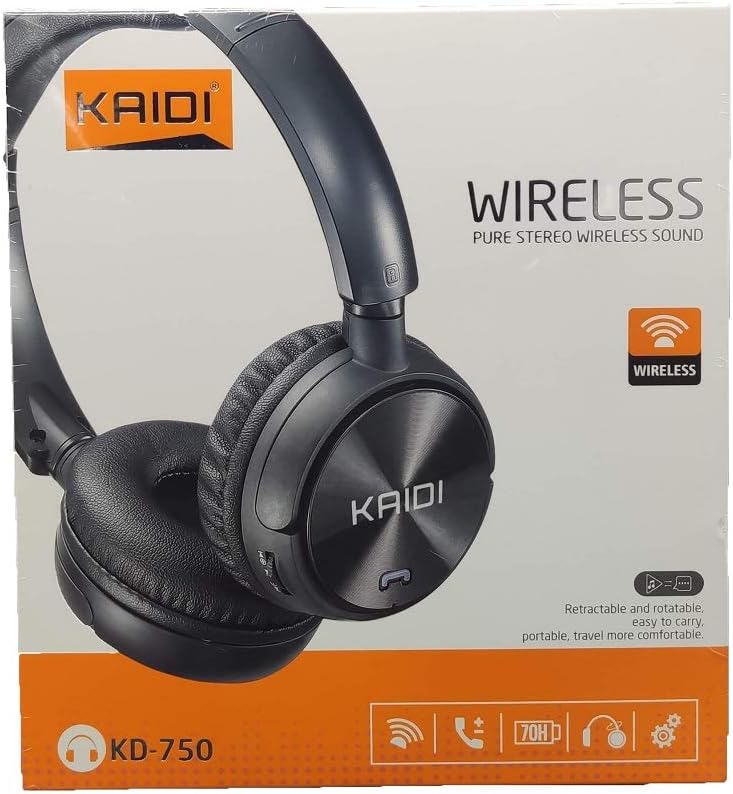
Pilt: Esikülg view of the Kaidi KD-750 retail packaging, showing the headphones and branding.
3. Toote lõppview
Familiarize yourself with the various parts and controls of your Kaidi KD-750 headphones.

Pilt: Esikülg view of the Kaidi KD-750 Bluetooth Headphones, showcasing the earcups with Kaidi logo and the adjustable headband.
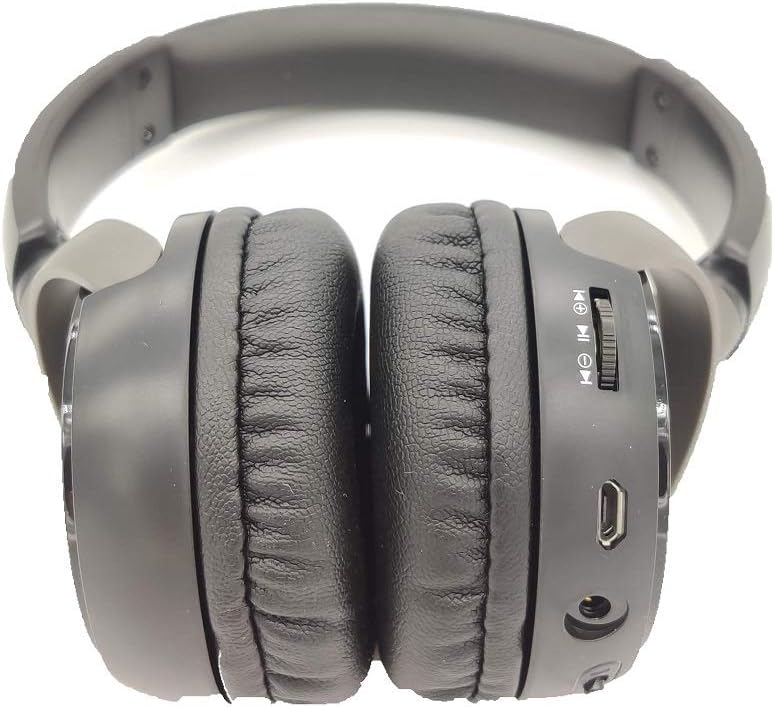
Pilt: Külg view of the Kaidi KD-750 Bluetooth Headphones, highlighting the control buttons, charging port, and audio jack on the earcup.

Image: Back of the Kaidi KD-750 retail box, featuring a diagram of the headphone controls and key product features.
3.1. Juhtimisseadmed ja pordid
- Toitenupp / multifunktsionaalne nupp: Toide sisse/välja, esitamine/paus, kõnele vastamine/lõpetamine.
- Helitugevuse suurendamise / järgmise loo nupp: Lühike vajutus helitugevuse suurendamiseks, pikk vajutus järgmise loo kuulamiseks.
- Helitugevuse vähendamise / eelmise loo nupp: Lühike vajutus helitugevuse vähendamiseks, pikk vajutus eelmise loo kuulamiseks.
- Režiimi nupp (M): Switch between Bluetooth, FM Radio, and SD Card modes.
- Mikro-USB laadimisport: Kõrvaklappide laadimiseks.
- 3.5 mm AUX sisend: Juhtmega ühenduse loomiseks kaasasoleva audiokaabli abil.
- Micro SD kaardi pesa: Muusika esitamiseks otse Micro SD-kaardilt.
- Mikrofon: Käed-vabad kõnede jaoks.
4. Seadistamine
4.1. Kõrvaklappide laadimine
Enne esmakordset kasutamist laadige kõrvaklapid täielikult.
- Ühendage laadimiskaabli micro-USB-ots kõrvaklappide laadimisporti.
- Ühenda laadimiskaabli USB-A-ots USB-toiteadapteriga (ei kuulu komplekti) või arvuti USB-porti.
- The LED indicator will illuminate (usually red) during charging.
- Once fully charged (approximately 2 hours), the LED indicator will change color or turn off (refer to specific LED behavior in the specifications).
Märkus. Aku eluiga on täislaadimisel umbes 5 tundi.
4.2. Bluetoothi sidumine
Siduge kõrvaklapid Bluetooth-toega seadmega.
- Veenduge, et kõrvaklapid on välja lülitatud.
- Press and hold the Power Button for approximately 3-5 seconds until the LED indicator flashes blue and red alternately, indicating pairing mode.
- Luba oma seadmes (nutitelefon, tahvelarvuti, arvuti) Bluetooth ja otsi saadaolevaid seadmeid.
- Select "KD-750" from the list of found devices.
- Once paired, the LED indicator will typically flash blue slowly or remain solid blue.
- Kui parool on vajalik, sisestage "0000".
Bluetoothi efektiivne leviala on umbes 10 meetrit (33 jalga).
5. Kasutusjuhised
5.1. Toide sisse/välja
- Toide sisse: Press and hold the Power Button for 2-3 seconds until the LED indicator lights up.
- Toide välja: Press and hold the Power Button for 3-4 seconds until the LED indicator turns off.
5.2. Music Playback (Bluetooth Mode)
- Esita/peata: Vajutage lühidalt toitenuppu.
- Järgmine lugu: Vajutage pikalt helitugevuse suurendamise nuppu.
- Eelmine lugu: Vajutage pikalt helitugevuse vähendamise nuppu.
- Helitugevuse suurendamine: Vajutage lühidalt helitugevuse suurendamise nuppu.
- Hääl maha: Vajutage lühidalt helitugevuse vähendamise nuppu.
5.3. Telefonikõned
- Vasta kõnele: Sissetuleva kõne helisemisel vajutage lühidalt toitenuppu.
- Kõne lõpetamine: Vajutage kõne ajal lühidalt toitenuppu.
- Keeldu kõnest: Long press the Power Button when an incoming call rings.
- Viimase numbri kordusvalimine: Vajutage kaks korda toitenuppu.
5.4. Mode Switching (FM Radio / SD Card / AUX)
Vajutage nuppu Režiimi (M) nupp to cycle through available modes: Bluetooth, FM Radio, and SD Card playback.
5.4.1. FM-raadio režiim
- Switch to FM mode using the Mode (M) Button.
- Long press the Power Button to automatically scan and save available FM stations.
- Short press the Volume Up/Down buttons to adjust volume.
- Long press the Volume Up/Down buttons to switch between saved stations.
5.4.2. Micro SD-kaardi taasesitus
- Sisestage microSD-kaart (MP3-ga) files) into the SD card slot.
- Switch to SD Card mode using the Mode (M) Button. The headphones will automatically begin playing music from the card.
- Use the Play/Pause, Volume Up/Down, and Next/Previous Track controls as in Bluetooth mode.

Pilt: Lähivõte view of the Micro SD card slot on the Kaidi KD-750 headphones.
5.4.3. AUX Wired Mode
- Connect one end of the included 3.5mm audio cable to the AUX input on the headphones.
- Ühendage teine ots oma seadme 3.5 mm heliväljundiga.
- Kõrvaklapid lülituvad automaatselt AUX-režiimile.
- In AUX mode, controls on the headphones (volume, track control) may not function; use your connected device for control.
6. Hooldus ja hooldus
- Puhastage kõrvaklappe pehme ja kuiva lapiga. Ärge kasutage abrasiivseid puhastusvahendeid ega lahusteid.
- Vältige kõrvaklappide jätmist äärmuslike temperatuuride, niiskuse või otsese päikesevalguse kätte.
- Ärge kastke kõrvaklappe vette ega muudesse vedelikesse.
- Hoidke kõrvaklappe jahedas ja kuivas kohas, kui neid ei kasutata.
- Aku töökorras hoidmiseks laadige kõrvaklappe regulaarselt, isegi kui neid pikka aega ei kasutata.
7. Veaotsing
7.1. Headphones do not power on.
Lahendus: The battery may be depleted. Connect the headphones to a power source using the USB charging cable and allow them to charge for at least 30 minutes before attempting to power on again.
7.2. Cannot pair with a Bluetooth device.
- Lahendus 1: Ensure the headphones are in pairing mode (LED flashing blue and red alternately).
- Lahendus 2: Make sure Bluetooth is enabled on your device and it is within 10 meters of the headphones.
- Lahendus 3: Lülitage oma seadmes Bluetooth välja, seejärel lülitage see uuesti sisse ja proovige uuesti otsida.
- Lahendus 4: If previously paired, try "forgetting" or "unpairing" the headphones from your device's Bluetooth list and then re-pairing.
7.3. No sound or low volume.
- Lahendus 1: Kontrollige nii kõrvaklappide kui ka ühendatud seadme helitugevust.
- Lahendus 2: Veenduge, et kõrvaklapid oleksid Bluetoothi või 3.5 mm AUX-kaabli kaudu korralikult ühendatud.
- Lahendus 3: If using AUX mode, ensure the cable is fully inserted into both the headphones and the audio source.
7.4. FM radio reception is poor.
Lahendus: Move to an open area away from obstructions or electronic interference. The 3.5mm audio cable can sometimes act as an antenna; try connecting it even if not using AUX mode for improved reception.
8. Tehnilised andmed
| Bluetoothi versioon: | v4.2 |
| Toetatud protokollid: | AVRCP1.3, A2DP1.0, HFP1.5, HSP1.0 |
| Tõhus vahemik: | 10 meetrit (33 jalga) |
| Töösagedus: | 2.402 GHz kuni 2.480 GHz |
| Aku tüüp: | Built-in 3.7V 300mAh Rechargeable Lithium Battery |
| Laadimine Voltage: | Alalisvool 4.2–5.5 V |
| Laadimisaeg: | Umbes 2 tundi |
| Aku kestvus: | Approximately 5 hours (playback) |
| Kõlari takistus: | 32 oomi |
| Mürakontroll: | Passiivne müra tühistamine |
| Ühenduvustehnoloogia: | Bluetooth, 3.5 mm pesa |
| Ühilduvad seadmed: | Any device supporting Bluetooth connectivity |
| Toote kaal: | 190 g |
| Värv: | Must |
9. Garantii ja tugi
The Kaidi KD-750 Bluetooth Headphones come with a standard manufacturer's warranty against defects in materials and workmanship. Please refer to the warranty card included with your purchase for specific terms and conditions, including the warranty period.
For technical support, troubleshooting assistance, or warranty claims, please contact your retailer or the official Kaidi customer service. Contact information can typically be found on the product packaging or the official Kaidi websaidile.
Palun hoidke oma ostutõend garantiinõuete täitmiseks alles.