
1. Sissejuhatus
Thank you for choosing the HOTT CD511 Portable CD Player. This manual provides detailed instructions for the proper setup, operation, and maintenance of your device. Please read this manual thoroughly before use to ensure optimal performance and longevity of your CD player.
2. Toote lõppview
2.1 Põhifunktsioonid
- CD/MP3 Compatibility: Supports CD, CD-R, CD-RW, and MP3 discs.
- Electronic Anti-Skip/Anti-Shock Protection (ESP/ASP): Ensures smooth playback even during movement.
- Toiteallika valikud: Can be powered by batteries or via USB charging.
- Nupu lukustusfunktsioon: Prevents accidental button presses during use.
- Mitu heliefekti: Includes BBS, Classic, Jazz, Pop, and Rock EQ modes.
- Various Play Modes: Offers play in order, repeat a track, repeat all, intro (first 10 seconds), and shuffle.
- Jätkamise funktsioon: Remembers the last played position even after power off.
2.2 Komponendid ja juhtseadised
Familiarize yourself with the various parts and controls of your HOTT CD511 CD player.
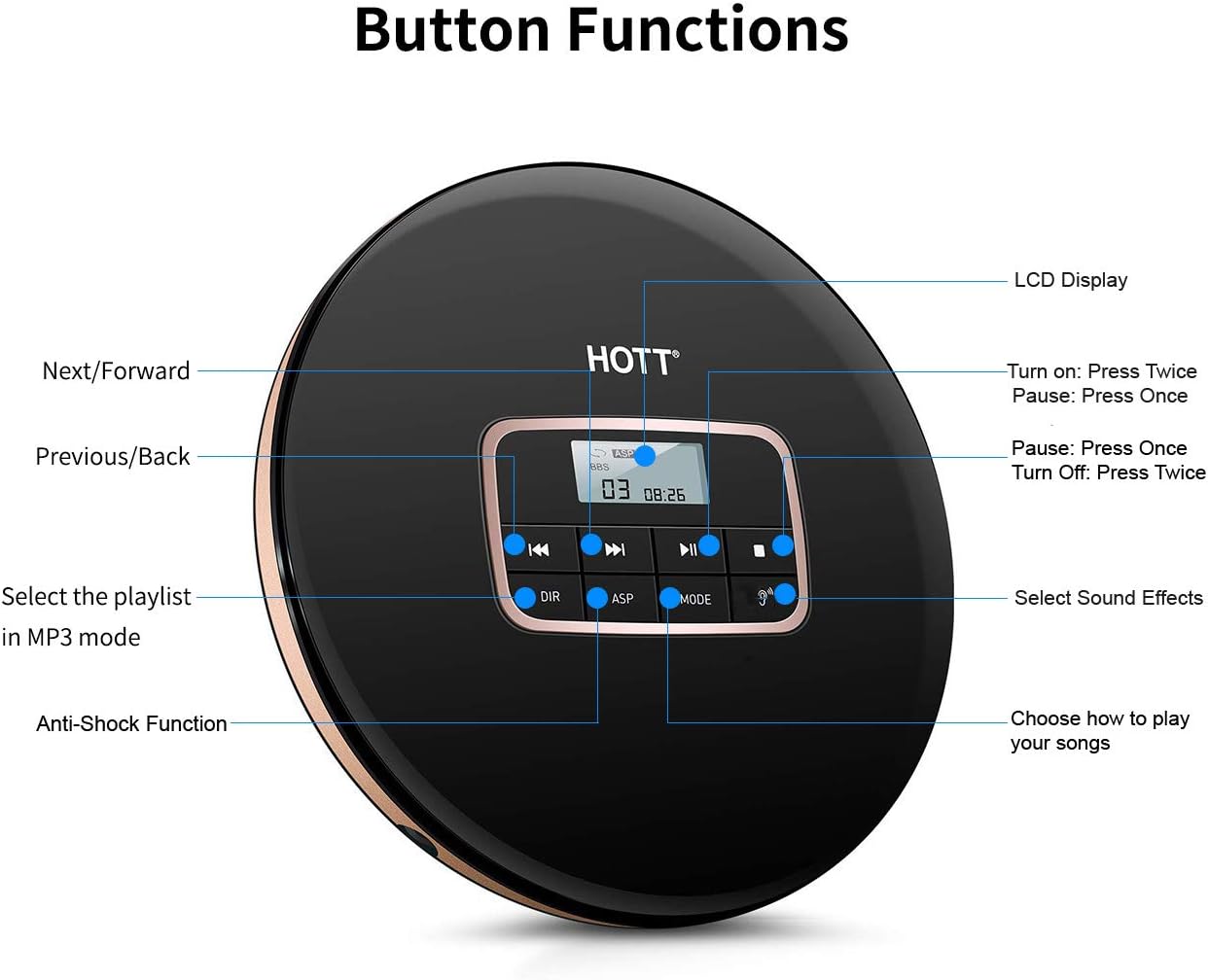
1. pilt: Üles view of the HOTT CD511 Portable CD Player, highlighting the LCD display and various control buttons for navigation, sound effects, and play modes.
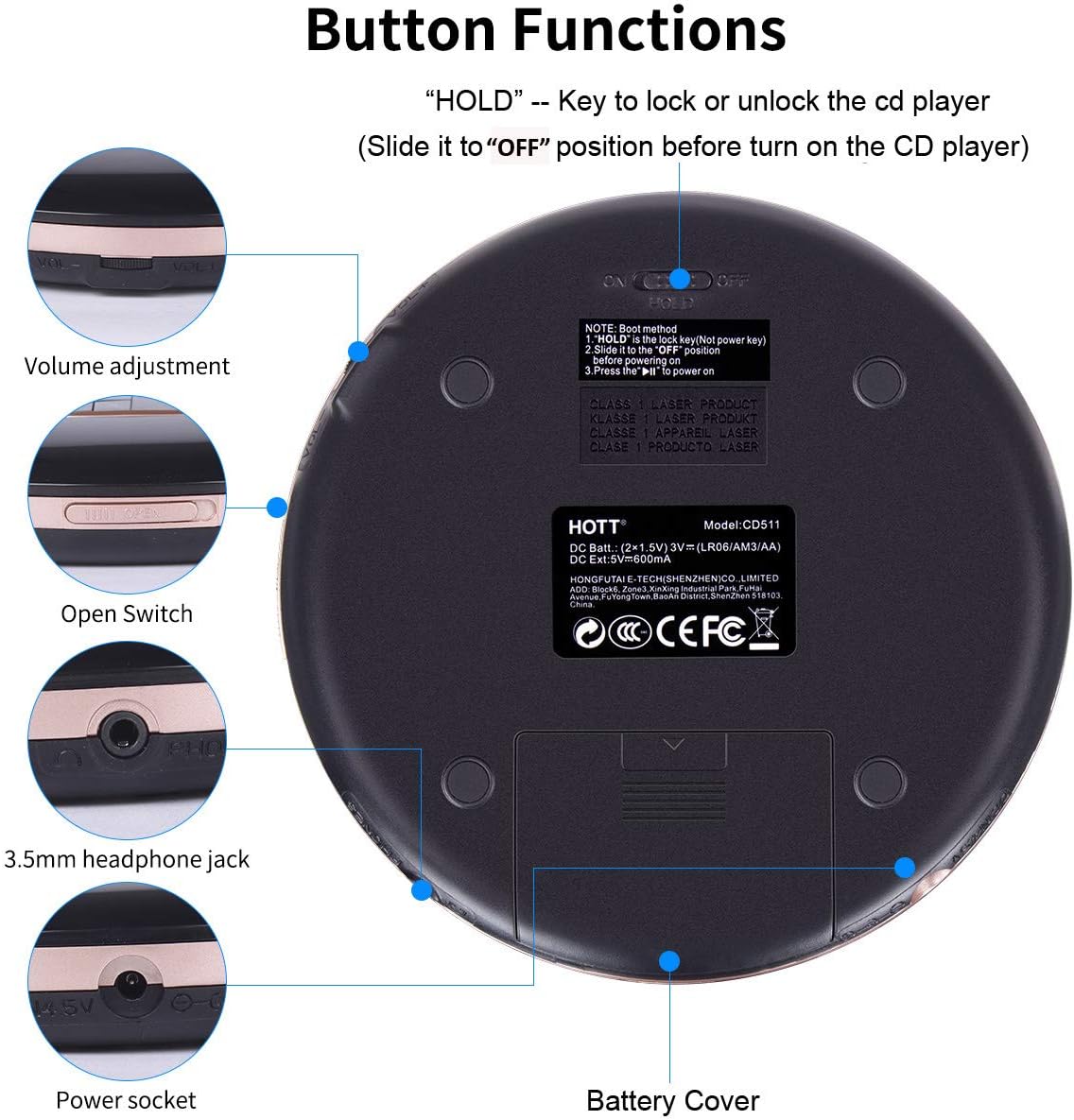
2. pilt: Alumine ja külgmine view of the HOTT CD511 Portable CD Player, showing the HOLD switch, volume control, disc compartment open switch, headphone jack, power socket, and battery cover.
2.3 Ühilduvus

3. pilt: The HOTT CD511 CD player supports various disc formats including standard CD, CD-R, CD-RW, and MP3 discs.
3. Seadistamine
3.1 Seadme sisselülitamine
The HOTT CD511 can be powered in two ways:
- Patareid: Open the battery cover on the bottom of the player. Insert two (2) 1.5V AA batteries, ensuring correct polarity. Close the battery cover securely.
- USB-toide: Connect the provided USB cable to the power socket on the side of the player and to a USB power adapter (not included) or a computer's USB port.
Note: Ensure the "HOLD" switch is in the "OFF" position before turning on the CD player.
3.2 CD sisestamine
- Slide the "OPEN" switch to open the disc compartment lid.
- Asetage CD ettevaatlikult keskmisele spindlile, sildiga pool ülespoole.
- Vajutage CD-d õrnalt, kuni see klõpsuga oma kohale lukustub.
- Close the disc compartment lid firmly until it latches.
3.3 Kõrvaklappide ühendamine
Insert your 3.5mm headphones into the headphone jack located on the side of the player.
4. Kasutusjuhised
4.1 Põhiline taasesitus
- Toide sisse: Vajutage nuppu ESITA/PAUS nuppu kaks korda.
- Esita/peata: Vajutage nuppu ESITA/PAUS button once to play or pause.
- Peatus: Vajutage nuppu STOP nuppu.
- Toide välja: Vajutage nuppu STOP nuppu kaks korda.
4.2 Navigeerimine
- Järgmine lugu: Vajutage nuppu JÄRGMINE/EDASI nuppu.
- Eelmine lugu: Vajutage nuppu PREVIOUS/BACK nuppu.
- Kiire edasi/tagasi kerimine: Vajutage ja hoidke all nuppu JÄRGMINE/EDASI or PREVIOUS/BACK nuppu taasesituse ajal.
4.3 Helitugevuse reguleerimine
Reguleerige helitugevust nupu abil MAHT +/- buttons located on the side of the player.
4.4 Play Modes and Sound Effects

4. pilt: The HOTT CD511 offers various play modes and sound effects for a customized listening experience.
- MODE nupp: Press to cycle through play modes: Single Repeat, All Repeat, Intro, Shuffle.
- EQ nupp: Press to cycle through sound effects: BBS, Pop, Jazz, Rock, Classic.
- DIR Button (MP3 mode only): Selects the playlist or folder when playing MP3 discs.
4.5 HOLD funktsioon
Libistage HOIDA switch on the side of the player to the "ON" position to lock all buttons. This prevents accidental operation during transport. Slide it to "OFF" to unlock the buttons.
4.6 Anti-Skip/Anti-Shock Protection (ASP)
The ASP feature is automatically activated to prevent interruptions during playback caused by minor shocks or vibrations. The duration of anti-shock protection varies depending on the disc type (e.g., CD: 40 seconds, MP3 CD: 120 seconds).
4.7 Car Connectivity

5. pilt: The HOTT CD511 can be connected to a car's auxiliary input using a 3.5mm audio cable for playback through the car's sound system.
The CD player supports connection to car audio systems via a 3.5mm auxiliary cable. Connect one end of the cable to the player's headphone jack and the other end to your car's AUX input. This feature is compatible with most car models including Toyota, Honda, and Hyundai.
4.8 Kasutusstsenaariumid

6. pilt: The HOTT CD511 is suitable for various activities such as relaxation, learning, prenatal education, and travel.
5. Hooldus
- Puhastamine: Mängija välispinna puhastamiseks kasutage pehmet ja kuiva lappi. Objektiivi puhastamiseks kasutage spetsiaalset CD-objektiivi puhastuskomplekti. Ärge kasutage abrasiivseid puhastusvahendeid ega lahusteid.
- Plaadi hooldus: Handle CDs by their edges. Keep them clean and free from scratches. Store discs in their cases when not in use.
- Patarei vahetus: Replace batteries when the low battery indicator appears on the LCD screen or when playback becomes inconsistent. Remove batteries if the player will not be used for an extended period.
- Hoiustamine: Hoidke mängijat jahedas ja kuivas kohas, eemal otsesest päikesevalgusest, kõrgetest temperatuuridest ja niiskusest.
6. Veaotsing
| Probleem | Võimalik põhjus | Lahendus |
|---|---|---|
| Mängija ei lülitu sisse. | Batteries are dead or incorrectly inserted. USB cable is not connected or faulty. HOLD switch is ON. | Replace batteries, check polarity. Ensure USB cable is securely connected. Turn HOLD switch OFF. |
| Plaati ei esitata. | Disc is dirty, scratched, or inserted incorrectly. Disc format is not supported. | Clean the disc, check for damage. Reinsert the disc correctly. Ensure disc is CD, CD-R, CD-RW, or MP3. |
| Sound skipping or interruption. | Disc is dirty or scratched. Player is subjected to excessive shock. | Clean the disc. Avoid strong vibrations. ASP function is active but has limits. |
| Kõrvaklappidest ei kostu heli. | Headphones not connected properly. Volume is too low. Headphones are faulty. | Veenduge, et kõrvaklapid on täielikult ühendatud. Suurendage helitugevust. Testige erinevate kõrvaklappidega. |
7. Tehnilised andmed
- Mudel: CD511
- Toote mõõtmed: 5.6 x 5.6 x 0.6 tolli
- Kauba kaal: 15.5 untsi
- Kaubamärk: KUUM
- Värv: Must
- Ühenduvustehnoloogia: Abiseade, USB
- Erifunktsioon: Kaasaskantav
- Plaatide arv: 1
- Tootja: KUUM
- Esimene saadaval: 10. märts 2019
8. Ametlik tootevideo
1. video: An official product video demonstrating the features and usage of the HOTT CD Player.
9. Garantii ja tugi
For warranty information or technical support, please refer to the contact details provided with your product packaging or visit the official HOTT webveebisait. Hoidke ostutšekk ostutõendina garantiinõuete korral.