
1. Oluline ohutusteave
Please read all safety instructions carefully before using your monitor. Keep this manual for future reference.
- Ärge asetage monitori ebastabiilsele vankrile, alusele, statiivile, klambrile ega lauale.
- Tagage monitori ümber piisav ventilatsioon. Ärge blokeerige ventilatsiooniavasid.
- Kasutage ainult monitoriga kaasasolevat toitejuhet ja adapterit.
- Tulekahju või elektrilöögi vältimiseks vältige monitori jätmist vihma või niiskuse kätte.
- Ärge avage monitori korpustasing. Kõik hooldustööd suunake kvalifitseeritud hoolduspersonali poole.
- Unplug the monitor from the wall outlet during lightning storms or when unused for long periods.
2. Pakendi sisu
Veenduge, et tootepakendis on kõik esemed olemas:
- Samsung LC27F396FHNXZA 27-Inch Curved Monitor
- Aluse alus
- Seisa kael
- Power Adapter and Power Cable (1.5 m)
- HDMI kaabel
- Kiire seadistusjuhend
- Garantiikaart
3. Seadistamine
3.1 Aluse kokkupanek
- Asetage monitor ettevaatlikult ekraaniga allapoole pehmele ja puhtale lapile, et vältida kriimustusi.
- Kinnitage statiivi kael monitori tagaküljele, kuni see klõpsuga oma kohale lukustub.
- Connect the stand base to the stand neck by aligning the tabs and tightening the screw at the bottom of the base.

3.2 Ühenduskaablid
Ensure the monitor and your computer are powered off before connecting any cables.
- Toitekaabel: Connect the power adapter to the monitor's power input, then plug the power cable into the adapter and a wall outlet.
- Videokaabel (HDMI või VGA): Connect one end of the HDMI or VGA cable to the corresponding port on your computer's graphics card and the other end to the HDMI or VGA input on the monitor. Ensure cables are tightened securely.
- Helikaabel (valikuline): If you wish to use external speakers or headphones, connect a 3.5mm audio cable from your computer's audio output to the monitor's 3.5mm audio input.
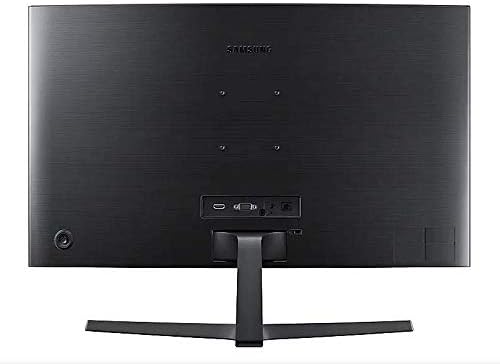
3.3 Sisselülitamine
Pärast kõigi vajalike kaablite ühendamist lülitage arvuti sisse ja vajutage monitori toitenuppu. Monitor peaks sisendsignaali automaatselt tuvastama.
4. Monitori kasutamine
4.1 Basic Functions and OSD Menu
The monitor features a single joystick button located on the back for navigating the On-Screen Display (OSD) menu. Press the joystick to open the OSD menu, then move it up/down/left/right to select and adjust settings.
4.2 Pildiseaded
Adjust picture quality settings via the OSD menu:
- Heledus/kontrastsus: Adjust these to your preferred viewtasemed.
- Resolutsioon: The optimal resolution for this monitor is 1920 x 1080 (FHD 1080p).
- Kuvasuhe: Set to 16:9 for widescreen content.
- MagicBright: Select from various preset modes (e.g., Standard, Cinema, Dynamic Contrast) for optimized viewkeskkondades.
- Active Crystal Color: Enhances color reproduction for a more vibrant display.

4.3 AMD FreeSync and Game Mode
This monitor supports AMD FreeSync technology, which synchronizes the screen refresh rate with your graphics card's frame rate to reduce input latency and minimize image tearing and stutter during gaming. Enable FreeSync through the OSD menu for a smoother gaming experience.

4.4 Curved Display Benefits
The 1800R curvature of this monitor is designed to match the natural curve of the human eye, providing a more immersive viewing experience. This curvature helps to reduce peripheral distractions and enhances depth perception, drawing you deeper into your content.

5. Hooldus
5.1 Monitori puhastamine
- Enne puhastamist eemaldage monitor alati vooluvõrgust.
- Kasutage kergelt pehmet ebemevaba lappi dampveega või spetsiaalse ekraanipuhastusvahendiga.
- Ärge pihustage puhastusvahendit otse ekraanile.
- Vältige abrasiivsete puhastusvahendite, vahade või lahustite kasutamist.
5.2 Säilitamine
Monitori pikemaajalisel hoiustamisel veenduge, et see oleks jahedas ja kuivas kohas, eelistatavalt originaalpakendis, et kaitsta seda tolmu ja füüsiliste kahjustuste eest.
6. Veaotsing
Kui teil tekib monitoriga probleeme, vaadake järgmisi levinud tõrkeotsingu samme.
| Probleem | Võimalik lahendus |
|---|---|
| Jõudu pole | Ensure the power cable is securely connected to the monitor, power adapter, and wall outlet. Check if the wall outlet is functioning. |
| Signaali pole / tühi ekraan | Verify that the video cable (HDMI/VGA) is firmly connected to both the monitor and the computer. Try a different video input source on the monitor if available. Ensure the computer is powered on and not in sleep mode. |
| Distorted Image / Incorrect Resolution | Adjust the display resolution on your computer to 1920 x 1080. Check the video cable for damage. |
| Ekraani rebenemine / katkendlik pilt (mängude ajal) | Ensure AMD FreeSync is enabled in the monitor's OSD menu and your graphics card settings. |
| Monitor does not wake up from sleep | Try unplugging and replugging the monitor's power cable. Check your computer's power management settings. |
7. Tehnilised andmed
| Funktsioon | Detail |
|---|---|
| Mudeli number | LC27F396FHNXZA |
| Ekraani suurus | 27 tolli |
| Resolutsioon | 1920 x 1080 (FHD 1080p) |
| Kuvasuhe | 16:9 |
| Ekraani kumerus | 1800R |
| Paneeli tüüp | VA |
| Reageerimisaeg | 4 millisekundit |
| Värskendussagedus | 60 Hz |
| Ühenduvus | 1x HDMI, 1x VGA, 1x 3.5mm Audio Out |
| Adaptiivne sünkroonimistehnoloogia | AMD FreeSync |
| Energiatarve | 25 vatti (tüüpiline) |
| Mõõdud (koos alusega) | 62.28 x 24.26 x 46.61 cm (24.5" x 9.6" x 18.4") |
| Kaal (koos alusega) | 4.1 kg (9.04 naela) |
| Paigaldustüüp | Seinale kinnitatav |
8. Garantii ja tugi
8.1 Tootja garantii
This Samsung monitor is covered by a 1-aastane tootjagarantii alates ostukuupäevast. Palun hoidke ostutõend garantiinõuete esitamiseks alles. Garantii katab materjali- ja tootmisdefektid normaalse kasutamise korral.
8.2 Klienditugi
For technical assistance, troubleshooting, or warranty service, please contact Samsung Customer Support. You can find contact information on the official Samsung webteie piirkonna sait.
Tootja kontaktandmed: Mississauga, ON L5M 9Z9, CA
Lisateabe saamiseks külastage ametnikku Samsung Kanada tugi websaidile.