
Sissejuhatus
Thank you for choosing the NEC NP-MC372X Portable Projector. This manual provides essential information for the safe and efficient use of your projector. Please read these instructions thoroughly before operating the device and retain them for future reference. The NEC NP-MC372X is an XGA LCD projector designed for clear and bright presentations, offering 3700 lumens of brightness and a native resolution of 1024x768.
Ohutusteave
Tulekahju, elektrilöögi või vigastuste vältimiseks järgige alati järgmisi ohutusnõudeid:
- Ärge blokeerige ventilatsiooniavasid. Jätke projektori ümber piisavalt ruumi korralikuks õhuvooluks.
- Ärge vaadake otse projektori objektiivi, kui lamp on sisse lülitatud, kuna ere valgus võib silmi kahjustada.
- Ärge asetage projektorit ebastabiilsele kärule, alusele või lauale.
- Unplug the projector from the power outlet before cleaning. Use a dry cloth for cleaning.
- Andke kõik hooldustööd kvalifitseeritud teeninduspersonalile.
Pakendi sisu
Veenduge, et kõik allpool loetletud esemed on teie pakendis olemas:
- NEC NP-MC372X Portable Projector
- Toitekaabel
- HDMI kaabel
- Kaugjuhtimispult
Toode läbiview
The NEC NP-MC372X is a versatile projector featuring an LCD display, 1024x768 native resolution, and 3700 lumens brightness. It includes a 1.2x zoom lens and offers a lamp life of up to 10,000 hours. Connectivity options include Dual HDMI, VGA, and USB.
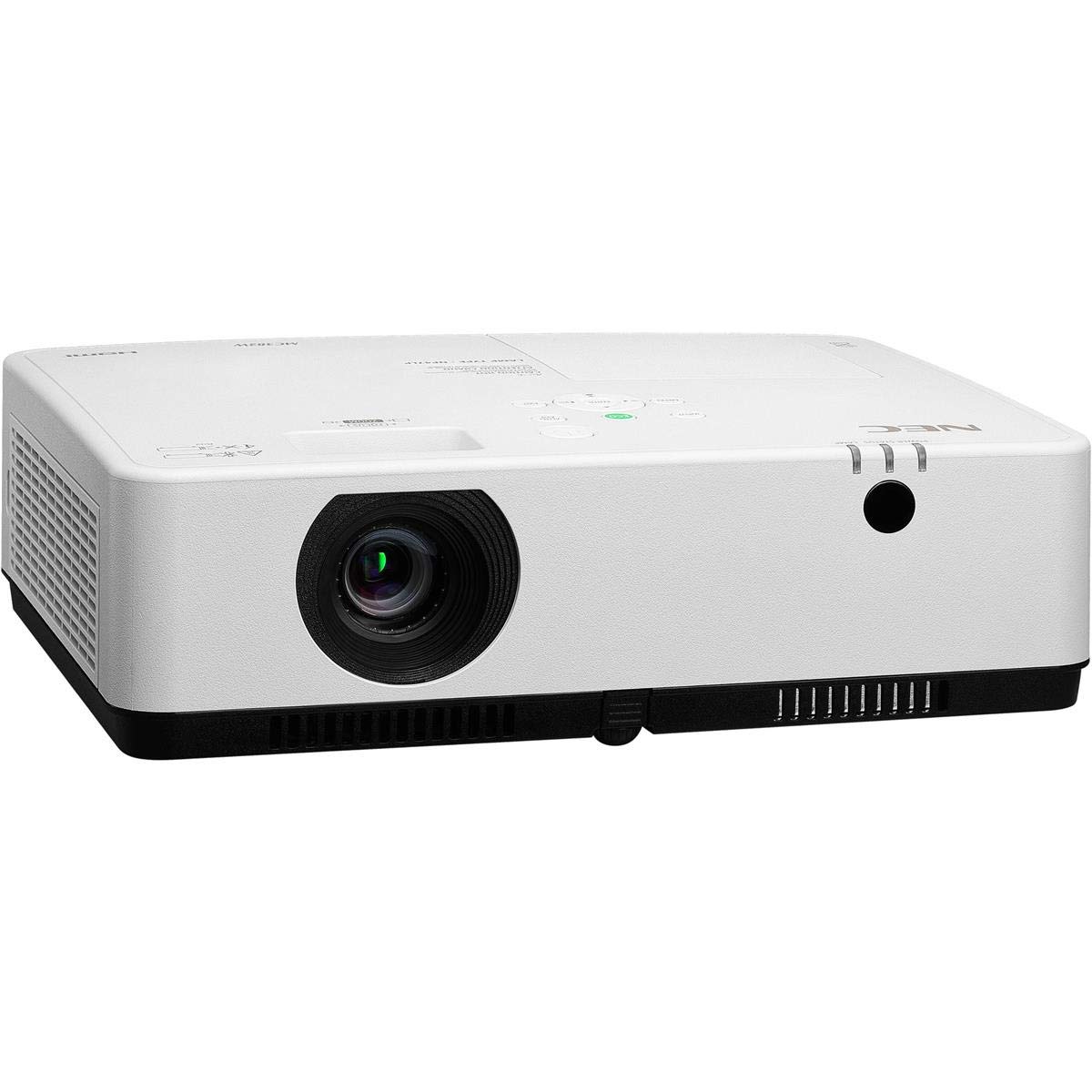
Joonis 1: Esikülg ja ülemine osa view of the NEC NP-MC372X Portable Projector, showing the lens and control panel.

Joonis 2: Esiosa view of the projector, highlighting the projection lens.

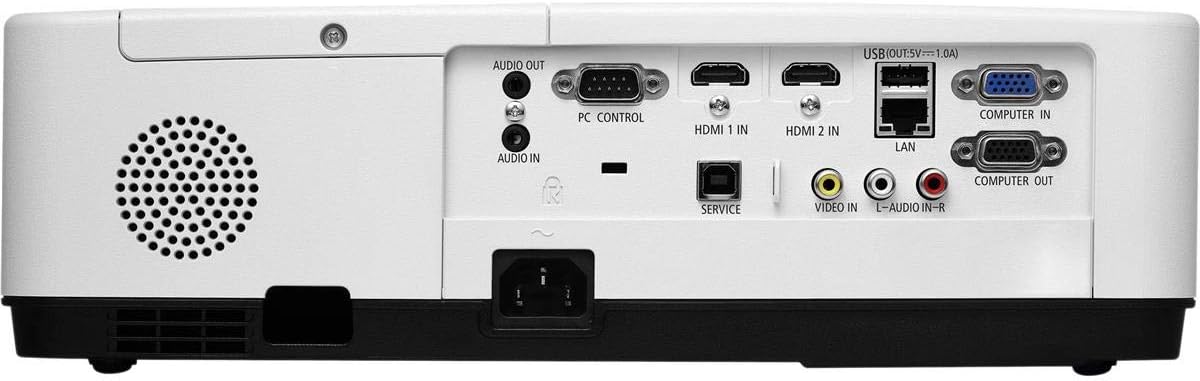
Joonis 3: Tagumine view of the projector, displaying the various input and output ports including HDMI, VGA, USB, LAN, and audio connections.
Joonis 4: Külg view of the projector, showing the ventilation grille for heat dissipation.
Seadistamine
Füüsiline paigutus
Place the projector on a stable, flat surface or mount it securely. Ensure the projector is positioned at an appropriate distance from the screen to achieve the desired image size. Maintain clear space around the projector for ventilation.
Seadmete ühendamine
Refer to Figure 3 for port locations. Connect your source device (e.g., laptop, gaming console) to the projector using one of the following methods:
- HDMI: Use an HDMI cable to connect to either HDMI 1 IN or HDMI 2 IN.
- VGA: Use a VGA cable to connect to COMPUTER IN. For audio, connect a 3.5mm audio cable to AUDIO IN.
- USB: Connect a USB device to the USB port for direct media playback.
- LAN: Connect an Ethernet cable to the LAN port for network connectivity.
Sisse/välja lülitamine
1. Connect the power cable to the projector and a power outlet.
2. Press the power button on the projector or the remote control to turn on the projector.
3. To turn off, press the power button again. Confirm shutdown when prompted.
Kasutusjuhised
Põhifunktsioonid kaugjuhtimispuldiga
Use the included remote control to navigate menus, select input sources, and adjust settings. Point the remote control towards the projector's remote sensor.
Sisendallika valik
Press the 'Input' button on the remote control or projector control panel to cycle through available input sources (HDMI 1, HDMI 2, Computer In, USB).
Pildi reguleerimine
- Fookus: Keera objektiivi teravustamisrõngast, kuni pilt on terav.
- Suum: Use the zoom ring on the lens to adjust the image size without moving the projector. The projector features a 1.2x optical zoom.
- Keystone'i parandus: If the image appears trapezoidal, use the keystone correction function in the projector menu to square the image.
Eriomadused
- Multi Presenter: This feature allows multiple users to connect and display content wirelessly from their devices. Refer to the on-screen menu for setup instructions.
- USB Viewer Capability: Insert a USB drive into the USB port to directly view photos, videos, and documents without a connected computer.
- Subtiitrid: Enable closed captioning for compatible video sources through the projector's menu settings.
Hooldus
Lamp Asendamine
Projektor lamp has an operating life of up to 10,000 hours. When the lamp reaches the end of its life, a warning message will appear. Consult a qualified service technician for lamp replacement to ensure proper installation and safety.
Puhastamine
- Välimus: Pühkige projektori puhastuslappiasinpehme, kuiva ja ebemevaba lapiga. Kangekaelsete plekkide korral pühkigeampet lappi veega.
- Objektiiv: Use a professional lens cleaning kit or a soft, dry cloth specifically designed for optical lenses. Avoid harsh chemicals.
- Õhufilter: Kontrollige ja puhastage õhufiltrit regulaarselt, et vältida tolmu kogunemist, mis võib mõjutada jõudlust ja ...amp life. Refer to the projector's on-screen menu for filter usage time.
Veaotsing
Probleemide korral proovige enne toega ühenduse võtmist järgmisi lahendusi.
- Pilt puudub: Ensure all cables are securely connected. Verify the correct input source is selected. Check if the lens cap is removed.
- Heli puudub: Confirm audio cables are connected (if applicable). Adjust volume on both the projector and the source device.
- Kaugjuhtimispult ei tööta: Check the batteries in the remote. Ensure there are no obstructions between the remote and the projector's sensor.
- Pilt on udune: Reguleeri objektiivi teravustamisrõngast. Veendu, et projektsioonipind on tasane.
- Ülekuumenemise hoiatus: Ensure ventilation openings are not blocked. Clean the air filter if necessary.
Tehnilised andmed
| Funktsioon | Spetsifikatsioon |
|---|---|
| Kaubamärk | NEC |
| Mudeli nimi | MC372X |
| Mudeli number | NP-MC372X |
| Kuva tüüp | LCD |
| Natiivne eraldusvõime | 1024 x 768 (XGA) |
| Heledus | 3700 XNUMX luumenit |
| Ühenduvustehnoloogia | HDMI, USB, VGA, LAN |
| Suumi | 1.2x optiline |
| Valgusallika kasutusiga | 10,000 tundi |
| Wattage | 267 watts (typical 120V) |
| Kontrolleri tüüp | Kaugjuhtimispult |
| Kauba kaal | 7.1 naela |
| Voltage | 120 volti |
| UPC | 805736070248 |
Garantii ja tugi
The NEC NP-MC372X Portable Projector comes with a 3-aastane piiratud garantii. For warranty claims or technical support, please contact NEC customer service. You can find contact information on the official NEC webveebisaidilt või oma toote jaemüüja kaudu.